
Share wtfjim2's profile


wtfjim2
wtfjim2's stats
- Review count4
- Helpfulness votes1
- First reviewNovember 8, 2013
- Last reviewNovember 4, 2014
- Featured reviews0
- Average rating4.8
Reviews comments
- Review comment count0
- Helpfulness votes0
- First review commentNone
- Last review commentNone
- Featured review comments0
Questions
- Question count0
- Helpfulness votes0
- First questionNone
- Last questionNone
- Featured questions0
- Answer count5
- Helpfulness votes1
- First answerNovember 4, 2014
- Last answerNovember 4, 2014
- Featured answers0
- Best answers1
wtfjim2's Reviews
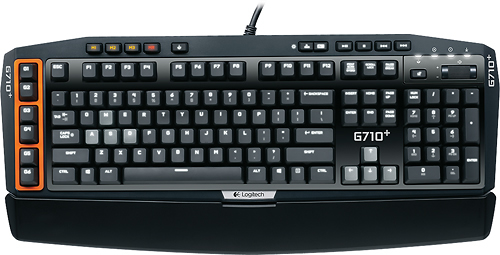
Take control of the on-screen action with this Logitech G710+ 920-003887 mechanical keyboard, which features 124 responsive, high-speed keys for enhanced tactile feedback. Six G-keys can be programmed to map a wide range of functions to the keyboard.
Customer Rating

5
A keyboard that embraces mechanical keys
on November 4, 2014
Posted by: wtfjim2
from Chattanooga tn
Verified Purchase:Yes
This keyboard uses cherry brown keys. These in my opinion offer the best balance between quietness and feel. They make this even better by adding the rubber stoppers that make it easier on your fingers and also make it even quieter. This keyboard is actually quiet enough where it's ok to use it in most offices.
I do work and game with this keyboard. I type code with it all the time and the layout leaves me typing very accurately. I am sadly not typing this review on it as I'm at my office right now and couldn't bring it with me. I actually can type much more on this keyboard than I was able to with the 2004 bought APS mechanical keyboard with metal mechanical keys. It has a much better feedback than my more classic on and doesn't put as much impact on my fingers either, which is surprising. The keyboard I previously used at work was another brand's attempt at the same keyboard that was just not as well built. It definitely had some flex and made me slightly less accurate.
If you are considering this keyboard, buy it. You will not be disappointed with it and you will want to use it all the time. If you are just a gamer and don't type a lot outside of a message in a game, this keyboard will not make a big difference to you. If you are at typist typing over 60 words per minute for prolonged periods of time, this will be the keyboard that you want to use.
My Best Buy number: 2083223499
My Best Buy number: 2083223499
I would recommend this to a friend!
Share this review:


0points
0of 0voted this as helpful.
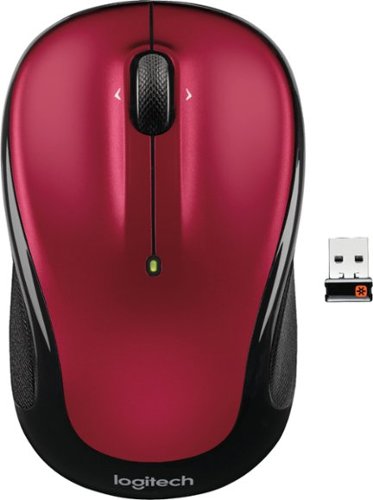
Logitech Wireless Mouse M325. A better mix of precision and comfort-with designed-for-Web scrolling. Designed for how you use the Web, our newest micro-precise scrolling makes everything you love to do online easier. Its feel-good, contoured shape and textured grips help keep your hand happy-even after long hours. And with up to 18 months of battery life, it virtually eliminates the hassle of changing batteries.*
Customer Rating
5
old design still works
on November 8, 2013
Posted by: wtfjim2
from Chattanooga tn
Verified Purchase:Yes
This mouse has been rebooted many times over the past 7 years. It is still a good reliable mouse and is compact to carry around.
My Best Buy number: 2083223499
My Best Buy number: 2083223499
I would recommend this to a friend!
Design

5
Ease of Use
5
Share this review:


+1point
1of 1voted this as helpful.
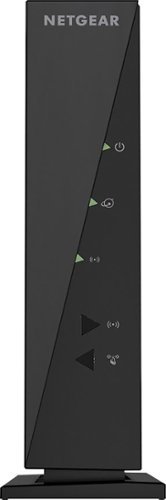
Keep your Wi-Fi connection strong anywhere in the house with this NETGEAR router. Monitor your network with the NETGEAR genie app, keep track of your kids with parental controls, and use multiple devices simultaneously for downloading, gaming and more
Customer Rating

4
works for a home user
on November 8, 2013
Posted by: wtfjim2
from Chattanooga tn
Verified Purchase:Yes
This router us perfect at home. Good response for gaming and simple to set up with a password. Nothing too badly wring with it aside from lack of business features, but at this price point I didn't expect that.
My Best Buy number: 2083223499
My Best Buy number: 2083223499
What's great about it: easy to set up
What's not so great: lacks features needed for anything but home use
I would recommend this to a friend!
Ease of Use
5
Performance

3
Share this review:


0points
0of 0voted this as helpful.
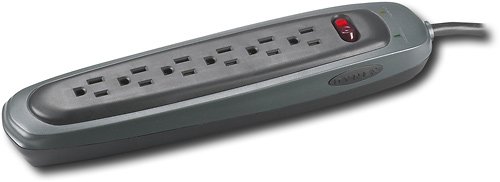
Protect your PC, phone and other electronics from power surges and brownouts with this 6-outlet PC home/office surge protector.
Customer Rating
5
good from what I can tell
on November 8, 2013
Posted by: wtfjim2
from Chattanooga tn
Verified Purchase:Yes
I luckily haven't had to test too many features of this but it works and feels like a quality product.
My Best Buy number: 2083223499
My Best Buy number: 2083223499
I would recommend this to a friend!
Features
3
Share this review:


0points
0of 0voted this as helpful.
wtfjim2's Review Comments
wtfjim2 has not submitted comments on any reviews.
wtfjim2's Questions
wtfjim2 has not submitted any questions.
wtfjim2's Answers
Will the WRT1900AC work with VOIC phone service
I am a senior citizen, not tech savy that is fed up with my comcast router, constant resetting, poor phone service, will the WRT 1900AC work with VOIC phone service, it doesn't saw anything about it
No it will not. You will still need to use the comcast router/ modem combo, due to the way they run their service. You can use your own wireless router behind it, but there is no point if you aren't having problems specific to the wireless. The voice portion of the combo cannot be had any other way aside from that piece of hardware that they provide you.
11 years, 7 months ago
by
wtfjim2
Brentwood, TN
i need a patch cable
Female coax one end for cable and the other end is male RJ45 for my modem/router
Such a cable does not exist. Coax and RJ45 are completely different technologies. What should happen is you have Coax into a modem, then you have Cat 5 cable from the modem to your router/ switch/ computer. You can not bypass this method with a non existent cable.
11 years, 7 months ago
by
wtfjim2
Brentwood, TN
do I still need my DSL modem if I use a wireless router
Yes you will. The wireless router just gives your devices access to that router through a wireless connection. it does not remove the need to have a modem to get to the internet.
11 years, 7 months ago
by
wtfjim2
Brentwood, TN
Ethernet to VGA Converter
Hi i am looking to purchase a ethernet to vga converter. i was told by one of your co-employee i can go to the store website and get what i am looking for. I did and did not find what I am looking for. However, I saw one that is different and will like to know if it will split the pics to two different monitors.
You are actually not going to be able to get a vga to Ethernet adapter. Such an adapter does not exist.
A vga splitter will just produce the same image on both screens. If you want to extend your desktop across multiple displays you will need to have a video card that supports it. I will note one below that is a budget card.
A vga splitter will just produce the same image on both screens. If you want to extend your desktop across multiple displays you will need to have a video card that supports it. I will note one below that is a budget card.
Products from my answer
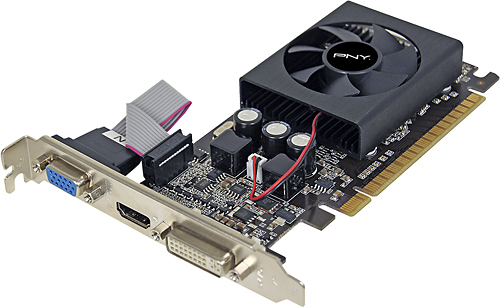
PNY - GeForce GT 610 2GB DDR3 PCI Express 2.0 Graphics Card - Black
 (375)
(375)11 years, 7 months ago
by
wtfjim2
Brentwood, TN
Keep your Wi-Fi connection strong anywhere in the house with this NETGEAR router. Monitor your network with the NETGEAR genie app, keep track of your kids with parental controls, and use multiple devices simultaneously for downloading, gaming and more
How do I install without the CD?
I've misplaced the Installation CD that goes with my upgrade to WNR2000 (N300).
Can I simply use the Installation CD that goes with my old WGR614 (G54), or
could I download the proper installation files from the net?
I have a related query. My Comcast service provides 105 Mbps. Speedtest with my G54 router indicates I'm getting 95 Mbps d/l, 12 Mbps u/l. What can I expect to gain with the upgrade N300 router.
Thank you for your response.
Can I simply use the Installation CD that goes with my old WGR614 (G54), or
could I download the proper installation files from the net?
I have a related query. My Comcast service provides 105 Mbps. Speedtest with my G54 router indicates I'm getting 95 Mbps d/l, 12 Mbps u/l. What can I expect to gain with the upgrade N300 router.
Thank you for your response.
You are never going to actually get the 105mbps no matter which router you use. There will be a loss at some point in your connection. The best thing you can do is put the best hardware you can on your side to ensure it's not your side causing the problem.
As per installation. You should not need the cd for installation. There should be an ip address that is default for it printed somewhere and if you plug in wired you should be able to use that ip address in the address bar of your browser to get to the router. Once there, you should be able to set it up.
As per installation. You should not need the cd for installation. There should be an ip address that is default for it printed somewhere and if you plug in wired you should be able to use that ip address in the address bar of your browser to get to the router. Once there, you should be able to set it up.
11 years, 7 months ago
by
wtfjim2
Chattanooga tn