
Share MartyD's profile


MartyD
MartyD's stats
- Review count1
- Helpfulness votes0
- First reviewJanuary 24, 2015
- Last reviewJanuary 24, 2015
- Featured reviews0
- Average rating5
Reviews comments
- Review comment count0
- Helpfulness votes0
- First review commentNone
- Last review commentNone
- Featured review comments0
Questions
- Question count0
- Helpfulness votes0
- First questionNone
- Last questionNone
- Featured questions0
- Answer count2
- Helpfulness votes0
- First answerJanuary 24, 2015
- Last answerJanuary 24, 2015
- Featured answers0
- Best answers0
MartyD's Reviews
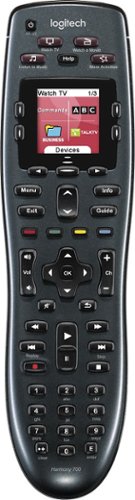
Manage up to 8 of your home theater electronics devices with this Logitech Harmony 700 915-000162 universal remote, which features a brilliant color command screen for easy navigation. One-touch activity buttons simplify device selection.
Customer Rating

5
The macros make this easy for A/V challenged
on January 24, 2015
Posted by: MartyD
Verified Purchase:Yes
I bought two of these for my fiancé for Christmas. Initially, she gave me that, "You bought these for yourself," look. But once I showed her how she could just scroll to which activity she wanted she was convinced. I have a receiver in the LR and MBR and multiple components attached to them (e.g. Blu-ray player, ROKU, WD Live Box, HTPC, etc.) So, depending on what you want to view, the TV and receiver have to be properly configured. And you had to just commit to memory what input to select on the receiver. Some were obvious like "BD" was for the Blur-ray but most where not and she just never really tried hard enough to figure it out. In comes the Harmony 700; by simply connecting it to an online PC, registering it, inputting the model numbers of all your devices and telling it which devices are required for each activity you will soon streamline the process for configuring your system. You can even add the logos from all you favorite TV channels so you don't have to remember that 69.1 is PBS and 69.2 is NBC...
My Best Buy number: 0236296413
My Best Buy number: 0236296413
I would recommend this to a friend!
Share this review:


0points
0of 0voted this as helpful.
MartyD's Review Comments
MartyD has not submitted comments on any reviews.
MartyD's Questions
MartyD has not submitted any questions.
MartyD's Answers
Playing back a DVD on TV
What DVD disc should I use to record a video from the computer and be able to play it back on my TV through a DVD player?
It depends if you want to re-record on the same DVD or not. For one-time recording, I have found that DVD-R are compatible with more devices than DVD+R. For re-usable, try the DVD-RW or DVD±RW. Hope that helps. Also, make sure you use the proper format. Most DVD players will support MPEG-1 and MPEG-2 and many will support DivX.Go to this site to see what your player supports. http://www.videohelp.com/dvdplayers
11 years, 4 months ago
by
MartyD
Manage up to 8 of your home theater electronics devices with this Logitech Harmony 700 915-000162 universal remote, which features a brilliant color command screen for easy navigation. One-touch activity buttons simplify device selection.
how long does the battery last before replacing?
My harmony 900 Logitech is about 2 1/2 years old and at times it won't turn off the TV or turn it on and then if you wait awhile it does it.
Use the help button. It will perform functions and ask you if you got the desired result and re-teach itself.
11 years, 4 months ago
by
MartyD