


Cipher469's stats
- Review count196
- Helpfulness votes252
- First reviewOctober 29, 2009
- Last reviewJune 3, 2026
- Featured reviews0
- Average rating4.5
Reviews comments
- Review comment count0
- Helpfulness votes0
- First review commentNone
- Last review commentNone
- Featured review comments0
Questions
- Question count0
- Helpfulness votes0
- First questionNone
- Last questionNone
- Featured questions0
- Answer count15
- Helpfulness votes4
- First answerJuly 5, 2018
- Last answerNovember 19, 2021
- Featured answers0
- Best answers0
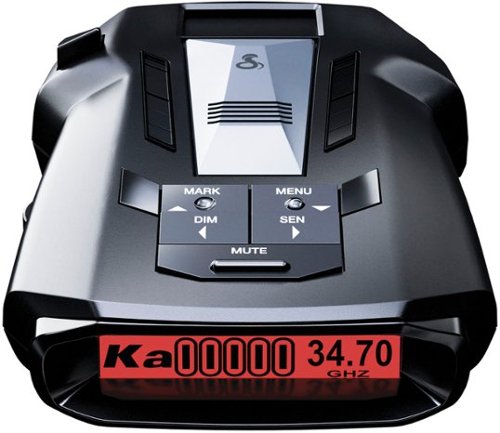
The Cobra RAD 700i Radar Detector offers premium detection range for improved awareness and intelligent filtering software for a quieter ride. GPS-based AutoLearn Intelligence provides advanced intelligence that learns to reject false alert locations over time. Plus, built-in Bluetooth links you to the Drive Smarter community for shared alerts from other connected detectors.
Posted by: Cipher469
It’s been a while since I used a radar detector. For highway driving, I use my GPS’s MPH function to monitor my speed. That permitted me to drive in a usually “safe zone” of 2 or 3 miles over the limit. Before GPS was readily available, I mostly used Cobra detectors. Their alarm tones saved me on several occasions when I had slipped into a danger zone. This new 700i offers so much more functionality, including GPS, than I have experienced before.
Removing the 700i from its box, I was pleasantly surprised to see a space age sleek looking device. It has so many more features that it takes some time to get familiar with them. These include:
*Extended detection range provides an earlier opportunity to slow down. Detection includes Laser, X-Band, K-Band, Ka Radar, Ka Photo, and Ka Wideband, and Red-light. City/Highway modes are included.
*Autolearn Intelligence uses GPS to remember location of false alert locations.
*5-color OLED display shows alert types and other data as needed. The screen is small, of course, but the display is sharp enough to assist in proper viewing. Further assistance is provided by voice alerts, so you don’t necessarily have to take your eyes off the road.
*The detector connects magnetically to its windshield mount, permitting easy attachment/detachment. This is quite handy.
*The 700i can be utilized as it comes out of the box; however, if you download the Drive Smarter app from Google Play or Apple Store, you can open additional features. These assist with better control of operational features, alerts, etc.
*Extended detection range provides an earlier opportunity to slow down. Detection includes Laser, X-Band, K-Band, Ka Radar, Ka Photo, and Ka Wideband, and Red-light. City/Highway modes are included.
*Autolearn Intelligence uses GPS to remember location of false alert locations.
*5-color OLED display shows alert types and other data as needed. The screen is small, of course, but the display is sharp enough to assist in proper viewing. Further assistance is provided by voice alerts, so you don’t necessarily have to take your eyes off the road.
*The detector connects magnetically to its windshield mount, permitting easy attachment/detachment. This is quite handy.
*The 700i can be utilized as it comes out of the box; however, if you download the Drive Smarter app from Google Play or Apple Store, you can open additional features. These assist with better control of operational features, alerts, etc.
The only issue I have with the device is the plug fits so tightly in the outlet, it takes a hard pull to get it out and feels as if it wants to take the outlet out with it. That aside, the RAD 700i provides lots of bangs for the bucks. It is an excellent example of Cobra’s continuing production of first-class products.
I would recommend this to a friend!
Share this review:


+1point
1of 1voted this as helpful.
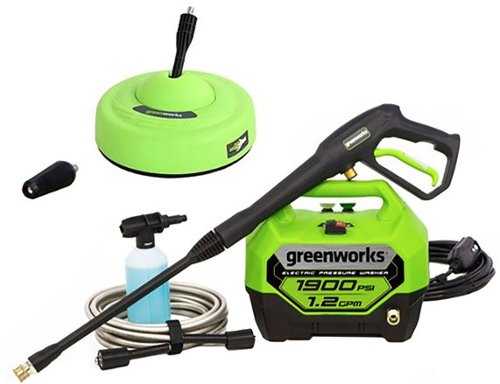
With up to 1,900 PSI at 1.2 GPM, the Greenworks GPW1900 pressure washer is perfect for light- to medium-duty clean-up of windows, vehicles, grills, patio furniture and decking. With a powerful 13-amp universal motor, axial cam pump, and hassle-free, push-button starts, you~ll get to work fast, with no priming, no choke, and no pull cord. Just plug the 35-foot power cord. This quiet-running, lightweight, compact, easy-to-store when not in use. With a 20-foot, non-marring, high-pressure hose, and on-board accessory storage with 25-degree and 40-degree nozzles, soap nozzle and bonus turbo nozzle, 11~ surface cleaner, it~s versatile, portable, and powerful.
Posted by: Cipher469
My deck flooring was looking awful, lots of mildew, etc., and I was preparing to purchase a power washer wand for my hose. Fortunately, before I made that purchase, I got the opportunity to test the Greenworks 1900 PSI washer (1900). Must have been some good karma, because I know the 1900 has done a far better job than would have been done had I purchased a wand to put on my water hose.
The 1900’s console is hefty, but a solid grip is built-in for hand carrying. Its comparatively compact size produces plenty of “horsepower” to ensure effective cleaning. Furthermore, the multiple accessories that are included with the 1900 complete a package of, in most cases, has pretty much all you need for cleaning. You will need to provide a hose between your faucet and the console. Odds are you probably already own.
Accessories included are:
• 20’ High pressure hose to provide the connection between the console pressure pump and the spray guns.
• Spray gun attachments include three nozzles for the cleaning wand. Two wand nozzles are housed on the console (25- and 40-degree nozzles) and a third (turbo) is not housed on console. It is the super turbo nozzle for heavy duty cleaning. It is so powerful that it almost makes the cleaning job fun! (See before and after pics and a power” graffiti” pic)
• For spraying liquid cleaner, a smaller wand holding the cleaner container is provided to be attached to the gun. It spreads the solution well.
• An 11” circular surface cleaner. As a suggestion, I would recommend you not use this for an initial cleaning of a hard-core dirty surface. However, once that surface has been deep cleaned, the curricular device would be a great way to provide ongoing maintenance.
• The 30’ electrical power cord provides lots of cleaning distance. The plug is large because it has reset and test controls on it. So, if your outdoor outlets are inside weather-resistant boxes, as many are, use a heavy-duty extension cord to plug into the outlet box.
• 3-year warranty!
• 20’ High pressure hose to provide the connection between the console pressure pump and the spray guns.
• Spray gun attachments include three nozzles for the cleaning wand. Two wand nozzles are housed on the console (25- and 40-degree nozzles) and a third (turbo) is not housed on console. It is the super turbo nozzle for heavy duty cleaning. It is so powerful that it almost makes the cleaning job fun! (See before and after pics and a power” graffiti” pic)
• For spraying liquid cleaner, a smaller wand holding the cleaner container is provided to be attached to the gun. It spreads the solution well.
• An 11” circular surface cleaner. As a suggestion, I would recommend you not use this for an initial cleaning of a hard-core dirty surface. However, once that surface has been deep cleaned, the curricular device would be a great way to provide ongoing maintenance.
• The 30’ electrical power cord provides lots of cleaning distance. The plug is large because it has reset and test controls on it. So, if your outdoor outlets are inside weather-resistant boxes, as many are, use a heavy-duty extension cord to plug into the outlet box.
• 3-year warranty!
I am so glad to have the 1900 to help me clean my deck. It does such a great job that what would have been a difficult, “back-aching” job has saved me time and toil. The 1900 does everything that is promised and does it well. The only issue I have with the device is the male/female connectors (wand to gun and cleaning solution wand to gun) are very difficult to connect and disconnect. Obviously, a snug connection is needed to handle the water pressure, but this is beyond snug. Perhaps, something like the snap lock nozzles would facilitate the connect/disconnect of the wands. WD40 helped a little.
All in all, the Greenworks 1900 is a very handy tool for exterior cleaning. Its reasonable one-time cost is well worth not having to hire the cleaning done with out of pocket cost each time cleaning is done. Even with the connection issue, I do recommend it.
I would recommend this to a friend!
Share this review:


+2points
2of 2voted this as helpful.
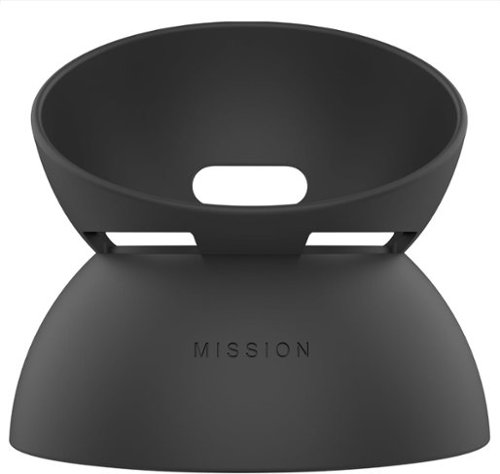
Make your Echo Dot portable with the Mission Battery Base. The Echo Dot Battery Base is specifically designed to work with Echo Dot (4th & 5th Gen). Enjoy your music away from the power outlet with integrated battery lasting up to 5 hours. Not compatible with other generations of Amazon Echo Dot or the larger Amazon Echo. Echo Dot sold separately.
Customer Rating

5
Very Handy Device for Amazon Echo Mobility
on October 24, 2023
Posted by: Cipher469
With a houseful of various Echoes, music, information, and smart home activity is all over the place, including the garage. When I want music on the deck, I get it using a Bluetooth connection between the Echo 10 in my living room and a paired speaker. For the most part that works, but the overall control functionality is missing. This new Mission Battery Base for the Amazon Dot has made that issue go away. By pairing it with the Dot 5th Gen currently in my garage, I have 100% Echo mobility anywhere I want it. This base is the perfect solution.
A major advantage afforded is complete portability for a long period of time. The first time I used it for any length of time, the Dot had been on battery for about 10 hours, and it still had juice. The “feed me” light was blinking. During that period, several hours were music. The rest of the time was to satisfy curiosity about its performance. The battery is promoted as having a 5-hour capability on a full charge, and I find no reason to doubt it. So long as you have Wi-Fi to connect to Alexa, it will work a long time anywhere. That is terrific!
A major advantage afforded is complete portability for a long period of time. The first time I used it for any length of time, the Dot had been on battery for about 10 hours, and it still had juice. The “feed me” light was blinking. During that period, several hours were music. The rest of the time was to satisfy curiosity about its performance. The battery is promoted as having a 5-hour capability on a full charge, and I find no reason to doubt it. So long as you have Wi-Fi to connect to Alexa, it will work a long time anywhere. That is terrific!
The base is sturdy and well designed for the Dot to fit into. You would have to hit it very hard to knock it over. Speaking of “hitting” the Dot, I have read some bashing complaints of the Dot stopping music or whatever else is going if it got bumped. Perhaps they were unaware that the newer Dot Gens have a “pause” function that is performed by tapping the Dot’s surface. Tap again to resume. In pause mode, a lighted pause icon (II) appears on the surface. That said, the tap does need to be firm to make pause/un-pause work. Of course, you can always tell Alexa to do it for you. She’ll be glad to help.
The only thing that bothers me about this base is the connector wire between device and base is quite short. I found it difficult getting both ends connected through the slot in the base. If the wire were even 1/8” longer, it would have made the job so much easier for my “old” hands to accomplish. With that, “set up” would have been a snap. It was annoying, but it wasn’t enough to cost a star.
It is said that good things come in small boxes, and that is certainly true as to this battery base. It really does expand the usefulness of 4th and 5th Gen Dots.
I would recommend this to a friend!
Share this review:


0points
0of 0voted this as helpful.
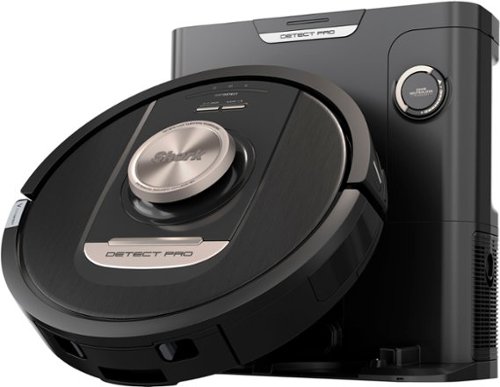
The PowerDetect robot vacuum is powered by 3 deep-cleaning technologies that enable the robot to maximize performance by sensing mess level, floor type, and edges & corners. DirtDetect sees even the hidden debris and automatically increases suction and cleaning passes to remove the mess on carpets and hardfloors. Now with NeverStuck technology, this robot will navigate around obstacles AND lift itself up and over thresholds and onto thick carpets. Not only can the robot deep clean, but you also do not have to worry about it getting stuck. Detect Pro finishes the cleaning mission every time and with each clean will empty itself into its bagless base that contains a HEPA Anti-Allergen Seal trapping dust & allergens inside. The odor neutralizer technology will also ensure the odor is trapped in the base for a fresher smelling home and making it the ultimate end to end solution for pet hair pick up.
Posted by: Cipher469
When it comes to robot vacuums, the Shark brand continues to be a leader in the market. I have two older models, one upstairs and one downstairs, and they both continue to perform well. Given the opportunity to test drive this new Shark Detect Pro, I jumped on it. After the mapping run and then the first cleaning run, my overall reaction was WOW, I LOVE THIS VACCUM!
The Detect Pro gets its name from new technologies: DirtDetect, EdgeDetect, FloorDetect, and Neverstuck. One could say that detecting and not getting stuck features are nothing new. However, this new model takes it all to a new and higher level of performance. Along with the new technology, additional features include:
*Easy setup: Pre-setup, be sure to insert the odor reduction cartridge into the base. Also, attach the side brush to the underside of the vac. (Note: Two brushes are included {box says one}, but only one is used. To my knowledge, there have always been two brushes, one on each side. Using only one seems odd, but the results appear to show it really doesn’t matter on this machine?)
After installing the two items and placing the vacuum and the base station pad, you should be ready to connect to Wi-Fi. I have Wi-Fi 6, and connecting to the vac was done in seconds.
After installing the two items and placing the vacuum and the base station pad, you should be ready to connect to Wi-Fi. I have Wi-Fi 6, and connecting to the vac was done in seconds.
*Charging: It is important to get a full charge before running the vac. If you have not used a self-emptying vac, please read this point carefully. After installation, it took me a few minutes to figure out why the vac wouldn’t charge. Then, looking at the picture shown in the guide, I realized it backs into the charging dock instead of going forward like they’ve done for years. When in dock, all control IDs are essentially upside down for reading. That’s what helped throw me off; but, hey, it was a learning experience. The docking process is interesting to watch at least once. In fact, I wish I could back up my car at least half as well as the vac does.
*Self-emptying: I love this feature! It saves so much time and effort. Having to empty the vac after each use is a pain, especially if you forget to empty it from a prior run. Now, after docking, it goes through a dumping process. No muss, no fuss. You can’t miss it if you are anywhere within hearing distance. It is loud, but it is worth the few moments it takes to do its job. This great feature means less work because you only need to empty the holding bin occasionally. Of course, the frequency depends on how much dirt, pet hair, or whatever has been collected.
*Mapping: The process seemed to take less time than my older Sharks. Though the first run was good, I ran it again to see if it made any major difference. It didn’t. The next day, having spilled grated coconut on the kitchen floor, it presented an opportunity to see how well the Spot Clean process worked. It was “spot on.” It was amazing to watch it work. There was a bit that it kept passing up and I’m wondering if it is going to overlook it entirely. NOPE. When the vac started back to dock, the entire “spot” had been cleaned. No coconut remained. Never have I seen Spot Cleaning so complete. NOTE: Be sure you have marked in the app map the exact area you want spot cleaned. If you fail to do that, don’t blame the vac. It will go exactly where you have marked.
*NeverStuck: There are two areas downstairs that my vac (being replaced) liked to get stuck. In both places, it looked to me as if all it had to do was back out. On the two full runs with this new one, not one incident occurred.
*NeverStuck: There are two areas downstairs that my vac (being replaced) liked to get stuck. In both places, it looked to me as if all it had to do was back out. On the two full runs with this new one, not one incident occurred.
Everything this new Shark is supposed to do, it does well. If I had to pick at something, it would be that in avoidance of hitting walls it turns away about 2.5 to 3 inches before contact. At times that can miss something needing removal. My older ones did not do that, and they were more prone to bumping into something. If it came down to having to choose, I would choose no contact.
Shark continues to up its game with this new DetectPro Self-Empty Robot. I have been using Shark (and co-brand Ninja) products for some years now, and both brands continue to impress me. Without a doubt, I would recommend the DetectPro to relatives and friends.
I would recommend this to a friend!
Share this review:


0points
0of 0voted this as helpful.

The Tablo 2-tuner, whole-home DVR ablo lets you watch, pause, and record TV for free~. Tablo connects to your TV antenna and your Wi-Fi to send live broadcast programming from ABC, NBC, FOX, CBS~, and more as well as a selection of 100+ free streaming channels~ to compatible smart devices - including smartphones, tablets, as well as smart TVs & streaming players from Roku, Amazon Fire TV, Apple TV, Android TV, Chromecast w/ Google TV, Samsung TV, LG TV, anywhere in your home.
Customer Rating

4
The Little Engine That Could…
on September 27, 2023
Posted by: Cipher469
Would you like to watch TV, recorded or live, pretty much any place you go? If your answer is “Yes,” then you should look at TABLO TV (TTV). It offers a choice of using your smartphone and/or your tablet for viewing TV via wi-fi. (NOTE: Other options are available, with more coming.) Like pretty much everything else these days, there’s an app for that! It can be found on Google Play or the Apple Store. Other sources are available on TabloTV.com. The TTV concept is a good one. It’s essentially a DVR with a comparatively tiny footprint that can be placed anywhere, so long as it can be connected to an OTA (Over the Air) TV antenna. All function control is by the app.
Initially, the TTV had set up and connectivity issues. That has been corrected by a significant firmware update, and setup can be accomplished in minutes. So, if you are having issues, be sure to download the updated app, which should make it a breeze. (NOTE: If connecting is still a problem and you have an active VPN, turn off the VPN until you have the TTV up and running.) After your mobile device and TTV have connected via wi-fi (Ethernet hard wire is an option.), the app will lead you through the remaining steps. A channel search begins; and, depending on how many channels are found, this can take a few minutes. Mine identified 82 channels! TTV then creates a program guide for those channels. After this step is done, you can go back later and delete any that you don’t need. Out of curiosity, I have not deleted any; however, I am sure I will eventually remove a lot of them. However, what this does is demonstrate the long reach of the TTV when paired with a quality OTA antenna. The channels I have checked out so far are, for the most part, good to excellent in both video and audio reception. Bear in mind the quality of your OTA antenna, distance, weather, and topography all play a part in the quality of OTA reception. TTV, like any other DVR, it is not creating the OTA signal so it can only record what it “sees and hears.”
On board storage for lots of viewing material should be no problem, because the TTV provides 128Gb of storage (est. 50 viewing hours). Should that not be enough for you, the TTV console has a slot ready for any USB drive up to 8TB. You can do some serious bingeing with that!
TTV is ready for prime time, and it is available at a comparatively affordable price. If you want your favorite TV shows on the go, TTV has an app for that.
I would recommend this to a friend!
Share this review:


0points
0of 0voted this as helpful.
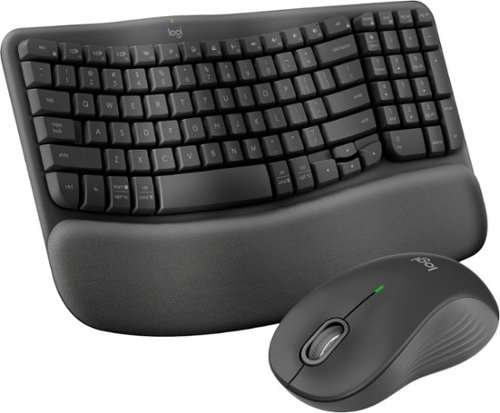
Experience day-long comfort and productivity with this wireless ergonomic keyboard and mouse combo. Typing feels instantly familiar on Wave Keys~ wavy keyframe design. The cushioned keyboard palm rest lifts pressure and improves wrist support. The Signature M550 L Wireless Mouse features a contoured shape and rubber side grip to keep medium- to large-sized hands comfortable throughout the day.
Customer Rating
5
Another Winner From Logitech
on September 22, 2023
Posted by: Cipher469
I have used Logitech keyboards and mice for years. Currently, I have the K860, a large version of the wave keyboard, and the ergonomics of it and the accompanying mouse have been very friendly to my hands. I have arthritis and a bit carpal tunnel in my right hand, so ergonomics is very important to me. With that in mind, what does the new MK670 bring to the table? It has all the comfort in a much smaller keyboard footprint in length and width.
Using a small keyboard after using a large one for so long definitely takes some adjustment. For the most part, acclimating to it has not been a problem. Some function keys are in different locations than the larger one, so there’s a small learning curve. If you have never tried a wave keyboard, they are so much better than the standard flat ones. This is especially true if you have hand issues. The more I use this model, the more I like it. In fact, it pairs ergonomic functionality with a small footprint for a winning combination.
The keyboard’s accompanying mouse is also excellent. It’s light in weight and oh so comfortable for the hand. The “SmartWheel” scroll button is effortless in function. In fact, the mouse is so easy to maneuver that it seems to be riding on a cushion of air. Plus, it truly is as quiet as a mouse (pun intended).
Connecting the keyboard and mouse to a computer can be done in one of two ways: Bluetooth or the included plug-in receiver. Either method provides wireless connectivity and a reasonable range of mobility. This outstanding combo works with Windows, ChromeOS, macOS, and iPadOS, so no OS excuse for not using the very hand-friendly Logitech MK670 Combo. Yes, I do highly recommend it!
I would recommend this to a friend!
Share this review:


0points
0of 0voted this as helpful.
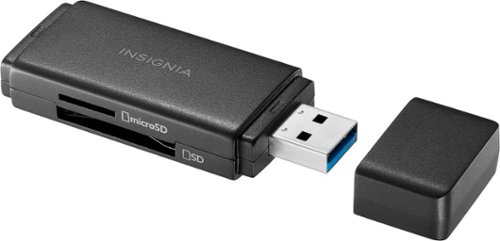
Whether you~re filming or taking photos, don~t run out of memory in the middle of a shoot. Transfer and back up files with the Insignia NS-CRSA1, USB 3.0 to SD and microSD Memory Card Reader. Simply plug in the card reader to your computer, tablet or other device with USB-A female connector to quickly transfer data. It~s backward compatible with USB 2.0 device and wide variety of SD and microSD cards to keep your creativity flowing without having to pause and delete unwanted files. Its compact design and protective cap mean you can easily fit it in a pocket or bag and not have to worry about damaging your connector. Never let a full memory card stop you again.
Customer Rating
5
A must for your tech tool kit
on September 13, 2023
Posted by: Cipher469
The various types of home and portable computing devices these days are often coming with fewer slots for peripherals. As such, it can be hard to find a card reader slot for other than maybe nanos. Insignia has solved that problem with a Memory Card Reader (MCR) that is simply a USB 3.2 “thumb drive." It can handle SD, microSD, SDHC, micro SDHC, SDXC, micro SDXC cards. The MCR also comes with a pull/push cover to prevent damage. Carry it safely in your pocket, handbag, etc.
The MCR is compatible with pretty much the gamut of OS: Windows, Mac, Chrome, iPad, and Android. Plug in one of the many compatible cards into the MCR, then plug the MCR into a computer or other device, and you are good to go. With the first use, you can set how you want the MCR to be opened with each use. (Note: Only one card at a time can be read.) The MCR is simplicity at its best. Plug memory card into MCR, plug MCR into device, and then download or upload as needed. Data stored on “old” tech can so easily be moved to “new” tech.
I would recommend this to a friend!
Share this review:


0points
0of 0voted this as helpful.
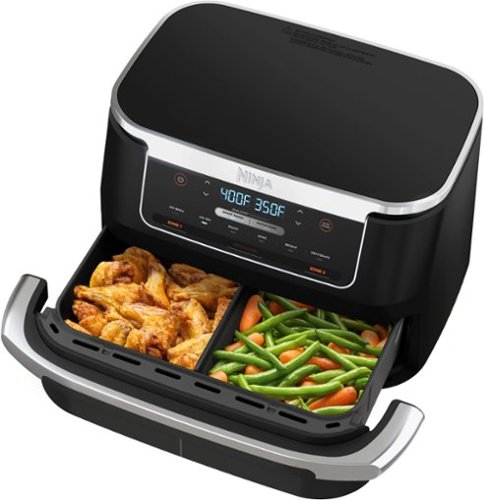
Meet the Ninja Foodi DualZone FlexBasket Air Fryer with 7-qt MegaZone. With the MegaZone, you can now cook larger proteins or entire meals that feed your whole family all in one basket. Insert the basket divider to cook with two 3.5 qt baskets or remove it to cook in 1 MegaZone for full 7-qt capacity. Eliminate back-to-back cooking with Dual Zone Technology. Use Smart Finish to cook 2 foods, 2 ways that finish cooking at the same time, or sync the settings across both zones with Match Cook. Plus, it features 6 cooking functions (air fry, air broil, roast, bake, reheat, dehydrate) so no matter what you~re craving, you can make it all in this 7 qt air fryer. Then, when you~re done cooking, cleanup is a breeze with nonstick and dishwasher safe crisper plates and basket.
Customer Rating
5
One Basket +Two Cook Zones = Yummy
on September 4, 2023
Posted by: Cipher469
I must confess up front that Ninja is my favorite brand of innovative cookware. That said, with this new FlexBasket (Flex) cooker, I expected it to be great, so I tried it out and looked for something not to like. Tough one!
This new Flex is impressive right out of the box. It looks good, has a large touch screen for controlling the many functions that it can provide for you. The build is sturdy and rather heavy. I would suggest placing it somewhere that you can easily operate without having to move it around a lot. Not a criticism!
Features are plentiful; and some major ones include:
• Six cooking programs: Air Fry, Broil, Bake, Roast, Reheat, and Dehydrate. Each is programable to your taste.
• Six cooking programs: Air Fry, Broil, Bake, Roast, Reheat, and Dehydrate. Each is programable to your taste.
• The FlexBasket is large enough to cook up to 7 quarts in the MegaZone formation. For example, a roast of up to 4 lbs. can be cooked in this format. Smaller amounts up to 3.5 lbs. of meat, and/or veggies can be cooked at the same time with the basket divider in place. The beauty of this is you can cook two foods at the same time. If the two items require different time, temperature, and/or cooking function, that’s not a problem for the Flex. That programmability is what puts flexibility into the Flex. Don’t let “programming” scare you, it is not complicated if you read the very clear instructions in the accompanying manual. Providing detailed easy to read manuals is another thing I like about Ninja. In addition, the detailed cooking time and temperature for numerous food types are usually spot on when it comes to the finished product.
Fish and chips is one of my favorite meals, so that’s usually the first thing I cook on an air fryer. Using the two-basket settings suggested, the breading on the fish came out brown and crisp, and the fish itself was done, yet still moist. The fries were nicely crisp on the outside and soft on the inside. Perfect fish and chips. Pork loin steaks, again following the manual’s suggestion, were perfect: Crisp on the outside and perfectly done to my taste on the inside. Carrots on the other side also came out very tasty.
• Cleaning is fast and easy. The manual says the pot, crisper plates, and divider are dishwasher safe. I cannot attest to that, because my preference is to soak non-stick coated items in hot water and Dawn. A bit later, I rinse them off, pat dry with soft cloth and call it done. It seems to me the coating lasts longer. Either way, it’s fast and easy.
Ninja has produced an excellent “next gen” air fryer! The Flex looks good, can perform multiple cooking tasks excellently, and is a great time saver for producing tasty meals!
I would recommend this to a friend!

Share this review:


+3points
3of 3voted this as helpful.

Small size, big function. The Echo Show 5 includes a 5.5~ display so you can see news and weather at a glance, make video calls, view compatible cameras, stream music and shows, and more. Set alarms and timers with your voice and create routines so you can personalize how you wake up and wind down.
Customer Rating
5
Bigger and So Much Better
on August 16, 2023
Posted by: Cipher469
Amazon Echoes have been a part of my home environment since the original Tower. Now, from Dot 5th Gen to Echo 10, they are all over my house. The Echo 5 in my guest room is Gen 1 and works great; however, having the opportunity to review the Gen 3 was too tempting to pass.
Though the screen size remains the same, the body is a bit taller and wider to accommodate new features. These include:
• A larger speaker provides better clarity of voice and music, rivaling some of its siblings. Plus, music quality is enhanced by deeper bass tones. It truly sounds great.
• An additional microphone improving Alexa’s ability to hear and respond to requests.
• Processing power in Gen 3 is approximately 20% faster with Amazon’s new AZ2 Neural Edge processor.
• Screen display has been improved, allowing better viewing at night.
• A larger speaker provides better clarity of voice and music, rivaling some of its siblings. Plus, music quality is enhanced by deeper bass tones. It truly sounds great.
• An additional microphone improving Alexa’s ability to hear and respond to requests.
• Processing power in Gen 3 is approximately 20% faster with Amazon’s new AZ2 Neural Edge processor.
• Screen display has been improved, allowing better viewing at night.
For accessing Alexa many features with a small footprint, the upgraded 5 Gen 3 is an excellent choice. The small price difference is well worth it for the large performance difference.
I would recommend this to a friend!
Share this review:


0points
0of 0voted this as helpful.
![McAfee - Privacy & Identity Guardian (1 User) Privacy Software (1-Year Subscription, Auto-Renews at $99.99 first year) - Android, Apple iOS, Chrome, Mac OS, Windows [Digital]](https://pisces.bbystatic.com/prescaled/500/500/image2/BestBuy_US/images/products/f17ac41d-7080-4674-b052-e15af39b1bc6.jpg)
McAfee Privacy & Identity Guardian is a unique solution for enhancing the protection of your personal info and data. Designed with a feature set that helps close off sources of data that are increasingly popular among cybercriminals, McAfee Privacy & Identity Guardian proactively helps prevent potential ID theft and fraud. Key features: Identity Monitoring: Monitor your personal info with timely alerts. McAfee Text Scam Detector: Our technology helps protect you if it detects a suspicious link in your text messages. Personal Data Cleanup (Full-Service): McAfee's Personal Data Cleanup regularly scans data broker sites for info like your home address, age, and names of relatives. We'll let you know which sites are collecting and selling your data without consent and automatically request removal, so you can feel more confident that your privacy is protected from identity thieves, hackers, and spammers. Social Privacy Manager: Stay in control of your privacy on social media. We'll help you adjust more than 100 privacy settings across your social media accounts in just a few clicks. Get recommendations based on how you want to engage online, so you can rest assured that your personal info is only visible to the people you want to share it with. Online Account Cleanup (Scans): Find personal data tied to unused online accounts. Benefits: Protection from scams and identity theft; automated privacy; custom guidance; industry-leading protection to defend from evolving threats. How it Works: McAfee Privacy & Identity Guardian works by monitoring your personal information and alerting you to potential threats. It also provides you with tools to manage your privacy settings and remove your personal data from data broker sites. To get started with McAfee Privacy & Identity Guardian, simply download the software and create an account. Once you've created an account, you can start monitoring your personal information and protecting your privacy.
Posted by: Cipher469
I like McAfee products and have been using the Live Safe suite of services for several years. So far, this new product for privacy and ID protection appears to be an excellent addition to their range of products. Reviewing this type of software product is quite different than it would be for reviewing the computer you are using it on. It's sort of like insurance, you buy it hoping you never need it. However, if it catches a breach and protects your device or detects weaknesses in your protection, you’ll be glad you have it.
Installation is quick and easy, especially if you already have a McAfee account. When that was completed, it ran a review of my system and quickly produced a list (thankfully short) of possible issues. Digging down into those items, I found some were associated with a trusted source and others that were not easily identified as such by me. Had I not had this new software, I would never have had any idea of what was going on behind the screen.
Identity Guard also went immediately to work, scanning the identity related information contained in accounts and other personal information: SSN, credit cards, etc. When the scan finished, it reported that I had no breaches. That was great news, and I look forward to it staying that way.
Privacy and Identity Alarm is already a worthy partner for my Live Safe protection. If you don’t use McAfee otherwise, this product can still be beneficial for your online security.
I would recommend this to a friend!
Share this review:


0points
0of 0voted this as helpful.
Cipher469's Review Comments
Cipher469 has not submitted comments on any reviews.
Cipher469's Questions
Cipher469 has not submitted any questions.

Shark AI Robot VACMOP combines powerful vacuum suction and hard floor wet mopping for a complete clean, all in one robot. Features include: Shark suction power, Sonic Mopping that delivers 100 scrubs per minute for stuck-on stains, and AI Laser Navigation for precision cleaning.
Can the robot work with 220 voltage? I am planning on taking it to another country?
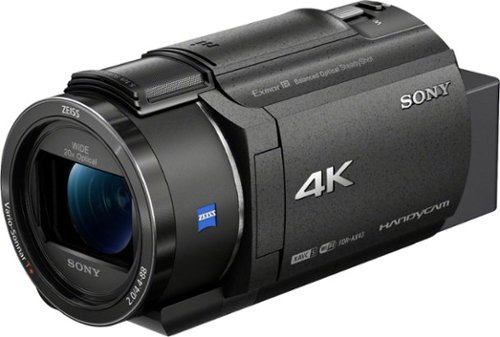
Capture high-quality videos with this Sony Handycam 4K camcorder. The 0.4-inch CMOS sensor delivers high-resolution 4K content with fast intelligent autofocus and enhanced audio, while the SteadyShot image stabilizer boasts clear detailed shots even at full zoom. This Sony Handycam 4K camcorder has a built-in Highlight Movie Maker that lets you create and share videos seamlessly.
Does the camera have night vision? And is it waterproof?
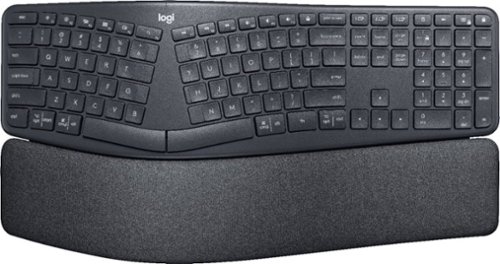
Type more naturally with ERGO K860 ~ an advanced ergonomic keyboard that promotes a more relaxed typing posture ~ reducing wrist bending and offering wrist support. A curved keyframe helps reduce wrist strain, while a pillowed wrist rest keeps your forearms elevated to help prevent excessive bending. This Logitech ERGO keyboard features Perfect Stroke keys for quiet performance and responsiveness, and the 2-year battery life offers long-lasting use.
How do you turn the Ergo 860 on/off?
Small switch on rear of upper level of keyboard at the top of the curve. See "logi" and look up from there.
6 years, 4 months ago
by
Cipher469
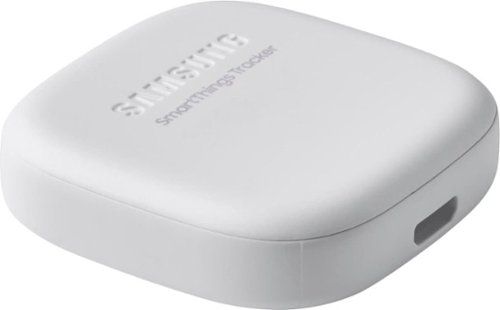
Secure yourself, a loved one or valuables with this smart, versatile Samsung SmartThings tracker. Its geo-fencing feature triggers smart home automations or alerts you when a pet or person who has it leaves or enters your designated zone. Double-press the button of this IP68-rated Samsung SmartThings tracker to notify authorized persons of your current location.
Does the LTE data cost anything?
It's free for the first 12 months. $50/year after.
7 years, 6 months ago
by
Cipher469
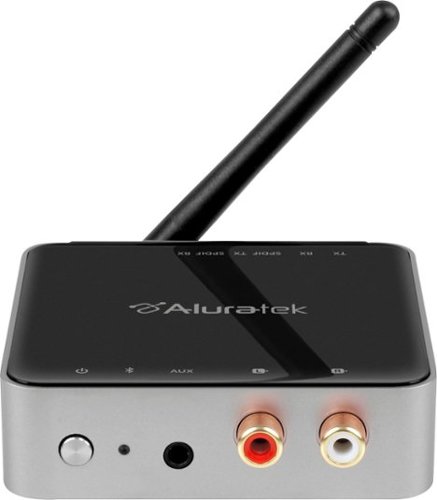
Stream HD audio from your TV to your headphones with this Aluratek Bluetooth 5.0 dual TV transmitter. It has a range up to 300 feet, which is four times the range of Bluetooth 4.2 transmitters, and you can easily connect the device to your TV via aux, RCA or SPDIF. This Aluratek Bluetooth 5.0 dual TV transmitter can handle two headphones at once.
How do you pair Bluetooth capable items an see that they have been connected sucessfully❓ Will the Bluetooth connections be seen on the TV screen after hooking up the audio receiver/transmitter❓
It doesn't show on screen, but the steady blue light on the device is an indicator. The best and easiest way to know is when you hear the TV audio coming through your headphones.
7 years, 11 months ago
by
Cipher469