


RandallFlagg's stats
- Review count315
- Helpfulness votes388
- First reviewMarch 14, 2014
- Last reviewSeptember 28, 2023
- Featured reviews0
- Average rating4.6
Reviews comments
- Review comment count0
- Helpfulness votes0
- First review commentNone
- Last review commentNone
- Featured review comments0
Questions
- Question count0
- Helpfulness votes0
- First questionNone
- Last questionNone
- Featured questions0
- Answer count45
- Helpfulness votes55
- First answerNovember 3, 2015
- Last answerNovember 11, 2021
- Featured answers0
- Best answers8
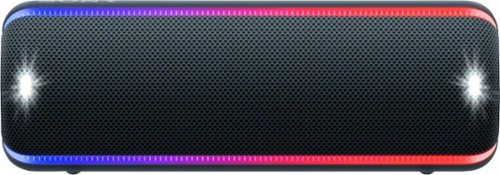
Play music anywhere with this Sony EXTRA BASS portable Bluetooth speaker. The Party Booster feature makes a variety of sounds depending on where the speaker is touched, and the volume increases or decreases depending on the strength of force used when tapping. This Sony EXTRA BASS portable Bluetooth speaker has multicolor flashing lights that sync to the beat of the music for added style.
Customer Rating

5
Great sound out of this small format
on April 11, 2019
Posted by: RandallFlagg
from Hi Desert, CA
I have last years XB21 and XB41. When the chance came to pick up the XB32 this year, I jumped at it. I have a few different Bluetooth speakers and for me, the Sony models just sound great. The app makes connecting to sources such as iheartradio, tunein, my library, spotify easy. With the latest patch, you can add any source you want. I just added Prime Music and it opens the app the same as those that were installed by Sony. Pairing the unit up takes little to no effort. Some of these type of devices can be a headache to get paired, but I've yet to struggle with any of the Sony units. I just add the unit to the app, it sees it within 20-30 seconds and I pick a music source via the Music Center app. I've tried audiobooks, music, even a slot machine game and if the phone is paired up with the speaker, it sound really good. And these speakers can get pretty loud. I rarely turn the volume up all the way. I only did it to test the units, then I usually have it set around 70%. I like my music loud and clear and having around 3/4's of the way is good enough in the house. Maybe outside I'd crank it, but my neighbors would probably no enjoy my taste in music or ask me to turn it down. Anyway, just saying I think most listeners would find their happy spot on the volume dial (is there a dial?) button then.
Some observations about this years model. I like last years fabric case over the grippy rubber model this year. The unit still uses micro USB to charge it, rather than updating it to USB-C. Battery life on these seem really good. The unit arrived with a 70% battery and charging it took no time. I leave the older models uncharged for months and they always say 70% battery life left. I never go to use them and they're dead or dying. Bluetooth connection seems really good. I was in the office and it was in the kitchen, 3 walls away. I forgot that it was paired and went to call a friend. The phone started ringing and it sounded so far away that I hung up thinking my phone was messed up. I dialed again and followed the ring only to talk to my buddy through the speaker until I turned off Bluetooth. Things I rarely use, but the unit has are the fiestable app, live sound mode and sound effects. I played with the sound effects, but that entertained me for about a minute or two. Then I just enjoyed the lights and music.
For anyone wanting a great sounding Bluetooth speaker from a well known manufacturer, that takes up little to no space and is very portable, I'd recommend any of the Sony products in this line. I've been nothing but happy with their performance and I'm sure you would be too!
Mobile Submission: False
I would recommend this to a friend!
Share this review:


+1point
1of 1voted this as helpful.

Logitech C920s is a budget-friendly, work-from-anywhere webcam that delivers a professional video meeting experience. It includes features designed to make you look and sound great in your next meeting. A 78~ diagonal field of view perfectly frames you and your space, while autofocus adjusts smoothly and precisely. RightLight 2 technology automatically adjusts to your lighting situation even in low-light or backlit conditions. And dual integrated mics accurately capture your voice from multiple angles for greater nuance. If you~re streaming or recording, use Logitech~s Capture app to edit and customize. Flip down the lens cover at any point to protect your privacy.
Customer Rating
5
Great Camera for Windows...
on April 8, 2019
Posted by: RandallFlagg
from Hi Desert, CA
Unboxed the camera and my first impression was it's hefty. It feels like a well-made unit. My side hustle is a photographer and the tripod mount will come in handy. I tested the unit on my Windows 10 machine and my Mac Mini I5 2.6ghz. The unit works great on Windows 10 with the Logitech Capture software (downloaded from Logitech). On the Mac, it's a bit more difficult. The Logitech site only has software downloads for Windows, yet the box states it works with Os X. So, I Google'd the C920S and saw a YouTube video. It suggested a app from the Apple store, but it isn't free. The $7.99 price tag isn't much, but I wasn't looking to spend money during the review. I saw one free app and it works. It isn't fancy, but it has most of the capabilities of the Windows version. As a regular Windows user and a part-time Mac user, I struggled to figure out if the camera was working. On Windows, the Capture software works through the app. No so with Mac. The app saw the camera, but how do I start recording or take a snapshot. Back to Google to figure out what I was missing, and I saw Photo booth. Ah, I have the app and software running, I need to open an additional Mac app to utilize the camera. So, I tested Photo booth and it works great. Taking snapshots was easy. Photo booth saw both my C920S and my C615. I was able to choose between the two. The quality seems much clearer on the C920S even though both cameras are HD 1080P @ 30 fps. Maybe it's me or something I need to adjust in settings. Regardless, I like the C920S and will use it on my Windows 10 desktop. The C615 will remain on the Mac. I just fired both up with Face time and they stream video very well. Again, the C920S looks clearer, crisper and more vibrant. Changing between cameras on the Mac is done through the drop menus under camera. Once I figure it out and got the free software (Logitech Camera Settings) from the app store, the camera's work very well.
Other things I like about this camera are the privacy cover. It's snug so moving it back and forth isn't the easiest, but having a dedicated cover is nice. The solid feel of the unit over my older model, which feels a bit cheap and plastic. Lastly the tripod and monitor mount just feels more secure than the older camera.
Overall, this is a great camera. I almost gave it 4 stars because of the difficulty I had with Os X. Logitech could make it really simple if they just put a link to the app on the Apple app store. But since the majority of users will likely be Windows users, I say it's a 5 star and I'd recommend it to them. I'd recommend it to Mac users also, just find the free app or Google Webcam settings in the app store and YouTube and you'll see what the 3rd party paid version offers. You choose, and I think you'll be happy too. Oh, and I just figure out how to record video using QuickTime player. Open the app and use the drop-down menu >file>New Movie Recording and a window will open for you to start recording.
One more thing. The instructions state it will work with Chrome OS and Android. I didn't get a chance to try it out on Chrome, when I do I'll come back and add a note. How it works with Android (5.0 and above) I haven't a clue. It will take some Googling to figure that out. If you know, drop me a note...thanks!
Mobile Submission: False
I would recommend this to a friend!
Share this review:


+3points
3of 3voted this as helpful.
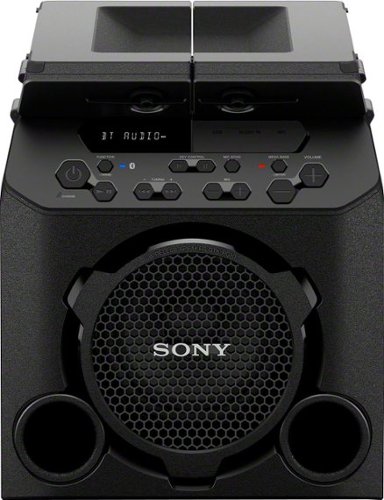
Enjoy your favorite music and podcasts anywhere with this Sony PG10 portable wireless speaker. It features a splash-proof top with four built-in cup holders, and will be great for parties with outdoor party mode. Bluetooth connectivity allows pairing this speaker with up to three devices simultaneously, while the built-in rechargeable battery lasts for up to 13 playback hours.
Customer Rating
5
Should be great outside in the hot tub or grilling
on April 2, 2019
Posted by: RandallFlagg
from Hi Desert, CA
First impression was I thought this was waterproof, but it's not. It is well built and should handle a spilled drink as long as it doesn't get in the tweeters. The sides are particle board and need to be kept dry. The design however is awesome. It has a 7" woofer and two tweeters that sound pretty good. If you like your music with lots of bass, the unit has the mega bass feature and you will notice the difference immediately. I had no problem streaming music from my phone, iheartradio and tunein at full volume with mega bass on or off. There may bit just a bit of distortion, but outside or turning the volume down a bit makes that go away. Besides, this unit is loud enough at full volume that I imagine a few neighbors will complain.
The unit has fm capabilities with an antenna on the back. It's a retractable unit like on an old transistor radio, but it works great. I was able to pull in my local stations. It also has a USB port, 1/4 inch jack, RCA input and bluetooth. You can use the 1/4 inch jack for a microphone, allowing for speeches or karaoke.
By far the best thing about this speaker is the battery. The unit shipped with about 70% charge. I plugged it in and played with it for just a short while and it was fully charged when I checked. With a full charge, Sony claims it will play for 13 hours, depending on the chosen volume.
The table top wings are a nice bonus. You can fold them out and have 4 cup holders. Just watch out for spills as the speakers aren't waterproof. Also make sure it's placed where no one will try and sit on it. Folded out the wings aim the tweeters upward and folded in they shoot straight ahead. Also when the wings are folded in, they lock in place with clips and create handles on both sides for easy moving. The unit is fairly light, just a bit awkward to carry. The handles fix that.
Lastly, the unit uses Sony's Music Center app. The app has Sony's Fiestable app allowing you to control the unit from your phone as well as using voice commands for a touch free experience. The app has iheartradio and tunein available with a push of a button. Overall I think this is going to be a great speaker for outside activities this spring and summer as well as tailgating should the opportunity arise.
Mobile Submission: False
I would recommend this to a friend!
Share this review:


+1point
1of 1voted this as helpful.

Use your stove top to its full potential with this Calphalon Premier 10-piece space-saving hard-anodized nonstick cookware set. This collection of pans also includes one stock pot, letting you prepare a wide range of recipes and cleanup with ease. Fit this Calphalon Premier 10-piece space-saving hard-anodized nonstick cookware set into two neat stacks to better organize your shelf, cupboard and cooking area.
Customer Rating
5
Calphalon and Farberware are my favorite cooking..
on March 27, 2019
Posted by: RandallFlagg
from Hi Desert, CA
So this set is great. I have a small kitchen and being able to stack the pots, pans and lids in two stacks works. I have a set of Calphalon that I bought back in 09. I know because that's when Gottschalks went out of business. It was a few months old when they closed my local store. I've loved using these every since. I don't have to worry about the finish flaking off. It is what it is and I can either hand wash them or run them through the dishwasher. I've never had an issue either way. The box states they are dishwasher safe. You can also use them on gas, electric or glass burners and in an oven up to 450 degrees. The other thing I like about the pots/pans is that they get hot quickly and retain the heat. I'm able to heat up food quickly, which works for me.
As for this set. I like the glass lids with the long handles. The pot lid with the two stubby handles will most likely need mittens, but hey, no biggie. I have the old glass lid with the handle in the middle and you have to use something to pick it up as it get toasty. The six pan/pot assortment was a good choice. A small simmering pot and fry pan for small individual meals and a large skillet, pot and my favorite 3qt saute pan. The box states that it's safe with metal utensils, but I prefer plastic or wood. Maybe that's why my old set hasn't had any finish issues or maybe they're just that good.
I'd recommend these to anyone. I've loved them for the last decade and I don't see that changing in the near future.
Mobile Submission: False
I would recommend this to a friend!
Share this review:


0points
0of 0voted this as helpful.
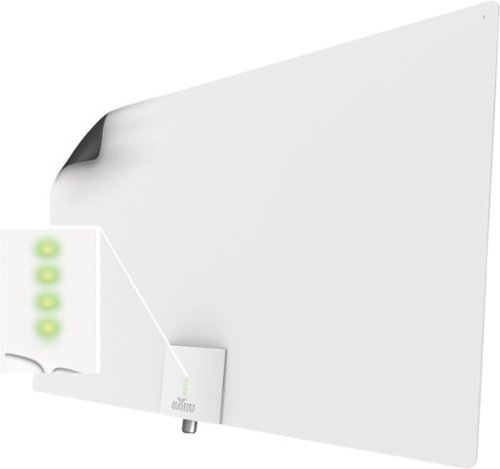
Enjoy quality signal reception with this Mohu Leaf Supreme Pro antenna. A 65-mile range ensures reception of a wide variety of channels, while the integrated TV signal indicator LEDs simplify placement for optimal signal strength. This Mohu Leaf Supreme Pro antenna comes with a 16-foot detachable high-performance coaxial cable for connectivity and features a plug-and-play design for quick installation.
Customer Rating

4
It does the job, but....
on March 19, 2019
Posted by: RandallFlagg
from Hi Desert, CA
So I had high hopes that this antenna would allow me to view the limited number of OTA channels being rebroadcasted in my area. I live on the back side of the San Gabriel mountains and they block the signal from Mt. Wilson on the other side (LA basin). One of our local parks departments has a few ancient transponders that they use to resend some signals out to this valley (a valley of over 400,000). I was able to view every channel, but not with the antenna in one location. It needed to be moved and turned to capture a clear picture, which is weird since all of the signals come from Ore Grande, 17 miles NE of my location, less as the crow flies.
Not finding a single location to receive all signals was a let down, but trying to mount the unit is another. It's floppy and has two small holes that I guess you're supposed to tack to a wall. Not exactly aesthetically pleasing to the eye. I basically held it in a number of locations and at different heights to achieve good results.
In a positive note. The unit comes with a signal booster, RG cable and the antenna. Everything you need is in the box to connect it and give it a try. If I lived in a larger broadcast market, I'd say this would work great just by tacking it up behind the tv or taping it to the back. It gives a great HD signal when I'm able to aim it correctly.
I wouldn't recommend anyone in my area purchasing the unit since it needs to move to get a clear picture on everything that we can get. I'd suggest they get an outdoor antenna with a motor to turn it, at least until this market gets better equipment...yeah right! I would recommend it to anyone in a large market that offers a number of channels. This would also be great in those markets for renters and people living in apartments.
Mobile Submission: False
I would recommend this to a friend!
Share this review:


0points
0of 0voted this as helpful.

Logitech G432 7.1 Surround Sound Gaming Headset is enhanced with advanced soundscape technology. Hear more of the game with huge 50 mm drivers that deliver a big sound. For maximum immersion, DTS Headphone:X 2.0 surround sound creates precise in-game positional awareness. Hear enemies sneaking up behind you, sense air attacks or special-ability cues, and enjoy the full cinematic experience of your favorite games. Its slim and lightweight, with rotating sports-performance ear cups, a large 6 mm, flip-to-mute mic, and convenient multi-platform compatibility.
Posted by: RandallFlagg
from Hi Desert, CA
The headphones are quite comfortable and work well with my prescription glasses. They fit my rather large cranium without maxing out the adjustment. They are well made and the ear cups are comfortable on my ears, something most headphones aren't. I'm able to leave them on for an extended amount of time.
I used these on my Windows 10 pc and they sound great. The mic works well with Dragon Naturally Speaking and the speakers work well with iTunes and gaming on Twitch.
The reason I docked it one star is that they sound awful when used with my Onkyo receiver. I recently bought the receiver for my home theater because I needed new HDMI's with the 2.2 update. I thought it would sound great with the 7.1. I tried phono, cd's, iheartradio and other apps. Either I don't have a setting right or they just don't work with audio equipment and are for consoles and pcs. Not sure, but I was really bummed when the sound wasn't close to usable.
Anyhow, if you are in need of a decent low priced gaming headset w/ mic, this might be the one for you. It really depends on how picky you are about the construction. If you don't mind lots of plastic, as I don't, then I say go for it. I'd recommend these to most average gamers/users.
Mobile Submission: False
I would recommend this to a friend!
Share this review:


0points
0of 0voted this as helpful.
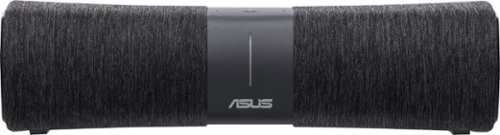
Enjoy whole-home Wi-Fi, premium audio and voice-activated operation with this Lyra Voice all-in-one router. Tri-band, AC2200-class Wi-Fi ensures a reliable network connection, while the built-in network security protects your privacy and data. The Bluetooth speaker lets you stream audio from your mobile device, bringing rich sound throughout the room. This Lyra Voice all-in-one router features Amazon Alexa, so you can control all the features with just the sound of your voice.
Customer Rating
4
I like it, but it has a few quirks
on March 1, 2019
Posted by: RandallFlagg
from Hi Desert, CA
I've had the Lyra hooked up for a few days and here's what I've observed. First off, I use Cortana with my Harmon Kardon Invoke and Google Home with a mini and a Insignia (Best Buy) clock. Adding Alexa to the mix seemed like a good idea. That said, here we go.
I had a hard time getting my Linksys EA9500 and the Lyra to work together. I knew I was going to set it up as a bridge/repeater and following the instructions failed miserably. The android phone app never would see the Lyra. I finally chose the add a new network button and got it to work. Once you enter the new network button/link on the phone app, it gives you the option to use the Lyra as a repeater. Then just read carefully what the app wants. I thought it was asking me to set up new passwords, when it was asking for my local network and password. No biggie! When it wouldn't connect, I figured it out and just repeated the process with my home network info. Tada, it works. Well sort of.
Once I got the app working and the Lyra stable, I unplugged the unit to move it to the kitchen. I plugged it in and again it too a bit to get it to sync up. Once it did, I thought it was okay. I ran it through some questions, Got it to play KOLA on tunein and KGB on Iheartradio. So what's my issue? Every few hours it reboots (I guess) and I hear a gong and the blue light goes on and off. It doesn't do anything else, so I'm guessing it loses the network and reboots. I haven't had to resync it, so it must figure it out on it's own. Two, at least 2 times a day, it spouts off and starts to answer a question from the tv. My tv doesn't say Alexa, but it must say something close enough for it to start a dialog.
Overall I'm happy to add Alexa to the mix. With do it yourself home automation still in its infancy, I want the opportunity to see what each company brings to market and how each one can improve daily tasks. I enjoy the ability to listen to music, get the weather, set a timer and/or alarm as well as ask it how to pronounce words in different languages. I had light bulbs in the mix, but they failed to respond after about a month. I contacted the manufacturer and they are sending replacements plus a few extra or so they say. I should have them next week and I'm excited to see if they work with Alexa and Google.
I'd recommend this unit because the music sounds good enough while I'm in the kitchen doing chores. You can say Alexa, set the volume to anything between 1 - 10 and it works. 10's pretty decent and 7 is enjoyable. Also for the price, I'd recommend trying different systems to see what works for you.
Mobile Submission: False
I would recommend this to a friend!
Share this review:


+1point
1of 1voted this as helpful.
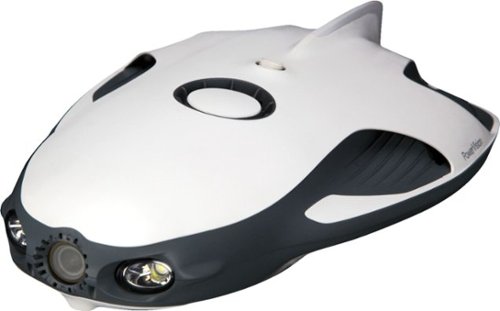
Open a world of ocean exploration with this PowerRay Wizard underwater camera. The detachable PowerSeeker fishfinder can be used by itself to map landscapes, and the 4K Ultra HD camera with wide-angle lens captures photos or videos in lakes or seas. Real-time streaming at 1080p from this PowerRay Wizard underwater camera lets you share your adventures via social networks.
Customer Rating
4
Had a few beginner's issues, but....
on February 23, 2019
Posted by: RandallFlagg
from Hi Desert, CA
I wanted to test the powerray in a large body of water here in So. Cal, but for the last week we've had rain and snow (yes snow) making that impossible. So today with our first nice day of sunshine, I phoned my sister and asked to use her swimming pool to test the unit. Here's what I discovered.
First off, I'm a trained network specialist and I had difficulty getting the unit to connect. I was lucky to have my nephew's help and between the two of us messing with it for about 25 minutes, we got it to connect. What I observed was that once you power up the unit and go to connect to wifi, you have about 4 new connections available. ONLY one of those will start with PRA, the other is like PSA and two others were something else. Anyways, once you connect to the PRAxxxxx network, use the default password 1234567890 and it should change to connected in the phone app. Then you will probably be so excited that it's connect that you'll do what we did and start pushing levers on the controller. Remember that once the unit is in the water, you need to unlock it. I did so by using the left dial and dialing it left while pressing the right bottom button in the middle of the controller. Then it was off and running.
Once it was moving, it's like anything else. You need to take it for a spin and figure out what does what. It seems to have no lag between the controller and unit, but the phone app seems to lag just a bit. I'm using an original Pixel so it should be okay. I did come home and download firmware updates for 4 different functions, so maybe that fixes it. Either way, the lag isn't so bad that its unusable. It was noticeable is all. I don't think it really affects the performance of the unit and once it's in deeper water, I doubt you would be able to tell. We could because the unit was visible in clear pool water. The unit has 3 speeds, low, medium and high. In the pool, we used low for learning how the unit moves, but it seems to operate best in high. Taking off and ascending were smoother and easier when the unit had more thrust. Getting it to do the same maneuver in low speed and the unit seemed to stay on the bottom or struggle to take off.
VR mode. I was unable to test the VR goggles. It is made for the iPhone 6 or better and I use the Pixel XL so that was a no go. It would be great if they offered suggestions on how to use Android phones with the goggles. I saw one YouTube video that had a comment that the Play store has an Android app, but I couldn't find it. Maybe it's the same Vision + app, but I wasn't sure. I'll have to research it some more.
Charging the unit. It is easy to charge the unit, controller, base station and even your phone via a standard USB port. You can hook up all 4 items and simultaneously charge them in about 2-3 hours. You'll just need a 110 outlet nearby to get the job done.
Phone mount. The mount works good and it kept the phone locked in place with no issues. The only downside is my Pixel is really hard to view in the sunlight. I found it best to stand in the shade to operate the unit. Not really sure how much shade there would be on a shoreline, dock or deck of a boat.
The case. It comes with a great case. Everything has a spot, including the two pockets on the flap for holding the 110 power cord and the straps used to tie up the tether. So far I've kept the tether on the spool. One downside to the case is the finish. I got so flustered trying to connect the base station to my phone that it got a bit scuffed up on the concrete patio. When you get your, maybe lay it out on a towel or blanket to protect the finish.
So all in all, this is a fun (do I dare say toy). It works pretty well and I imagine with the fish finder and bait, it would make for some fun fishing. My brother in law said, yeah but when you find the fish, you have to guess where the unit is and whether or not the fish were scared off. Like him, I think this would be great for underwater exploration and taking pics and vids of coral beds and underwater sea life. Getting the unit to sync up with the base and phone are a bit of a head scratcher, but with persistence you'll get it. I think the quick start manual needs an overhaul and a bit more information would be helpful. The short company YouTube videos help, but it seems each one leaves the viewer with additional questions.
In Addition. I just got home and checked my phone for the pictures and video we took. I didn't find it in the usual places, so I hooked up the unit and turned it on. My phone remembered all the settings and it connected with no issue. That's wonderful for my next venture. Once I had the unit powered up, I was able to click the picture icon on the app (I used the one on the right in the driving app, but I believe there's also one at the bottom of the white screen before the app starts. It allowed me to click on each photo and download it to my phone. I wish it had a select all button. I can imagine it's pretty tedious to do a bunch one at a time. Maybe there is a way to download a batch, but I didn't see it. I then transferred those to my PC. There is an app I found for PC use, but I kept getting "connect to camera fail" At least I was able to get the photos and video onto my PC. One other concern is the tether. If the unit were to get detached from the tether, would the unit be retrievable or is it a loss. There ought to be a safety like my brother in law said. Maybe a short cable or chain with a small carabiner.
If drones, remotes and/or underwater exploration are your thing, I'd recommend this unit. It will take some patience at the beginning to get it all set up and running, but once you work out the kinks, I'd think you be pretty happy.
Mobile Submission: False
I would recommend this to a friend!


Share this review:


-2points
3of 8voted this as helpful.
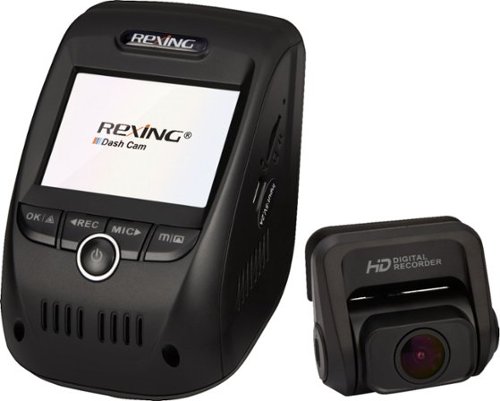
Record road trips with this Rexing dash cam. Its built-in GPS logger and G-sensor safely store footage in addition to time, location and speed without a separate accessory. Full HD front and rear cameras with ultra-wide lenses and Wi-Fi connection let you share your footage from this Rexing dash cam.
Customer Rating
4
Nice, but impossible to view
on January 7, 2019
Posted by: RandallFlagg
from Hi Desert, CA
I've been using an inexpensive dashcam from Denicer and except for not being able to view it in the car because the screen is so tiny, I've been happy with it. I was hoping this unit with it's slightly bigger screen would allow me to view it in the car. Unfortunately for me, it doesn't. I'm barely able to view the menu and navigating the menu isn't user-friendly. I kept shutting the menu while trying to remember what button scrolls. In defense of the unit, it does have WiFi and I haven't tried it out yet. Viewing from my phone, which is also dash mounted while I drive may be a good alternative. I'll have to see and YMMV. My other gripe and probably my most troublesome part was getting the red backing off the 3m mounting tape. It was next to impossible and 3m should machine cut a tab on the backing. Also the unit should include a couple of alcohol wipes to clean the glass for mounting.
Now that my negatives are posted..sorry didn't mean to start with a rant, I'll say this unit is really nice. Once you get past the initial setup and mounting, the unit works. It's a bit large, but it tucks up nicely next to the rearview mirror. The kit comes with all the cables you'll need to power up the unit, connect the rear camera and be up and running in no time. Tucking cables in the headliner and pillars is just part of any install, so no issues there. The screen is hard to see, but better than my old one and viewing the microsd card on my pc works as it should. The GPS seems to work as time and date automatically updated...thank you. One less menu setup for me! The mic switch is nice. I like mine muted and not having to go into the menu to turn it off and on is convenient. Also having the red icon light up on screen to show audio off is wonderful.
One concern I have is this summer. I live in the So. Cal desert and I wonder if the mounting tape will hold up to the extreme interior temps we get. My interior is grey, so not too bad. We'll see. If not, I'll probably buy a thicker 3m tape to ensure a complete bond to the glass. I got a good bond, but I could see the middle of the plate wasn't stuck as well as I would have liked when I view it from outside the windshield.
So yeah I have a few issues with the setup of this unit, but overall and once it's installed, I'd say it's a pretty sturdy kit and I'd recommend it to any driver wanting to have a witness to their daily driving. With officers unable to come to most non-injury accidents, one needs to have evidence to back up their story. It's the reason I got the first one and now with this unit mounted, I can use the other one in my truck without moving it from car to car.
Mobile Submission: False
I would recommend this to a friend!
Share this review:


+1point
1of 1voted this as helpful.
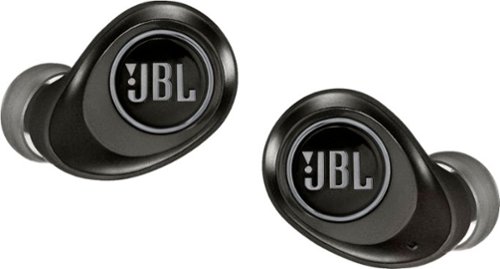
Perceive every detail of your music with this pair of JBL wireless headphones. The 10Hz to 22kHz frequency response lets you enjoy the full range of sound, while the in-line microphone provides an effortless switch to hands-free calls. Featuring 5.6mm dynamic drivers, these JBL wireless headphones supply rich, resonant bass for your enjoyment.
Customer Rating
5
4 1/2 stars, but we'll say 5
on January 2, 2019
Posted by: RandallFlagg
from Hi Desert, CA
I'm pretty happy with the JBL True Wireless headphones. I received a pair of JLab Audio - Epic Air True Wireless Earbud Headphones last year and was disappointed. One bud would always drop out and the companies solution was to put the phone closer to the earbuds. I bought an arm sleeve to hold my Pixel, but it still dropped out. I was skeptical that the JBL's would be the same, but was happy to have much better results with this second generation tech. I was not only able to keep a connection with my phone on the kitchen countertop, but I could walk 20+ feet over to the couch in the living room before I lost one bud. At about 25 feet the signal got the hiccups and would connect and disconnect. I think that's pretty good for Bluetooth. I have confidence that I'll keep a decent connection at the gym with my phone in my front pocket. That's really all I demand out of this type of earbud. I wish JLab could update the firmware in the older model so I had a backup pair. Oh well, I guess that goes to show that the older name brand products still give better performance than these younger tech companies.
If you have had a bad experience with wireless earbuds and want to give it another go, I'd recommend these. If your results aren't the same as mine, you can always return them.
Mobile Submission: False
I would recommend this to a friend!
Share this review:


0points
0of 0voted this as helpful.
RandallFlagg's Review Comments
RandallFlagg has not submitted comments on any reviews.
RandallFlagg's Questions
RandallFlagg has not submitted any questions.
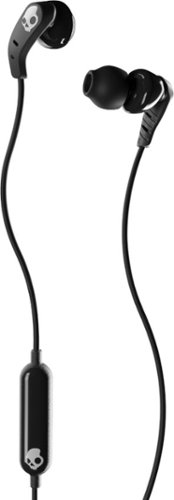
From Work to Workout. Comfortable, sweat-proof earbuds that work from the office to the gym. Set features secure-fit earbuds and powerful audio that gets you moving. The Set in-ear sport headphones let you manage calls and audio with the in-line remote and microphone and come with the enhanced bass that Skullcandy products are known for.
How long is the cable?
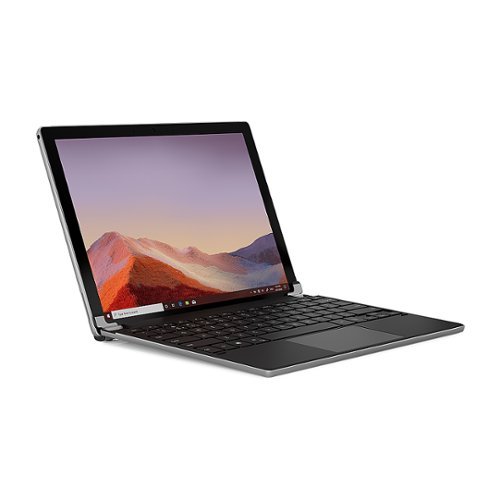
The Brydge 12.3 Pro+ wireless keyboard with touchpad matches the quality and functionality of the Surface Pro 4,5,6, and 7 seamlessly. Designed to meet the standards set by Microsoft, the Brydge 12.3 Pro+ features a precision touchpad, adjustable viewing angles and 3-level backlit keys, bringing a laptop-like experience to your Surface Pro.
Is it running on windows 10? And What’s the speed how fast is it?
It's just a Bluetooth keyboard for the Microsoft Surface Pro 4,5,6,or 7. So no operating system. You need a Surface Pro to make it a laptop or working computer.
5 years, 5 months ago
by
RandallFlagg
The Brydge 12.3 Pro+ wireless keyboard with touchpad matches the quality and functionality of the Surface Pro 4,5,6, and 7 seamlessly. Designed to meet the standards set by Microsoft, the Brydge 12.3 Pro+ features a precision touchpad, adjustable viewing angles and 3-level backlit keys, bringing a laptop-like experience to your Surface Pro.
Does the laptop have a front camera and is it also the laptop with the key board?
It's just the keyboard. It works via Bluetooth with your existing Microsoft Surface Pro 4,5,6, or 7 tablet. Together they create a laptop. So no, no camera since it's not a computer, just a keyboard. The Surface Pro would have the camera.
5 years, 5 months ago
by
RandallFlagg
The Brydge 12.3 Pro+ wireless keyboard with touchpad matches the quality and functionality of the Surface Pro 4,5,6, and 7 seamlessly. Designed to meet the standards set by Microsoft, the Brydge 12.3 Pro+ features a precision touchpad, adjustable viewing angles and 3-level backlit keys, bringing a laptop-like experience to your Surface Pro.
Is this a laptop and keyboard
No, it's a Bluetooth keyboard that attaches to a Microsoft Surface Pro 4,5,6,or 7. You have to have one of those tablets and together they turn the tablet into something that works like a laptop.
5 years, 5 months ago
by
RandallFlagg
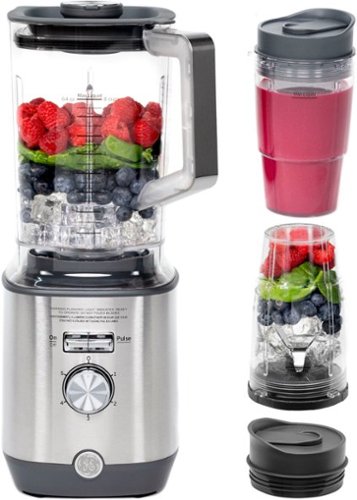
Now that quality you've come to love from GE is available right on your countertop, thanks to GE Appliances blenders, available in both Standard and Immersion designs. Our immersion blenders are ideal for one-handed operation, and available whisk and chopping attachments make whipping up family meals a cinch. You can even take it with you to help make kitchen magic on the go. GE Appliances standard blenders are the perfect addition to any kitchen and have the power to blend through tough ingredients to make delicious shakes, sauces and pur~es. The available personal blending cups are perfect for your morning smoothie and help make clean-up a snap. Make your blending experience a snap with help from GE Appliances, a brand you trust.
Is the jar glass or plastic?

Malwarebytes Premium Security (standard subscription) protects against malware, including viruses, ransomware, and spyware, without slowing you down. It removes any existing infections and proactively prevents future ones. It also defends against phishing scams, fake or malicious websites, infected ads, credit card skimmers and credential stealers. Expand your protection to your other devices- computers, smartphones, or tablets.
Is this a CD or a download?
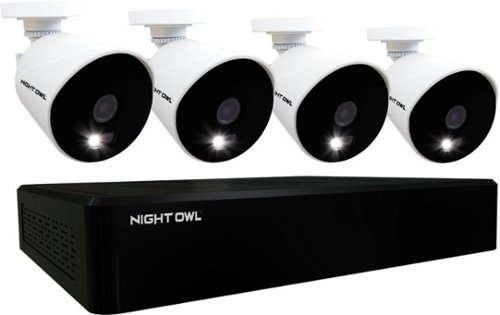
Monitor your surroundings with this Night Owl 16-channel DVR security system. The four Full HD cameras feature L2 Color Boost technology to maintain footage clarity in low-light conditions, while the single sign-on two-step verification ensures secure access. This Night Owl 16-channel DVR security system features a 1TB HDD for ample storage.
How long are the wires for the cameras ?
Monitor your surroundings with this Night Owl 16-channel DVR security system. The four Full HD cameras feature L2 Color Boost technology to maintain footage clarity in low-light conditions, while the single sign-on two-step verification ensures secure access. This Night Owl 16-channel DVR security system features a 1TB HDD for ample storage.
Will this DVR system work with other non-night owl cameras (PAL)? I have some really nice wide angle, commercial grade cameras.
I'm across the pond, so NTSC, not PAL. I have a Lorex 4k system and this Night Owl 1080p system and they both use BNC connectors. I'm able to connect the Night Owl cameras to my Lorex DVR and it will automatically set them to 1080p with no issues. I'm guessing I could add the 4k cams to the Night Owl DVR, but they would probably downgrade to 1080p, so I didn't even bother. If your systems use BNC connectors and a male/female power cable, I'd say yeah, it should work.
5 years, 9 months ago
by
RandallFlagg
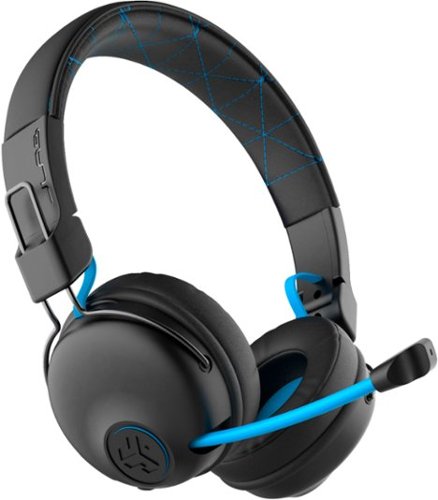
Hear all your games in high-quality sound with this JLab Play wireless gaming headset. With an increased mid to high frequency response and super-low 60 ms latency, this headset is able to deliver clear vocals and enhance spatial awareness without lag. JLab~s Play wireless gaming headset delivers over 22 hours of playtime and compatibility with PCs, consoles and mobile devices to handle every session.
Is it compatible with ps4 & xbox?
I was supposed to get the black/blue unit, but they sent a JBuddies unit instead. It shows xbox, playstation and nintendo compatible on the cover.
5 years, 10 months ago
by
RandallFlagg
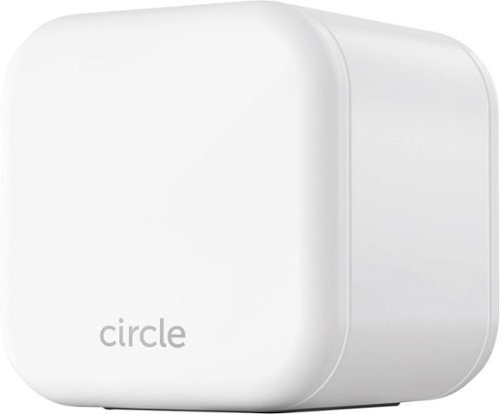
Keep your kids safe online with this Circle Home Plus monitoring setup. The included device uses your router to manage every device on your network, and Circle App makes it simple to limit screen time, filter content, and check browsing histories. This Circle Home Plus monitoring setup is easy to set up and lets you create custom settings for each family member.
Is this product has app that can be accessed from cell phone? All I want is to have a control from my cell phone when to allow the kids to access internet or to limit their game time. Such as if I can set a certain time limit for the specific game.
Yes it will do that when the phone is connected to WiFi on your home network. The kids still can use 4G or your minutes to connect, so be careful. If they're locked out of WiFi, kids are smart enough or will just let the phone connect and you may go over your phone plan. As for you home network, all items, tablets, phones, pcs, macs etc will be visible to you on your phone. Each kid will have an account set up by you and on your phone you can limit their access, reward them for good behavior with extra time and set bedtime hours. You do need to purchase a subscription, 3 month, 1 year or lifetime. AND make sure you figure out how to limit their cellular access with services like AT&T Secure Family or whatever your provider offers.
5 years, 11 months ago
by
RandallFlagg