
Share chadmichael's profile


chadmichael
chadmichael's stats
- Review count24
- Helpfulness votes2
- First reviewMay 19, 2015
- Last reviewJuly 9, 2018
- Featured reviews0
- Average rating4.5
Reviews comments
- Review comment count0
- Helpfulness votes0
- First review commentNone
- Last review commentNone
- Featured review comments0
Questions
- Question count0
- Helpfulness votes0
- First questionNone
- Last questionNone
- Featured questions0
- Answer count1
- Helpfulness votes0
- First answerJuly 23, 2016
- Last answerJuly 23, 2016
- Featured answers0
- Best answers0
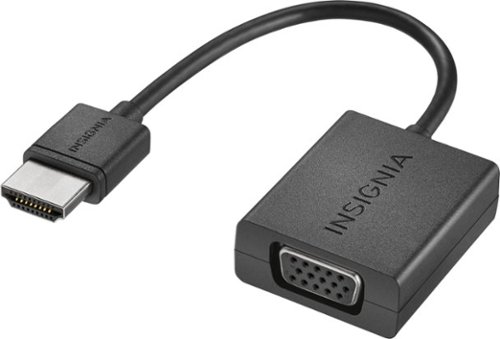
Connect your laptop with an HDMI output to a VGA-enabled monitor or projector with the Insignia HDMI-to-VGA adapter for reliable transfer of signals up to 1920 x 1080 @60Hz. Product does not convert VGA sources (computers) to HDMI (TV input), it only converts HDMI sources (computers) to VGA displays.
Customer Rating

5
Great low-cost alternative
on July 23, 2016
Posted by: chadmichael
from Atlanta, GA
Verified Purchase:Yes
Simple device, works great, cheaper than the other same/similar items on the shelf.
My Best Buy number: 0768524497
My Best Buy number: 0768524497
I would recommend this to a friend!
Share this review:


0points
0of 0voted this as helpful.
![The Divergent Series: Insurgent [Includes Digital Copy] [Blu-ray] [2015]](https://pisces.bbystatic.com/prescaled/500/500/image2/BestBuy_US/images/products/1b41f2dc-2016-4353-b5f5-63735857c57d.jpg)
Customer Rating

4
Sequel to Divergent
on August 7, 2015
Posted by: chadmichael
from Atlanta, GA
Verified Purchase:Yes
I enjoyed this film, more geared for teenagers and young adults though.
My Best Buy number: 0768524497
My Best Buy number: 0768524497
I would recommend this to a friend!
Share this review:


0points
0of 0voted this as helpful.
![The Wedding Ringer [Includes Digital Copy] [Blu-ray] [2015]](https://pisces.bbystatic.com/prescaled/500/500/image2/BestBuy_US/images/products/b99be0b4-cbf3-4e51-a268-b34961b529d3.jpg)
Customer Rating
5
Very funny movie!
on June 22, 2015
Posted by: chadmichael
from Atlanta, GA
Verified Purchase:Yes
Kevin Hart is hilarious. I really enjoyed this movie, leaves you feeling good at the end.
My Best Buy number: 0768524497
My Best Buy number: 0768524497
I would recommend this to a friend!
Share this review:


0points
0of 0voted this as helpful.
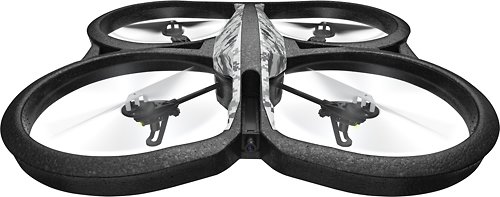
Parrot AR.Drone 2.0 Elite Edition Drone: Get a bird's-eye view of your surroundings through the onboard camera while you record HD video and take photos from above. Plan your flight's destination ahead of time by choosing a point on the map that you want your drone to fly to.Fly Responsibly:Before takeoff, update all software and firmware, and read the instructions thoroughly.See the FAA website for requirements and information about flying a drone safely: https://www.faa.gov/uas/getting_started/fly_for_fun/. Additional state or local requirements may apply. Check your local jurisdiction. The following websites may help you make informed decisions about flying your drone: www.knowbeforeyoufly.org and www.modelaircraft.org.
Customer Rating
4
Good learning drone
on May 19, 2015
Posted by: chadmichael
from Atlanta, GA
Verified Purchase:Yes
good for the beginner, camera works great. Range is somewhat limited.
My Best Buy number: 0768524497
My Best Buy number: 0768524497
I would recommend this to a friend!
Share this review:


+1point
2of 3voted this as helpful.
chadmichael's Review Comments
chadmichael has not submitted comments on any reviews.
chadmichael's Questions
chadmichael has not submitted any questions.
chadmichael's Answers
Connect your laptop with an HDMI output to a VGA-enabled monitor or projector with the Insignia HDMI-to-VGA adapter for reliable transfer of signals up to 1920 x 1080 @60Hz. Product does not convert VGA sources (computers) to HDMI (TV input), it only converts HDMI sources (computers) to VGA displays.
Can I use this cable to connect two monitors to a Dell Inspiron with a video card that supports VGA and HDMI?
Want to use two monitors in a Church AV setting. One monitor will display the music app and one will display the words to the song that will be shown on the big screens. Need to be able to drag the songs from one screen to another.
Just connect one monitor to your VGA port and the other to the HDMI. Then (turn both on first) go to your display settings, if it doesn't automatically detect the second screen you may have to select 'detect' (or similar) then make sure you select under Multiple Displays, 'extend these displays'.
10 years ago
by
chadmichael