
Share Wabliepops's profile


Wabliepops
Wabliepops's stats
- Review count21
- Helpfulness votes5
- First reviewFebruary 23, 2015
- Last reviewFebruary 6, 2018
- Featured reviews0
- Average rating4.5
Reviews comments
- Review comment count0
- Helpfulness votes0
- First review commentNone
- Last review commentNone
- Featured review comments0
Questions
- Question count0
- Helpfulness votes0
- First questionNone
- Last questionNone
- Featured questions0
- Answer count8
- Helpfulness votes8
- First answerDecember 1, 2016
- Last answerJanuary 9, 2017
- Featured answers0
- Best answers2

Keurig 2.0 K450 20231 Coffeemaker: Get your day started on the right track with this coffeemaker, which brews up to 4 cups of delicious, aromatic coffee and features 9 brew sizes. Save your favorite settings to make a quick cup the way you like it.
Customer Rating

5
Excellent
on February 23, 2015
Posted by: Wabliepops
Verified Purchase:Yes
Used to make my coffee at work and didn't have a way to make it over the weekends. I saw a lot of complaints about needing 2.0 compatible cups but where as I did not have a 1.0 previously this was not an issue for me. The coffee or other beverage comes out good and hot, and it's nice to have a choice between a pot or a cup.
My Best Buy number: 3313086693
My Best Buy number: 3313086693
I would recommend this to a friend!
Share this review:


0points
0of 0voted this as helpful.
Wabliepops's Review Comments
Wabliepops has not submitted comments on any reviews.
Wabliepops's Questions
Wabliepops has not submitted any questions.
Wabliepops's Answers
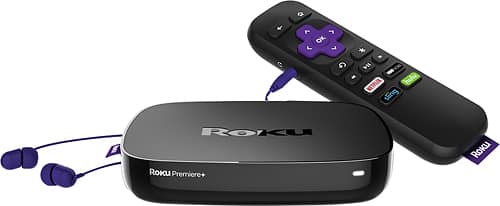
Stream favorite shows and movies with the Roku Premiere+. It handles 4K resolution so you get the most out of your high-end television, and it includes access to more than 4500 channels for varied subscription options. The Roku Premiere+ comes with a remote so you can browse entertainment options from your couch.
How much is it a month with local channels. And why do the prices keep changing.
The roku is a device that you purchase. There is no monthly fee to own one. You would still need to pay for an internet connection. That being said you can install multiple apps on the device such as Netflix, Slinger, Hulu. There are some free channels for news stations but you would need to pay the subscription fee of the services that are not free.
9 years, 5 months ago
by
Wabliepops
Stream favorite shows and movies with the Roku Premiere+. It handles 4K resolution so you get the most out of your high-end television, and it includes access to more than 4500 channels for varied subscription options. The Roku Premiere+ comes with a remote so you can browse entertainment options from your couch.
Does the Roku Premiere+ decode Dolby Digital and Dolby Digital Plus? If I don't have a receiver should I go with the Ultra version instead?
Stream favorite shows and movies with the Roku Premiere+. It handles 4K resolution so you get the most out of your high-end television, and it includes access to more than 4500 channels for varied subscription options. The Roku Premiere+ comes with a remote so you can browse entertainment options from your couch.
Stream favorite shows and movies with the Roku Premiere+. It handles 4K resolution so you get the most out of your high-end television, and it includes access to more than 4500 channels for varied subscription options. The Roku Premiere+ comes with a remote so you can browse entertainment options from your couch.
Stream favorite shows and movies with the Roku Premiere+. It handles 4K resolution so you get the most out of your high-end television, and it includes access to more than 4500 channels for varied subscription options. The Roku Premiere+ comes with a remote so you can browse entertainment options from your couch.
Stream favorite shows and movies with the Roku Premiere+. It handles 4K resolution so you get the most out of your high-end television, and it includes access to more than 4500 channels for varied subscription options. The Roku Premiere+ comes with a remote so you can browse entertainment options from your couch.
what is streaming media devise why would i want one already have direct tv
A streaming device is a device used to install various apps and stream content. Streaming content is watching TV and movies over your internet connection. Most of the time people purchase them if they are looking to minimize their cable bill be dropping the cable box and paying solely for internet. Depending on your cable provider some streaming services such as HBO Go are free with an internet subscription. They can also be used to view videos from your phone or tablet on the TV. Currently I use mine to stream netflix, & HBO Go as these are my only outlets for shows and movies.
9 years, 5 months ago
by
Wabliepops
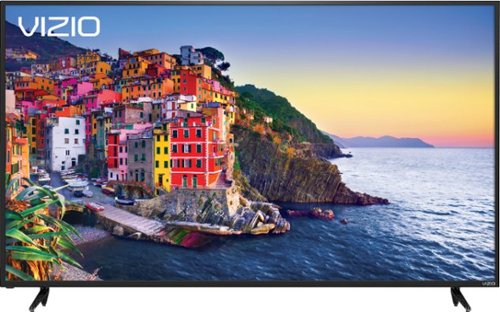
Introducing the all-new VIZIO SmartCast E-Series 70-inch Class 4K UHD XLED Display. Powered by XLED, VIZIO's powerful full-array local dimming backlight technology, the 2017 E-Series features 4K Ultra HD resolution for sharper details, and Xtreme Black Engine for deep black levels. And with the latest SmartCast experience delivering popular top apps like Netflix directly on the big screen with the included remote. Additional connected features include Chromecast built-in, and voice control compatibility with the Google Assistant and Amazon Alexa.
Does this E3 model 70 inch Visio have the capability for Wi-Fi connection what I mean is am I able to get on the Internet with it
The TV does have Wi-Fi built in, but it is not technically a smart TV. The remote that is included has limited functionality and the rest of the settings and functions must be accessed via the SmartCast app from a tablet or phone. The TV has built in chromecast that would allow you to cast (display) shows from your phone or tablet onto the TV. I believe the Wifi also allows the TV to update when needed. I had a coupon for the Warcraft movie on google play and decided to give it a shot as I usually use a ROKU to stream. Everything played fine and the quality was quite good. Please keep in mind that Streaming 4k content requires a fast internet connection. They recommend at least 25MBps, but I would recommend at least 40 depending on the number of devices on your network. I run a 60 MBps connections with no issues.
9 years, 6 months ago
by
Wabliepops
Introducing the all-new VIZIO SmartCast E-Series 70-inch Class 4K UHD XLED Display. Powered by XLED, VIZIO's powerful full-array local dimming backlight technology, the 2017 E-Series features 4K Ultra HD resolution for sharper details, and Xtreme Black Engine for deep black levels. And with the latest SmartCast experience delivering popular top apps like Netflix directly on the big screen with the included remote. Additional connected features include Chromecast built-in, and voice control compatibility with the Google Assistant and Amazon Alexa.
Does this come with the vizio tablet device?
Unfortunately this one does not include the tablet style remote. When first powering on the TV it required you to access it via your phone. Unfortunately the included remote does not allow you to access the TV's settings. All of these must be accessed from a phone or tablet.
9 years, 6 months ago
by
Wabliepops