
Share quicky422's profile


quicky422
quicky422's stats
- Review count1
- Helpfulness votes1
- First reviewJanuary 16, 2010
- Last reviewJanuary 16, 2010
- Featured reviews0
- Average rating5
- Review comment count2
- Helpfulness votes3
- First review commentAugust 28, 2010
- Last review commentNovember 5, 2014
- Featured review comments0
Questions
- Question count0
- Helpfulness votes0
- First questionNone
- Last questionNone
- Featured questions0
Answers
- Answer count0
- Helpfulness votes0
- First answerNone
- Last answerNone
- Featured answers0
- Best answers0
quicky422's Reviews
![Cage the Elephant [CD]](https://pisces.bbystatic.com/prescaled/500/500/image2/BestBuy_US/images/products/12726ee7-2858-4ec0-8c8d-e18397ab2af6.jpg)
Posted by: quicky422
from Fayetteville, AR newrock1049x.com
I finally purchased the album the other day and I'm sorry I didn't buy it sooner. Great album, great music. can't go wrong. I love when I find new music and when I first gave it a listen it just put a big a** grin on my face. Music is awesome!!!! So don't wait, but it NOW
What's great about it: Draws you in on the 1st track and doesn't disappoint!
What's not so great: NOTHING!!!
I would recommend this to a friend!
Share this review:


+1point
1of 1voted this as helpful.
quicky422's Review Comments

We'll calibrate your HDTV for optimal video performance, using the latest tools and techniques to create the most true-to-life high-definition experience for you. Learn more about TV Calibration here. Geek Squad Installation Videos~ See how our highly trained Geek Squad Installers can help you get the most out of your home theater. Have questions about this Geek Squad service? Ask fellow shoppers and Best Buy staff. Share your answers.
Overall 4 out of 5
4 out of 5Must have for any videophile!
By webhead0626
from Sioux City IA
I read a lot of these reviews in the days leading up to my calibration. and i believe that a lot of the people complaining about this service are misinformed on what to expect, or had a bad tech. Apparently not all Techs are created equal. Mine was awesome! Nate was just as excited about doing it as i was. He truly loved his job. And was more knowledgeable than me, which is saying a lot!
A lot of people seem to complain about the TV being brighter and more vivid before the calibration , and that's true.TV's are set that way for a REASON, all the settings cranked up (Torch Mode) to look better against the competitors in a retail store under florescent lights. Not to look great in your living room in natural lighting or dark settings. And since they don't know which set goes to BB and which one is going to your house, they set them all the same.
I will start by clarifying that what this service does, is set your colors to an ISF standard .Which is going to let you view the content as the director INTENDED. This is NOT going to make your colors more vivid or your picture brighter. What it will do though is give you "TRUE and NATURAL" colors and a SHARPER picture.(Which is what HDTV is supposed to be)
You will notice after the calibration the picture seems "dull", (good thing i knew to expect that.) and why wouldn't it? you've been watching TV on "Torch Mode" for the past month. After your eyes adjust, the real magic happens. You see details in the blacks you've never seen before. And the colors are soooooo natural. The "graininess" is all but eliminated from compressed video as well. I switch back and fourth between factory settings and calibration for comparison and am blown away. The presets look horrific. The whole screen has an unnatural blue hue to it. It literally hurts my eyes! The difference is amazing! I will never go back. It's like watching HDTV for the first time all over again!
Sure you might get close to this w/ self optimizers. But if your like me you want the "TRUEST" picture possible. I don't think that's possible with out professional calibration.
The computer knows what white looks like, your eyes only "perceive" white. Our eyes see bluish white as whiter which makes eyeballing it next to impossible. Plus w/ so many options in the picture settings calibration has never been easier and more in-depth for a tech and never more confusing for the consumer.
On the downside, of course the price. $300 is a hard price to sell. If however you just bought a $3000 TV it's worth every penny.
Now i will say that this service is not for everyone. If you only plug in your TV and turn it on, then this is not for you. Although if that's the case you wouldn't be reading this! If on the other hand your like me(which you probably are) and want to squeeze every bit of potential out of you home theater system and get THEE BEST picture possible, than this is DEFIANTLY for you.
Videophiles thank me later. ; )

quicky422
Fayetteville, AR newrock1049x.com
Not the same with all Tv's
August 28, 2010
I know with the Panasonic s2's there is an initial setup menu when it's first plugged in. And in that process it will ask you whether the tv is being displayed for home or showroom.
So they are not set all the same. So, for a majority of the consumers, out-of-the-box setup will provide a great picture that doesn't need calibrated.
And I beleive those calibrations are biased toward the eye of the tech.
I will stay with the manufactures POV when it comes to picture quality and bypass the $200 calibration. So chose your manufacture carefuly!
-2points
3of 8voted this comment as helpful.
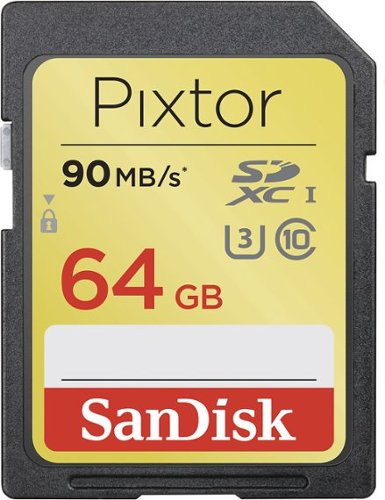
Featuring a Class 10 rating for fast data transfer, this SanDisk Pixtor Advanced SDXC memory card lets you capture 1080p, 3D or 4K video. The 64GB capacity ensures you have plenty of room for your data.
Overall 5 out of 5
5 out of 5Good product
By Chris
With the SDXC memory card I was able to record in XAVC S format, but have not been able to find software that would allow me to burn a DVD on my computer from video recorded in XAVC S format.
Any suggestions ?
Any suggestions ?
quicky422
Fayetteville, AR newrock1049x.com
Sony Format
November 5, 2014
Since XAVC S is a format developed by Sony, and maybe Panasonic?, I would look at the software offered from them! Good luck, I don't often process to DVD but maybe using Blu-Ray might make a difference also? I bought the same card because Sony updated the RX-10 to use this format which offers 120fps and I'm excited about that!! Beware, the XC format is not offered in cards under 64GB, I guess, because of the extended capacity and the ability to shoot at higher frame rates.
0points
0of 0voted this comment as helpful.
quicky422's Questions
quicky422 has not submitted any questions.
quicky422's Answers
quicky422 has not submitted any answers.