
Share onepiper's profile


onepiper
onepiper's stats
- Review count7
- Helpfulness votes25
- First reviewNovember 5, 2014
- Last reviewJune 23, 2017
- Featured reviews0
- Average rating3.9
Reviews comments
- Review comment count0
- Helpfulness votes0
- First review commentNone
- Last review commentNone
- Featured review comments0
Questions
- Question count0
- Helpfulness votes0
- First questionNone
- Last questionNone
- Featured questions0
Answers
- Answer count0
- Helpfulness votes0
- First answerNone
- Last answerNone
- Featured answers0
- Best answers0
onepiper's Reviews
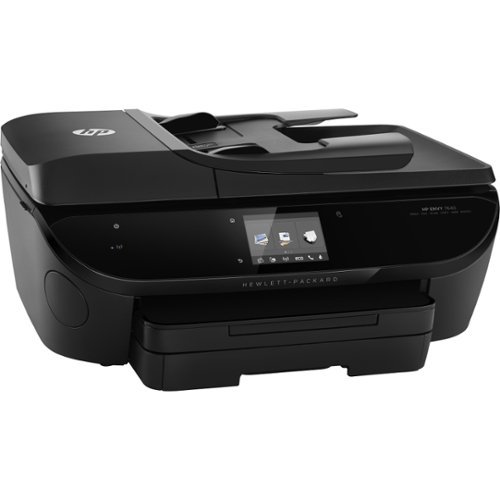
Print stunning borderless photos and bold documents using this HP ENVY 7640 printer, which features an optimized color resolution of up to 4800 x 1200 dpi and a rendered black resolution of up to 1200 x 1200 dpi to ensure crisp text and vibrant images.
Customer Rating

5
Very good general and photo printer.
on June 23, 2017
Posted by: onepiper
Verified Purchase:Yes
I've have this printer for a month now and it is performing very well so far. Beautiful photo copies. Fairly quiet and starts up reasonably quick. If you buy an HP printer, make sure you sign up for the Instant Ink Program. The standard cartridges don't last that long and the Instant Ink cartridges are a lot larger, even when compared to the XL. You can select a printer page level that fits your particular usage. With a 50 page use per month I chose the $2.99/mo. program that get a year of refills for $36. That's cheaper and more convenient than buying replacement or refill ink. It's a no brainer. The printer communicates with HP and orders your refills before you run out. As soon as you sign up, they send you refills so you don't have to wait for your 1st replacement. You might be eligible for a month or so free if the program is still going on.
The setup cartridges get used up fairly quickly. So if you don't get the Instant Ink, you might consider buying some extra ink right away.Setting up the printer took a little more effort than I anticipated. Make sure you set the print preferences for each Print Shortcut using the HP Printer Assistant Program.
Print speed is Ok, but not great. If you set the printer to Max resolution in the advanced settings, It bumps the res to 4800 x 1200 DPI, which accordingly slows down the print speed. I very pleased with the printer so far as my learning curve improves.
The setup cartridges get used up fairly quickly. So if you don't get the Instant Ink, you might consider buying some extra ink right away.Setting up the printer took a little more effort than I anticipated. Make sure you set the print preferences for each Print Shortcut using the HP Printer Assistant Program.
Print speed is Ok, but not great. If you set the printer to Max resolution in the advanced settings, It bumps the res to 4800 x 1200 DPI, which accordingly slows down the print speed. I very pleased with the printer so far as my learning curve improves.
My Best Buy number: 1052508841
My Best Buy number: 1052508841
Mobile Submission: False
I would recommend this to a friend!
Share this review:


0points
0of 0voted this as helpful.
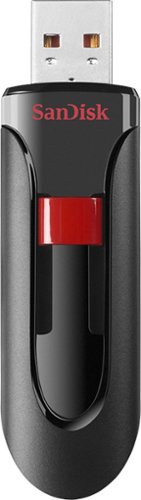
Store and protect everything from cherished photos and videos to sensitive work files with the Cruzer Glide USB Flash Drive. The drive comes with SanDisk SecureAccess software, which lets you password-protect and secure files you want to keep private while permitting access to files you want to share. The compact drive features a red slider that glides shut to shield the USB connector. SanDisk products are constructed to the highest standards and rigorously tested. You can be confident in the outstanding quality, performance and reliability of every SanDisk product.
Customer Rating
5
Works great.
on October 1, 2016
Posted by: onepiper
Verified Purchase:Yes
This flash drive has a fast download rate. Easy to use.
My Best Buy number: 1052508841
My Best Buy number: 1052508841
I would recommend this to a friend!
Share this review:


0points
0of 0voted this as helpful.

Store music, photos, files and more with this WD My Passport Ultra 1TB portable hard drive, which features password protection and 256-bit AES encryption to safeguard your data. WD Backup software makes it easy to back up your data to the Cloud.
Customer Rating
5
Works as advertised. Easy to use.
on September 25, 2016
Posted by: onepiper
Verified Purchase:Yes
I elected to use this as an external drive without using the included software. Works great.
My Best Buy number: 1052508841
My Best Buy number: 1052508841
I would recommend this to a friend!
Share this review:


0points
0of 0voted this as helpful.
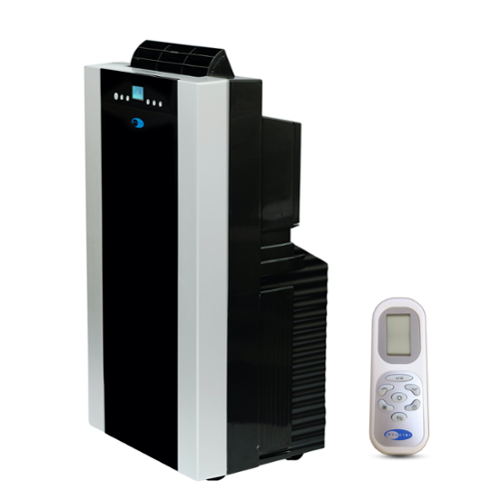
Keep your home comfortable with this Whynter ARC-14SH 14,000 BTU portable air conditioner and 13,000 BTU heater that features dual-hose operation for fast, efficient cooling. The 101-pts./day dehumidification capacity helps you breathe easily.
Customer Rating

2
Good cooling, delivered damaged.
on June 12, 2015
Posted by: onepiper
Verified Purchase:Yes
Received the unit in just 2 days because the shipping warehouse was fairly local to Orange County Calif. Unfortunately, after hauling it upstairs, and removing the packing tape, I discovered that the front panel had been damaged. I had already installed the window panel, which was fairly easy. I tried it out that night and discovered that the blower made a low howling noise that awoke me when it cycled on and off. I did not request a replacement and just returned the unit for credit. I don't believe the noise was created by the shipping damage.
My Best Buy number: 1052508841
My Best Buy number: 1052508841
No, I would not recommend this to a friend.
Share this review:


-2points
4of 10voted this as helpful.
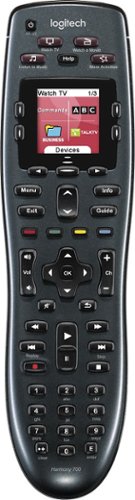
Manage up to 8 of your home theater electronics devices with this Logitech Harmony 700 915-000162 universal remote, which features a brilliant color command screen for easy navigation. One-touch activity buttons simplify device selection.
Customer Rating

4
Great remote..Easy to program and use.
on December 28, 2014
Posted by: onepiper
Verified Purchase:Yes
I had an older version Harmony Remote that I only used to make my wife's life less complicated. The older version had the DVR controls at the very bottom of the remote, making it less than handy to use those buttons while holding the remote. I elected to use my Directv remote for that reason.
The Harmony 700 design has these buttons up about 2 1/2" from the bottom making those functions much more convient to use while holding it.
Pros:
Programming the remote is fairly easy. Just get together the model numbers of your equipment, plug in your remote and follow the instructions to register your remote and download MyHarmony software. Add each piece of equipment, check out the operation and you're set. If you need to change your setting, that to is simple. I love the way the buttons have a light click to them, they just feel like they are high quality and should last.
You can add your Favorite Channels added to the LCD screen, I really like that.
One the my favorite features is having the buttons to skip 25 seconds forward and 6 seconds back is a real winner for me. That really sold me on this model.
You won't be disappointed wit this one, clears up your remote clutter and make life a little easier. Who wouldn't like that?
Cons:
This model has rechargeable batteries. I do a lot of skipping forward watching golf and football. I have to recharge the batteries once a week. Not great....That's why I gave it 4 stars.
The Harmony 700 design has these buttons up about 2 1/2" from the bottom making those functions much more convient to use while holding it.
Pros:
Programming the remote is fairly easy. Just get together the model numbers of your equipment, plug in your remote and follow the instructions to register your remote and download MyHarmony software. Add each piece of equipment, check out the operation and you're set. If you need to change your setting, that to is simple. I love the way the buttons have a light click to them, they just feel like they are high quality and should last.
You can add your Favorite Channels added to the LCD screen, I really like that.
One the my favorite features is having the buttons to skip 25 seconds forward and 6 seconds back is a real winner for me. That really sold me on this model.
You won't be disappointed wit this one, clears up your remote clutter and make life a little easier. Who wouldn't like that?
Cons:
This model has rechargeable batteries. I do a lot of skipping forward watching golf and football. I have to recharge the batteries once a week. Not great....That's why I gave it 4 stars.
My Best Buy number: 0735363036
My Best Buy number: 0735363036
I would recommend this to a friend!
Share this review:


+2points
2of 2voted this as helpful.
LG 65UB9500 4K Ultra HD TV: This TV displays 4K video with Ultra HD picture quality ~ 4x the resolution of Full HD ~ and upscales non-4K content to near-4K levels. With an expansive screen and an impressive suite of Web features, you can stay connected while being entertained.
Customer Rating
4
Great picture with decent sound
on December 28, 2014
Posted by: onepiper
Verified Purchase:Yes
I've gone through a few TV's so I hope this review is helpful.
Pros:
This TV has a great picture and up-scales to near 4K extremely well.
After doing a little calibration, you'll find that brightness and contrast still are not at max, which indicates that you will have some adjustment left as the set get older. I tried the Sony XBR65X850B and found that those setting needed to be nearly maxed out. Also faces were artificially smoothed and colored and made people look computer generated, regardless of how you change the settings. The LG on the other hand does an excellent job with this.
WebOS.. This feature works quite well. The SmartShare links to your Photo and Movie folders on your computer and you can view them on the LG. Resolution looks great. If you want to Project your computer to the set, that takes a little more effort to set it up. You have to push the Home button on the remote and find the ScreenShare Icon. I found that the instructions didn't get the job done for my HP Envy laptop using Window 8.1. I suggest downloading SmartShare software from LG.com, then click on it's Icon before trying to Projecting from the computer. Using Windows 8.1, bring up the Devices pull out by swiping to the right of the screen. Go to Project and click Add a wireless device ( if it hasn't already found your LG) then click on the LG and you should be in business. Make sure you select to Duplicate your computer screen.
Sound is pretty good for an LCD with small built in speakers. I found that watching movies and Blue Rays is obviously more enjoyable pumping the sound through my receiver. The settings give you plenty of adjustments to make most TV watching through the set just fine.
Check out the LG Store and YouTube to watch 4K and 3D clips.
3D Works pretty good. Even the simulated 3D work decent. It's good that the glasses are passive. You can use any 3D glasses that you might have saved from the theater.
Overall love this TV.
Pros:
This TV has a great picture and up-scales to near 4K extremely well.
After doing a little calibration, you'll find that brightness and contrast still are not at max, which indicates that you will have some adjustment left as the set get older. I tried the Sony XBR65X850B and found that those setting needed to be nearly maxed out. Also faces were artificially smoothed and colored and made people look computer generated, regardless of how you change the settings. The LG on the other hand does an excellent job with this.
WebOS.. This feature works quite well. The SmartShare links to your Photo and Movie folders on your computer and you can view them on the LG. Resolution looks great. If you want to Project your computer to the set, that takes a little more effort to set it up. You have to push the Home button on the remote and find the ScreenShare Icon. I found that the instructions didn't get the job done for my HP Envy laptop using Window 8.1. I suggest downloading SmartShare software from LG.com, then click on it's Icon before trying to Projecting from the computer. Using Windows 8.1, bring up the Devices pull out by swiping to the right of the screen. Go to Project and click Add a wireless device ( if it hasn't already found your LG) then click on the LG and you should be in business. Make sure you select to Duplicate your computer screen.
Sound is pretty good for an LCD with small built in speakers. I found that watching movies and Blue Rays is obviously more enjoyable pumping the sound through my receiver. The settings give you plenty of adjustments to make most TV watching through the set just fine.
Check out the LG Store and YouTube to watch 4K and 3D clips.
3D Works pretty good. Even the simulated 3D work decent. It's good that the glasses are passive. You can use any 3D glasses that you might have saved from the theater.
Overall love this TV.
Cons:
I mentioned that I've been through a few TV's. The Vizio and LG's both seem to have a banding issue that shows up mostly watching Golf and sometimes a little on football. It happens on scenes when the entire screen is green. There are vertical shadows of various widths that are annoying when the camera is panning to follow the ball or player. I'm convinced that most panels have this problem to one degree or another since only the Sony didn't have it. I've tried 2 LG's. I'm just living with it since the rest of the programming is so outstanding on the LG.
Connections:
Plenty of connections for connecting peripherals.
Reflection from the screen is not too bad. If you have lights or windows behind you can see some reflection during darker scenes, but it's not like a mirror.
I mentioned that I've been through a few TV's. The Vizio and LG's both seem to have a banding issue that shows up mostly watching Golf and sometimes a little on football. It happens on scenes when the entire screen is green. There are vertical shadows of various widths that are annoying when the camera is panning to follow the ball or player. I'm convinced that most panels have this problem to one degree or another since only the Sony didn't have it. I've tried 2 LG's. I'm just living with it since the rest of the programming is so outstanding on the LG.
Connections:
Plenty of connections for connecting peripherals.
Reflection from the screen is not too bad. If you have lights or windows behind you can see some reflection during darker scenes, but it's not like a mirror.
My Best Buy number: 0735363036
My Best Buy number: 0735363036
I would recommend this to a friend!
Share this review:


+14points
15of 16voted this as helpful.
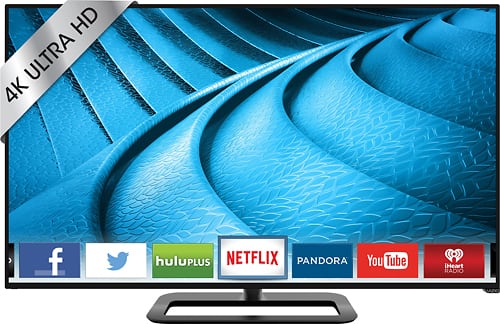
VIZIO P-Series P652UI-B2 LED 4K Ultra HD TV: This VIZIO 4K Ultra HD TV features a large LED screen with Clear Action 960 and a Spatial Scaling Engine to deliver movies, shows, games and sports in sharp 2160p resolution with minimal motion blur. VIZIO Internet Apps Plus lets you stream Netflix, Pandora, Facebook, Hulu Plus and Twitter.
Customer Rating
2
Great picture.. bad panel
on November 5, 2014
Posted by: onepiper
Verified Purchase:Yes
I hoped that the Vizio would have worked out. The picture was great but had some banding issues. Then on day 3, It got a crescent shaped shadow about a foot long. Had to return it...
My Best Buy number: 0735363036
My Best Buy number: 0735363036
No, I would not recommend this to a friend.
Share this review:


-6points
4of 14voted this as helpful.
onepiper's Review Comments
onepiper has not submitted comments on any reviews.
onepiper's Questions
onepiper has not submitted any questions.
onepiper's Answers
onepiper has not submitted any answers.