
Share AVP79's profile


AVP79
AVP79's stats
- Review count1
- Helpfulness votes5
- First reviewSeptember 19, 2011
- Last reviewSeptember 19, 2011
- Featured reviews0
- Average rating5
Reviews comments
- Review comment count0
- Helpfulness votes0
- First review commentNone
- Last review commentNone
- Featured review comments0
Questions
- Question count0
- Helpfulness votes0
- First questionNone
- Last questionNone
- Featured questions0
- Answer count7
- Helpfulness votes6
- First answerFebruary 25, 2010
- Last answerDecember 30, 2010
- Featured answers0
- Best answers0
AVP79's Reviews
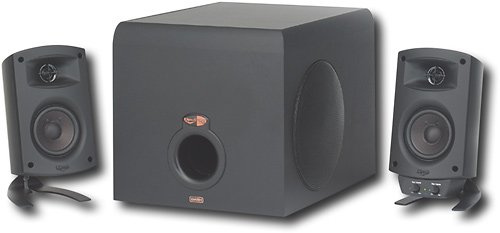
Use this Klipsch ProMedia 3-piece speaker system to enjoy brilliant sound when playing games, listening to music or watching videos on your computer.

Posted by: AVP79
from Baltimore, MD
My Klipsch speakers are almost 8 years old. For all these years they have seen a lot. I think that they are a little blown up, but I am not complaining. They still sound great. Great, solid system. Great sub and midrange. Very loud. If you want the best computer speakers, get those or Bose for $250.
What's great about it: Solid sound and construction
What's not so great: Can't complain.
I would recommend this to a friend!
Sound Quality

4
Share this review:


+4points
5of 6voted this as helpful.
AVP79's Review Comments
AVP79 has not submitted comments on any reviews.
AVP79's Questions
AVP79 has not submitted any questions.
AVP79's Answers
Are there any good quality wireless web cams with built in microphone?
We like to skype with an entire classroom of kids. My computer is too far away from the screen to be able to have the kids look at the camera and the screeen at the same time (using a camera with wires).
Yes
15 years, 5 months ago
by
AVP79
Baltimore, MD
Do i need to buy a webcam to use SKYPE on my laptop
I HAVE A GATEWAY LAPTOP PENTIUM 2 THAT IS 4YEARS OLD WHAT IS THE BEST WEBCAM TO USE. I just downloaded SKYPE and looking to purchase a webcam.
If you want video calls you might wanna get one. If your laptop has build in microphone you can use skype for voice calls.
15 years, 5 months ago
by
AVP79
Baltimore, MD
Web cam setup
i have a web cam built into my laptop can i start using it once i get wireless internet or do i need to purchase addtional software?
What? Just use skype, you will not need and additional software...
15 years, 5 months ago
by
AVP79
Baltimore, MD
Compatibility
I have an older computer, 5 years, with a single core 1.6Ghz processor. Most web cams require duel core 2.0Ghz or higher. Will the web cam still work properly?
Yes, it will work fine. You will not be able to use features such as High quality video chap, dew hardware limitations, but at low resolutions you should be fine.
15 years, 5 months ago
by
AVP79
Baltimore, MD
i have a asus desktop computer that i purchased from bestbuy wat kind of webcam would be compatible for it
If you have Windows OS, then any web cam will work.
15 years, 5 months ago
by
AVP79
Baltimore, MD
Do you need software for your web cam?
Yes, you need the software. It comes with the web cam, but you can also download it from Microsoft.com/hardware
If you Windows 7 user than you don't have to worry about anything, win7 should do everything on it's own.
If you Windows 7 user than you don't have to worry about anything, win7 should do everything on it's own.
16 years, 3 months ago
by
AVP79
Baltimore, MD
Digitally Signed??
I purchased two webcams at Christmas so that my mom & I could chat long distance. I installed mine with no problem. When I tried to load the disk on her computer, I got a msg about it ...not being digitally signed by Microsoft. What does this mean and what is the solution to be able to use her webcam as well?
Ignore, the message and continue the installation.
16 years, 3 months ago
by
AVP79
Baltimore, MD