


Daddio's stats
- Review count115
- Helpfulness votes548
- First reviewJanuary 16, 2015
- Last reviewMay 13, 2026
- Featured reviews0
- Average rating4.6
Reviews comments
- Review comment count0
- Helpfulness votes0
- First review commentNone
- Last review commentNone
- Featured review comments0
Questions
- Question count0
- Helpfulness votes0
- First questionNone
- Last questionNone
- Featured questions0
- Answer count30
- Helpfulness votes72
- First answerNovember 7, 2015
- Last answerDecember 11, 2021
- Featured answers0
- Best answers5
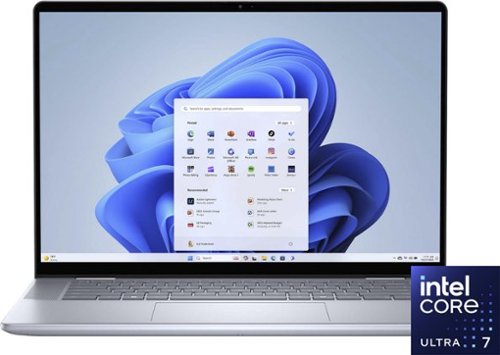
Whether you~re working, collaborating, creating or playing, Intel Core Ultra processors deliver a dedicated engine to help unlock AI possibilities on the PC, the next level in an immersive graphics experience, and high-performance low power processing, so you can confidently perform for longer while on the go.
Customer Rating

5
A Solid Choice for Demanding Home and Office Work
on May 4, 2024
Posted by: Daddio
At home, or in the office, most people will never push the Dell - Inspiron 16 7640 hard enough to demonstrate the full power it has available. With a respectable (but not “Gaming Fast) 16” FHD touch display with Webcam, it’s certainly capable of running Engineering or Architectural Design Programs like SolidWorks or Revit. This computer will give you years of use. If the Feature details below are too technical, you can just be sure they are VERY impressive especially for a Laptop.
Features:
- Core Ultra 7 155H CPU
- 16” Touch Display with Intel ARC Graphics, Built-in microphone, and Web-cam
- Flexible Hinge allows the screen and keypad to be bent backwards so the 7640 can be used like a flat tablet, or the screen can be propped up securely on a surface like an airplane tray.
- 16 Gb of Dual Channel, DDR5 6400MHz RAM (soldered in place, therefore not expandable)
- 1TB M.2 PCIe 4.0 NVMe Solid State Drive (very compact, very fast, relatively cool running), (can be replaced by up to a 2 TB drive)
- Wireless AX+ Bluetooth
- 1 SD Card Reader Slot
- 2 USB 3.2 Gen1 Type-A Ports
- 1 Thunderbolt 4 Port (with DisplayPort Alt Mode and Power Delivery)
- 1 HDMI 1.4 Port
- Charges through a standard USB 3 port rather than a proprietary dedicated port.
- Backlit Keyboard.
- Core Ultra 7 155H CPU
- 16” Touch Display with Intel ARC Graphics, Built-in microphone, and Web-cam
- Flexible Hinge allows the screen and keypad to be bent backwards so the 7640 can be used like a flat tablet, or the screen can be propped up securely on a surface like an airplane tray.
- 16 Gb of Dual Channel, DDR5 6400MHz RAM (soldered in place, therefore not expandable)
- 1TB M.2 PCIe 4.0 NVMe Solid State Drive (very compact, very fast, relatively cool running), (can be replaced by up to a 2 TB drive)
- Wireless AX+ Bluetooth
- 1 SD Card Reader Slot
- 2 USB 3.2 Gen1 Type-A Ports
- 1 Thunderbolt 4 Port (with DisplayPort Alt Mode and Power Delivery)
- 1 HDMI 1.4 Port
- Charges through a standard USB 3 port rather than a proprietary dedicated port.
- Backlit Keyboard.
PROS:
- The NVMe hard drive gives fast bootup and transition speeds between programs. Its 1 TB size can be doubled with a screw-driver by most DIY users.
- The Backwards-Bending hinge makes the Dell 7640 good for small sales presentations or training sessions.
- The touchscreen makes it a good tablet-device too.
- Considering its power, it’s thin and light.
CONS:
- RAM is not upgradable.
- Because I travel on business a lot, I turn the laptop on when I have even a short time to do some work between flights. For some reason Dell chose on this 7640 not to include a camera good enough to enable Windows-Hello facial recognition. This means that instead of coming to life as soon as you open the laptop and show it your face, you have to go through the tedious manual password typing startup or fumbling for the fingerprint reader.
- To save battery on my other laptops, I like the option of being able to hit the function keys to turn the screen fully dark when I have to take a short break. For some reason, the Dell designers decided to only let you adjust the screen dimmer, but never fully off.
Conclusion:
Again, this laptop is not designed for AAA gaming performance, but if you just type emails and cruise the internet, or work with graphic applications like SolidWorks Engineering, Revit or Photoshop that don’t require blazing response times, then this one deserves your serious consideration.
Again, this laptop is not designed for AAA gaming performance, but if you just type emails and cruise the internet, or work with graphic applications like SolidWorks Engineering, Revit or Photoshop that don’t require blazing response times, then this one deserves your serious consideration.
I would recommend this to a friend!
Share this review:


+1point
1of 1voted this as helpful.
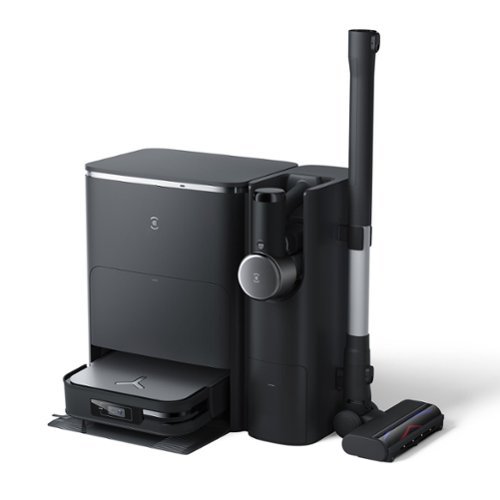
ECOVACS DEEBOT X2 COMBO COMPLETE is the total package for whole home cleaning. This exclusive set combines the convenience of our cutting edge robot vacuum and mop with the go-everywhere capabilities of our cordless, hand-held stick vacuum. Both state-of-the-art cleaning tools are charged up and automatically emptied by the industry-first OMNI Docking Station so they stay ready to clean every inch of your home. For the most advanced clean, it doesn~t get better than DEEBOT X2 COMBO COMPLETE.
Customer Rating

4
Three-in-One capability is a Major Strength
on April 28, 2024
Posted by: Daddio
I recently welcomed the Deebot X2 Combo Robot Vacuum/Mop Stick Vacuum into my home, and I must say, it's the most multi-capability robo-vac I have ever owned. However, with great capability comes great overall size and complexity. You have to invest time to read and understand the owner’s manual to get the maximum use of what it offers.
FEATURES:
· Triple Functionality: Combines a hand-held stick-vacuum, a robot vacuum and a robot mop into one device.
. Self-Emptying: The vacuumed debris and dirty water storage bins on the mobile robo-vac section both auto-empty into wet and dry chambers of the charging station upon finishing a session, or sooner if the AI decides it’s necessary. The Handheld Stick-Vac also empties when returned to the charging station after use.
· Smart Cleaning: High frequency downward aimed SONAR and 300 KHZ Ultrasound allows the AI to react to various floor surfaces (hard flooring vs. short or thick carpets/rugs). This allows it to turn floor washing spray nozzles, scrubbing discs and vacuum brushes on & off at various speeds when appropriate for best efficient cleaning. This unique sensing also allows the AI to raise or lower the wheels to get the suction head and the mopping discs to the optimum speed and distance from the surface being cleaned.
· Performance: The Vacuum function picks up dirt, dust, food particles, and pet hair. The Mop feature doesn’t just drag a damp towelette over hard floors. It has two stiff bristled counter-rotating discs that are pressed firmly down and wiggle back and forth over problem stains several times depending on how you set the App.
· App Control: It has an Android or Apple mobile app available for easy scheduling and monitoring. Notifications for full dustbin or when it's time to empty the dirty mop water in the large charging station tank.
· Remote Video Monitoring: The high-definition camera on the front of the X2 Robot helps the Robot navigate and create maps An interesting added feature is that the camera can be accessed from anywhere using the internet. The Robot can then be sent on a patrol mission to keep tabs on your home or pets while you’re miles away.
· Connectivity: Seamless integration into smart home systems (Alexa, Google home, etc.).
· Battery Life: Impressive battery life considering how much power it takes to vacuum and mop simultaneously. Automatic recharge and resume feature for continuous cleaning.
· Efficient Cleaning: Thorough cleaning on various floor types, including hardwood and carpets. Set “Virtual Boundaries” in App to dictate where your robot should or shouldn’t vacuum and/or mop.
· Time-Saving: Reduces manual cleaning efforts, saving time and effort. Set custom schedules for automated cleaning sessions.
· Automatic Recharge and Resume: Returns to the charging dock when the battery is low and resumes cleaning once recharged.
· Triple Functionality: Combines a hand-held stick-vacuum, a robot vacuum and a robot mop into one device.
. Self-Emptying: The vacuumed debris and dirty water storage bins on the mobile robo-vac section both auto-empty into wet and dry chambers of the charging station upon finishing a session, or sooner if the AI decides it’s necessary. The Handheld Stick-Vac also empties when returned to the charging station after use.
· Smart Cleaning: High frequency downward aimed SONAR and 300 KHZ Ultrasound allows the AI to react to various floor surfaces (hard flooring vs. short or thick carpets/rugs). This allows it to turn floor washing spray nozzles, scrubbing discs and vacuum brushes on & off at various speeds when appropriate for best efficient cleaning. This unique sensing also allows the AI to raise or lower the wheels to get the suction head and the mopping discs to the optimum speed and distance from the surface being cleaned.
· Performance: The Vacuum function picks up dirt, dust, food particles, and pet hair. The Mop feature doesn’t just drag a damp towelette over hard floors. It has two stiff bristled counter-rotating discs that are pressed firmly down and wiggle back and forth over problem stains several times depending on how you set the App.
· App Control: It has an Android or Apple mobile app available for easy scheduling and monitoring. Notifications for full dustbin or when it's time to empty the dirty mop water in the large charging station tank.
· Remote Video Monitoring: The high-definition camera on the front of the X2 Robot helps the Robot navigate and create maps An interesting added feature is that the camera can be accessed from anywhere using the internet. The Robot can then be sent on a patrol mission to keep tabs on your home or pets while you’re miles away.
· Connectivity: Seamless integration into smart home systems (Alexa, Google home, etc.).
· Battery Life: Impressive battery life considering how much power it takes to vacuum and mop simultaneously. Automatic recharge and resume feature for continuous cleaning.
· Efficient Cleaning: Thorough cleaning on various floor types, including hardwood and carpets. Set “Virtual Boundaries” in App to dictate where your robot should or shouldn’t vacuum and/or mop.
· Time-Saving: Reduces manual cleaning efforts, saving time and effort. Set custom schedules for automated cleaning sessions.
· Automatic Recharge and Resume: Returns to the charging dock when the battery is low and resumes cleaning once recharged.
PROS:
· Triple Functionality: Combines robot vacuuming and mopping, as well as a hand-vac in a single device.
· App Control: Compatible with voice assistants for hands-free control and allows easy scheduling and monitoring of cleaning sessions.
· Connectivity: Easy guided Wi-Fi set-up
· Time-Saving: Reduces manual cleaning efforts, saving time and effort for users.
· Customizable schedules for automated cleaning sessions add convenience.
· Effectiveness: The X2 has a very high suction and brush speed capability which will clean a lot of dirt out of carpets and floors. I tested this by vacuuming an area with other common brand-name robo-vac. I immediately followed with the X2. Checking the bin afterward showed the X2 picked up a lot of dirt the other robo-vac left behind. If this much cleaning power is not needed, the App will allow you to turn it down to lower noise and increase battery life.
· Versatility: Suitable for various floor types, including hardwood, throw-rugs and carpets. It switches its height, speed, and suction power on the go automatically depending on conditions and your settings in the App.
· The head unit on the Hand-held Stick-Vac, has a series of very bright white LED lights low down on the front. I thought this was just a gimmick, until I saw how this low angle bright light illuminates small pieces of dirt and debris on the floor that you might be trying to pick up quickly because of a spill. The LEDs make those objects stand out separately from the general background so you don’t miss them.
· Triple Functionality: Combines robot vacuuming and mopping, as well as a hand-vac in a single device.
· App Control: Compatible with voice assistants for hands-free control and allows easy scheduling and monitoring of cleaning sessions.
· Connectivity: Easy guided Wi-Fi set-up
· Time-Saving: Reduces manual cleaning efforts, saving time and effort for users.
· Customizable schedules for automated cleaning sessions add convenience.
· Effectiveness: The X2 has a very high suction and brush speed capability which will clean a lot of dirt out of carpets and floors. I tested this by vacuuming an area with other common brand-name robo-vac. I immediately followed with the X2. Checking the bin afterward showed the X2 picked up a lot of dirt the other robo-vac left behind. If this much cleaning power is not needed, the App will allow you to turn it down to lower noise and increase battery life.
· Versatility: Suitable for various floor types, including hardwood, throw-rugs and carpets. It switches its height, speed, and suction power on the go automatically depending on conditions and your settings in the App.
· The head unit on the Hand-held Stick-Vac, has a series of very bright white LED lights low down on the front. I thought this was just a gimmick, until I saw how this low angle bright light illuminates small pieces of dirt and debris on the floor that you might be trying to pick up quickly because of a spill. The LEDs make those objects stand out separately from the general background so you don’t miss them.
CONS:
- For a top-end robo-vac system, I am disappointed in the navigation and particularly the Map making ability of the Deebot X2 Combo Robot. Compared to many other robo-vacs I’ve owned, the X2’s map display is missing important (to me) information. For some reason, the map’s algorithm only recognizes and displays walls that are physically connected to the outside house wall. In my home (as in many), there are major free-standing load-bearing walls that create the floor plan by separating spaces into rooms with open doorways in between. No matter how many times I tried to create a map the X2 missed these important central walls. They were never sensed or shown as walls. They were effectively invisible. That meant that the Foyer, the Hallway, the Livingroom, the Dining room and the Kitchen were all shown as one giant ~1000 sq. ft. room and vacuumed as one giant room with different flooring types. This resulted in odd cleaning patterns.
Also, the X2 got stuck or “confused” in more dense areas of the house. Partly because of its square shape (which I think is necessary to get the two rotating mop pads close to the wall and the vacuum brush into corners) the X2 will get stuck under things like chair legs. It will try to rotate to find a path out, but a corner of the robot will get stuck on a leg. My X2 sometimes takes weird unnecessarily long paths back to the charging/mop-cleaning base as though it is mapping a new path instead of remembering its original path. I am confident that Deebot will solve the navigation issues with software updates. The X2 certainly has more than enough computing hardware to handle this.
- The X2 main station uses a HEPA type bag filter to store the large amount of debris it removes from the robo-vac and the hand-vac after each cleaning session. Other self-cleaning robo-vacs use hard plastic bins that are emptied into a trash can or outside for disposal. The X2 bag filter is not meant to be emptied which means proprietary replacement bags must be purchased and installed frequently.
CONCLUSION:
The Deebot X2 Combo Robot Vacuum/Mop Stick Vacuum is a game-changer in home cleaning. Unlike hardware issues, navigation issues can be solved with software updates. The X2 is so mechanically advanced that it will probably soon do things we haven’t even thought of yet.
If you're looking for a time-saving and efficient cleaning companion, this robot vacuum and mop triple combo is certainly worth considering.
- For a top-end robo-vac system, I am disappointed in the navigation and particularly the Map making ability of the Deebot X2 Combo Robot. Compared to many other robo-vacs I’ve owned, the X2’s map display is missing important (to me) information. For some reason, the map’s algorithm only recognizes and displays walls that are physically connected to the outside house wall. In my home (as in many), there are major free-standing load-bearing walls that create the floor plan by separating spaces into rooms with open doorways in between. No matter how many times I tried to create a map the X2 missed these important central walls. They were never sensed or shown as walls. They were effectively invisible. That meant that the Foyer, the Hallway, the Livingroom, the Dining room and the Kitchen were all shown as one giant ~1000 sq. ft. room and vacuumed as one giant room with different flooring types. This resulted in odd cleaning patterns.
Also, the X2 got stuck or “confused” in more dense areas of the house. Partly because of its square shape (which I think is necessary to get the two rotating mop pads close to the wall and the vacuum brush into corners) the X2 will get stuck under things like chair legs. It will try to rotate to find a path out, but a corner of the robot will get stuck on a leg. My X2 sometimes takes weird unnecessarily long paths back to the charging/mop-cleaning base as though it is mapping a new path instead of remembering its original path. I am confident that Deebot will solve the navigation issues with software updates. The X2 certainly has more than enough computing hardware to handle this.
- The X2 main station uses a HEPA type bag filter to store the large amount of debris it removes from the robo-vac and the hand-vac after each cleaning session. Other self-cleaning robo-vacs use hard plastic bins that are emptied into a trash can or outside for disposal. The X2 bag filter is not meant to be emptied which means proprietary replacement bags must be purchased and installed frequently.
CONCLUSION:
The Deebot X2 Combo Robot Vacuum/Mop Stick Vacuum is a game-changer in home cleaning. Unlike hardware issues, navigation issues can be solved with software updates. The X2 is so mechanically advanced that it will probably soon do things we haven’t even thought of yet.
If you're looking for a time-saving and efficient cleaning companion, this robot vacuum and mop triple combo is certainly worth considering.
I would recommend this to a friend!
Share this review:


0points
0of 0voted this as helpful.
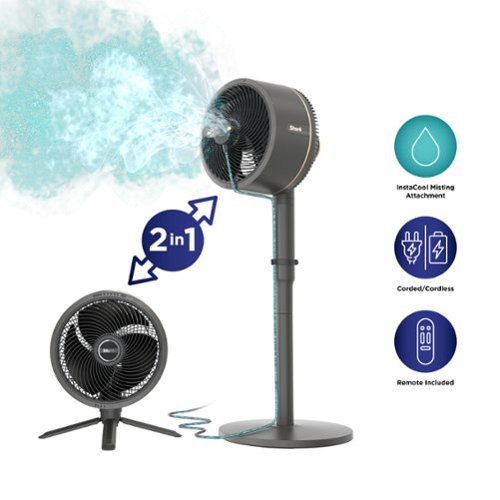
Meet the ultra-powerful Shark FlexBreeze Fan with InstaCool misting attachment. Outdoor & indoor, cordless & corded, transforms from pedestal & tabletop with 70 ft range and up to 24-hour runtime. The InstaCool misting attachment easily connects to your hose and rapidly reduces temperatures to feel up to 10 degrees cooler. Incredibly quiet, even at high speed. Rain and UV resistance for outdoor use.
Customer Rating
5
They go together like chocolate and peanut butter!
on February 22, 2024
Posted by: Daddio
Combining the Shark FlexBreeze Fan and its InstaCool Mist Attachment more than double the functionality of the whole device. This outdoor and indoor fan with misting feature has a sleek design and keeps you cool and comfortable even in our often extremely humid Florida heat. The fan has a strong breeze that will keep you cool both near and far, especially on the warmest of days! We’ve used it both at home and at family functions to stay cool.
FEATURES:
· Dual Functionality: Fan can be used to move high volume of air with or without misting feature.
· Performance: Fan keeps you cool in any weather. Incredibly powerful, yet, extremely quiet.
· Battery Life: Impressive battery life spanning 24 hours. After 24 hours, you can plug the fan in (setting 1 – not oscillating), to keep it running, while it simultaneously charges.
· Instacool Misting Attachment: Hook fan up to your hose to feel 10 degrees cooler. Fine mist is refreshing.
· Cools Large Space: Breeze can be felt up to 70 feet away.
. Variable Speed: Fan has 5 speeds and 180 degrees of side-to-side oscillation. Fan also tilts up or down for maximum flexibility.
. Durable: UV and water resistant. Fan can be used inside or outside even in gentle rain.
· Dual Functionality: Fan can be used to move high volume of air with or without misting feature.
· Performance: Fan keeps you cool in any weather. Incredibly powerful, yet, extremely quiet.
· Battery Life: Impressive battery life spanning 24 hours. After 24 hours, you can plug the fan in (setting 1 – not oscillating), to keep it running, while it simultaneously charges.
· Instacool Misting Attachment: Hook fan up to your hose to feel 10 degrees cooler. Fine mist is refreshing.
· Cools Large Space: Breeze can be felt up to 70 feet away.
. Variable Speed: Fan has 5 speeds and 180 degrees of side-to-side oscillation. Fan also tilts up or down for maximum flexibility.
. Durable: UV and water resistant. Fan can be used inside or outside even in gentle rain.
PACKAGING INCLUDES:
1. FlexBreeze Fan Head
2. Pedestal Pole
3. Pedestal Base
4. Charging Cable
5. Remote Control (stores on fan housing with magnet)
6. Cooling Mist Attachment
1. FlexBreeze Fan Head
2. Pedestal Pole
3. Pedestal Base
4. Charging Cable
5. Remote Control (stores on fan housing with magnet)
6. Cooling Mist Attachment
PROS:
· Dual Functionality: Can be used with or without misting feature.
· Combines cooling and misting in a single device.
· Covers large area – cooling up to 70 feet in distance.
· Cools in one direction and various speeds or multiple directions with oscillating feature.
· Fan is whisper quiet. Perfect for use during work or rest.
· Easy assembly.
· User-Friendly Design – simple to operate.
· Moves a high volume of air.
· Versatility: Can be used corded or cordless. Use it with stand or tabletop. Indoor or outdoor. Stationary or portable.
· Dual Functionality: Can be used with or without misting feature.
· Combines cooling and misting in a single device.
· Covers large area – cooling up to 70 feet in distance.
· Cools in one direction and various speeds or multiple directions with oscillating feature.
· Fan is whisper quiet. Perfect for use during work or rest.
· Easy assembly.
· User-Friendly Design – simple to operate.
· Moves a high volume of air.
· Versatility: Can be used corded or cordless. Use it with stand or tabletop. Indoor or outdoor. Stationary or portable.
CONS:
- Water hose could be longer.
- When you remove the fan from the pedestal, the legs of tabletop fan could be sturdier to support the weight of the fan.
When the unit's fan is turned off a few drops of water can slide off of the fan's shroud. Don't use the misting feature if the fan is sitting on a very delicate surface' or water staining can occur.
- Water hose could be longer.
- When you remove the fan from the pedestal, the legs of tabletop fan could be sturdier to support the weight of the fan.
When the unit's fan is turned off a few drops of water can slide off of the fan's shroud. Don't use the misting feature if the fan is sitting on a very delicate surface' or water staining can occur.
CONCLUSION:
The Shark Flexbreeze Fan with InstaCool Mist Attachment is exactly what you need to beat the heat. This is not the box fan you had as a youngster. It is attractive and functional beyond expectation. The fan itself will be a welcome addition to your indoor or outdoor living space and will soon become a household necessity. Gone are the worries of hosting a picnic in the heat or profusely sweating at your kids outdoor sporting events. Never worry again about staying up all night because you are hot. Particularly for outdoor cooling, this fan checks all the boxes for our family.
The Shark Flexbreeze Fan with InstaCool Mist Attachment is exactly what you need to beat the heat. This is not the box fan you had as a youngster. It is attractive and functional beyond expectation. The fan itself will be a welcome addition to your indoor or outdoor living space and will soon become a household necessity. Gone are the worries of hosting a picnic in the heat or profusely sweating at your kids outdoor sporting events. Never worry again about staying up all night because you are hot. Particularly for outdoor cooling, this fan checks all the boxes for our family.
I would recommend this to a friend!
Share this review:


+3points
3of 3voted this as helpful.
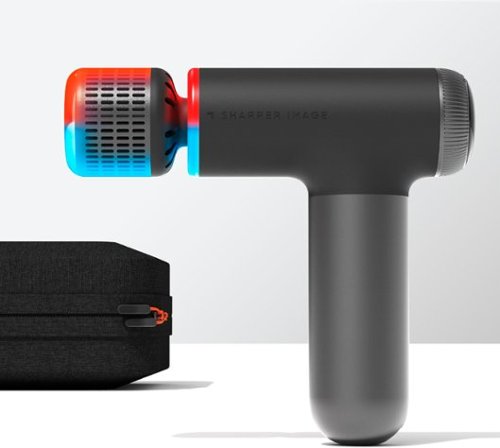
Sharper Image Powerboost Pro+ Compact delivers an unrivaled deep tissue massage experience, effectively targeting sore muscles and tension for outstanding sports recovery. Seamlessly alternate between soothing heat (115~F) and invigorating cold (38~F) with the groundbreaking dual-temperature attachment, and easily manage intensity levels using the user-friendly dial and bright LED display. The whisper-quiet brushless motor guarantees tranquil massage sessions without disturbances, while the compact, long-lasting design provides on-the-go relief with a 2-hour runtime per charge. Customize your massage with 4 unique attachments - Round, Hot + Cold, Fork, and Flat - and conveniently store the device and accessories in the provided carrying case. Transform your sports recovery routine with the Powerboost Pro+ Compact today!
Posted by: Daddio
The Sharper Image Compact Hot/Cold Massager has quickly become my go-to for quick relief and relaxation. Its compact size is a game-changer, fitting perfectly in my hand and making it a breeze to carry wherever I go.
FEATURES:
- Hot and cold percussion massager
- Compact design for portability
- Power-Boost technology for intense massage
- Adjustable intensity levels
- Provides both hot and cold therapy
- Percussion massage for deep tissue relief
- Multiple attachments for versatile use
- Ergonomic handle for comfortable grip
- Rechargeable for convenience
- Hot and cold percussion massager
- Compact design for portability
- Power-Boost technology for intense massage
- Adjustable intensity levels
- Provides both hot and cold therapy
- Percussion massage for deep tissue relief
- Multiple attachments for versatile use
- Ergonomic handle for comfortable grip
- Rechargeable for convenience
PROS:
The dual hot/cold functionality is a standout feature. Whether I need to soothe sore muscles with a warm massage or alleviate aches with a burst of cool relief, this massager has me covered. The simplicity of switching between these modes with just a few taps is a definite plus.
The massage experience is surprisingly customizable for a device of this size. The intensity settings allow me to tailor the massage to my liking. The nodes target specific areas with precision. It's not a heavy-duty massager, but it gets the job done for quick relaxation sessions.
I appreciate the wireless design, freeing me from the hassle of cords. The battery life is decent providing ample use before needing a recharge. Maintenance is a breeze too – the detachable nodes make cleaning straightforward.
I appreciate the wireless design, freeing me from the hassle of cords. The battery life is decent providing ample use before needing a recharge. Maintenance is a breeze too – the detachable nodes make cleaning straightforward.
CONS:
In terms of drawbacks, the weight is a bit more than expected, but it's a minor complaint considering the overall convenience and effectiveness of this massager.
In terms of drawbacks, the weight is a bit more than expected, but it's a minor complaint considering the overall convenience and effectiveness of this massager.
Conclusion:
For anyone seeking a portable oasis of relief, the Sharper Image Compact Hot/Cold Massager is a simple yet powerful solution. It's become an essential part of my routine, offering relaxation at my fingertips whenever I need it. Highly recommended.
For anyone seeking a portable oasis of relief, the Sharper Image Compact Hot/Cold Massager is a simple yet powerful solution. It's become an essential part of my routine, offering relaxation at my fingertips whenever I need it. Highly recommended.
I would recommend this to a friend!
Share this review:


+1point
1of 1voted this as helpful.
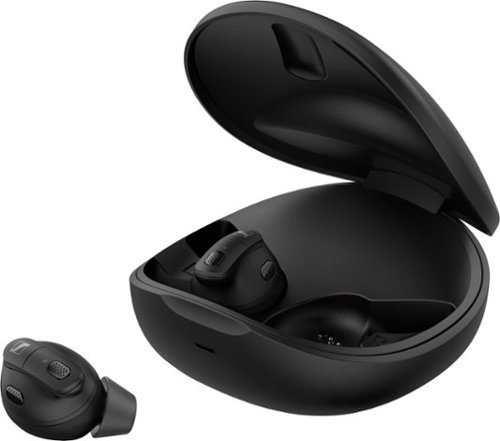
Conversation Clear Plus from Sennheiser lets you live life fully with effortlessly clear communication. With these stylish True Wireless earbuds, you can easily follow every conversation. Whether you are in a crowded environment like a restaurant or office, making a phone call, or want to boost speech clarity when streaming content, Conversation Clear Plus keeps your world of sound in focus. Conversation Clear Plus ensures the clearest speech in every environment thanks to powerful Speech Enhancement functions and Automatic Scene Detection. Active Noise Cancellation works dynamically to block distracting noise so you can still focus on conversations when background noise levels increase. Ambient Awareness keeps you in touch with your surroundings. With a dedicated companion app, it~s easy to set up, control and personalize the listening experience. Bluetooth connectivity seamlessly connects to phones, tablets and computers, and three sound modes (Communicate, Relax, Stream) provide enhancements tailored to these listening scenarios. The Optimized Media Streaming feature automatically applies the best enhancements and amplification for speech, music or movies. An advanced ergonomic design provides outstanding comfort for any activity. With up to 27 hours of operation from on-the-go charging with the case, the Conversation Clear Plus is ready whenever you need it.
Customer Rating
5
Hiding in Plain Sight
on December 26, 2023
Posted by: Daddio
I know it’s just vanity, but my personal favorite feature of the Sennheiser-Conversation Clear True Wireless Ear-Buds is the fact that they look like common Blue-tooth ear buds most people wear listening to their phone. It’s the same vanity that kept me from wearing reading glasses until my arms were no longer long enough to hold the book far enough away. Sennheiser doesn’t promote these ear buds as straight forward “hearing aids” per se, but rather as a “Hearing Solution with Speech Enhancement and Active Noise Cancellation”. They’re for us older guys who have just started complaining that their wives are “mumbling”. They work for me!
Features:
- Up to 9 hours run time when in the ears.
- Up to 18 hours running time from power stored in the caring-case with no external a/c power. Good for wilderness camping etc.
- They do not go deep in the ear canal and pick up wax like some hearing aids. So, much less cleaning and maintenance is required.
- The Sennheiser-Conversation App is quite easy to use, making it simple to make adjustments to change to the relax mode for blocking out or enhancing most ambient sound.
- They connect quite well via Bluetooth to listen to various types of media on your phone or other media device.
- I found them very handy to carry in my pocket. When I find myself needing additional conversational hearing, I can just pop them in.
- Calls can be answered by the ear-bud’s controls with phone still in the pocket
- 2-year Warranty against defects in materials or workmanship
Features:
- Up to 9 hours run time when in the ears.
- Up to 18 hours running time from power stored in the caring-case with no external a/c power. Good for wilderness camping etc.
- They do not go deep in the ear canal and pick up wax like some hearing aids. So, much less cleaning and maintenance is required.
- The Sennheiser-Conversation App is quite easy to use, making it simple to make adjustments to change to the relax mode for blocking out or enhancing most ambient sound.
- They connect quite well via Bluetooth to listen to various types of media on your phone or other media device.
- I found them very handy to carry in my pocket. When I find myself needing additional conversational hearing, I can just pop them in.
- Calls can be answered by the ear-bud’s controls with phone still in the pocket
- 2-year Warranty against defects in materials or workmanship
PROS:
- Much improved sound, and speech clarity in most situations.
- The different sized supplied ear tips and fins, allow you to make the earbuds fit very well and comfortably.
- Using the Sennheiser Conversation App, the frequency range can be adjusted for clear voice or rich music.
- Little to no maintenance is required.
- Much improved sound, and speech clarity in most situations.
- The different sized supplied ear tips and fins, allow you to make the earbuds fit very well and comfortably.
- Using the Sennheiser Conversation App, the frequency range can be adjusted for clear voice or rich music.
- Little to no maintenance is required.
CONS:
- Occasionally they picked up some kind of interference with my car’s Bluetooth system
- Set-up did not allow balancing volume for differences in hearing of my left and right ears.
- When using the earbuds to listen to my phone, they would disconnect when a text or other message came to the phone. However, they did reconnect quickly by themselves.
- Occasionally they picked up some kind of interference with my car’s Bluetooth system
- Set-up did not allow balancing volume for differences in hearing of my left and right ears.
- When using the earbuds to listen to my phone, they would disconnect when a text or other message came to the phone. However, they did reconnect quickly by themselves.
Conclusion:
The Sennheiser Conversation Clear Plus earbuds greatly improve my listening quality in conversations. I’m now hearing ambient sounds I’ve been missing in the past. Overall, I think these are well worth the value and I would recommend them.
The Sennheiser Conversation Clear Plus earbuds greatly improve my listening quality in conversations. I’m now hearing ambient sounds I’ve been missing in the past. Overall, I think these are well worth the value and I would recommend them.
I would recommend this to a friend!
Share this review:


0points
0of 0voted this as helpful.
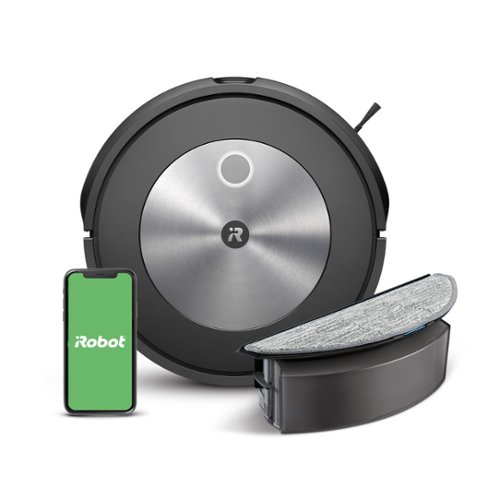
The Roomba Combo j5 robot vacuum & mop is designed for both wet and dry floor cleaning~converting our most popular Roomba j7 vacuum to a vacuum & mop solution with the simple switch of a bin. Unleash powerful, accurate cleaning when, where, and how you want. The Roomba Combo j5 robot vacuum and mop packs not only Power-Lifting Suction, but also unique intelligence that learns your home and your routines to give you custom cleaning control. With PrecisionVision navigation, your robot knows to avoid objects like pet waste, cords, socks, and shoes for worry-free cleaning.
Customer Rating
4
Duality is Key with new Combo Vac/Mop
on November 29, 2023
Posted by: Daddio
I recently welcomed the Roomba Combo® j5 Vacuum/Mop into my home, and I must say, it's nothing short of a revolution in the world of automated cleaning. I have had two other robot vacuums, and for years have always wished there was a robo-vac with a wet mop to replace my Swiffering. The day has finally arrived and I am impressed how the device seamlessly combines the efficiency of a robot vacuum with the convenience of a mop, cutting down my cleaning regime significantly.
FEATURES:
· Dual Functionality: Combines robot vacuum and mop capabilities in one device.
· Smart Navigation: Adapts to various floor surfaces and maneuvers around furniture.
· Performance: Vacuum function picks up dirt, dust, and pet hair. Mop feature wipes surfaces clean.
· App Control: Mobile app for easy scheduling and monitoring. Notifications for full dustbin or when it's time to change the mop water.
· Connectivity: Seamless integration into smart home systems (Alexa, Google home, etc.).
· Battery Life: Impressive battery life covering multiple rooms on a single charge. Automatic recharge and resume feature for continuous cleaning.
· Efficient Cleaning: Thorough cleaning on various floor types, including hardwood and carpets. Set “no fly zones” on app to dictate where your robot should or shouldn’t clean.
· Time-Saving: Reduces manual cleaning efforts, saving time and effort. Set custom schedules for automated cleaning sessions.
· Automatic Recharge and Resume: Returns to the charging dock when the battery is low and resumes cleaning once recharged.
INCLUDES:
1. Roomba mop/vacuum itself
2. Charging Dock
3. Power Cord
4. Removable Dustbin
5. Mop Compartment: A compartment for holding the water and mop attachment during the mopping function.
6. Mop Attachment: Mop accessory for cleaning and mopping hard floors.
7. Water Tank
8. Cleaning Tools: Tools and brushes for maintaining and cleaning the Roomba Combo® j5, including a brush cleaning tool.
9. User Manual: Instructions on setup, operation, maintenance, and troubleshooting.
10. Warranty Information
PROS:
· Dual Functionality:
· Combines vacuuming and mopping in a single device.
· Smart Navigation:
· Sensors to map navigation around obstacles and furniture.
· App Control and Connectivity:
· Compatible with voice assistants for hands-free control and allows easy scheduling and monitoring of cleaning sessions. Works well with my Alexa app.
· Battery Life and Automatic Recharge: Impressive battery life covers a majority of my home on a single charge.
· Automatic recharge and resume feature for continuous cleaning
· User-Friendly Design: Intuitive controls Sleek and compact design.
· Time-Saving: Reduces manual cleaning efforts, saving time and effort for users.
· Customizable schedules for automated cleaning sessions add convenience.
· Versatility: Suitable for various floor types, including hardwood and carpets. This is great because I have hardwood floors with lots of floating area rugs, so it can go back and forth between the two functions.
CONS:
- This version does NOT have the self-emptying dustbin. If I could do it over again, I would have prioritized the self-emptying to further automate my cleaning routine.
- Water Tank Capacity: I wish there was a larger tank, but then the device would have to be bigger. The price you pay for sleekness, but I do sometimes wish it went further.
- Noise Level: Although not as loud as my previous generations of robot vacuums, there is still a good amount of noise.
- Occasional Navigation Issues: My device gets stuck or “confused” sometimes in more dense areas of the house. Every once in a while I do have to pick it up to “save” it.
- Limited Deep Cleaning: While the mop and vacuum function is appropriate for handling light vacuuming or mopping tasks, it will never replace a manual deep cleaning. I like to use my Roomba for regular cleaning a couple times a week, but I still have to pull out my stick vacuum or Swiffer every once in awhile for a deep clean. For big messes, I can’t depend on the Roomba to get everything to my liking. It will never fully replace my stick-vac, but it is a welcome addition to make life easier and more automatic.
- Learning Curve: It took some getting used to with the wet to dry. It takes a few tries to get an understanding its navigation patterns and setting up cleaning schedules and mapping certain areas.
- Size and Obstacles: There is always the task of picking up the area to ensure that the coast is clear for the vacuum. If not, it can get stuck in a sticky situation and need my help to reset itself. Although the size is shallow, it can’t fit under my couch, but it does get in most hard-to-reach areas.
Limited Wet Mopping Control: I wish there was more control over the wetness of the mop. The Roomba Combo j5's mop doesn’t allow for adjusting water flow or customizing the wetness level for different flooring types.
CONCLUSION:
In my experience with the Roomba Combo j5 Robot Vacuum and Mop, I've found it to be a game-changer in home cleaning. The seamless integration of vacuuming and mopping, coupled with its smart navigation system, has made my cleaning routine incredibly efficient. I appreciate the device's ability to adapt to different floor types and the convenience of controlling it through the user-friendly app. It's saved me a significant amount of time and effort.
While I've enjoyed the versatility and advanced features, it's worth mentioning that there have been occasional navigation hiccups. Although it will never fully replace my stick vacuum or Swiffer mop, the Roomba is an integral part of my regular cleaning routine. Despite these minor drawbacks, the Roomba Combo j5 has become an indispensable part of my household cleaning arsenal, providing a thorough and convenient solution. If you're looking for a time-saving and efficient cleaning companion, this robot vacuum and mop combo is certainly worth considering.
FEATURES:
· Dual Functionality: Combines robot vacuum and mop capabilities in one device.
· Smart Navigation: Adapts to various floor surfaces and maneuvers around furniture.
· Performance: Vacuum function picks up dirt, dust, and pet hair. Mop feature wipes surfaces clean.
· App Control: Mobile app for easy scheduling and monitoring. Notifications for full dustbin or when it's time to change the mop water.
· Connectivity: Seamless integration into smart home systems (Alexa, Google home, etc.).
· Battery Life: Impressive battery life covering multiple rooms on a single charge. Automatic recharge and resume feature for continuous cleaning.
· Efficient Cleaning: Thorough cleaning on various floor types, including hardwood and carpets. Set “no fly zones” on app to dictate where your robot should or shouldn’t clean.
· Time-Saving: Reduces manual cleaning efforts, saving time and effort. Set custom schedules for automated cleaning sessions.
· Automatic Recharge and Resume: Returns to the charging dock when the battery is low and resumes cleaning once recharged.
INCLUDES:
1. Roomba mop/vacuum itself
2. Charging Dock
3. Power Cord
4. Removable Dustbin
5. Mop Compartment: A compartment for holding the water and mop attachment during the mopping function.
6. Mop Attachment: Mop accessory for cleaning and mopping hard floors.
7. Water Tank
8. Cleaning Tools: Tools and brushes for maintaining and cleaning the Roomba Combo® j5, including a brush cleaning tool.
9. User Manual: Instructions on setup, operation, maintenance, and troubleshooting.
10. Warranty Information
PROS:
· Dual Functionality:
· Combines vacuuming and mopping in a single device.
· Smart Navigation:
· Sensors to map navigation around obstacles and furniture.
· App Control and Connectivity:
· Compatible with voice assistants for hands-free control and allows easy scheduling and monitoring of cleaning sessions. Works well with my Alexa app.
· Battery Life and Automatic Recharge: Impressive battery life covers a majority of my home on a single charge.
· Automatic recharge and resume feature for continuous cleaning
· User-Friendly Design: Intuitive controls Sleek and compact design.
· Time-Saving: Reduces manual cleaning efforts, saving time and effort for users.
· Customizable schedules for automated cleaning sessions add convenience.
· Versatility: Suitable for various floor types, including hardwood and carpets. This is great because I have hardwood floors with lots of floating area rugs, so it can go back and forth between the two functions.
CONS:
- This version does NOT have the self-emptying dustbin. If I could do it over again, I would have prioritized the self-emptying to further automate my cleaning routine.
- Water Tank Capacity: I wish there was a larger tank, but then the device would have to be bigger. The price you pay for sleekness, but I do sometimes wish it went further.
- Noise Level: Although not as loud as my previous generations of robot vacuums, there is still a good amount of noise.
- Occasional Navigation Issues: My device gets stuck or “confused” sometimes in more dense areas of the house. Every once in a while I do have to pick it up to “save” it.
- Limited Deep Cleaning: While the mop and vacuum function is appropriate for handling light vacuuming or mopping tasks, it will never replace a manual deep cleaning. I like to use my Roomba for regular cleaning a couple times a week, but I still have to pull out my stick vacuum or Swiffer every once in awhile for a deep clean. For big messes, I can’t depend on the Roomba to get everything to my liking. It will never fully replace my stick-vac, but it is a welcome addition to make life easier and more automatic.
- Learning Curve: It took some getting used to with the wet to dry. It takes a few tries to get an understanding its navigation patterns and setting up cleaning schedules and mapping certain areas.
- Size and Obstacles: There is always the task of picking up the area to ensure that the coast is clear for the vacuum. If not, it can get stuck in a sticky situation and need my help to reset itself. Although the size is shallow, it can’t fit under my couch, but it does get in most hard-to-reach areas.
Limited Wet Mopping Control: I wish there was more control over the wetness of the mop. The Roomba Combo j5's mop doesn’t allow for adjusting water flow or customizing the wetness level for different flooring types.
CONCLUSION:
In my experience with the Roomba Combo j5 Robot Vacuum and Mop, I've found it to be a game-changer in home cleaning. The seamless integration of vacuuming and mopping, coupled with its smart navigation system, has made my cleaning routine incredibly efficient. I appreciate the device's ability to adapt to different floor types and the convenience of controlling it through the user-friendly app. It's saved me a significant amount of time and effort.
While I've enjoyed the versatility and advanced features, it's worth mentioning that there have been occasional navigation hiccups. Although it will never fully replace my stick vacuum or Swiffer mop, the Roomba is an integral part of my regular cleaning routine. Despite these minor drawbacks, the Roomba Combo j5 has become an indispensable part of my household cleaning arsenal, providing a thorough and convenient solution. If you're looking for a time-saving and efficient cleaning companion, this robot vacuum and mop combo is certainly worth considering.
I would recommend this to a friend!
Share this review:


0points
0of 0voted this as helpful.
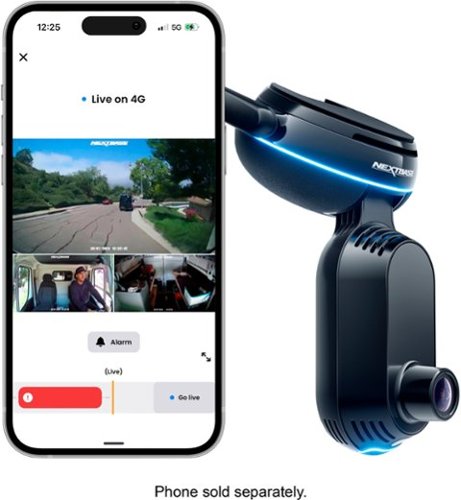
Unlock your car~s smart potential with the latest Nextbase iQ 1K Smart Dash Cam that~s always on duty. Predict threats and protect your car from anywhere using Live View, powered by 4G connectivity. See what your car sees and get custom alerts wherever you are. Park with confidence using Smart Sense Parking, as your iQ constantly scans the surrounding area of your vehicle, detecting potential intruders or vehicles backing up too close, allowing you to intervene using voice or an alarm.
Customer Rating
4
A Dash-Cam is almost a Necessity these days.
on November 13, 2023
Posted by: Daddio
Initial Impressions:
My initial impressions were quite positive. The physical design of the dash-cam aesthetically and functionally are more premium compared to your typical dash-cams. It's loaded with advanced features that levels up your vehicle’s capability’s and overall safety.
My initial impressions were quite positive. The physical design of the dash-cam aesthetically and functionally are more premium compared to your typical dash-cams. It's loaded with advanced features that levels up your vehicle’s capability’s and overall safety.
Features:
This dash cam comes with a host of impressive features. It boasts a recording resolution of 1920x1080 at 30fps and a wide 140-degree field of view. It's equipped with Wi-Fi, 4G, and GPS capabilities, making it highly connected. The memory can be expanded using microSD and microSDHC cards, and it comes with an adhesive mount for easy installation.
Other noteworthy features include a built-in microphone, night vision, and various app-related functionalities such as Smart Sense Parking, Witness Mode, Live View mode, Event notification, Driving/Security Mode, Emergency SOS, and Roadwatch AI for tracking other vehicles and pedestrians.
This dash cam comes with a host of impressive features. It boasts a recording resolution of 1920x1080 at 30fps and a wide 140-degree field of view. It's equipped with Wi-Fi, 4G, and GPS capabilities, making it highly connected. The memory can be expanded using microSD and microSDHC cards, and it comes with an adhesive mount for easy installation.
Other noteworthy features include a built-in microphone, night vision, and various app-related functionalities such as Smart Sense Parking, Witness Mode, Live View mode, Event notification, Driving/Security Mode, Emergency SOS, and Roadwatch AI for tracking other vehicles and pedestrians.
Features / Listed version:
• Recording resolution 1920x1080 at 30fps.
• 140 degrees field of view
• Wifi / 4G / Gps enabled
• Memory - microSD, microSDHC
• Adhesive mount
• Built in microphone
• Night Vision
Some app related features that stood out for me:
• Smart Sense Parking using G-sensor and radar / Automatic incident detector
• Witness Mode - Voice activated recording and uploads it to the cloud.
• Live View mode
• Event notification
• Driving/Security Mode - Automatically detects and switches between parking & driving mode.
• Emergency SOS
• Roadwatch AI - Tracks other cars, people, bikes, etc around you.
• Recording resolution 1920x1080 at 30fps.
• 140 degrees field of view
• Wifi / 4G / Gps enabled
• Memory - microSD, microSDHC
• Adhesive mount
• Built in microphone
• Night Vision
Some app related features that stood out for me:
• Smart Sense Parking using G-sensor and radar / Automatic incident detector
• Witness Mode - Voice activated recording and uploads it to the cloud.
• Live View mode
• Event notification
• Driving/Security Mode - Automatically detects and switches between parking & driving mode.
• Emergency SOS
• Roadwatch AI - Tracks other cars, people, bikes, etc around you.
Pros:
• Dual view for the main cam on the dash. Front and back facing cameras.
• Rear camera at the back is a smaller size.
• Great to have SD card and cloud storage options.
• Auto sensing feature is great. I don’t want to have to be thinking about what to do with the device. I would like to just leave it alone.
• Voice activated is useful.
• Good field of view. Enough to see the whole car.
• Good video quality. For this iQ 1K version - FrontCam:1080 CabinCam:1080 RearCam:1440 which is plenty for most use cases.
• Lots of advance features (but I just want it to record any potential accidents or theft)
• Hardware feels pretty solid. 4 out of 5.
• Adhesive seems strong, doesn’t feel like it’s going anywhere. Curious how it holds up over time during the heat of summer.
• Comes with 32gb micro SD, 4g Sim Card, car cables, etc. Essentially everything you need to run the system.
• Live view with 4g. Probably the biggest draw for me is the live view of your vehicle, which is not very common with most dash cams.
• Dual view for the main cam on the dash. Front and back facing cameras.
• Rear camera at the back is a smaller size.
• Great to have SD card and cloud storage options.
• Auto sensing feature is great. I don’t want to have to be thinking about what to do with the device. I would like to just leave it alone.
• Voice activated is useful.
• Good field of view. Enough to see the whole car.
• Good video quality. For this iQ 1K version - FrontCam:1080 CabinCam:1080 RearCam:1440 which is plenty for most use cases.
• Lots of advance features (but I just want it to record any potential accidents or theft)
• Hardware feels pretty solid. 4 out of 5.
• Adhesive seems strong, doesn’t feel like it’s going anywhere. Curious how it holds up over time during the heat of summer.
• Comes with 32gb micro SD, 4g Sim Card, car cables, etc. Essentially everything you need to run the system.
• Live view with 4g. Probably the biggest draw for me is the live view of your vehicle, which is not very common with most dash cams.
Cons:
• Slightly bigger than I expected. But still a small-ish footprint. (could be a pro in having a visible security camera for deterrence)
• The dash cam could possibly obstruct your car sensors, so be mindful where you place it.
• Some advanced features require a subscription. But you can use it, (basic) without the extra subscription. There are different subscription options to choose from.
• It’s only 1k resolution. The lowest in this lineup.
• You need the phone to be able to see the camera. If you bump or move it, you can’t see your framing without the phone streaming the camera’s view. For this size, I wish it had a tiny screen for better accessibility.
• Substantial lag time for live view (but it’s sort of expected)
• Windshield only mounting option. I wish there’s more flexibility in mounting options, even on the dashboard itself.
• Slightly bigger than I expected. But still a small-ish footprint. (could be a pro in having a visible security camera for deterrence)
• The dash cam could possibly obstruct your car sensors, so be mindful where you place it.
• Some advanced features require a subscription. But you can use it, (basic) without the extra subscription. There are different subscription options to choose from.
• It’s only 1k resolution. The lowest in this lineup.
• You need the phone to be able to see the camera. If you bump or move it, you can’t see your framing without the phone streaming the camera’s view. For this size, I wish it had a tiny screen for better accessibility.
• Substantial lag time for live view (but it’s sort of expected)
• Windshield only mounting option. I wish there’s more flexibility in mounting options, even on the dashboard itself.
Wish-list:
• A smaller footprint would be appreciated.
• Higher resolution for base models (at least 2k resolution)
• Reduced the lag time for live view.
• Useful no subscription option, as many people already have multiple subscription services.
• A smaller footprint would be appreciated.
• Higher resolution for base models (at least 2k resolution)
• Reduced the lag time for live view.
• Useful no subscription option, as many people already have multiple subscription services.
Things I Have Questions About:
• The long-term impact on the vehicle's battery while the device is connected.
• The dash cam's night performance, especially in terms of reading license plates.
• The durability of the adhesive mount in hot summer conditions.
• The long-term impact on the vehicle's battery while the device is connected.
• The dash cam's night performance, especially in terms of reading license plates.
• The durability of the adhesive mount in hot summer conditions.
General Thoughts:
• For clarity, make sure to download the "NextBase IQ App" and not the regular "NextBase app" to make sure it works.
• It has so many advanced features on the app, but a simpler, security-focused function is all I really need. Keep it simple.
• Not the simplest thing to set up, but very much worth the time. You can also just get it professionally installed.
•
Conclusion:
The Nextbase iQ 1k Smart Dash Cam is an excellent tool that instantly upgrades your car’s ability and security. It offers a whole lot of advanced features, although some areas could use some more polishing. This is probably the smartest and the most feature packed dash cam I have ever used.
• For clarity, make sure to download the "NextBase IQ App" and not the regular "NextBase app" to make sure it works.
• It has so many advanced features on the app, but a simpler, security-focused function is all I really need. Keep it simple.
• Not the simplest thing to set up, but very much worth the time. You can also just get it professionally installed.
•
Conclusion:
The Nextbase iQ 1k Smart Dash Cam is an excellent tool that instantly upgrades your car’s ability and security. It offers a whole lot of advanced features, although some areas could use some more polishing. This is probably the smartest and the most feature packed dash cam I have ever used.
I would recommend this to a friend!
Share this review:


0points
0of 0voted this as helpful.
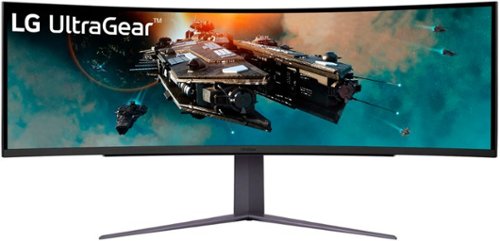
The next big thing for your battlestation is here. The massive 49 inch Dual QHD (5120 x 1440) curved UltraGear monitor with 32:9 aspect ratio offers gaming immersion in a big way. The huge display is geared for competition with up to a 240Hz refresh rate~ and 1ms (GtG) response time for smoother, ultra-fast game play. The 49GR85DC sports a three-side, virtually borderless design and LED hexagon backlighting that looks amazing as the centerpiece of an awesome gaming setup. Other gaming-centric features include a 4-pole headphone jack for audio and mic support, HDMI 2.1 and DisplayPort inputs, and VESA DisplayHDR 1000 support.
Customer Rating
5
Almost (but not quite) Too Big
on October 26, 2023
Posted by: Daddio
So, you just got the fastest, most high-performance PC you’ve ever owned. Now you want to harness all of that impressive video horsepower. This is the monitor for you.
Features:
- Too many to list all of them here, but these are the key ones:
- 49-inch Dual QHD (5129x1440) curved (1000R) monitor
- Ultra-wide 32:9 aspect ratio
- Picture-in-Picture (PiP) and Picture-by-Picture (PbP) allow the monitor to show content from two separate input sources in various positions and sizes.
- Advanced Gaming Features like: Dynamic Action Sync, Black Stabilizer, Crosshair, and Frames per Second Display
- Aspect ratio 32:9
- Resolution up to 5120 x 1440
- Too many to list all of them here, but these are the key ones:
- 49-inch Dual QHD (5129x1440) curved (1000R) monitor
- Ultra-wide 32:9 aspect ratio
- Picture-in-Picture (PiP) and Picture-by-Picture (PbP) allow the monitor to show content from two separate input sources in various positions and sizes.
- Advanced Gaming Features like: Dynamic Action Sync, Black Stabilizer, Crosshair, and Frames per Second Display
- Aspect ratio 32:9
- Resolution up to 5120 x 1440
PROS:
- This monitor will display the highest outputs from the most powerful gaming computers today.
- The included stand is perfectly balanced to the size and weight of the display to allow effortless adjustments up-down, tilt, and side-to-side angles.
- The performance gives a competitive edge in game-play that requires extremely fast reflexive movements.
- A beautiful/stylish addition to any Gaming Set-up
- Comes with all of the cables required for the numerous inputs and outputs.
CONS: (Because, with Power comes Compromise)
- Heavy weight (32.5 lbs. with Stand), means you need a sturdy table to support it and a strong back to move it.
- The very useful stand and the extreme curvature means that this monitor needs more room than most. The front-middle of the screen sits 9.75 inches from the wall behind it. The front of the curved outside edges are 15 inches from the wall. Top corner to top corner, the screen is 47 inches wide. To prevent my neck from getting sore from too much swiveling from side to side (to catch all of the action), the front of my head is 4 feet from the back wall. Make sure you can move your chair back far enough from the wall in front of you.
- The speed and surface area of this screen takes a lot of power to drive it. 90 watts typical, up to 250 watts max.
- No built-in speakers. A female jack for headphones or speakers is under the front edge.
- The joy-stick like control to access and change feature settings is under the front edge. It’s out of sight, making it hard to find and awkward to use.
- The screen is not as bright or color saturated as I would like in a bright room.
Conclusion:
This monitor is designed for gaming performance with little or no compromises for more common use. If you just view YouTube or cruise the internet, it is unnecessarily big, heavy and expensive. But, if you’re a serious gamer or graphics user, then this one deserves your serious consideration.
This monitor is designed for gaming performance with little or no compromises for more common use. If you just view YouTube or cruise the internet, it is unnecessarily big, heavy and expensive. But, if you’re a serious gamer or graphics user, then this one deserves your serious consideration.
I would recommend this to a friend!
Share this review:


+2points
2of 2voted this as helpful.
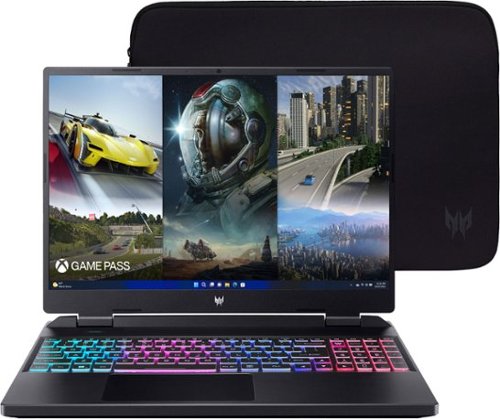
When you brandish this Predator Helios Neo gaming laptop, you~re holding the key to unlocking your ambitions ~ your curiosities ~ and endless possibilities. Suit up, strap in ~ and let Helios Neo pave the way. Equipped with superior cooling technology and a trove of performance like NVIDIA GeForce RTX 4050 laptop graphics and the latest 13th Gen Intel Core i5 processor with new performance hybrid architecture~ this gaming laptop will be your guide to gaming bliss. With the 16" 1920 x 1200 IPS panel, 165Hz Refresh, NVIDIA Advanced Optimus, NVIDIA G-SYNC technology and 3ms Overdrive response time you can say farewell to blur and hello clear, crisp, high-octane gameplay.
Posted by: Daddio
Acer’s Predator line of gaming laptops continues to get smaller, sleeker, and more powerful. My previous gaming laptop was an Acer Predator Helios 300. This model has impressed me with many improvements over the model from a few years back.
Features:
- High Resolution (1920x1200)/High Refresh Rate (165Hz) Screen
- GeForce RTX 4050 Graphics
- Customizable RGB illumination
- Intel i5 CPU with 16GB RAM and 500GB SSD Storage
- Thunderbolt 4 ports
- Predator Sense
- High Resolution (1920x1200)/High Refresh Rate (165Hz) Screen
- GeForce RTX 4050 Graphics
- Customizable RGB illumination
- Intel i5 CPU with 16GB RAM and 500GB SSD Storage
- Thunderbolt 4 ports
- Predator Sense
The first thing I noticed when booting the machine up was the very loud startup sound during the POST. Once I got into the BIOS, this was the first thing that I disabled. The only other change I needed to make in the BIOS was changing the default num lock behavior to ON. I cannot figure out why this is not the default on all PCs.
After performing the initial Windows Setup, removing unwanted programs, installing the programs that I regularly use, and disabling all unwanted startup programs, I let the machine sit for about 10 minutes after a clean boot and then checked the CPU and Memory usage. The CPU idles around 1% and the Memory usage is 5 GB or about 32%. The main games that I tested were Destiny 2 and Forza Horizon 5. Both performed admirably with Destiny 2 never dropping below 100 Frames. REMEMBER to change the refresh rate of the screen to 165 in the Nvidia Control Panel. It drives me crazy that the system KNOWS the supported refresh rate is 165 but defaults to 60. If you don’t make this change, you won’t be getting all the frames that your machine is capable of displaying. While 16GB is a ton of memory and the machine performed well in all tests I threw at it, including gaming, I do plan to upgrade the Memory to 32GB, which is the max this board supports.
Speaking of upgrading the RAM, the included 16GB of RAM spans both available SODIMMs which is good because 2 populated RAM slots means the machine can utilize both memory channels resulting in slightly faster memory performance, but it also means that if you want to upgrade to 32GB, you have to buy 32GB of RAM.
The first upgrade I would recommend is to add more hard drive storage space. 500GB is ok for most basic productivity users but since this laptop is for gaming and some game footprints are over 100GB, we need some more space. I added a 2 TB drive in the second M.2 slot, which I am VERY glad that Acer included. I have to say that I had a VERY hard time opening the laptop to add a second hard drive. There are 11 non-captive (boo) screws that need to be removed and you will need some sort of tool to help you pry the bottom off. Even with the appropriate tools, It was VERY difficult to open. This is the first laptop I have ever seen where the battery is not secured to the chassis at all, it simply fell out once it wasn’t held in by the bottom of the laptop.
Predator Sense was a little confusing at first but once I launched the Predator Sense program (which is launched with a dedicated key on the keyboard) it became much clearer. Basically, you can either launch the Predator Sense app to make granular changes to the 4 different operating modes: Quiet, Balanced, Performance, Turbo, or you can press a different key to cycle through the 4 modes without launching the program. The 4 different modes work well and its nice to have a way to quickly swap modes. Predator Sense is also where you make changes to the RGB Lights under the keyboard. The RGP options are a bit limited, and there is no preview, you need to change the settings and exit the Predator Sense program before you see a change. This was a hassle because I had to exit and re-open the program more than a dozen times before I got the RGB effect that I wanted.
As far as the construction and the material, I am VERY pleased. The shell has a very nice matte finish which is a HUGE step up from the fingerprint magnet of brushed aluminum that previous models had. The laptop has a nice solid feel, a footprint that feels not too big and not too small, and I love that the connectivity options are spread evenly between both sides AND the rear of the laptop. BOTH Thunderbolt 4 ports are charge ports which is fantastic, the SD reader is a micro, which is great since pretty much nothing I own is full size SD anymore so I don’t need to keep adapters handy.
PROS:
- Small Footprint
- Very nice super bright screen with a high refresh rate and low response time
- Enough power to play pretty much anything you throw at it.
- Lots of Connectivity options and nothing feels crowded
- RGB Illumination, even with limited options, once you get it set up, it looks great.
- Very nice super bright screen with a high refresh rate and low response time
- Enough power to play pretty much anything you throw at it.
- Lots of Connectivity options and nothing feels crowded
- RGB Illumination, even with limited options, once you get it set up, it looks great.
CONS:
- There are faster graphics cards on the market, BUT they are a good deal more expensive
- 500 GB Storage might not be enough for gamers with big libraries
- No free ram slots for a memory upgrade, must replace ram if you want 32GB
- Difficult to open, battery not secured to chassis
- 500 GB Storage might not be enough for gamers with big libraries
- No free ram slots for a memory upgrade, must replace ram if you want 32GB
- Difficult to open, battery not secured to chassis
Conclusion:
Overall I really love this machine, it just FEELS snappy, even just navigating around in Windows. Its all a matter of preference but I highly recommend switching Windows to dark mode and setting the RGB on the keyboard to a combination of blue, purple, and pink. It REALLY matches the aesthetic of the default Acer desktop background which is actually quite good. Grab an extra hard drive and a wireless controller and you will be off to the races.
Overall I really love this machine, it just FEELS snappy, even just navigating around in Windows. Its all a matter of preference but I highly recommend switching Windows to dark mode and setting the RGB on the keyboard to a combination of blue, purple, and pink. It REALLY matches the aesthetic of the default Acer desktop background which is actually quite good. Grab an extra hard drive and a wireless controller and you will be off to the races.
I would recommend this to a friend!
Share this review:


0points
0of 0voted this as helpful.
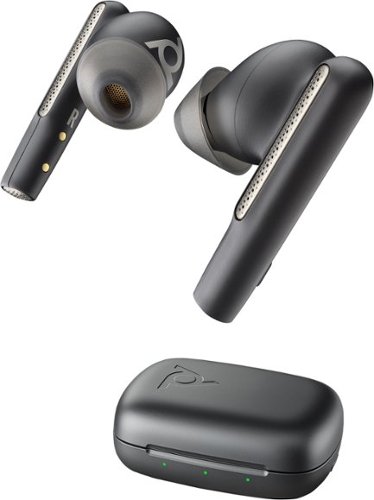
Work or play with complete audio clarity, thanks to Voyager Free 60 true wireless earbuds. You~ll sound your best on calls regardless of background noise, making them ideal for hybrid work. These noise canceling Bluetooth earbuds have multiple mics that ensure you sound clear to your caller. Adaptive Active Noise Canceling (ANC) blocks out non-essential sounds, allowing you to focus. Let in the outside world when you need to ~ without removing an earbud ~ by using one-touch transparency mode. Or shut yourself off from your surroundings completely or partially by using one or both earbuds at any time for calls. Answer calls instantly ~ smart sensors allow you to automatically answer a call just by inserting an earbud. With extended talk time, these powerful wireless earbuds are ready for full workdays. You can also relax and immerse yourself in music, movies, mobile gaming, and more with high-quality audio. Connect the Voyager Free 60 Bluetooth headphones to your iPhone, Android and tablets. Designed by Poly, formerly known as Plantronics.
Customer Rating
4
Earbuds Aimed at Office Use
on July 22, 2023
Posted by: Daddio
At first I was not particularly impressed with the Poly Voyager Free 60 Bluetooth Earbuds. They did not stand out as anything but “OK” for my normal use such as listening to music and podcasts or making personal phone calls. This seemed disappointing for what was otherwise a high-end looking product, so I was ready to give them a mediocre 3 Star rating. I had never heard of Poly so I searched the internet to see what kind of a company it is. I soon saw that the bulk of their product line is aimed at commercial office Call-Center environments. That realization made me go back and redo my evaluation. For example, the “noise cancelling” seemed ineffective while surrounded by loud lawn equipment and car traffic when I switched noise cancelling on and off. I was also confused by the noise canceling labels such as “Transparency Mode” “Environment” and “Speech”. After testing it by calling a friend we discovered that this noise canceling seemed aimed at what the person you CALLED heard, more than what YOU heard. I had my wife chat in the background like a person in another cubicle. The person I called said he heard a reduction in my wife’s voice in the background when the feature was turned on. Going through the Poly App on my phone I discovered many features that make great sense for a call center but not for my general earbud use. SO, is the Poly Voyager Free 60 (as Strange name) for you? Absolutely yes if you are one of the thousands of people who sometimes work from home or perhaps an actual Call Center. The frequency cut-out filter might help lower the distraction of children, pets or a TV running in the background. I think that Poly should express this feature focus much more clearly in the advertising and features written on the box.
FEATURES:
- No wires.
- 2-year limited warranty.
- A separate Charging/Carrying Case that can protect and recharge the ear-buds even if you’re away from an source of electrical power.
- LED lights on the Charging/Carrying Case that give the state of charge of both the ear-buds and the Charging-Carrying Case itself.
- The Charging/Carrying Case’s battery can be charged by either plugging in the included USB type C cable or simply placing it on a Qi induction charger like the ones used to recharge some cell phones.
- Listening time ~8 hours plus ~16 more hours available from the battery in the Charging Case.
- Talking time ~5.5 hours plus ~11 more hours available from the battery in the Charging Case.
- Earbud charge time 2 hours for full charge with 1hr. 12 min. talk time after 15 minutes of charge.
- Charging Case Battery fully charged after 3 hours.
- Good audio quality throughout the normal human voice audio frequencies are focused on, to improve phone call performance.
- Includes a “Small/Medium/Large selection of ear canal sized soft ear-tips to modify the contours of the ears-buds themselves to match your unique ear size and shape for a secure fit.
- Supported Bluetooth Profiles: AAC, AVRCP, HSP, HFP, SSP and sound compression Codecs like AAC, AptX, 5BC, mSBC. These allow these earbuds to connect to many Call Center devices not normally found outside those offices.
- No wires.
- 2-year limited warranty.
- A separate Charging/Carrying Case that can protect and recharge the ear-buds even if you’re away from an source of electrical power.
- LED lights on the Charging/Carrying Case that give the state of charge of both the ear-buds and the Charging-Carrying Case itself.
- The Charging/Carrying Case’s battery can be charged by either plugging in the included USB type C cable or simply placing it on a Qi induction charger like the ones used to recharge some cell phones.
- Listening time ~8 hours plus ~16 more hours available from the battery in the Charging Case.
- Talking time ~5.5 hours plus ~11 more hours available from the battery in the Charging Case.
- Earbud charge time 2 hours for full charge with 1hr. 12 min. talk time after 15 minutes of charge.
- Charging Case Battery fully charged after 3 hours.
- Good audio quality throughout the normal human voice audio frequencies are focused on, to improve phone call performance.
- Includes a “Small/Medium/Large selection of ear canal sized soft ear-tips to modify the contours of the ears-buds themselves to match your unique ear size and shape for a secure fit.
- Supported Bluetooth Profiles: AAC, AVRCP, HSP, HFP, SSP and sound compression Codecs like AAC, AptX, 5BC, mSBC. These allow these earbuds to connect to many Call Center devices not normally found outside those offices.
INCLUDED ACCESSORY ATTACHMENTS:
- 1-inch-long USB-3 to USB type C-out Adapter (If needed) to take power from a USB-3 older style charging port on a laptop or PC.
- A relatively short 1-foot-long type C to type C charging cable
- 580 mAh battery powered Charging/Carrying Case
- 1-inch-long USB-3 to USB type C-out Adapter (If needed) to take power from a USB-3 older style charging port on a laptop or PC.
- A relatively short 1-foot-long type C to type C charging cable
- 580 mAh battery powered Charging/Carrying Case
PROS:
- Good Audio Quality
- High Tech features aimed a Call Center or Home Office use.
- Ear-buds can be recharged two times by the Charging Case while away from other USB power sources.
CONS:
- Personally, I found the Poly earbuds did not feel really secure in my ears for outside athletic activities. However, that looser feel is there to make these earbuds comfortable for 8 hours a day office use. Everyone’s ear canals are different, so one of the three sizes of removable ear tips included, my work better for you.
- If the unique Poly Charging/Carrying Case is lost, there is no way to charge these Ear-Buds. It’s a common modern Earbud problem.
- The Poly Website is too large a mix of full line advertising and technical support. Information on just these Voyager Free 60 Earbuds is harder to find than it needs to be.
- At the time of writing this review Poly has a companion App for Apple laptops and iPads, but not for Windows Laptops or Tablets. I’m told they are working on this, but with seeing it in action I docked them a Star.
- Good Audio Quality
- High Tech features aimed a Call Center or Home Office use.
- Ear-buds can be recharged two times by the Charging Case while away from other USB power sources.
CONS:
- Personally, I found the Poly earbuds did not feel really secure in my ears for outside athletic activities. However, that looser feel is there to make these earbuds comfortable for 8 hours a day office use. Everyone’s ear canals are different, so one of the three sizes of removable ear tips included, my work better for you.
- If the unique Poly Charging/Carrying Case is lost, there is no way to charge these Ear-Buds. It’s a common modern Earbud problem.
- The Poly Website is too large a mix of full line advertising and technical support. Information on just these Voyager Free 60 Earbuds is harder to find than it needs to be.
- At the time of writing this review Poly has a companion App for Apple laptops and iPads, but not for Windows Laptops or Tablets. I’m told they are working on this, but with seeing it in action I docked them a Star.
CONCLUSION:
- It has to be remembered that these particular Earbuds seem to be part of a Call-Center/Home Office type Ecosystem. If you are not using them in that kind of environment, they may be overkill. But if you do have a home office where you are often on calls, they have features that would be hard to find in most earbuds.
- It has to be remembered that these particular Earbuds seem to be part of a Call-Center/Home Office type Ecosystem. If you are not using them in that kind of environment, they may be overkill. But if you do have a home office where you are often on calls, they have features that would be hard to find in most earbuds.
I would recommend this to a friend!
Share this review:


+1point
1of 1voted this as helpful.
Daddio's Review Comments
Daddio has not submitted comments on any reviews.
Daddio's Questions
Daddio has not submitted any questions.
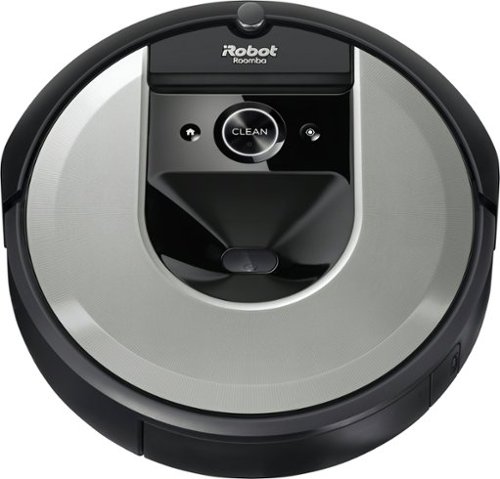
The Roomba i6 robot vacuum unleashes powerful cleaning when, where, and how you want with a single command to your Google Assistant or Alexa voice assistant. When messes happen, just say, ~Tell Roomba to clean under the kitchen table.~ Smart navigation maps specific objects in your home, guiding it to the mess, right when the mess happens. With 10x the suction* and automatic, personalized schedules~even recommendations during pollen and pet-shedding seasons~ its vacuuming that fits seamlessly into your life. *(compared to the Roomba~ 600 series cleaning system) *(Alexa and all related logos are trademarks of Amazon.com or its affiliates. Google is a trademark of Google LLC)
What comes in the box for the IROBOT Roomba 6150?
The contents include the i6 Rooma, the charging base, a transformer to plug into a room electric outlet and a cord to plug that power into the charging base and an owner's manual.
4 years, 5 months ago
by
Daddio
The Roomba i6 robot vacuum unleashes powerful cleaning when, where, and how you want with a single command to your Google Assistant or Alexa voice assistant. When messes happen, just say, ~Tell Roomba to clean under the kitchen table.~ Smart navigation maps specific objects in your home, guiding it to the mess, right when the mess happens. With 10x the suction* and automatic, personalized schedules~even recommendations during pollen and pet-shedding seasons~ its vacuuming that fits seamlessly into your life. *(compared to the Roomba~ 600 series cleaning system) *(Alexa and all related logos are trademarks of Amazon.com or its affiliates. Google is a trademark of Google LLC)
Does it work with a i Robot clean base?
Yes, it will after you add an evacuation port to the i6. That plastic piece comes in the box when you buy the charge base that sucks the dirt out of the i6's chamber when it docks to re-charge.
4 years, 5 months ago
by
Daddio
The Roomba i6 robot vacuum unleashes powerful cleaning when, where, and how you want with a single command to your Google Assistant or Alexa voice assistant. When messes happen, just say, ~Tell Roomba to clean under the kitchen table.~ Smart navigation maps specific objects in your home, guiding it to the mess, right when the mess happens. With 10x the suction* and automatic, personalized schedules~even recommendations during pollen and pet-shedding seasons~ its vacuuming that fits seamlessly into your life. *(compared to the Roomba~ 600 series cleaning system) *(Alexa and all related logos are trademarks of Amazon.com or its affiliates. Google is a trademark of Google LLC)
Does this include virtual wall?
Yes, after you send it out for the first-time to map all of the rooms, you can look at the map on your phone app. There you can create virtual barriers that the i6 will not cross. You can also name the rooms and create square "Do-not-go" zones in any of the rooms or halls. With this information you can instruct the i6 to clean just one or more of the rooms or throw-rugs you named and avoid the rest of the rooms.
4 years, 5 months ago
by
Daddio
The Roomba i6 robot vacuum unleashes powerful cleaning when, where, and how you want with a single command to your Google Assistant or Alexa voice assistant. When messes happen, just say, ~Tell Roomba to clean under the kitchen table.~ Smart navigation maps specific objects in your home, guiding it to the mess, right when the mess happens. With 10x the suction* and automatic, personalized schedules~even recommendations during pollen and pet-shedding seasons~ its vacuuming that fits seamlessly into your life. *(compared to the Roomba~ 600 series cleaning system) *(Alexa and all related logos are trademarks of Amazon.com or its affiliates. Google is a trademark of Google LLC)
Does this model come with stair sensors?
Yes, it will not fall over the edge of a top stair.
4 years, 5 months ago
by
Daddio
The Roomba i6 robot vacuum unleashes powerful cleaning when, where, and how you want with a single command to your Google Assistant or Alexa voice assistant. When messes happen, just say, ~Tell Roomba to clean under the kitchen table.~ Smart navigation maps specific objects in your home, guiding it to the mess, right when the mess happens. With 10x the suction* and automatic, personalized schedules~even recommendations during pollen and pet-shedding seasons~ its vacuuming that fits seamlessly into your life. *(compared to the Roomba~ 600 series cleaning system) *(Alexa and all related logos are trademarks of Amazon.com or its affiliates. Google is a trademark of Google LLC)
Can the vacuum mop??
No, the i6 does a good job, but it's just a vacuum for hardwood/tile floors and carpet. Roomba has another model that squirts water on dirt and pulls it up with a "Swiffer" like disposable pad. You can see it on their website.
4 years, 5 months ago
by
Daddio
The Roomba i6 robot vacuum unleashes powerful cleaning when, where, and how you want with a single command to your Google Assistant or Alexa voice assistant. When messes happen, just say, ~Tell Roomba to clean under the kitchen table.~ Smart navigation maps specific objects in your home, guiding it to the mess, right when the mess happens. With 10x the suction* and automatic, personalized schedules~even recommendations during pollen and pet-shedding seasons~ its vacuuming that fits seamlessly into your life. *(compared to the Roomba~ 600 series cleaning system) *(Alexa and all related logos are trademarks of Amazon.com or its affiliates. Google is a trademark of Google LLC)
Would this work in a house with a guinea pig? I.e. be able to pick up poop and some hay (that’d be a huge bonus)
I owned a guinea pig MANY years ago so I'm sure it will pick up its poop as long as it's normal (for a guinea pig) and not diarrhea. The hay is another matter. As you can imagine, it all depends on the length and consistency of the hay. If it's too long or piled too high, almost no household vacuum can take stiff hay in. In this case, if the hay is relatively short (up to 1.5" or so), it should pick it up.
4 years, 5 months ago
by
Daddio
The Roomba i6 robot vacuum unleashes powerful cleaning when, where, and how you want with a single command to your Google Assistant or Alexa voice assistant. When messes happen, just say, ~Tell Roomba to clean under the kitchen table.~ Smart navigation maps specific objects in your home, guiding it to the mess, right when the mess happens. With 10x the suction* and automatic, personalized schedules~even recommendations during pollen and pet-shedding seasons~ its vacuuming that fits seamlessly into your life. *(compared to the Roomba~ 600 series cleaning system) *(Alexa and all related logos are trademarks of Amazon.com or its affiliates. Google is a trademark of Google LLC)
Do you have to have internet for it to work?
Technically it will vacuum without an internet connection, but it will never create a map of your floor plan or cover the rooms logically. Instead, it will bounce from wall to wall like a billiard ball until it runs down its battery. You can do this to cover a room or floor of your house that you don't intend to do again, but you would be wasting all of the advanced features this model has to offer.
4 years, 5 months ago
by
Daddio
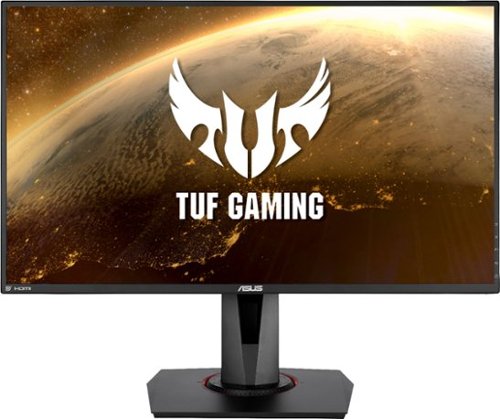
Enjoy a smooth gaming experience with this 27-inch ASUS Full HD monitor. The Shadow Boost feature increases clarity in dark scenes, and the ultrafast response times minimize blurring and streaking for seamless gameplay. This ASUS Full HD monitor has an ergonomic design that allows tilting, swiveling and pivoting as needed.
Does this support hdmi 2.1?
No, it has one HDMI, Version 1.4 port.
5 years, 1 month ago
by
Daddio
Lighten household chores with this SHARK~ ION~ vacuum system. The lithium-ion battery supplies a long-lasting charge, and the 0.66-quart dust cup and HEPA filter collect dirt, hair, and dander to prevent allergen buildup. This SHARK~ ION~ vacuum system comes with a built-in power vacuum to help with those extra cleaning jobs.
Does this one map a grid to use each time like the robot one? Thanks
No. The Shark Ion is the less complicated type of Robo Vac that uses the Billiard Ball Navigation method where it goes more or less in a straight line until it bumps into something. The "Map a Grid" type has advantages, but they are larger, more expensive and if the home's entire floor plan doesn't have really good Wi-Fi coverage, it can get lost an confused in a far back corner of the house. I have both types and they both have their advantages and disadvantages.
7 years, 6 months ago
by
Daddio
The SURFboard SBG7400AC2 combines a DOCSIS 3.0 Cable Modem with an AC2350 Wi-Fi Router. The SBG7400AC2 is equipped with four 1-Gigabit Ethernet ports and provides Wi-Fi speeds up to 2350 Mbps. It is compatible with major US Cable Internet providers including Cox, Spectrum, Xfinity and others. It's best for cable internet speed plans up to 400 Mbps. Setup is quick and easy with the SURFboard Central app.