
Share Cinpro's profile


Cinpro
Cinpro's stats
- Review count2
- Helpfulness votes1
- First reviewNovember 3, 2011
- Last reviewJanuary 29, 2013
- Featured reviews0
- Average rating4.5
Reviews comments
- Review comment count0
- Helpfulness votes0
- First review commentNone
- Last review commentNone
- Featured review comments0
Questions
- Question count0
- Helpfulness votes0
- First questionNone
- Last questionNone
- Featured questions0
Answers
- Answer count0
- Helpfulness votes0
- First answerNone
- Last answerNone
- Featured answers0
- Best answers0
Cinpro's Reviews

This Samsung TV features Wi-Fi capability. To build a complete 3D home theater system, we recommend you purchase a 3D Blu-ray player, high-speed HDMI cable and an A/V receiver that is compatible with 3D products. Smart TVGet a world of instant entertainment on this smart TV. Connect to the Internet and stream movies, listen to music and access a wide variety of other content on your HDTV.Learn more about smart products.Netflix Pandora Facebook TwitterFlickr
Customer Rating

5
Awesome picture
on January 29, 2013
Posted by: Cinpro
from Hurricane Wv
Internet Connectable?Yes
Connected to the Internet:No
Verified Purchase:Yes
I got this right before Christmas and set it up a couple of days later. All the connections are straight forward and easy to reach. Set up only took a few minutes to get the picture where I liked it. I seamlessly connected to my WiFi router, I haven't done much with the web yet myself other than a software update. Football games look great, old TV shows look good too. I watched the 3D versions of Finding Nemo, Brave and The Avengers, they all look better than they did in the theater. I got all three at my local Best Buy. I do recommend two people put this TV where you want it, its not heavy, just too bulky for one person and you don't want to drop your new TV. My only complaints are the rear facing speakers. The room is kind of large so they aren't up to the job. I use the stereo for the sound so its not a big deal. The screen is more shiny than the last Samsung I bought, I plan to wall mount it soon so I can avoid any glare from light sources. Overall a great TV, and very user friendly.
My Best Buy number: 28475002
What's great about it: Bright sharp picture, 3D, light weight
What's not so great: rear facing speakers
I would recommend this to a friend!
Picture Quality

5
Sound Quality

3
Features
5
Share this review:


0points
0of 0voted this as helpful.
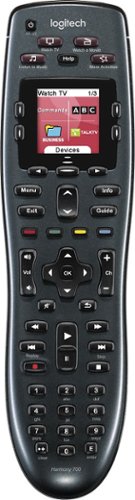
Manage up to 8 of your home theater electronics devices with this Logitech Harmony 700 915-000162 universal remote, which features a brilliant color command screen for easy navigation. One-touch activity buttons simplify device selection.
Customer Rating

4
Overall a good remote, but has short battery life
on November 3, 2011
Posted by: Cinpro
from Hurricane Wv
This is a replacement for my old Harmony remote, so set up was a snap, I just went in to the software, and added the remote. The computer loaded everything up, and I was good to go. the original set wasn't hard either, just tell the computer what you have and it will find the right codes for it. once it does you can customize it how you like for most used buttons and things like that. The color screen is nice but not really needed.
This new unit uses 2 AA batteries where the old one used 4 AAAs. I think this is the reason it eats batteries. the ones that came with the unit are passable, but I got more use out of store bought rechargeables, and charging them in an external charger. Not only is it faster that way, but they do last longer. the built in charger take about 3hrs, too long if your watching TV right then. I also keep a spare set on hand ready to go as this unit gives you little or no warning the batteries are getting low. It does however get slow to respond when your getting close.
If your an old Harmony user you will notice that the extra "hump" on the bottom of the remote is gone. it used to annoy me that it was there, now I miss it as the new doesn't have it. the "hump" was an extra bump on the bottom of the remote in front of the battery compartment, it made holding the remote to push buttons higher up easier. it wasn't attractive but it worked really well.
This new unit uses 2 AA batteries where the old one used 4 AAAs. I think this is the reason it eats batteries. the ones that came with the unit are passable, but I got more use out of store bought rechargeables, and charging them in an external charger. Not only is it faster that way, but they do last longer. the built in charger take about 3hrs, too long if your watching TV right then. I also keep a spare set on hand ready to go as this unit gives you little or no warning the batteries are getting low. It does however get slow to respond when your getting close.
If your an old Harmony user you will notice that the extra "hump" on the bottom of the remote is gone. it used to annoy me that it was there, now I miss it as the new doesn't have it. the "hump" was an extra bump on the bottom of the remote in front of the battery compartment, it made holding the remote to push buttons higher up easier. it wasn't attractive but it worked really well.
Overall its a good remote, and nothing here is a deal breaker for me.
What's great about it: easiest univerasl remote you will ever buy
What's not so great: short battery life, only 2 activites on the main screen
I would recommend this to a friend!
Ease of Use
3
Durability

2
Share this review:


+1point
1of 1voted this as helpful.
Cinpro's Review Comments
Cinpro has not submitted comments on any reviews.
Cinpro's Questions
Cinpro has not submitted any questions.
Cinpro's Answers
Cinpro has not submitted any answers.