
Share strivinglife's profile


strivinglife
strivinglife's stats
- Review count1
- Helpfulness votes8
- First reviewJuly 4, 2008
- Last reviewJuly 4, 2008
- Featured reviews0
- Average rating5
Reviews comments
- Review comment count0
- Helpfulness votes0
- First review commentNone
- Last review commentNone
- Featured review comments0
Questions
- Question count0
- Helpfulness votes0
- First questionNone
- Last questionNone
- Featured questions0
Answers
- Answer count0
- Helpfulness votes0
- First answerNone
- Last answerNone
- Featured answers0
- Best answers0
strivinglife's Reviews
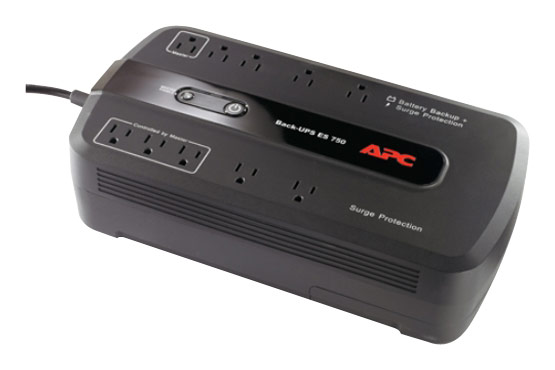
This APC Back-UPS BE750G UPS protects your computer system and keeps it running for up to 70 minutes in the event of a power failure.

Posted by: strivinglife
from Madison, WI
I purchased an APC Back-UPS ES 750 (BE750G) on May 10, 2008. Since I had a blackout on 6/27, I figured I could finally write a review.
First, this is my first APC, as well as my first battery backup, product. I've owned a number of surge protectors in the past, but since I had purchased a new computer, I wanted to try a backup device.
After a deal of research, I finally went with this one, after the value for the money, and the positive reviews APC had received.
This model offers 10 outlets, of which 5 can run off of the battery. This also offers a master, and three 'slave' outlets. This means that if the master is off, the three outlets can optionally be shut off as well (helpful for printers, monitors, speakers, ...) It's optional, so you can shut it off (which I did).
It also offers a USB connection, so you can monitor the status of the battery using APC PowerChute Personal Edition.
Along with charge percentage, it gives the number of volts being passed into it, and the watt load on the battery, which seems to translate into a battery estimate (how long equipment can run).
PowerChute offers a couple of options, for when the power goes off - preserve the battery, or keep the computer on for as long as possible.
Having had a blackout, albeit at night, I can suggest what I had happen. First, my computer appears to have been put to sleep. When it started back up, SpeedFan began running my two fans at 100%. In short, the battery handled the blackout perfectly.
If you're worried about alarms going off at night, there are settings to disable the alarm between particular hours, or disable it entirely.
Finally, while this comes with a battery, they do recommend you replace these every three years. You can run self-tests manually to verify the battery. I did have a bit of trouble when first hooking up the battery, but it was relatively minor.
(As a guy who's interested in statistics, I would also have liked to have been able to pull more information from PowerChute - for example, via a battery log of what's happening when I'm not at my computer. Granted, it'll tell you when the battery kicks in, but I'd like to know what voltage is being passed, and whether usage watts are spiking or moving throughout the day. What happens when I'm running tasks, or if I have my computer sit for a couple of hours with the monitor off?)
Overall, I'm *extremely* happy with this product, and will *definitely* be purchasing another one of these to hook up my Playstation 3 and Sony Bravia.
What's great about it: 10 outlets (5 battery), handles blackouts correctly, flexible configuration
What's not so great: PowerChute stats aren't what they could be
I would recommend this to a friend!
Share this review:


+8points
8of 8voted this as helpful.
strivinglife's Review Comments
strivinglife has not submitted comments on any reviews.
strivinglife's Questions
strivinglife has not submitted any questions.
strivinglife's Answers
strivinglife has not submitted any answers.