
Share dnottingham4's profile


dnottingham4
dnottingham4's stats
- Review count84
- Helpfulness votes366
- First reviewDecember 4, 2011
- Last reviewMay 1, 2026
- Featured reviews0
- Average rating4.5
Reviews comments
- Review comment count0
- Helpfulness votes0
- First review commentNone
- Last review commentNone
- Featured review comments0
Questions
- Question count0
- Helpfulness votes0
- First questionNone
- Last questionNone
- Featured questions0
- Answer count8
- Helpfulness votes12
- First answerOctober 6, 2019
- Last answerSeptember 26, 2021
- Featured answers0
- Best answers1
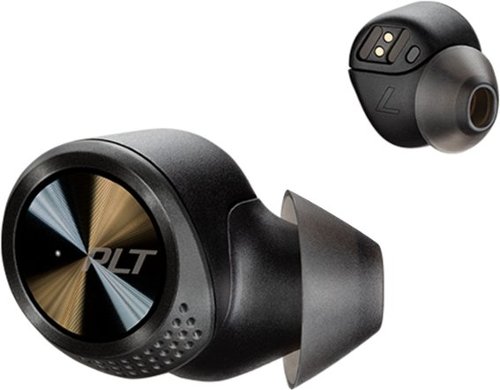
Experience powerful sound with these black Plantronics BackBeat PRO 5100 true wireless earbuds. The four noise-canceling mics and WindSmart technology let you answer calls in noisy environments by filtering background and wind noise, and the three eartip sizes offer a comfortable fit. These Plantronics BackBeat PRO 5100 true wireless earbuds feature 5.8mm drivers for high-quality sound.
Customer Rating

4
Quality Wireless earbuds with impressive sound
on January 16, 2020
Posted by: dnottingham4
from Pineville, NC
The Plantronics Backbeat PRO 5100 earbuds are a quality set of wireless earbuds that many will find useful for their audio needs.
This review will be done in 3 parts – features, usage impressions, and pros/cons:
Features:
The features of these wireless earbuds are excellent. They provide for up to 6.5 hours of wireless listening, which can be expanded by up to an additional 13 hours when the chagrining case is used. The earbuds come with, the charging case, a short USB to micro-USB cable for the case, and 3 sets of eartips (small, medium, and large). The wireless has a range of 10m and has an array of eight microphones – six used for noise canceling, two of which combine with the remaining two microphones for voice pickup performance.
The features of these wireless earbuds are excellent. They provide for up to 6.5 hours of wireless listening, which can be expanded by up to an additional 13 hours when the chagrining case is used. The earbuds come with, the charging case, a short USB to micro-USB cable for the case, and 3 sets of eartips (small, medium, and large). The wireless has a range of 10m and has an array of eight microphones – six used for noise canceling, two of which combine with the remaining two microphones for voice pickup performance.
Since these wireless earbuds are designed for long usage periods their small size and lightweight materials add to their comfort. For the sake of transparency, it should be known that I have gone on record stating that I abhor earbuds and prefer either an on-ear or over the ear headsets. For the Plantronics Backbeat PRO 5100 wireless earbuds, I could see myself using them should I need to as these have been some of the most comfortable earbuds I have worn, although still not as good as an over or on-ear solution, for my personal tastes.
The earbuds have a series of touch-controlled features available on both earbuds – the left side controls volume and the right side – which by default is the primary unit, contains the other controls. With one click on the right earbud you can play or pause music or answer or hang-up a call; two clicks will skip forward a track and 3 clicks will go backward a track. Pressing and holding the right earbud for 2 seconds will activate your phones, audio assistant. These are easy and intuitive after a few tries.
The earbuds also come with some fancy sensor capabilities. If you remove one earbud while listing to audio or video, the track will pause. While on a call removing both earbuds to mute the call. When the earbuds are out; putting them both in will answer the call.
Plantronics also provide the Backbeat app that is designed to allow you to control and update the earbuds as needed. The app also allows one to reverse the primary and secondary earbud, should one desire that. Other abilities of the app are to rename the headset, Update the headset, set the headset language, and manage connections.
Updating the device’s firmware proved to be a challenge for me but with some help from support, I was able to successfully do it. The key is paying attention during the paring operation as BOTH Pods need to be paired to your devices to be fully operational. The right bud pairs first and then you get a second popup asking to pair the left pod.
Usage Impressions:
The audio quality of these wireless earbuds is excellent and the eartips aid in noise reduction and the 4 - microphone based noise cancellation features do their job. I tested the headset using multiple tracks that are recommended for testing audio systems. These tracks test audio systems across the sound spectrum form deep base to soaring highs. The tracks allow testing spatial separation of sounds and the dynamic ranges of the piece being played. From all of these tracks, the sounds were excellent, despite the spatial audio being a bit reduced from other headsets I have tested. I also tested with several other tracks that I have listed too including the 1812 Overture with real cannons and Space shuttle ascent imagery – these also sounded excellent.
The audio quality of these wireless earbuds is excellent and the eartips aid in noise reduction and the 4 - microphone based noise cancellation features do their job. I tested the headset using multiple tracks that are recommended for testing audio systems. These tracks test audio systems across the sound spectrum form deep base to soaring highs. The tracks allow testing spatial separation of sounds and the dynamic ranges of the piece being played. From all of these tracks, the sounds were excellent, despite the spatial audio being a bit reduced from other headsets I have tested. I also tested with several other tracks that I have listed too including the 1812 Overture with real cannons and Space shuttle ascent imagery – these also sounded excellent.
The comfort and noise-canceling features of this headset are nice and really make these useful for situations where noise-canceling is important.
For calls, this headset works great and had no issues with hearing the other person or them hearing me even with background noise.
Pros: Audio quality, Batty life, portability, performance
Cons: still not as comfortable as on or over the ear solutions.
Cons: still not as comfortable as on or over the ear solutions.
Mobile Submission: False
I would recommend this to a friend!
Share this review:


0points
0of 0voted this as helpful.
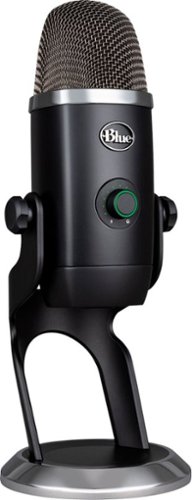
The Blue Yeti X is a state-of-the-art flagship USB microphone for professional-level gaming, streaming, podcasting, YouTube videos and more. With enhanced Blue VO!CE software, Yeti X delivers legendary Blue broadcast sound with greaterclarity than ever~in four versatile pickup patterns.
Customer Rating

5
Very High-Quality Professional USB Microphone
on December 22, 2019
Posted by: dnottingham4
from Pineville, NC
The Blue Yeti X is a high-quality professional USB Microphone for gaming, streaming, and podcasting. In addition to this written review, you can watch my video review at https://youtu.be/BnGGtSSJWxw. The video is important because it allows you to listen to the quality of this microphone and hear the various modes and effects possible with this microphone and the software that supports it.
This review will be done in 3 parts – features, usage impressions, and pros/cons:
Features:
The features of this Microphone are excellent. It is a four-capsule array that captures sound with focus and clarity. The array is also a side entry array, which means the microphone should be vertical vs. having the top pointed at you. The microphone has an 11-segment led metering, so you know if you are talking at the right levels. The multi-function smart knob allows one to set the microphone input level, the headset output level and the blending of the microphone and computer sound in the headset. This button also allows for quick muting at the press of the button.
One the back is a button for setting the 4 polar patterns of Cardioid Omni, Bi-Directional, and Stereo – depending on the current needs.
The features of this Microphone are excellent. It is a four-capsule array that captures sound with focus and clarity. The array is also a side entry array, which means the microphone should be vertical vs. having the top pointed at you. The microphone has an 11-segment led metering, so you know if you are talking at the right levels. The multi-function smart knob allows one to set the microphone input level, the headset output level and the blending of the microphone and computer sound in the headset. This button also allows for quick muting at the press of the button.
One the back is a button for setting the 4 polar patterns of Cardioid Omni, Bi-Directional, and Stereo – depending on the current needs.
Blue offers two options for software control – Blue Sherpa or Logitech GHUB. I used my GHUB software and this allows access to all kinds of audio setting, personalization, and audio preset to be used.
Usage Impressions:
The audio quality of this microphone is top-notch. I recorded multiple tracks and in multiple polar patterns and all were excellent quality. The microphone does not require any special software to be loaded for use and the software drivers load without issue.
The audio quality of this microphone is top-notch. I recorded multiple tracks and in multiple polar patterns and all were excellent quality. The microphone does not require any special software to be loaded for use and the software drivers load without issue.
Pros: Audio quality, versatile polar patterns/
Cons: None Noted at this time.
Cons: None Noted at this time.
Mobile Submission: False
I would recommend this to a friend!
Share this review:


0points
0of 0voted this as helpful.

Make your photos look amazing with Adobe Photoshop Elements 2020. The Adobe Sensei AI technology powers automated options to get a starting point for creative exploration, and the Guided Edits feature allows removing unwanted objects to achieve the result you want. Adobe Photoshop Elements 2020 lets you easily edit photos, make clips, and create memes to share on your favorite social websites.
Posted by: dnottingham4
from Pineville, NC
Photoshop elements 2020 is a wonderfully straightforward photo editor for the “common” person. This software is a well thought out photo editor/enhancer for most users. At $99.00 this software is a great deal. It has tons for features to aid one in enhancing, editing, and fixing their photos. It accomplishes this using an interfaced that lets the user decide what they want to do and how they want to do it. Quick mode is for basic photo fixing actions, Guided mode is a wizard-driven interface for a wide array of photo editing functions. It has so many functions, they are subdivided into categories – Basics (basic photo editing functions), Color (a few color functions), Black & White (color effects dealing with Black and White), Fun Edits (a set of fun edits – such a meme maker, Speed Effect, puzzle effect, and much more), Special Edits (special edits for your photos including frames, background swaps, old photo restoration and crack and blemish repairs), and Photomerge (thing stitching/merging/panoramas, and adding or removing objects). These wizards allow one to select a picture or many and work magic on the photos. During the execution of a wizard, one is guided through the steps – both mandatory and optional ones to get one to a result to your desire. Expert mode lets you take the wheel and use the wide array of layers, effects, filters, styles, graphics and more to edit and enhance your photos.
Installation is straightforward and requires an Adobe account, but this software is not sold under the same subscription model that the higher end photoshop and other creative cloud applications are sold under. This product retails for $99.99 when bought alone and for $149.99 when bundled with Premier Elements 2020 (a similar product for video editing).
My testing focused on the Guided method of making edits to one’s photos. Please see the accompanying images for a sample guided edit and examples of the work I did to prepare for this review. For the Panorama example - I took the 3 pictures on the left and used the panorama photomerge to make one new photo shown under the 3 originals. The Black and White conversion example, you can see before and after on a conversion to black and white. Finally, you can see a Black and White with a color pop enhancement.
Overall, I like the interface and the capabilities of this product and believe that this can be a nice addition to one’s editing suite of tools for photos. The wizards can help you do some amazing enhancements and photo fixes to your photos. As one’s experience increases and other needs arise you can shift to expert mode to add even more finesse to your photo edits.
Pros: does the job it was intended to do. Modes of operation help make tasks easier. MSPR of $99.99 seems right.
Cons: None Noted.
Cons: None Noted.
Mobile Submission: False
I would recommend this to a friend!


Share this review:


+4points
4of 4voted this as helpful.
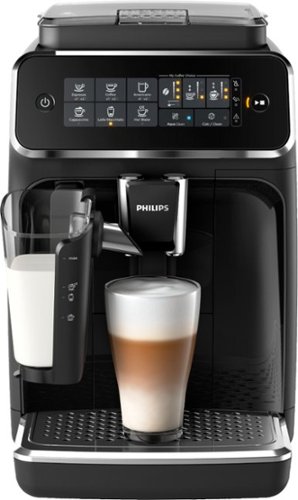
Philips 3200 Series Fully Automatic Espresso Machine w/ LatteGo, Black
Posted by: dnottingham4
from Pineville, NC
The Philips - Series 3200 Espresso Machine with Milk Frother - Glossy Black is a very good Fully automatic espresso machine as Philips advertises this device as a Fully automatic espresso machine. The device retails for $799.99.
This automatic coffee machine has the following features and specifications:
• Enjoy 5 types of coffee including regular coffee, Espresso, Americano, Cappuccino, and Latte Macchiato. The machine can also produce hot water for tea or other uses.
• For Cappuccino and Latte Macchiato, the system uses the LatteGo high-speed frothing system.
• Uses either whole beans or ground coffee. For whole beans the ceramic grinders have 12 setting levels to grind the beans for an ultra-fine powder to coarse grindings.
• AquaClean water filter system to aid in the taste of the coffer and reduce the need for descaling the machine.
• Removable brew group allows one to thoroughly clean the machine.
• Enjoy 5 types of coffee including regular coffee, Espresso, Americano, Cappuccino, and Latte Macchiato. The machine can also produce hot water for tea or other uses.
• For Cappuccino and Latte Macchiato, the system uses the LatteGo high-speed frothing system.
• Uses either whole beans or ground coffee. For whole beans the ceramic grinders have 12 setting levels to grind the beans for an ultra-fine powder to coarse grindings.
• AquaClean water filter system to aid in the taste of the coffer and reduce the need for descaling the machine.
• Removable brew group allows one to thoroughly clean the machine.
The rest of this review will be done in 3 parts – set-up, usage impressions, and pros/cons. You may see a companion review at https://youtu.be/PVi3xwjl5t8.
Set-up:
Set- up of this Fully automatic espresso machine printer is very straight forward. The included manual details the setup though written and pictorial instructions. This machine weighs 8 kg (17.637 lbs.) and while it can be unboxed by one – have assistance makes the process easier. Much like a printer this until des have some doors that are taped shut and the tap should be removed before the machine’s first use – including dome tape that is hidden by the unit’s water tank.
Set- up of this Fully automatic espresso machine printer is very straight forward. The included manual details the setup though written and pictorial instructions. This machine weighs 8 kg (17.637 lbs.) and while it can be unboxed by one – have assistance makes the process easier. Much like a printer this until des have some doors that are taped shut and the tap should be removed before the machine’s first use – including dome tape that is hidden by the unit’s water tank.
There are a few items to set up before you can begin brewing using this machine – rinsing the machine, activating the AquaClean filter, setting the water hardness, and assembling the LatteGo milk container. These are simple steps and are detailed well in the manuals. From here is it a matter of filling the water tank and beginning to brew.
Usage Impressions:
Usage of the machine is very straight forward and generally following the following process: 1) turning on the machine, selecting the coffee source (beans or pre-ground), selecting the type of coffee drink you want, the strength and quantity of coffee and Milk (for Cappuccino and Latte Macchiato) that one wants and then proceeding to start the brew.
For non-milk coffees, you can choose to brew 1 or 2 at a time. For two, you place one cup under each spout on the machine. For a single cup, it should be centered so that both spouts are over the same cup.
Usage of the machine is very straight forward and generally following the following process: 1) turning on the machine, selecting the coffee source (beans or pre-ground), selecting the type of coffee drink you want, the strength and quantity of coffee and Milk (for Cappuccino and Latte Macchiato) that one wants and then proceeding to start the brew.
For non-milk coffees, you can choose to brew 1 or 2 at a time. For two, you place one cup under each spout on the machine. For a single cup, it should be centered so that both spouts are over the same cup.
Brewing with beans is the default mode of brewing. Should one want to use pre-group coffee, one needs to add the grounds into the pre-ground coffee compartment, and press the aroma button to tell the system to use this source of coffee. Using this mode, you can only brew one coffee at a time and this mode must be picked each time you want to brew in this manner.
Dispensing hot water is done via the LatteGo spout and the LatteGo must be removed from the system for it to dispense water. You can still select the volume of water to dispense as with any other drink.
Another nice capability of the system is to be able to adjust the highest quantity setting for both the drink amount and the milk amount – thus allowing one to customize the settings to your preference and is useful if your typical cup of coffee is larger than regular ones. One can also adjust the temperature of the coffees to your preference (low, medium, or high).
Adjusting the grinder settings allows one to have stronger or weaker coffee as you prefer. This is done by adjusting the grinder settings while the machine is grinding beans – it takes 2-3 cups after an adjustment for one to notice the adjusted settings and Phillips recommends you don’t adjust the grinder settings for the first 100-150 cups (approximately 1 month of usage).
The only consumable cost other than coffee for this machine is for the AquaClean filter with will last for 625 cups of coffee – which at 2 cups per day would last 312 days – resulting in needing 2 filters per year at this rate. Filters cost $24 each.
Finally, the machine does have an automatic shut-off safety feature in case one leaves the machine on it will shut itself off after some time and comes with a 2-year warranty.
Summary:
Overall the is an extremely nice automatic Expresso/Coffee machine that will thrill the coffee lover in your home. My wife, who is the coffee lover in our family has found it to be very enjoyable. This machine is ideal for coffee connoisseurs that would find value in using this machine. It could also be very useful for those that entertain, or host book clubs, etc.
Overall the is an extremely nice automatic Expresso/Coffee machine that will thrill the coffee lover in your home. My wife, who is the coffee lover in our family has found it to be very enjoyable. This machine is ideal for coffee connoisseurs that would find value in using this machine. It could also be very useful for those that entertain, or host book clubs, etc.
While this machine may seem like a steep investment; economically speaking this machine has some cost advantages vs buying coffee out, especially at the more popular coffee places that exist in today’s world. Here is an example of this economics – If one bought 2 cappuccinos per weekday $3.65 per coffee results in an annual cost of $1898.00. At 1 coffee out per weekday, the cost is $949.00. Taking the cost of this machine ($799) and the coffee ($7.99/48 cups) into account results in a saving of over $1,000 at 2 cups per day or $105.00 at 1 cup per day. This calculation does not consider other cost and time savings of not having to stand in line at the shop, drive out of your way, filters for this machine, etc.
Pros: Easy use, variety of coffees, ability to use beans or grounds as desired,
Cons: Size – Size - it is a countertop appliance.
Mobile Submission: False
I would recommend this to a friend!
Share this review:


+2points
2of 2voted this as helpful.
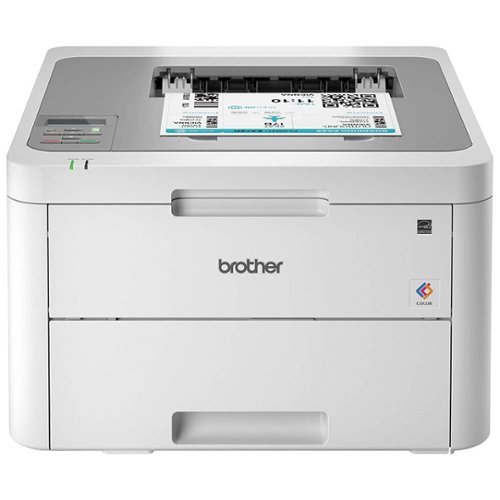
The reliable Brother HL-L3210CW compact digital color printer is a great choice for the busy home or small office. Quick print speeds of up to 19 pages per minute~ plus manual feed slot accommodates varied printing needs and can handle a variety of paper types and sizes including card stock, envelopes and more. Connect with versatile options including built-in wireless or USB interfaces and print wirelessly from mobile devices. The 250-sheet capacity adjustable paper tray helps improve efficiency with fewer refills and handles letter or legal sized paper. Brother Genuine high-yield replacement toner cartridges help lower printing costs. Comes with a 1-year limited warranty and free online, call or live chat support for the life of your product. Prints up to 19 ppm~ in black and up to 19 ppm~ in color.
Posted by: dnottingham4
from Pineville, NC
The Brother - HL-L3210CW Wireless Color Printer is an excellent, entry-level Small Office/Home Office Color Laser Printer. Brother advertises this printer as a compact digital color printer that is ideal for home or small offices. The printer retails for $199.99.
This printer has the following features and specifications:
• Rated at up to 19 ppm for its print speed and this is for both color and black and white printing.
• 250-Sheet capacity tray
• Manual feed tray with a capacity of 1 sheet.
• Mobile printing - AirPrint®, Google Cloud Print™, Brother iPrint&Scan, Mopria®, Wi-Fi Direct®
• USB and wireless connection options - Wireless 802.11 b/g/n, Hi-Speed USB 2.0
• 1-year Limited Warranty and free online, call or live chat support for the life of the printer.
• Dependable, durable, and compact design.
• Starter cartridges rated at 1,000 pages.
• Rated at up to 19 ppm for its print speed and this is for both color and black and white printing.
• 250-Sheet capacity tray
• Manual feed tray with a capacity of 1 sheet.
• Mobile printing - AirPrint®, Google Cloud Print™, Brother iPrint&Scan, Mopria®, Wi-Fi Direct®
• USB and wireless connection options - Wireless 802.11 b/g/n, Hi-Speed USB 2.0
• 1-year Limited Warranty and free online, call or live chat support for the life of the printer.
• Dependable, durable, and compact design.
• Starter cartridges rated at 1,000 pages.
The rest of this review will be done in 4 parts – set-up, usage impressions, cost analysis, and pros/cons. You may see a companion review at https://youtu.be/-SJjnfSOw9M.
Set-up:
Set- up of this printer is very straight forward. The included Quick Setup Guide is detailed and walks one thought process very quick and has instructions for each of the connection types (USB 2, Wi-Fi Direct, and the many mobile options. The unit has a single line LCD for set up on the device’s control panel. The device software comes with the Brother Utilities App that allows one to update the system firmware, check the status of the printer, download additional software, repair the printer’s network connection, and contact support. Using the network panel in Windows 10 one can also access the devices onboard web page that allows you to see the status, maintenance info, configure some settings, and reports.
Set- up of this printer is very straight forward. The included Quick Setup Guide is detailed and walks one thought process very quick and has instructions for each of the connection types (USB 2, Wi-Fi Direct, and the many mobile options. The unit has a single line LCD for set up on the device’s control panel. The device software comes with the Brother Utilities App that allows one to update the system firmware, check the status of the printer, download additional software, repair the printer’s network connection, and contact support. Using the network panel in Windows 10 one can also access the devices onboard web page that allows you to see the status, maintenance info, configure some settings, and reports.
Usage Impressions:
The usage of this printer is very straight forward as it is with any printer. The system’s driver does allow for manual duplex printing and this uses a combination of the manual feed tray and the main tray to accomplish this. The printer can handle up to legal-size paper in the main train.
The usage of this printer is very straight forward as it is with any printer. The system’s driver does allow for manual duplex printing and this uses a combination of the manual feed tray and the main tray to accomplish this. The printer can handle up to legal-size paper in the main train.
The system allow allows for mobile printing and has options for AirPrint for supported iOS devices, the Mopria Print Service app from Google Play for Android devices, and the Brother iPrint&Scan from brother. For testing purposes, I used the Brother iPrint&Scan software and it was very useful to print both pictures and emails. The only downside for this app that I found was printing from Gmail had an extremely large font size and I could not find a way to change this in the application.
Cost Analysis:
The $199.99 price for this printer is certainly attractive the real cost that one needs to look at is the price per page cost for the consumables. I use a simple system of dividing that the cost of each cartridge by how many pages the cartridge can print.
The $199.99 price for this printer is certainly attractive the real cost that one needs to look at is the price per page cost for the consumables. I use a simple system of dividing that the cost of each cartridge by how many pages the cartridge can print.
The best cost per page comes by using the higher capacity cartridges that can be purchased for the device. Doing this analysis results in a cost per page of $0.02 per page in black and $0.12 per page in color (assumes each color used equally). This cost is in line with the cost per page of my other laser printer with its high capacity cartridges. Using an annual printing rate of 12,000 pages this printer would have an annual toner cost of $1755.09 (MSRP for all toner cartridges) assuming equal uses of all 4 toner colors on each page. This again is in line, and technically cheaper by $44.82 than my other laser printer.
The Brother MFC-J895DW Inkjet printer has a $0.06 per page for black and $0.03 cents per page for color (interesting that this is cheaper) when using the high capacity ink cartridges. Using the same annual print capacity is would have a cost of $1,843.80 for the Ink Cartridges.
Summary:
Overall this is a very nice office/home office printer. Some of my image prints had some banding on them but this could be that the cartridges were new. The text was crisp and good. While this printer is advertised as a compact printer, I find it to be of a regular size at 16.1” W x 18.1” D x 9.9” H and the unit weighs 37.8 lbs.
Overall this is a very nice office/home office printer. Some of my image prints had some banding on them but this could be that the cartridges were new. The text was crisp and good. While this printer is advertised as a compact printer, I find it to be of a regular size at 16.1” W x 18.1” D x 9.9” H and the unit weighs 37.8 lbs.
Pros: Connectivity options, cost, speed
Cons: Quality may not be as good as other laser printers, inability to select a font size for Gmail print from mobile app,
Mobile Submission: False
I would recommend this to a friend!
Share this review:


0points
0of 0voted this as helpful.
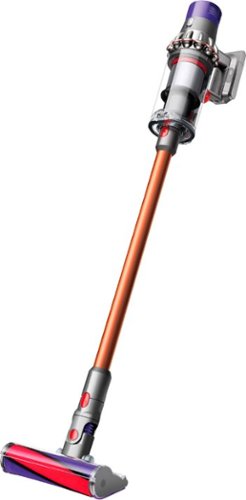
Big machine suction power* but with cord-free versatility. The Cyclone V10 Animal Pro bagless cordless pet stick vacuum has a 40% bigger bin than the previous V8 Absolute model and up to 40 minutes of fade-free power with the soft roller cleaner head (in Suction mode 1). The new torque drive cleaner head removes more dust from carpets. The soft roller cleaner head removes fine dust and large debris from hard floors. The Cyclone V10 Animal Pro cord-free vacuum quickly transforms to a handheld vacuum for quick cleanups, spot cleaning, and cleaning difficult places.* Suction tested to ASTM F558 at the flexible inlet.
Customer Rating
4
Well featured Vacuum Hampered By Poor Performance
on September 14, 2019
Posted by: dnottingham4
from Pineville, NC
The Dyson V10 Animal Pro Cord-free Vacuum is a versatile portable vacuum cleaner that works on multiple surfaces and is suitable for users with kids and/or pets. We’ll step thought the features and usage impressions and then provide some pros and cons for this device.
Feature-wise the Dyson V10 Animal Pro Cord-free Vacuum is a pretty straight forward device – it’s a battery-operated vacuum cleaner. The fact that it is a Dyson vacuum cleaner is a bonus due to the feature-rich capabilities that come with this unit – most notably the multiple attachments and heads for multiple floor types and vacuuming use cases. The unit comes with 2 main heads – the Torque Driver Cleaner Head used for strong pickup needs on any floor type, and the Soft Roller Cleaner Head used for large debris and dust on hard surfaces and crevices. Additionally, the unit comes with a Combination tool – allowing one to easily switch surfaces with the same tool, a crevice tool, a soft dusting brush, and a mini-motorized tool useful for hair and ground-in dirt in tight spaces. An extension tube is also included to allow the unit to be used in an upright configuration, or in a handheld configuration. The main unit has the suction settings, the waste bin (0.2-gallon capacity), the main motor, the battery, and the Dyson cyclones. The unit is rated at up to 60 minutes of run time that depends solely on the combination of power and tools used. For suction level I the unit is rated at up to 60 minutes of run time. This “up to” rating drops to 35 minutes when using the Torque Driver Head or 40 minutes when using the soft roller cleaner head. The unit takes 3.5 hours to fully recharge. It does come with a docking station that can be used to mount the unit on the wall for charging while it is not in use. The unit weighs 5.9 lbs. Suction level 1 is for day-to-day cleaning for most use cases including heard floors and short pile carpets; level 2 is for added power for everyday cleaning of all floor types; suction level 3 is recommended by Dyson to be reserved for very tough cleaning jobs. The instructions with the device are primarily visual instructions which can sometimes need an additional review to make sure they are understood. Once an owner registers the device, they will get an offer for additional tools.
Usage Impressions
This vacuum cleaner is a well-designed and useful tool for one’s cleaning regimen. Since the unit is portable it has distinct uses cases where it has advantages. First among these is the portability of the unit which makes it ideal for a quick clean up use case. This portability is also very useful for vacuuming stairs as you don’t have to manhandle a full upright unit with a long power cord on the stairs which increases the safety of stair vacuuming and frankly also does a better job on the stairs because the tools fit better on the stairs. The unit’s high degree of portability is awesome when using the device for dusting duties as it is easier to reach the corners of the ceilings and walls with this unit than a typical upright unit.
An extremely nice use case for this unit is for cleaning the car! The combined use of the Mini Motorized tool, the combination tool, and the crevice tool made quick work of cleaning out our SUV when testing this device. However, this cleaning also demonstrated the use of the Torque Driver Cleaner head and its impact on the battery life, especially at the level III Suction setting. The Up to 35 minutes is likely a bit of an overestimation but I am not sure I had a full 3.5 hours of charge time before this use.
An extremely nice use case for this unit is for cleaning the car! The combined use of the Mini Motorized tool, the combination tool, and the crevice tool made quick work of cleaning out our SUV when testing this device. However, this cleaning also demonstrated the use of the Torque Driver Cleaner head and its impact on the battery life, especially at the level III Suction setting. The Up to 35 minutes is likely a bit of an overestimation but I am not sure I had a full 3.5 hours of charge time before this use.
Summary
Overall this unit has some very nice features. Personally, I find vacuuming stairs much safer using this vacuum than our regular upright vacuum cleaner. Power level one is suited for extremely light vacuuming use cases and in many cases on will have to use either level II or level III and consequently impact the battery life. It gets a 5 on features but a 3 on performance.
Overall this unit has some very nice features. Personally, I find vacuuming stairs much safer using this vacuum than our regular upright vacuum cleaner. Power level one is suited for extremely light vacuuming use cases and in many cases on will have to use either level II or level III and consequently impact the battery life. It gets a 5 on features but a 3 on performance.
At the $599.99 MSRP price point, I would find this a challenging device to recommend to most folks even though it is a good device with some very good use cases.
Pros: Size, portability, Safety advantage for vacuuming stairs, additional tools when registering.
Cons: Extremely low battery life on the max settings, performance, cost.
Mobile Submission: False
No, I would not recommend this to a friend.
Share this review:


-1point
2of 5voted this as helpful.
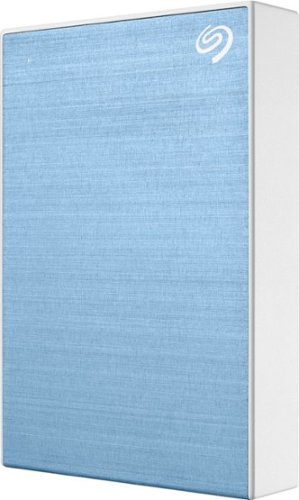
Store and transport files with this 5TB Seagate Backup Plus portable high-capacity drive. The included Seagate Toolkit software makes scheduling backups easy, while the USB 3.0 interface ensures rapid data transfers for faster backups. A 5TB capacity lets this Seagate Backup Plus portable high-capacity drive accommodate the largest files and programs.
Posted by: dnottingham4
from Pineville, NC
The Seagate Backup Plus Portable Hard drive – 5 TB is a compact and fast portable hard drive. It is a straightforward device that has several nice options that will be discussed in this review. We’ll step thought the features and usage impressions and then provide some pros and cons for this device.
You can see a video version of this review at https://youtu.be/trKBwSr9SVo
Feature-wise this drive is a hard disk drive (HDD) based portable storage. Using a hard drive helps the device have a $159.99 MSRP (as of this writing though the drive is priced at $117.99 at Best Buy). This device is a 5 TB drive that comes preformatted as a single exFAT partition with 4.54 TB available. The companion software, Seagate Toolkit, allows one to easily reformat to a native OS format should you only need it for one type of system (e.g. Windows and NTFS or Apple and MAC OS Extended (HFS+)). I have left this drive for the purposes of this review in the default exFAT configuration which is compatible with both window and MAC OS but is more sensitive to file loss/corruption if it is not ejected properly.
Rounding out the features and offers, the device comes with a 1-year MyLio Create package which is a special Seagate drive package and a 2-month Adobe Creative Cloud Photography Plan. MyLio is an online photo repository that “organizes your photo memories into the story of your life. MyLio is changing the way the world remembers by making photo management simple. It helps you bring your photos together so you can easily find, edit, save and share them. At long last, a way to remember the photos that matter.”
The drive itself is USB 3.0 / USB 2.0 compatible. The best speeds are of course achieved via USB 3.0. The drive comes with a USB 3.0 cable that is 1.5 feet long and has a type A connector on the computer end and a USB 3 Micro-B connector on the other end. This connector was most commonly used for Samsung Galaxy Smartphones. This too is likely a cost-containment issue – and could be improved via USB C with a USB type A Adapter – perhaps in a future edition, this will fully migrate to USB C.
Usage of this device is straightforward – connect the cable to the drive and plug it in and voila it will appear as a drive. The drive on first use has a nice getting started application that asks you to complete the registration and download the Seagate toolkit software. In order to test the performance of this drive, I ran a simple copy test from the host computer to the drive. Each test consisted of ~ 6.7 GB in 1822 files and 215 folders. The drive was able to move this amount of data at an average speed of 90MB/s and took 1 minute 40 seconds to complete. Deleting the files was extremely fast at about 10 seconds to complete.
Next, I configured a backup schedule for my computer and configured this to continuously backup from my Documents, Pictures, Videos, and Music folders. I then tested by adding and updating files to make sure it did back up as changes were saved and it did. Files in a backup setlist this are stored in a specific folder on the hard drive and a folder is created for the machine within that folder to help organize the files. A nice clean and easy approach. It even allows on to connect the drive to other machines and will then catch back up, per the schedule you have set up for that machine. This is nice in that one can create a backup routine and move the drive between machines to keep them backed up. Note that scheduled can be set up to be continuous (takes most resources) or hourly, daily, weekly, monthly or as a 1-time snapshot.
Next, I configured a backup schedule for my computer and configured this to continuously backup from my Documents, Pictures, Videos, and Music folders. I then tested by adding and updating files to make sure it did back up as changes were saved and it did. Files in a backup setlist this are stored in a specific folder on the hard drive and a folder is created for the machine within that folder to help organize the files. A nice clean and easy approach. It even allows on to connect the drive to other machines and will then catch back up, per the schedule you have set up for that machine. This is nice in that one can create a backup routine and move the drive between machines to keep them backed up. Note that scheduled can be set up to be continuous (takes most resources) or hourly, daily, weekly, monthly or as a 1-time snapshot.
Summary
Overall the Seagate Backup Plus Portable Hard drive is a nice portable storage and backup solution that can be used as a part of your own personal data backup and storage solution. Since it’s a portable drive it can be used as a backup storage for pictures and other files with traveling or possibly using multiple machines. It has a complete set of features including the optional Adobe Creative Cloud Photography offer and the MyLio tool for 1 year for free. The included toolkit software (download from the Seagate site) is full-featured and is useful for backing up one’s files. While I find the Micro-B cable and the fact that this drive does not come with a carrying case to be points of future improvements overall this is a very good device. As for a carrying case, the size of this drive can make finding a case very easy – my wife found an old glucose test kit case of mine that the drive fits into very easily.
Pros: Size, portability, ease of registration, toolkit software.
Cons: Micro-B USB connector, No included carrying case.
Mobile Submission: False
I would recommend this to a friend!


Share this review:


+5points
6of 7voted this as helpful.
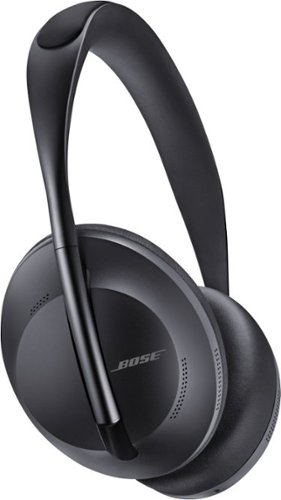
Bose Noise Cancelling Headphones 700 deliver everything you expect from Bluetooth headphones ~ and some things you never imagined possible. It~s no surprise PC Magazine called them ~The best active noise cancellation you can buy.~ Eleven levels of noise cancellation feature a range of options to choose from. You can totally eliminate distractions or minimize noise cancelling to hear everything around you. Or choose from nine other levels in between. Active noise cancelling technology in Bose Headphones 700 monitors the sounds around you and instantly cancels out unwanted noise to let your music shine through. At the same time, the acoustic space inside the earcups is maximized to give your music depth and detail. With these noise cancelling headphones, it~s not just your music that~s clear, so are your calls. The unrivaled microphone system uses a series of microphones to adapt in real time to noisy and windy environments so voices sound crystal clear on calls. Voice commands are also captured with unprecedented accuracy. The stunning new design of Bose Headphones 700 features a streamlined stainless-steel headband and a lightweight, comfortable fit that~s perfect for all-day listening. With these wireless headphones you get up to 20 hours of battery life and time-based power information per charge. Bose Headphones 700. The wireless headphones everyone is talking about.
Customer Rating
5
Feature laden headset with impressive features!
on August 4, 2019
Posted by: dnottingham4
from Pineville, NC
The Bose Noise Cancelling Headphones 700 is an impressive, feature-laden set of headphones that can also make a call and provide audio AR capabilities. In addition to this written review you can watch my unboxing video and the video review of these headphones:
Unboxing Video: https://www.youtube.com/watch?v=qp773bkXAOE&t=133s
Video Review: https://youtu.be/sRV6jyfmaWs
This review will be done in 3 parts – features, usage impressions, and pros/cons:
Features:
The features of these headphones are excellent. This wireless headset provides for up to 20 hours of wireless listening. The headset has a 20-inch USB to C cable included for charging and a 42-inch 2.5 mm (headphone side) to 3.5mm (device side) audio cable for use with non-wireless devices or when the wireless battery is depleted. The wireless has a range of 10m and has an array of eight microphones – six used for noise canceling, two of which combine with the remaining two microphones for voice pickup performance.
The features of these headphones are excellent. This wireless headset provides for up to 20 hours of wireless listening. The headset has a 20-inch USB to C cable included for charging and a 42-inch 2.5 mm (headphone side) to 3.5mm (device side) audio cable for use with non-wireless devices or when the wireless battery is depleted. The wireless has a range of 10m and has an array of eight microphones – six used for noise canceling, two of which combine with the remaining two microphones for voice pickup performance.
Since these headphones are designed for long usage periods – such as long-haul flights – the lightweight materials as well as the headset adjustment features combine to ensure the best fit and comfort. This headset is especially nice from my perspective as I abhor earbuds and prefer either an on-ear or as in this headset the over-the-ear headsets. The over the ear design of this headset allows for the impressive noise cancellation features and also allows one to concentrate on the task at hand be it a teleconference, a movie, or other audio need.
The headphones have a series of touch-controlled features for standard audio control on the right earcup – sliding up and down controls volume and forward and back move between the tracks. The right earcup also has call controls for answering calls and declining calls. These are easy and intuitive after a few tries.
Unfortunately, the Bose AR Features are currently only available for iPhone and iPad devices with the Android programs still in development this feature was unable to be reviewed for this review. According to the product website “Bose AR-enabled products have motion sensors embedded inside that can detect your head orientation and body movement while you wear them. Bose AR-enhanced apps can then use this information along with location data from your mobile device to offer you audio content tailored to where you are and what you’re doing.” The headphones are compatible with your device’s voice assistant via the Bose Music app.
Usage Impressions:
The headset is a wonderful addition to one’s setup and will allow you to get the best sounds from one’s system when using a headset. I tested the headset using multiple tracks that were recommended for testing audio systems. These tracks test audio systems across the sound spectrum form deep base to soaring highs. The tracks allow testing spatial separation of sounds and the dynamic ranges of the piece being played. From all of these tracks, the sounds were excellent. I also tested with a number of other tracks that I have listed too including the 1812 Overture with real cannons and Space shuttle ascent imagery – these also sounded excellent.
The comfort and noise-canceling features of this headset are nice and really make these useful for situations where noise-canceling is important. Just testing this in my home makes me want to experience these while flying.
The headset is a wonderful addition to one’s setup and will allow you to get the best sounds from one’s system when using a headset. I tested the headset using multiple tracks that were recommended for testing audio systems. These tracks test audio systems across the sound spectrum form deep base to soaring highs. The tracks allow testing spatial separation of sounds and the dynamic ranges of the piece being played. From all of these tracks, the sounds were excellent. I also tested with a number of other tracks that I have listed too including the 1812 Overture with real cannons and Space shuttle ascent imagery – these also sounded excellent.
The comfort and noise-canceling features of this headset are nice and really make these useful for situations where noise-canceling is important. Just testing this in my home makes me want to experience these while flying.
For calls, this headset works great and had no issues with hearing the other person or then hearing you.
Pros: Audio quality, Batty life, portability, performance
Cons: mainly price but this is minor for all the features you get, lack of audio AR apps for Android.
Cons: mainly price but this is minor for all the features you get, lack of audio AR apps for Android.
Mobile Submission: False
I would recommend this to a friend!
Share this review:


0points
0of 0voted this as helpful.
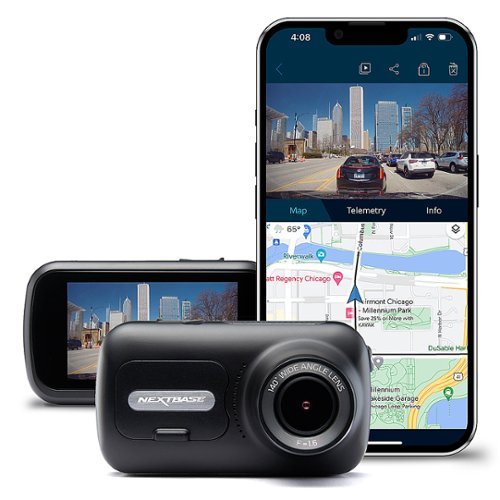
Record your experiences on the road with this Nextbase dash cam. A wide-angle lens captures every detail, ensuring you are covered at all times, and the 2.5-inch LCD screen allows for comfortable viewing when reviewing videos. This Nextbase dash cam connects with smart devices via Wi-Fi and and Bluetooth 4.2, letting you review video footage on your device.
Posted by: dnottingham4
from Pineville, NC
The Nextbase 322GW is a nice, full-featured Dash Cam that one can use for protection from Driving accidents, parking accidents, insurance fraud, or even documenting a trip across that famous bridge!
This review will be done in 4 parts – features, installation, usage impressions, and Pros/Cons. In addition to this written review you can watch my unboxing video and the video review of this Dash Cam:
Unboxing Video: https://youtu.be/IymOXAE3jNk
Video Review: https://youtu.be/OMb2WhH6vu0
Features:
The NextBase 322GW Dash Cam is nice full-featured Dash Cam that includes many key features including full HD video recording (1080p at 30 fps), 2.5-inch touch screen, 140-degree viewing angle, click and go mounts, 10 Hz GPS module with speed and location, intelligent parking mode, AutoSync, Bluetooth 4.2, WI-FI connection, and SOS mode. In combination with these features, NextBase also has the MyNextBase Connect App and the MyNextBasePlayer for the PC or MAC to playback recordings. The camera also contains a G Sensor to measure forces exerted to know if an incident has occurred. This is used for enabling protect mode for video recordings, intelligent park mode, and with the SOS feature.
The NextBase 322GW Dash Cam is nice full-featured Dash Cam that includes many key features including full HD video recording (1080p at 30 fps), 2.5-inch touch screen, 140-degree viewing angle, click and go mounts, 10 Hz GPS module with speed and location, intelligent parking mode, AutoSync, Bluetooth 4.2, WI-FI connection, and SOS mode. In combination with these features, NextBase also has the MyNextBase Connect App and the MyNextBasePlayer for the PC or MAC to playback recordings. The camera also contains a G Sensor to measure forces exerted to know if an incident has occurred. This is used for enabling protect mode for video recordings, intelligent park mode, and with the SOS feature.
Two features that are especially nice are the intelligent parking mode and SOS Mode. Intelligent parking mode will detect motion while your car is parked and activate the camera to record the incident. SOS mode will alert emergency services to your location in the event of an accident. This feature requires that you have the camera connected to your phone via the MYNextbase Connect app, an internet connection, and Bluetooth is active. In the event of an accident and in the event, you are unable to call for assistance it will contact emergency services with your last known location. This does require you to set it up to function in this manner.
An optional feature of this camera is the ability to add the Nextbase Rear-View Camera module to allow you to add a second camera and select from Rear, Cabin, or Rear Window views. This is done by split screening the view that is recorded between the front Dash Cam and the rear camera add-on.
One key item to note is that a class 10 microSD card with a minimum write speed of 48/MBPS up to 128 GB in size is required to use the camera and it is not included.
Installation:
Installation of the camera is very straight forward and the documentation of the camera provides guidance on proper camera placement to avoid it being a driver distraction and how to route the 4-meter power cable, so it is not interfering with the driver or passenger of the vehicle. NextBase even includes a tool to help tuck the cable into your vehicle’s trim. The Dash Cam comes with two mounting options – a suction cup mount and an adhesive mount.
The first time the camera is turned on it will guide you through the set-up menus to configure the unit for language, location, time-zone, speed units, time and date. This is an easy and straight forward process. I recommend checking out all the setup options at this time including the recording and feature preferences that are not turned on by default – for example, intelligent parking mode is not on by default. You can also configure the previously mentioned SOS features.
Installation of the camera is very straight forward and the documentation of the camera provides guidance on proper camera placement to avoid it being a driver distraction and how to route the 4-meter power cable, so it is not interfering with the driver or passenger of the vehicle. NextBase even includes a tool to help tuck the cable into your vehicle’s trim. The Dash Cam comes with two mounting options – a suction cup mount and an adhesive mount.
The first time the camera is turned on it will guide you through the set-up menus to configure the unit for language, location, time-zone, speed units, time and date. This is an easy and straight forward process. I recommend checking out all the setup options at this time including the recording and feature preferences that are not turned on by default – for example, intelligent parking mode is not on by default. You can also configure the previously mentioned SOS features.
Usage Impressions:
Once installed the camera is really there and usable and one does not need to do much from one trip to another trip to manage the device except to remember to plug it in (assuming you are like me and unplug it when the car is not in use). The Dash Cam turns on as soon as it detects power to it and records the action as the vehicle drives. The default setting is video’s in 1-minute increments (can be switched to 2 minutes or 3 minutes depending on your preferences), and it records both high-res and low-res files of the trip. Once the memory card is full, it will delete the older recordings to add new recordings. Should an incident occur, either the camera will record the files to a write-protected area of the card, or you manually force the file to the wite-protected area by pressing the red Protect button to prevent important files from being overwritten.
Once installed the camera is really there and usable and one does not need to do much from one trip to another trip to manage the device except to remember to plug it in (assuming you are like me and unplug it when the car is not in use). The Dash Cam turns on as soon as it detects power to it and records the action as the vehicle drives. The default setting is video’s in 1-minute increments (can be switched to 2 minutes or 3 minutes depending on your preferences), and it records both high-res and low-res files of the trip. Once the memory card is full, it will delete the older recordings to add new recordings. Should an incident occur, either the camera will record the files to a write-protected area of the card, or you manually force the file to the wite-protected area by pressing the red Protect button to prevent important files from being overwritten.
Accessing the videos can be done in multiple ways – you can download them to your phone via Wi-Fi, you can connect the camera to your pc and load them to your computer, or you could remove the card. I found the connecting the camera (via an included USB cable) to my computer the be the fastest of these options but may not be suited for all situations. Wi-Fi Downloads – especially of the larger files is extremely slow.
Viewing the videos is best done through the MyNextbase player (see the image accompanying this review for a quick look and the full video review for more details). This software allows one to view, edit, and share the camera footage on your computer. It shows the video, a map, and telemetry (speed, GPS location, G Sensor data) and a file list all in one screen. Once this is done you can use the free MyNextbase Cloud to share and safely store the video files for 30 days maximum.
In testing the system, I found that the default G Sensor settings that support the intelligent parking mode were not as sensitive as I expected. I recommend moving from the medium setting to the high setting for improved sensing in this mode. I also found that the Wi-Fi connection takes a bit of time to establish.
Overall, I like the Nextbase 322GW. It makes a great first impression with the included features and capabilities. One item that might be a nice addition would be a motion-sensing capability to the intelligent park mode and turn on the camera when motion is detected nearby. Another nice addition would be to include a 32 GB microSD card with the camera to add value to the purchase of this device.
Pros: Features, ease of installation, MyNextBase Player
Cons: no MicroSD card included, slow wi-fi transfer of videos, lacks motion-sensing features for parking mode
Mobile Submission: False
I would recommend this to a friend!

Share this review:


0points
1of 2voted this as helpful.
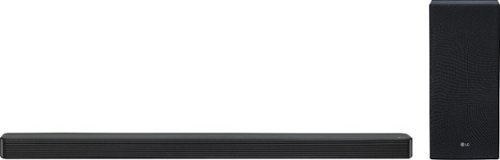
Realize immersive room-filling sound from your TV with this LG 3.1-channel high-resolution audio soundbar. DTS technology creates a thrilling surround sound experience, while high-resolution audio support ensures a stunning reproduction of sound and music. This LG 3.1-channel high-resolution audio soundbar features optical, USB, HDMI and Bluetooth for convenient connections to all compatible equipment and TVs.
Posted by: dnottingham4
from Pineville, NC
The LG - 3.1-Channel Soundbar with Wireless Subwoofer and DTS Virtual X - Black Soundbar (SL6Y) is a versatile and great sounding soundbar. With an impressive feature set that includes DTS Virtual X, and High-Resolution Audio (24Bit/96KHz).
This review will be done in 3 parts – features, usage impressions, and pros/cons:
Features:
The features of this soundbar are excellent. It is a 3.1 channel soundbar with a wireless subwoofer that is suitable for a soundbar sub-woofer in standard mode the bass is a little light. Bass Blast (the default setting) or DTS Virtual X have good sounding bass. This soundbar has an array of connection types including HDMI (ARC), Optical (optical cable included), HDMI, USB, and AUX (3.5mm), and Bluetooth inputs.
The features of this soundbar are excellent. It is a 3.1 channel soundbar with a wireless subwoofer that is suitable for a soundbar sub-woofer in standard mode the bass is a little light. Bass Blast (the default setting) or DTS Virtual X have good sounding bass. This soundbar has an array of connection types including HDMI (ARC), Optical (optical cable included), HDMI, USB, and AUX (3.5mm), and Bluetooth inputs.
The sound bar comes with the needed power inputs and mounting hardware to be able to mount it to a wall if desired and includes a nice template that can be used to aid in the mounting process.
The HDMI input can be used to connect another HDMI device to the system.
Usage Impressions:
The soundbar is a great addition to one’s setup should one need a soundbar. I tested the soundbar using multiple tracks that are recommended for testing audio systems. These tracks test audio systems across the sound spectrum from deep bass to soaring highs. The tracks also test spatial separation of sounds and the dynamic ranges of the system. The sounds were generally excellent on the Bass Blast and DTS Virtual X sound effect settings. For my preferences, Standard mode is severely lacking in bass.
The sound effects available are as follows:
The soundbar is a great addition to one’s setup should one need a soundbar. I tested the soundbar using multiple tracks that are recommended for testing audio systems. These tracks test audio systems across the sound spectrum from deep bass to soaring highs. The tracks also test spatial separation of sounds and the dynamic ranges of the system. The sounds were generally excellent on the Bass Blast and DTS Virtual X sound effect settings. For my preferences, Standard mode is severely lacking in bass.
The sound effects available are as follows:
ASC (Adaptive Sound Control) - Analyzes the property of the input sound and provides the sound optimized for the content in real time.
BASS BLAST or BASS BLAST+ - Reinforces the bass and powerful sound.
STANDARD - You can enjoy optimized sound.
DTS VIRTUAL X - You can enjoy more immersive and cinematic surround sound
BASS BLAST or BASS BLAST+ - Reinforces the bass and powerful sound.
STANDARD - You can enjoy optimized sound.
DTS VIRTUAL X - You can enjoy more immersive and cinematic surround sound
Bluetooth and USB connectivity testing were accomplished with relative ease and the sound remained excellent in all modes other than standard.
The DTS Virtual X sound is rich and helps to add to the immersion that adds to one’s enjoyment while watching movies and having this sound mode enabled. It's not quite up to par with a full surround sound system but it is better than not having anything.
It should be noted that there is an available rear speaker unit that can be added to this system for an additional cost to add to this until sound capabilities. Speaking of price this unit retails for $349 and while that may seem to be a little pricey; it is one of the best priced 3.1 soundbars that Best Buy has to offer.
Overall this is another great product.
Please watch my Video Review here that include demonstrations of this unit's sound: https://youtu.be/fneD4jADGl0
Pros: Audio quality, connection options, and inputs, performance in modes other than standard.
Cons: Standard mode sound is lacking in Bass.
Mobile Submission: False
I would recommend this to a friend!
Share this review:


+11points
13of 15voted this as helpful.
dnottingham4's Review Comments
dnottingham4 has not submitted comments on any reviews.
dnottingham4's Questions
dnottingham4 has not submitted any questions.
dnottingham4's Answers
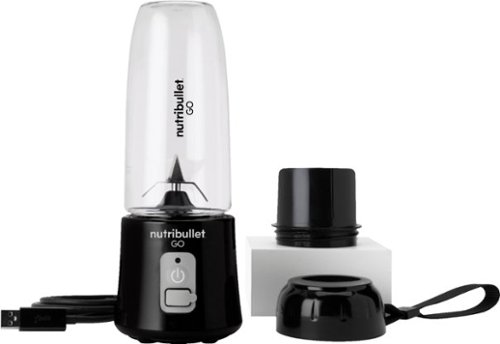
The Nutribullet GO Cordless Blender has a compact and ergonomic design, ideal for those on the go! The 2000mAH battery offers up to 20 blending cycles before needing to be recharged. The 13oz cups are the perfect size for personal smoothies or protein shakes and with 18000 RPMs you can be confident your smoothies will come out tasting delicious! Our base even comes with a blade protector so you can feel confident putting this in a backpack or bag.
Can you use it to blend fresh coffee (to make bulletproof coffee)
This unit is NOT intended for use with HOT or carbonated liquids.
4 years, 8 months ago
by
dnottingham4
The Nutribullet GO Cordless Blender has a compact and ergonomic design, ideal for those on the go! The 2000mAH battery offers up to 20 blending cycles before needing to be recharged. The 13oz cups are the perfect size for personal smoothies or protein shakes and with 18000 RPMs you can be confident your smoothies will come out tasting delicious! Our base even comes with a blade protector so you can feel confident putting this in a backpack or bag.
What’s the voltage on this product?
It is 7.4 Volts and 60 Watts (8.1 Amps) and runs off of a 2000mAH battery and is rated for 20 up to blending cycles.
4 years, 8 months ago
by
dnottingham4
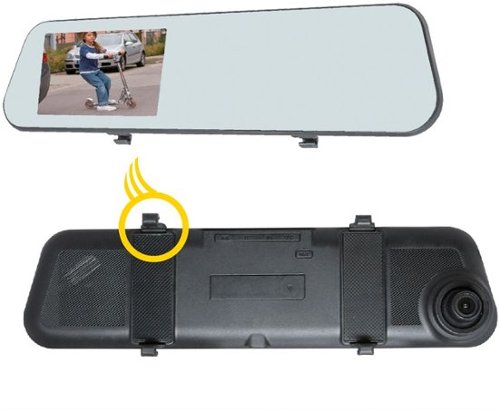
Add extra protection for your car with this EchoMaster vehicle camera kit. It has dual cameras for capturing front and rear action, and the 4.5-inch clip-on DVR display delivers real-time movements and recorded footage. The 500 mAh battery of this EchoMaster vehicle camera kit makes automatic recordings even after ignition is turned off to document any parking incident.
So, the rearview is only good for backing up and not to see out the back window?
Just the opposite - it is a rear facing camera and NOT a backup camera.
5 years, 5 months ago
by
dnottingham4
Add extra protection for your car with this EchoMaster vehicle camera kit. It has dual cameras for capturing front and rear action, and the 4.5-inch clip-on DVR display delivers real-time movements and recorded footage. The 500 mAh battery of this EchoMaster vehicle camera kit makes automatic recordings even after ignition is turned off to document any parking incident.
Will this fit a 2012 Volvo XC 60?
It should work and you might have to get an extension cable to route the rear-facing camera. Since your vehicle has a hatchback - routing the cable through the wiring harness and onto the glass will present challenges.
5 years, 5 months ago
by
dnottingham4
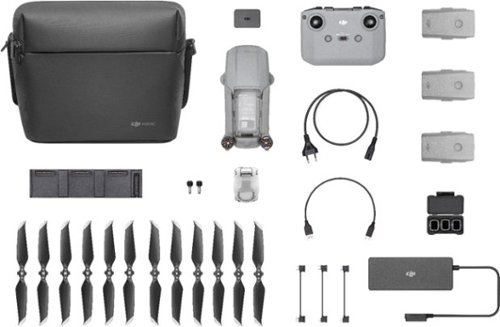
Shoot pro-quality aerial footage with this DJI Mavic Air 2 drone. The three-axis gimbal stabilizes the 48.0MP camera for stunning photos and clear videos, while the 3500 mAh battery delivers dependable power for every flight. This DJI Mavic Air 2 drone features FocusTrack technology for advanced obstacle avoidance and target tracking.
Is this made in china?
Yes
6 years ago
by
dnottingham4
Shoot pro-quality aerial footage with this DJI Mavic Air 2 drone. The three-axis gimbal stabilizes the 48.0MP camera for stunning photos and clear videos, while the 3500 mAh battery delivers dependable power for every flight. This DJI Mavic Air 2 drone features FocusTrack technology for advanced obstacle avoidance and target tracking.
Will the remote controller hold a Galaxy Note 9 in a case?
IT is unlikely to do so - I could not fit my iPhone 6 with an otter box case.
6 years ago
by
dnottingham4
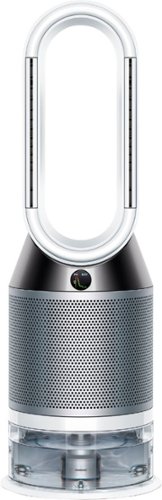
Automatically purifies and humidifies for a healthier environment. Hygienically removes 99.9% of bacteria in the water~. The Dyson Pure Humidify+Cool is a multi-functional machine for whole room air treatment - it purifies, humidifies and cools you. Its activated carbon and HEPA filters capture 99.97% of allergens and pollutants as small as 0.3 microns and Air Multiplier technology projects purified, humidified air throughout the room~. And with a hassle-free deep clean cycle, thoroughly eliminate mineral build-up and bacteria at the touch of a button. Dyson technology helps create a cleaner, healthier home - Our vacuums and purifiers are scientifically proven to capture particles as small as allergens and bacteria.
What type of humidifier is this new one? Ultrasonic or Evaporative?
From the Dyson Website - this unit "uses Dyson’s advanced evaporative technology. Water is placed onto a biostatic woven mesh evaporator and air is used to convert that water into water vapor so fine that it is invisible. This also means it can’t carry particles or bacteria with it, providing a healthier environment."
6 years, 1 month ago
by
dnottingham4
The reliable Brother HL-L3210CW compact digital color printer is a great choice for the busy home or small office. Quick print speeds of up to 19 pages per minute~ plus manual feed slot accommodates varied printing needs and can handle a variety of paper types and sizes including card stock, envelopes and more. Connect with versatile options including built-in wireless or USB interfaces and print wirelessly from mobile devices. The 250-sheet capacity adjustable paper tray helps improve efficiency with fewer refills and handles letter or legal sized paper. Brother Genuine high-yield replacement toner cartridges help lower printing costs. Comes with a 1-year limited warranty and free online, call or live chat support for the life of your product. Prints up to 19 ppm~ in black and up to 19 ppm~ in color.
Does this printer have two trays, one letter and one legal?
It has one tray that can use Letter or legal and holds 250 sheets. It does have a single-sheet manual feed tray also.
6 years, 8 months ago
by
dnottingham4