
Share kusdane's profile


kusdane
kusdane's stats
- Review count16
- Helpfulness votes10
- First reviewJuly 5, 2013
- Last reviewSeptember 21, 2016
- Featured reviews0
- Average rating4.6
- Review comment count1
- Helpfulness votes0
- First review commentJuly 10, 2013
- Last review commentJuly 10, 2013
- Featured review comments0
Questions
- Question count0
- Helpfulness votes0
- First questionNone
- Last questionNone
- Featured questions0
Answers
- Answer count0
- Helpfulness votes0
- First answerNone
- Last answerNone
- Featured answers0
- Best answers0
![Cloverfield [Blu-ray] [2008]](https://pisces.bbystatic.com/prescaled/500/500/image2/BestBuy_US/images/products/304b2327-370a-41e7-956a-951dd4939472.png)
Customer Rating

5
Excellent found-footage film
on September 21, 2016
Posted by: kusdane
from United States
Excellent found-footage film -- great effects and great cast -- recommended!
My Best Buy number: 1041195595
I would recommend this to a friend!
Share this review:


+1point
1of 1voted this as helpful.
Customer Rating
5
Excellent Rob Reiner film!
on September 21, 2016
Posted by: kusdane
from United States
Excellent Rob Reiner film! Classic of course - recommended!
My Best Buy number: 1041195595
I would recommend this to a friend!
Share this review:


0points
0of 0voted this as helpful.
Customer Rating
5
Excellent Mel Brooks film
on September 21, 2016
Posted by: kusdane
from United States
Excellent Mel Brooks film -- it's Spaceballs! Hilarious!
My Best Buy number: 1041195595
I would recommend this to a friend!
Share this review:


0points
0of 0voted this as helpful.
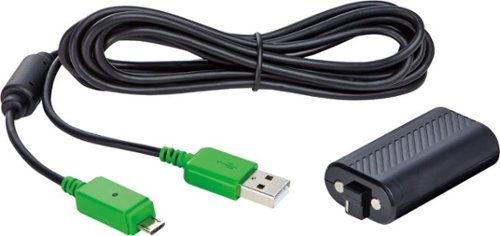
Prepare for long hours of gaming with this Insignia charge and play kit for Xbox One and One S. It slots into your Xbox One or One S controller so that you don't have to use disposable batteries, and it charges on the go. A 10-foot cord ensures a controller using this Insignia charge and play kit can be used anywhere in your room.
Customer Rating
5
great inexpensive charger for Xbox One controller
on September 21, 2016
Posted by: kusdane
from United States
Great inexpensive charger for Xbox One controller - recommended!
My Best Buy number: 1041195595
I would recommend this to a friend!
Share this review:


0points
0of 0voted this as helpful.
Customer Rating
5
Excellent Seth MacFarlane film
on September 21, 2016
Posted by: kusdane
from United States
Excellent Seth MacFarlane film - hilarious! Deleted scenes add to the movie - recommended!
My Best Buy number: 1041195595
I would recommend this to a friend!
Share this review:


0points
0of 0voted this as helpful.
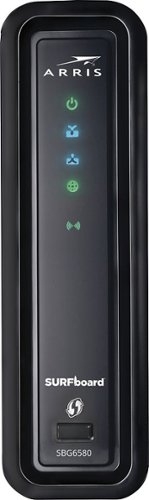
This ARRIS SURFboard cable modem uses DOCSIS 3.0 technology to ensure speed that lets you surf the Web and download videos, music and images with ease. The integrated wireless network (802.11n) is backward compatible with 802.11b/g access points
Customer Rating

1
Glitchy!!!!!!
on July 5, 2013
Posted by: kusdane
from United States
I use it in...:Large home
Verified Purchase:Yes
Have had three different Motorola Surfboard modems in the past, and they've all been great -- thought I'd take the risk with this one and get the modem/wifi router 2-in-1 -- big mistake -- Motorola is great with cable modems, but no so much in wifi or routing/LAN admin --
After calling my ISP to provision the modem, I went to access the web console to configure, and changed its default local IP to the subnet I prefer -- it tool 5 mins before it applied (in the meantime, I'm calling my ISP thinking the provisioning was unsuccessful) -- finally took, and I could access -- ok -- configured wifi -- successfully connected all my devices in the house -- wifi glitched out after an hour -- had to reset the device (which resets the modem every time since it's a 2-in-1) -- ok --
Next, DHCP table would not show all my devices, even though all were connected -- ok glitchy -- proceeded to create 2 DHCP reservations -- 10 mins later, the 2 reservations I created disappeared from the config!!
Called Motorola about this, and they said yeah it should not be doing that -- could have been a faulty device, but then read some bad reviews on this device on amazon -- sorry Motorola, I still love your cable modems, but will steer clear of your 2-in-1 devices!
My Best Buy number: 1041195595
My Best Buy number: 1041195595
What's great about it: Nice modem for WAN connectivity
What's not so great: Terrible wifi and routing functionality
No, I would not recommend this to a friend.
Share this review:


+6points
9of 12voted this as helpful.
kusdane's Review Comments
This ARRIS SURFboard cable modem uses DOCSIS 3.0 technology to ensure speed that lets you surf the Web and download videos, music and images with ease. The integrated wireless network (802.11n) is backward compatible with 802.11b/g access points
Overall1 out of 5
1 out of 5Glitchy!!!!!!
By kusdane
from United States
Have had three different Motorola Surfboard modems in the past, and they've all been great -- thought I'd take the risk with this one and get the modem/wifi router 2-in-1 -- big mistake -- Motorola is great with cable modems, but no so much in wifi or routing/LAN admin --
After calling my ISP to provision the modem, I went to access the web console to configure, and changed its default local IP to the subnet I prefer -- it tool 5 mins before it applied (in the meantime, I'm calling my ISP thinking the provisioning was unsuccessful) -- finally took, and I could access -- ok -- configured wifi -- successfully connected all my devices in the house -- wifi glitched out after an hour -- had to reset the device (which resets the modem every time since it's a 2-in-1) -- ok --
Next, DHCP table would not show all my devices, even though all were connected -- ok glitchy -- proceeded to create 2 DHCP reservations -- 10 mins later, the 2 reservations I created disappeared from the config!!
Called Motorola about this, and they said yeah it should not be doing that -- could have been a faulty device, but then read some bad reviews on this device on amazon -- sorry Motorola, I still love your cable modems, but will steer clear of your 2-in-1 devices!

kusdane
United States
Still, very glitchy LAN functionality
July 10, 2013
Thanks for your input -- you must've lucked out with your 3 devices!
As I mentioned, I did indeed contact my ISP to provision the modem, which you are correct, is a mandatory step when changing modems -- my ISP absolutely requires the device's new MAC address and serial number (if not, upon opening a web browser, you are immediately taken to a company landing page stating to contact them) --
But, WAN connectivity aside, it was the unexplainable behavior of the local DHCP table which was the deal-breaker for me -- I had numerous devices that were successfully leased an IP address by the router, but the DHCP table would only reflect 2 or 3 devices at a time, and it was random which device it would show -- so there was no way of accurately monitoring what devices were connected to my LAN --
Plus, I have some static routing in my home config, so I like to utilize DHCP reservations for certain devices -- after setting up 2 reservations, the corresponding devices were successfully leased the intended IP addresses -- however, about an hour later, those reservations literally disappeared from the config!
Anyway, I probably just got a dud (as Motorola tech support stated), but did not want to chance it further --
So for now, I'm back to my old Motorola SB6120 (which is at least still a DOCSIS 3.0 modem), and my 5-year old Buffalo wifi/router -- going to eventually get the Motorola SB6141, since as I said, I know Motorola is solid for WAN connectivity!
0points
0of 0voted this comment as helpful.
kusdane's Questions
kusdane has not submitted any questions.
kusdane's Answers
kusdane has not submitted any answers.