
Share phyzycs's profile


phyzycs
phyzycs's stats
- Review count1
- Helpfulness votes10
- First reviewDecember 27, 2012
- Last reviewDecember 27, 2012
- Featured reviews0
- Average rating5
- Review comment count1
- Helpfulness votes0
- First review commentFebruary 17, 2013
- Last review commentFebruary 17, 2013
- Featured review comments0
Questions
- Question count0
- Helpfulness votes0
- First questionNone
- Last questionNone
- Featured questions0
Answers
- Answer count0
- Helpfulness votes0
- First answerNone
- Last answerNone
- Featured answers0
- Best answers0
phyzycs's Reviews
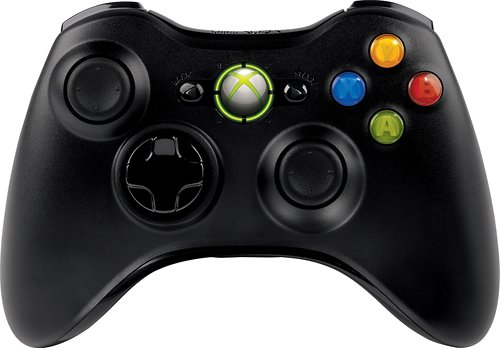
Enhance your gaming with this ergonomically designed Microsoft Xbox 360 JR9-00011 controller that features 2.4GHz wireless technology to provide an up to 30' wireless range from your PC or Xbox 360. Vibration feedback ensures riveting gameplay.
Customer Rating

5
Best PC gamepad on market
on December 27, 2012
Posted by: phyzycs
I've been on the market for a PC gamepad for a while now and have had a generally terrible experience. Most gamepads out there for the PC are, quite frankly, terrible. Typically, they're flimsy, offer no control or customization in buttons, don't support joystick movement, and aren't supported by a lot of games. After a lot of research, I found this controller.
Set up:
For Windows 7, this is literally a plug and play. It's beyond easy to hook this up and start using it right away. However, I had some issues getting this controller to sync with the receiver on my main gaming rig. Everything installed without a problem and the wireless receiver was recognized, but the controller itself was not recognized.
For Windows 7, this is literally a plug and play. It's beyond easy to hook this up and start using it right away. However, I had some issues getting this controller to sync with the receiver on my main gaming rig. Everything installed without a problem and the wireless receiver was recognized, but the controller itself was not recognized.
I followed troubleshooting guides and searched online through forums and could not find the answer I needed. I called Microsoft support and waited in queue for about an hour only to get transferred to Games for Windows Live to then get transferred to another tech support line of Microsoft Xbox Live. I spent a good 3 hours on the phone with only about 15 minutes of that talking to a live person and endured about 3 or 4 transfers.
After all of that, I just hung up and didn't want to wait anymore. I tried everything. Uninstalling, reinstalling, manual setup through device manager, etc. Out of disgust from calling Microsoft, I was about ready to take it back when I thought I'd try plugging it into my work laptop. Everything installed and synced just fine. Hm.... strange.
At that point, I decided to do some serious brain storming and remembered that I used to use the PS3 motioninjoy driver a while back. The Xbox360 wireless controller for windows also uses motioninjoy drivers. I uninstalled my PS3 motioninjoy drivers a while back so I figured that it had been removed from my computer. It turns out I was wrong.
I decided to take a look through my drivers directory (...windows/system32/drivers) and was surprised to come across my old motioninjoy file "mijxfilt.sys." I deleted that file, removed the drivers for the Xbox360 wireless controller for windows, unplugged the wireless receiver, and restarted my computer. After I booted to desktop, I plugged the receiver in and literally in < 10 seconds, Windows installed the driver automatically and synced the controller just fine.
That's what's "not so great" about this controller. Microsoft support blows. Nobody really knew where to send me and by the time I was speaking with an "expert" (as they like to say when they transfer you), there apparently was another expert that was more expert with the issues I was having. For a PC beginner, this might seem like a huge challenge if they have problems and they may end up feeling like I was after calling support.
Controller use:
Wow - this is an amazing controller all around. I purchase a lot of games through steam sales; a good bit of those games are console ports like Darksiders and I've been wanting to play with a good gamepad that feels exactly how it would on console. I was very impressed with the full support this controller provides.
Wow - this is an amazing controller all around. I purchase a lot of games through steam sales; a good bit of those games are console ports like Darksiders and I've been wanting to play with a good gamepad that feels exactly how it would on console. I was very impressed with the full support this controller provides.
Despite the difficulties in my set up, I'm very happy that I kept this controller. If you're looking for the perfect PC gamepad and want the console feel, I highly recommend this one. You will NOT be disappointed.
What's great about it: Control, durability, feel, customization
What's not so great: Ignorant microsoft support, possible difficult setup for beginners
I would recommend this to a friend!
Design

5
Durability
5
Share this review:


+8points
10of 12voted this as helpful.
phyzycs's Review Comments
Enhance your gaming with this ergonomically designed Microsoft Xbox 360 JR9-00011 controller that features 2.4GHz wireless technology to provide an up to 30' wireless range from your PC or Xbox 360. Vibration feedback ensures riveting gameplay.
Overall5 out of 5
5 out of 5Best PC gamepad on market
By phyzycs
I've been on the market for a PC gamepad for a while now and have had a generally terrible experience. Most gamepads out there for the PC are, quite frankly, terrible. Typically, they're flimsy, offer no control or customization in buttons, don't support joystick movement, and aren't supported by a lot of games. After a lot of research, I found this controller.
Set up:
For Windows 7, this is literally a plug and play. It's beyond easy to hook this up and start using it right away. However, I had some issues getting this controller to sync with the receiver on my main gaming rig. Everything installed without a problem and the wireless receiver was recognized, but the controller itself was not recognized.
For Windows 7, this is literally a plug and play. It's beyond easy to hook this up and start using it right away. However, I had some issues getting this controller to sync with the receiver on my main gaming rig. Everything installed without a problem and the wireless receiver was recognized, but the controller itself was not recognized.
I followed troubleshooting guides and searched online through forums and could not find the answer I needed. I called Microsoft support and waited in queue for about an hour only to get transferred to Games for Windows Live to then get transferred to another tech support line of Microsoft Xbox Live. I spent a good 3 hours on the phone with only about 15 minutes of that talking to a live person and endured about 3 or 4 transfers.
After all of that, I just hung up and didn't want to wait anymore. I tried everything. Uninstalling, reinstalling, manual setup through device manager, etc. Out of disgust from calling Microsoft, I was about ready to take it back when I thought I'd try plugging it into my work laptop. Everything installed and synced just fine. Hm.... strange.
At that point, I decided to do some serious brain storming and remembered that I used to use the PS3 motioninjoy driver a while back. The Xbox360 wireless controller for windows also uses motioninjoy drivers. I uninstalled my PS3 motioninjoy drivers a while back so I figured that it had been removed from my computer. It turns out I was wrong.
I decided to take a look through my drivers directory (...windows/system32/drivers) and was surprised to come across my old motioninjoy file "mijxfilt.sys." I deleted that file, removed the drivers for the Xbox360 wireless controller for windows, unplugged the wireless receiver, and restarted my computer. After I booted to desktop, I plugged the receiver in and literally in < 10 seconds, Windows installed the driver automatically and synced the controller just fine.
That's what's "not so great" about this controller. Microsoft support blows. Nobody really knew where to send me and by the time I was speaking with an "expert" (as they like to say when they transfer you), there apparently was another expert that was more expert with the issues I was having. For a PC beginner, this might seem like a huge challenge if they have problems and they may end up feeling like I was after calling support.
Controller use:
Wow - this is an amazing controller all around. I purchase a lot of games through steam sales; a good bit of those games are console ports like Darksiders and I've been wanting to play with a good gamepad that feels exactly how it would on console. I was very impressed with the full support this controller provides.
Wow - this is an amazing controller all around. I purchase a lot of games through steam sales; a good bit of those games are console ports like Darksiders and I've been wanting to play with a good gamepad that feels exactly how it would on console. I was very impressed with the full support this controller provides.
Despite the difficulties in my set up, I'm very happy that I kept this controller. If you're looking for the perfect PC gamepad and want the console feel, I highly recommend this one. You will NOT be disappointed.

phyzycs
Response @unikr0n
February 17, 2013
unikr0n ,
I tested the controller. It works perfectly fine for an extended period of time anywhere from 10-15 feet. This controller is still kicking butt for me. I love it!
0points
0of 0voted this comment as helpful.
phyzycs's Questions
phyzycs has not submitted any questions.
phyzycs's Answers
phyzycs has not submitted any answers.