
Share eaglei22's profile


eaglei22
eaglei22's stats
- Review count1
- Helpfulness votes3
- First reviewJuly 24, 2013
- Last reviewJuly 24, 2013
- Featured reviews0
- Average rating2
- Review comment count1
- Helpfulness votes0
- First review commentJune 29, 2014
- Last review commentJune 29, 2014
- Featured review comments0
Questions
- Question count0
- Helpfulness votes0
- First questionNone
- Last questionNone
- Featured questions0
Answers
- Answer count0
- Helpfulness votes0
- First answerNone
- Last answerNone
- Featured answers0
- Best answers0
eaglei22's Reviews
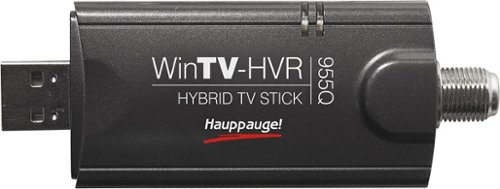
Tune in to live television broadcasts on your PC with this PCTV USB 2.0 stick and watch and record your favorite TV shows with ease.
Customer Rating

2
Great hardware, horrible software
on July 24, 2013
Posted by: eaglei22
from St. Louis
I purchased this item to watch tv on my 27 inch monitor in my kitchen/living room area of my apartment. It's only really for when I'm cooking or relaxing in the living room. So it's not my primary tv source thank God. That is in my bedroom.
I have Windows 8 with my 27 inch monitor extended off my laptop. Some times the program just randomly locks up and crashes, usually (always) when I move the program from my 27 inch monitor to my laptop screen and try to maximize, the program crashes.. It's works fine on the 27 inch though.
Also, My tv in my bedroom was able to have my analog channels on whole numbered tv stations (1,2,3,4... 25...45.. etc).. and then my HD channels on decimal numbers .. so, NBC would be channel 5, and its HD affiliate would be 5.1... this stupid thing puts my analog stations from 1 to 100.. then puts my HD channels in the 2000's out of order, with no labels. They expect you to label every channel yourself.. Some of them are labeled 99.4 or something but it's really annoying as I have not memorized every channel that my service provider offers..
Next switching from channel to channel takes a while sometimes.. some times the average load time is 2 to 5 seconds.. that's a long time if you are channel surfing. Also, my 42 inch displays HD channels pretty clear.. although the clarity is decent on my 27 inch I feel it doesn't compare to the 42 inch which being a smaller image it should be better.. btw this monitor is a 27 inch LED samsung, and the 42 inch tv in the bedroom is a LCD sharp.. so i'd expect the better quality from the 27 inch..
Finally, the remote sometimes turns on the device and sometimes does not...
This product is nice when it's working but it definitely was designed to make money and not with the user in mind. It is not worth 79.99 and I'm glad I did not pay that much for this device. ..
What's great about it: Clear HD pictures
What's not so great: scatters my HD signals around, Crashes a lot.
No, I would not recommend this to a friend.
Share this review:


+1point
3of 5voted this as helpful.
eaglei22's Review Comments
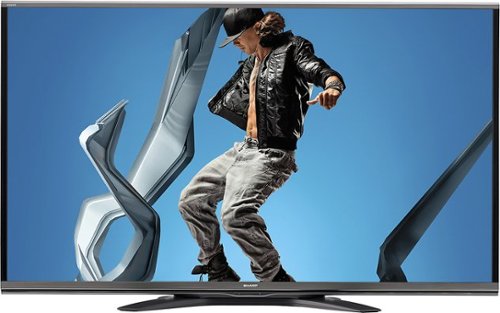
Sharp AQUOS Q+ Series LC-70SQ15U HDTV: This Sharp AQUOS Q+ Series TV features an even more impressive picture than standad HD to give you lifelike detail, depth and color. LED technology ensures excellent performance in all lighting conditions.
Overall 4 out of 5
4 out of 5Great TV for the money
By RealisticViewpoint
from Rockford, IL
Now you've probably read through all the reviews on this TV and still aren’t sure what to do. There are some good reviews, and also some bad ones. First off, if you're buying a TV now-a-days you have to understand that it’s not going to be completely perfect/calibrated out of the box. If you don’t have the time, or aren’t savvy enough to go onto internet forums and figure out how to calibrate the saturation, brightness, sharpness, etc, etc, you are going to have a bad time...regardless if you're buying this TV or some other one.
Now, time for my review: Its a great TV, as mentioned above I went and researched on some AVS forums and got calibration settings on making the best picture quality I could...it’s really not all that hard. I like the up-convert feature that will allow you to watch 4K content. I paired my computer with the TV and was able to watch some UHD content, and it was absolutely beautiful.
I wasn’t too excited at first about the SmartTV feature but I've found it does have some value with Netflix, YouTube, etc. If you're planning on browsing the internet on this or searching on YouTube, Google, I would suggest buying a wireless keyboard to make it more efficient. Speakers aren’t really that great, but if you don’t have surround sound then I would suggest purchasing a cheaper TV and using your left over budget to buy a surround sound package. This TV is about the picture, not the audio.
I watch a lot of movies and sports so the 240Hz refresh rate is absolutely perfect. I haven’t noticed the “trails” when watching basketball or soccer. Blu-ray’s look great and if you’ve calibrated your TV correctly and also don’t have it on the “dynamic” setting you will not get the soap opera effect.
That being said, I am satisfied with my purchase. I did a lot of research as I’m sure you are doing right now and for the money, this 70” is exactly what I wanted. Good Luck
Now, time for my review: Its a great TV, as mentioned above I went and researched on some AVS forums and got calibration settings on making the best picture quality I could...it’s really not all that hard. I like the up-convert feature that will allow you to watch 4K content. I paired my computer with the TV and was able to watch some UHD content, and it was absolutely beautiful.
I wasn’t too excited at first about the SmartTV feature but I've found it does have some value with Netflix, YouTube, etc. If you're planning on browsing the internet on this or searching on YouTube, Google, I would suggest buying a wireless keyboard to make it more efficient. Speakers aren’t really that great, but if you don’t have surround sound then I would suggest purchasing a cheaper TV and using your left over budget to buy a surround sound package. This TV is about the picture, not the audio.
I watch a lot of movies and sports so the 240Hz refresh rate is absolutely perfect. I haven’t noticed the “trails” when watching basketball or soccer. Blu-ray’s look great and if you’ve calibrated your TV correctly and also don’t have it on the “dynamic” setting you will not get the soap opera effect.
That being said, I am satisfied with my purchase. I did a lot of research as I’m sure you are doing right now and for the money, this 70” is exactly what I wanted. Good Luck

eaglei22
St. Louis
Vividness
June 29, 2014
How is the vivid and backlight brightness? I Had a Q series 70 inch and cracked the screen (tear rolls down cheek) and I loved it. Was super bright and vivid.. I am concerned because I saw the 60 inch version of this at Best Buy on display and it seemed much dimmer than the TQ version.. Not sure why, even had the associate turn the backlight all the way up and when we checked it already was. Were you ever at a point confused on getting this model vs some of the more expensive ones like the TQ or the UQ? If so what made you lean to this one. The UQ seems like the best buy.. but is about $600 more so I am stuck on my decision..
0points
0of 0voted this comment as helpful.
eaglei22's Questions
eaglei22 has not submitted any questions.
eaglei22's Answers
eaglei22 has not submitted any answers.