
Share Brenthew's profile


Brenthew
Brenthew's stats
- Review count1
- Helpfulness votes1
- First reviewJune 20, 2012
- Last reviewJune 20, 2012
- Featured reviews0
- Average rating4
Reviews comments
- Review comment count0
- Helpfulness votes0
- First review commentNone
- Last review commentNone
- Featured review comments0
Questions
- Question count0
- Helpfulness votes0
- First questionNone
- Last questionNone
- Featured questions0
Answers
- Answer count0
- Helpfulness votes0
- First answerNone
- Last answerNone
- Featured answers0
- Best answers0
Brenthew's Reviews
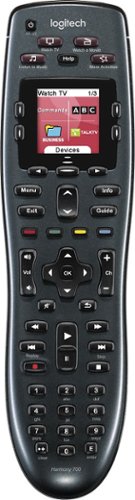
Manage up to 8 of your home theater electronics devices with this Logitech Harmony 700 915-000162 universal remote, which features a brilliant color command screen for easy navigation. One-touch activity buttons simplify device selection.
Customer Rating

4
One remote to control them all
on June 20, 2012
Posted by: Brenthew
from Seattle, WA
This is now my second Harmony remote. My first one was purchased as a refurbished unit from a popular online electronics retailer and worked great for many years. But it finally bit the dust. Without hesitation, I bought another Logitech Harmony remote.
This remote has a great feel in the hand and is light-weight but doesn't feel cheap. The buttons are nice and rubbery and have a great tactile feel when pressed. Response time between pressing a button and the action being performed on the device is much better than my previous Harmony remote.
The remote uses (and comes with) re-chargeable AA batteries. You can use a regular battery charger or you can plug a micro-USB (similar to what most cell phones use to charge) cable into the remote to begin charging. Of course, you can use standard AA batteries as well - just don't try to recharge those.
The only downside of this newer remote is the lack of a charging/docking station. My old Harmony remote came with a slim and sleek docking station battery charger that fit neatly into my entertainment center. You would just lay the remote on top of the dock and it would begin charging. No need to fuss around with finding and plugging in a micro-USB cable.
What's great about it: One button control over all devices.
What's not so great: No charging dock.
I would recommend this to a friend!
Ease of Use

5
Durability
5
Share this review:


+1point
1of 1voted this as helpful.
Brenthew's Review Comments
Brenthew has not submitted comments on any reviews.
Brenthew's Questions
Brenthew has not submitted any questions.
Brenthew's Answers
Brenthew has not submitted any answers.