
Share AG2014's profile


AG2014
AG2014's stats
Reviews
- Review count0
- Helpfulness votes0
- First reviewNone
- Last reviewNone
- Featured reviews0
- Average rating0
- Review comment count2
- Helpfulness votes5
- First review commentOctober 27, 2013
- Last review commentOctober 27, 2013
- Featured review comments0
Questions
- Question count0
- Helpfulness votes0
- First questionNone
- Last questionNone
- Featured questions0
- Answer count1
- Helpfulness votes0
- First answerOctober 27, 2013
- Last answerOctober 27, 2013
- Featured answers0
- Best answers0
AG2014's Reviews
AG2014 has not submitted any reviews.
AG2014's Review Comments
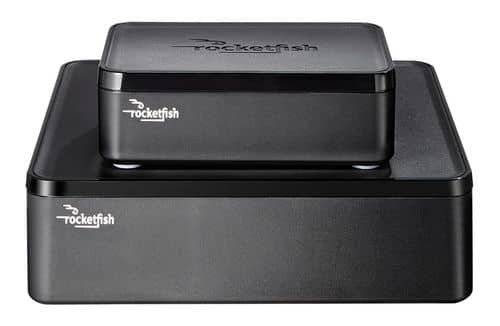
Only at Best BuyEnjoy vibrant CD-quality audio with this Rocketfish~ RF-WHTIB wireless rear speaker kit, which features a wireless range up to 100' for clear transmission. Multiple placement options allow flexible use.
Overall 4 out of 5
4 out of 5Great for not running wires, poor for audiophiles.
By CarterfromCOS
from Colorado Springs, CO
This product looked just right to solve my problem. I bought a great TV (Samsung 55" Series 8) and the matching Samsung HW-C700 A/V 3D receiver to match back in March. Along with a great picture, I am a musician and audiophile. I have a very good ear for music and the quality thereof. So after making my initial purchase which also included front towers, center channel, and subwoofer (all Polk Audio), I wanted to complete my surround sound by adding two rear speakers. I got a great deal on a couple Polk bookshelf speakers on a Black Friday sale, but I didn't want to run wires from my A/V to the back since I have vaulted ceilings and hiding the wires would be a lot of work for me. There's my situation and this product look like a great solution for me in my room.
Setting up the wireless system (installing the wires [which I used monster 16gauge wire] and hiding them) took me about 30 minutes and calibrating it with my A/V receiver was really easy. I had previously worried a lot about the signal latency (15-20ms published, which is right on the money) which I had feared would create an echo. It may for you, if you don't have an A/V receiver that can automatically or manually set signal delay or sync for your individual speakers. I was about to get it all synced up and made the entire setup and calibration under 45 minutes.
After listening for a while to various forms of media, I could hear something wasn't right to my ears. I listened to lots of high quality music and blu-ray high def audio and in these trials something just didn't sound right to me. My troubleshooting approach was to A and B the speakers with one connected directly to the A/V receiver and one connected to the wireless rocket fish. A few minutes of listening I could tell what the problem was and I later confirmed it in the specs.
The Rocketfish Wireless Rear Speaker Kit's manual stats that it transmits and receives Stereo, 16-bit, 48Khz uncompressed audio with a bit-rate of 1.465 Mbps. The Signal to Noise Ratio is 87dBs and output power is 2 x 25W RMS (in 4 ohms).
Okay? So, the transmitter has to down-sample my 96Khz PCM high-def audio that my A/V receiver is sending. That is one of the differences in quality. Another is the RMS, my receiver can give 120 Watts RMS per channel (at 6 ohms). Also, It's no wonder that there is a slight hiss produced due to the signal to noise ratio. It is most recognizable when the Rocketfish receiver's volume control is cranked.
For me, the Rocketfish solves the problem of hiding wires across a room at a cost of quality and hiss (the hiss isn't terrible and may not be noticeable in your environment. It can also be controlled with some trail and error, but you'll sacrifice volume and headroom).
Of course, I'm comparing this to my A/V receiver which is awesome in comparison and rightfully so! The differences make the quality of sound noticeable to me, but not my non-audiophile wife.
So. Audiophiles beware, but if you aren't an audiophile that can pick out slight discrepancies in the signal, this product is really great. I am halfway tempted to keep it because I'm dreading the day's job (and money spent) of running the wires to the back of my home theater. But, for me, high quality audio is an ever elusive beast that I hope to one day capture.

AG2014
Houston, TX
True
October 27, 2013
Good stats!
However as an audiophile, why Polk?
Best Buy has GREAT selection, I suggest some Martin Logan as you are a musician
However as an audiophile, why Polk?
Best Buy has GREAT selection, I suggest some Martin Logan as you are a musician
+2points
5of 8voted this comment as helpful.
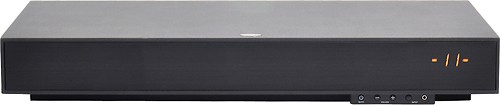
Learn moreabout Magnolia PremiumInstallation Create a virtual surround sound experience with this ZVOX Z-Base 320 4003201 soundbar system that features a built-in 5-1/4" active subwoofer and PhaseCue II virtual surround processing for immersive sound.
Overall 3 out of 5
3 out of 5OK sound - - better than tv
By GSDGary
from West Bend, Wi
The unit was supposed to mimick surround sound. Not even close. It is just a speaker with an amplifier attached.
AG2014
Houston, TX
um really?
October 27, 2013
This particular unit is not designed for that, you bought the lower of ZVOX system.
Go to a store with a Magnolia and actually try out the series in there!
The next one below still sounds just as clean but this unit is definitely not made for that.
Go to a store with a Magnolia and actually try out the series in there!
The next one below still sounds just as clean but this unit is definitely not made for that.
0points
0of 0voted this comment as helpful.
AG2014's Questions
AG2014 has not submitted any questions.
AG2014's Answers
Hooking up a VCR/DVD combo, a tv, a digital cable box, and a component video switch box
Could someone please help me to hook up all of these? I am a dummy when it comes to electronics. I got all these at best buy, but I'm not sure how to hook them all together so I can record on my combo. Please help!
Geek Squad!
119.99 TV and Device Set-Up
There are just a lot of variables.
Did you just get a new TV, if so there are a lot of different ways to connect everything especially with some of the equipment you are showing, they may be HDMI or Component. I'm unsure what they component switch is for in this case?
If you aren't paying for HD service your cable box should be upgraded in this case to get the most from the new TVs but that would use HDMI getting rid of the need for the switch box.
In essence it depends really on what connections on the TV and would require a lot more information to tell you how to connect everything.
119.99 TV and Device Set-Up
There are just a lot of variables.
Did you just get a new TV, if so there are a lot of different ways to connect everything especially with some of the equipment you are showing, they may be HDMI or Component. I'm unsure what they component switch is for in this case?
If you aren't paying for HD service your cable box should be upgraded in this case to get the most from the new TVs but that would use HDMI getting rid of the need for the switch box.
In essence it depends really on what connections on the TV and would require a lot more information to tell you how to connect everything.
12 years, 7 months ago
by
AG2014
Houston, TX