
Share jdvovan24's profile


jdvovan24
jdvovan24's stats
- Review count1
- Helpfulness votes0
- First reviewAugust 18, 2015
- Last reviewAugust 18, 2015
- Featured reviews0
- Average rating5
- Review comment count1
- Helpfulness votes0
- First review commentJune 15, 2016
- Last review commentJune 15, 2016
- Featured review comments0
Questions
- Question count0
- Helpfulness votes0
- First questionNone
- Last questionNone
- Featured questions0
Answers
- Answer count0
- Helpfulness votes0
- First answerNone
- Last answerNone
- Featured answers0
- Best answers0
jdvovan24's Reviews
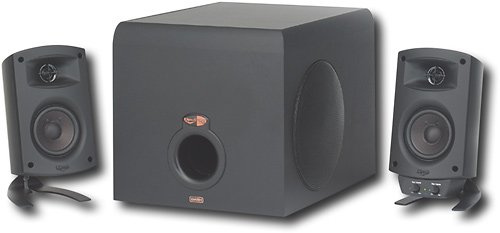
Use this Klipsch ProMedia 3-piece speaker system to enjoy brilliant sound when playing games, listening to music or watching videos on your computer.
Customer Rating

5
Great Speakers
on August 18, 2015
Posted by: jdvovan24
Recently, I went and bought a new computer (HP Envy 700) and monitor (ASUS VXH248) from Best Buy. I figured I should upgrade my speakers, which were Monsoon speakers with subwoofer that I've had for over 12 years. I did my research and couldn't decide on getting the Logitech Z623 or the Klipsch ProMedia 2.1. Both had excellent reviews, but I was able to listen to the Klipsch ProMedia at the store. I went with the Klipsch ProMedia 2.1 with the recommendation from a Best Buy employee. Needless to say, after setting it up and listening to the Klipsch at home, I'm extremely happy with the purchase (got it on sale for $125 too). I set the bass at midpoint, and it booms. The music comes in crisp and loud. The only criticism I have about the set is that it does not have an on/off switch. Other than that, it's been great.
My Best Buy number: 0085395947
I would recommend this to a friend!
Share this review:


0points
0of 0voted this as helpful.
jdvovan24's Review Comments
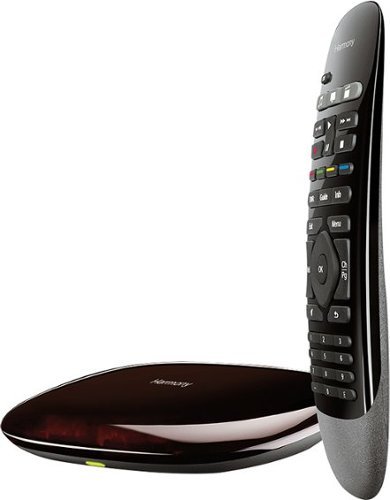
This Logitech Harmony 915-000194 smart control lets you use your compatible Apple~ iPhone~, iPod~ touch or iPad~ or Android device to control up to 8 components for simple, multifunction use.
Overall 1 out of 5
1 out of 5Good Product but with Deal Breaking Limitation
By PaapiPanther
I am a Huge Logitech Fan with all my Keyboard and mouse coming from them and also I had Logitech Harmony 700 Remote. I wanted to buy something that I can control with my IPad so purchased this Device and I am highly disappointed with this System. I would have expected a Home Hub to Control more that 8 Devices and now with increasing number of devices (Smart TV, Streaming devices, Projector and many More) 8 Device limit is way to small. I was hoping to have atleast 12 to 15 Devices to be added. My 2 year old Harmony can control upto 7 devices so I would hope that 2016 Model Harmony Hub can atleast provide 12 devices. Contacting supports tells us that I need to buy another Remote for 349$ more to add 15 devices which I think is not worth it. Even though Hardware allows more devices software is the limiting factor. I am highly disappointed with Logitech and will be returning the product.

jdvovan24
Read the description
June 15, 2016
The product description said it controls up to 8 components. So not sure why you were expecting more.
0points
0of 0voted this comment as helpful.
jdvovan24's Questions
jdvovan24 has not submitted any questions.
jdvovan24's Answers
jdvovan24 has not submitted any answers.