


TheOffice1234's stats
- Review count180
- Helpfulness votes1,035
- First reviewDecember 11, 2009
- Last reviewJune 7, 2026
- Featured reviews0
- Average rating4.6
Reviews comments
- Review comment count0
- Helpfulness votes0
- First review commentNone
- Last review commentNone
- Featured review comments0
Questions
- Question count0
- Helpfulness votes0
- First questionNone
- Last questionNone
- Featured questions0
- Answer count27
- Helpfulness votes22
- First answerApril 24, 2020
- Last answerDecember 18, 2021
- Featured answers0
- Best answers6
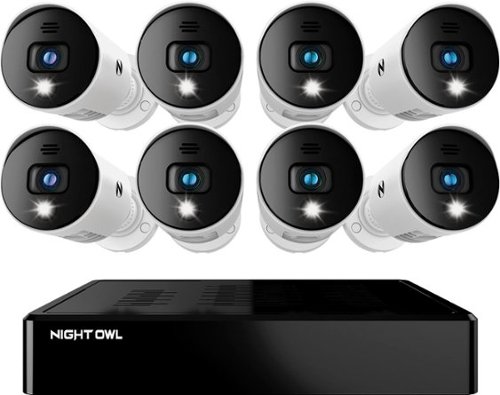
Night Owl is excited to offer our U.S. designed and engineered 1080p HD Bluetooth digital video recorder with wired 1080p HD spotlight cameras and pre-installed hard drive. With secure spp-based Bluetooth setup, there is no need to connect a TV or monitor for setup or viewing (optional). You can easily configure your system right from the app on your smartphone or tablet with the Bluetooth connection. While a TV or monitor is not required, with Google Assistant you can use simple voice commands to stream camera footage directly to your TV or monitor, all while remaining hands free. Each camera has 1-way audio (speaker) which works with our built-in siren and preset voice alerts. From within the app, you can easily activate the built-in siren, startling intruders and sending them packing. Smart detectiont Technology including human detection,facial capture and vehicle alerts reduce the risk of false alarms, keeping you safe and well protected. Facial capture lets you see who is on your property by snapping a photo and sending the image to your smart device. Motion-activated spotlights flood your yard with bright lights when human motion is detected, instantly warding off trespassers. Our app gives you control of your system and easy access to your recordings, regardless of where you are. Night Owl never charges fees for storage or access to your videos. All recordings are securely stored on a pre-installed hard drive for convenience. You can view and download the recordings as you need them. This system provides the latest technology to give you the ultimate security experience. NOTE: The DVR is compatible with our DP2 Series wired BNC cameras and our WNIP2 Series Wi-Fi IP devices, but is not backward compatible with other Night Owl products.
Customer Rating

4
GOOD - 1080p DVR SECURITY CAMERA SYSTEM OWL
on October 6, 2021
Posted by: TheOffice1234
from Lake Orion, MI
REVIEW NIGHT OWL - 8 CHANNEL BLUETOOTH DVR W/ 8 WIRED 1080P HD AUDIO CAMERAS - WHITE
MODEL:BTD2-81-8LSA
Best Buy Tech Insider Network
GOOD ENTRY LEVEL - 1080p DVR SECURITY CAMERA SYSTEM OWL
SUMMARY:
I’ve deployed about 8 security systems over the past several years (work, home, homeowner’s association, etc). The NIGHT OWL - 8 CHANNEL is compact, well built and easy to use. The image quality is good for both day and night (see pics). You can run everything through your phone, you don’t need a PC or even a monitor to set it up. Everything is color coded, so it hard to make a mistake installing it.
I’ve deployed about 8 security systems over the past several years (work, home, homeowner’s association, etc). The NIGHT OWL - 8 CHANNEL is compact, well built and easy to use. The image quality is good for both day and night (see pics). You can run everything through your phone, you don’t need a PC or even a monitor to set it up. Everything is color coded, so it hard to make a mistake installing it.
While everything is good, there is not much to make the NIGHT OWL - 8 CHANNEL stand apart from others in this class. That is not to say there is anything wrong, it works very well and has all the features you would expect. I was just not blown away with anything. Pictures are OK. Frame rate is pretty slow (guessing below 10 fps), motion is blurry (like a moving car for example). The UI is OK, but not the best, especially for advanced settings. That being said you can control everything from the phone and this is the first system I’ve used that can boast that. Setting Motion Zones, Face Recognition, Alerts, everything you would ever need is available on the phone app if you look hard enough.
The focal point is pretty shallow with the best focus area about 5 feet from the camera (see pics). This means it is very good at capturing close up images such as someone coming to the door. But anything over 20 feet lacks some detail. You won’t be capturing license plates as cars roll by, unless the camera is only a few feet from the car. But, you can easily see a “red station wagon” for example or a “person in a blue coat”. But probably not much more.
PRO’s
- 100% setup via the phone (no PC or screen needed)
- All included Cables and Cameras, nothing else to buy
- All features can be controlled by the phone
- Very sensitive motion detection
- Sturdy seeming Construction on the DVR Case
- 100% setup via the phone (no PC or screen needed)
- All included Cables and Cameras, nothing else to buy
- All features can be controlled by the phone
- Very sensitive motion detection
- Sturdy seeming Construction on the DVR Case
SETUP
The Bluetooth setup did not work for me, it would never find and pair my Android 11 phone with the DVR. I’m honestly not sure there is any value to Bluetooth anyway as that is much too slow for image transfers. That is perfectly fine as there is a button on the app something like “Scan my Network” in which case it worked just fine. I also found that I had to reboot my phone and the DVR at least one time after everything was installed in order to get the advanced features like “motion detection area” to work properly from the phone. With any wired system, you have to pay close attention to how long your runs are to the DVR and Cameras. You also have to make sure you have the cable polarity correct for power. There is a female power end and male power end. Make sure you run the cables so they mate properly with the camera so you don’t have to rerun the cable (as I’ve done many times in the past).
The Bluetooth setup did not work for me, it would never find and pair my Android 11 phone with the DVR. I’m honestly not sure there is any value to Bluetooth anyway as that is much too slow for image transfers. That is perfectly fine as there is a button on the app something like “Scan my Network” in which case it worked just fine. I also found that I had to reboot my phone and the DVR at least one time after everything was installed in order to get the advanced features like “motion detection area” to work properly from the phone. With any wired system, you have to pay close attention to how long your runs are to the DVR and Cameras. You also have to make sure you have the cable polarity correct for power. There is a female power end and male power end. Make sure you run the cables so they mate properly with the camera so you don’t have to rerun the cable (as I’ve done many times in the past).
OTHER TOPICS
The alerts work fine, and the cameras are very good at detecting motion. But, I found the “event recordings” are too short in duration. For example, as a car passed my house, often I would only see the front headlights then the event recording stopped. I tried all the sensitivity settings with the same results. Instead, I just changed the schedule to “always record”. The wires are well constructed, but they are the thinnest I have used in 20 years. Maybe that is OK, maybe not, time will tell. The cameras weigh almost nothing (honestly, they feel cheap). On one hand that will make them easy to mount without a lot of reinforcement needed. Still, I worry a little about the longevity. There is a cute feature where you can add audio alerts to each camera such a snarky greeting “Smile you’re on Camera” or “I’m not Available” or just a loud screeching siren. But the sound quality is pretty bad and you can’t really understand what it is saying anyway, and trust me you don’t want these things screeching all the time. We had one neighbor some years ago that went away for 2 weeks, and their alarms were going off the entire time.
The alerts work fine, and the cameras are very good at detecting motion. But, I found the “event recordings” are too short in duration. For example, as a car passed my house, often I would only see the front headlights then the event recording stopped. I tried all the sensitivity settings with the same results. Instead, I just changed the schedule to “always record”. The wires are well constructed, but they are the thinnest I have used in 20 years. Maybe that is OK, maybe not, time will tell. The cameras weigh almost nothing (honestly, they feel cheap). On one hand that will make them easy to mount without a lot of reinforcement needed. Still, I worry a little about the longevity. There is a cute feature where you can add audio alerts to each camera such a snarky greeting “Smile you’re on Camera” or “I’m not Available” or just a loud screeching siren. But the sound quality is pretty bad and you can’t really understand what it is saying anyway, and trust me you don’t want these things screeching all the time. We had one neighbor some years ago that went away for 2 weeks, and their alarms were going off the entire time.
There is a small floodlight (about 5 feet of illumination) and a single small InfraRed Light for about 10 feet of night vision illumination.
SUMMARY / RECOMMENDATIONS
I think the NIGHT OWL - 8 CHANNEL BLUETOOTH DVR is best suited for close up or interior work. What I mean is that if you put one outside all your doors, maybe over the garage, and by important 1st floor windows it will perform the best for motion and picture quality. If you need higher quality images you will probable need to invest more for 4K cameras.
Mobile Submission: False
I would recommend this to a friend!


Share this review:


+2points
9of 16voted this as helpful.
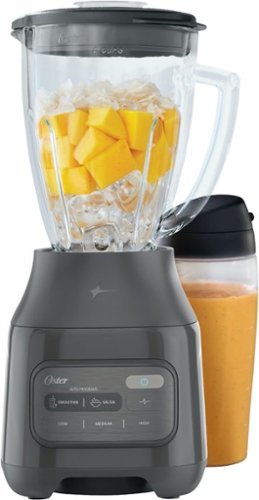
The Oster 2-in-1 Blender System is perfect for creating smoothies, frozen drinks, salsas, and more. Use it as a personal blender and take your drink to go with the included 20 oz. Blend-n-Go cup or blend and serve up your favorite recipes in the easy-to-clean 6-cup Boroclass glass jar. The powerful 800-watt motor and Crush 4 Pro stainless steel blade design work together to crush ice and blend your creations to perfection. Use this Oster blender as a smoothie maker with the Smoothie auto-program or make your favorite dips and salsas at the touch of a button with the Salsa auto-program. The simplified user interface allows for more intuitive blending control, with Low, Medium, and High manual blend settings, and Pulse functionality. Plus, the stylish, modernized design looks great on your countertop. With an All-Metal Drive designed for durable performance that lasts up to 10,000 blends, you'll never run out of recipes to blend.
Customer Rating

3
GOOD RESULTS, TAKES SOME EXPERIMENTING
on September 27, 2021
Posted by: TheOffice1234
from Lake Orion, MI
OSTER - OSTER® 2-IN-1 BLENDER SYSTEM WITH BLEND-N-GO™ CUP AND 800-WATT MOTOR – GRAY
GOOD RESULTS, TAKES SOME EXPERIMENTING
My experience with blenders normally is that you dump in the ingredients and hit blend until you get the consistency you desire. Because the bottom of the OSTER 2-IN-1 BLENDER is smaller than normal, you have to give a little more thought to what order you put in your ingredients, and also add more liquid than you may be used to including. You also have to take into account if you are adding frozen or fresh ingredients. Access to the blade was easily blocked by too many frozen ingredients in the “bottom”. The few recipes on the side of the box tell you to pay close attention to the order of ingredients. (The pictures don’t match the words, so pay attention to the words not the pictures).
After some experimenting, we were able to get a very good smoothie using both the larger and smaller containers. In general, and as advised on the insert, keep adding more liquid until it starts to blend properly.
I was not a fan of having to move the o-ring and blades between smaller and larger vessels, it would have been nice to have 2 sets of blades included as found on other higher end products. If you are primarily going to use the travel cup then just can just leave it off after each use, in which case you don’t have to move it back and forth.
The travel cup is nice, but the lid is really hard to open (it takes 2 hands). So I guess it is good to secure against leaking, but if you are driving you are going to want a straw and to leave it open, not sealed.
I wish there were more instructions and recipes besides reading the box for recipes and a few included pamphlets.
The motor gave off a burning smell the first few uses, but eventually that dissipated. It is pretty loud.
The sticker on the front (for the buttons) was already peeling off before it was even used.
I’m on the fence about fully recommending the unit. On one hand OSTER is a well known brand but this blender was more work than I want to deal with on a regular basis. I would say if you are primarily doing single cup smoothies of more or less the same recipe, and occasionally something larger then the OSTER 2-IN-1 BLENDER should serve you well. It like me you, you prefer just to dump in whatever comes to mind or you like larger batches, then you probably would want something with a larger base for easier access top the blades.
So I’m going to give this a recommendation, but only for single cup smoothies instead of general dump in whatever you want blending.
Remember 3 Stars = Average
Mobile Submission: False
I would recommend this to a friend!


Share this review:


+3points
3of 3voted this as helpful.
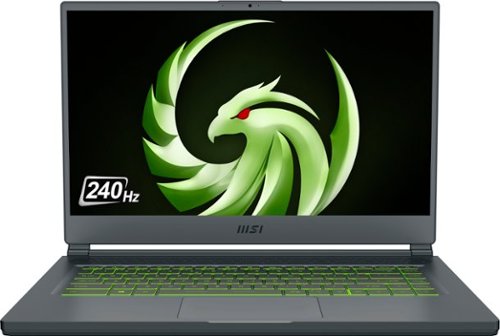
Unexpected. Unseen. Unreal. The Delta 15 AMD Advantage Edition uses the latest AMD Ryzen 7 5800H processor and Radeon RX 6700M graphics. Coming in at 4.19lbs light and 0.75in thin, the Delta 15 supports SmartShift, Smart Access Memory and Wi-Fi 6E for powerful performance inside a premium chassis. Break through and set off a new standard in gaming with the Delta 15.
Customer Rating

5
GREAT (and powerful) MSI DELTA GAMING LAPTOP
on September 20, 2021
Posted by: TheOffice1234
from Lake Orion, MI
MSI - DELTA 15.6" FHD 240HZ GAMING LAPTOP - RYZEN R7-5800 - RADEON RX6700M - 1TB SSD - 16GB MEMORY - BLACK
MODEL:DELTA15001
GREAT (and powerful) MSI DELTA GAMING LAPTOP
I’ve only ever heard great things about MSI Gaming Laptops and the MSI – DELTA Gaming laptop lives up to the hype. Since I’ve only used Nvidia GPU’s, I was not sure what to expect performance wise, but I was surprised how well the GPU (RX6700M) performs. Especially when paired with the ultra-fast CPU AMD RYZEN R7-5800H. Even when benchmarking with Unigine Superposition (which usually brings GPU’s to their knees) I was able to get up to 45 FPS in Extreme Mode (by comparison the Nvidia RTX 3050TI only got about 26 FPS). In real world gaming tests, the MSI-DELTA Gaming laptop easily blasted through anything I gave it, usually even at Ultra settings. So far, I’ve tested Doom Eternal, Star Wars Squadrons, and Forza 4 (which is really CPU / GPU / RAM intensive). Most of these are getting at least 100 FPS and closer to 200FPS in Doom for example. I’ve yet to start fine tuning the laptop to see if I can get more performance, but I assume I can get at least another 10% more after tweaking.
She does run hot though. When gaming, you will want to run this rig on a table and not on your lap.
The screen is bright, and colors seem accurate. I don’t have a spectrometer (or whatever it is called) to tell how true the colors are, but they seem really good to me. I was able to use it outside without any issues (on full brightness). Given that this will be used for gaming, it will almost always be plugged in, so I did not try to see exactly how long the batteries will last.
You should be aware that the MSI DELTA GAMING LAPTOP does not have a physical ethernet port. You can get a simple USB3 to Gb Ethernet for a few dollars just about anywhere.
What it does have instead of a physical ethernet port, is a 240hz screen, 1 TB of highspeed NVME storage, 16GB RAM (in 2 chips so you can run in dual channel mode), and the latest WiFi and Bluetooth versions.
The keyboard lights and colors can be controlled via included software. The keys themselves are only OK, they are not very tactile and are very smooth. That being said, I would be bringing a gaming keyboard and mouse with me, so that is not a huge deal. The trackpad was really responsive and plenty usable for example in first person shooters like Doom.
Overall, the MSI DELTA GAMING LAPTOP is one the best I’ve used in a long time. This will be my Go To system, when I don’t want to be tied down the big desktop system.
PRO’s
- 240hz Refresh Rate
- Great CPU / GPU Combo
- Plenty of Storage (1TB) and RAM (16GB)
- GPU with 10GB of VRAM
- Light Keyboard with ability to change colors
- Thin form factor
- USB 3.2 Gen 2 Port (Type C) (with DisplayPort function)
- Wi-Fi 6E / Bluetooth 5.2
- Qty (2) m.2 NVME Slots for SSD expansion according to the specs
- 240hz Refresh Rate
- Great CPU / GPU Combo
- Plenty of Storage (1TB) and RAM (16GB)
- GPU with 10GB of VRAM
- Light Keyboard with ability to change colors
- Thin form factor
- USB 3.2 Gen 2 Port (Type C) (with DisplayPort function)
- Wi-Fi 6E / Bluetooth 5.2
- Qty (2) m.2 NVME Slots for SSD expansion according to the specs
SETUP / MISC
I’m sure it was all about timing, but it was nice that the unit I received had a very recent versions of Win 10 build on it, so that I did not have to spend an hour doing the update / reboot thing that is typical with most laptops. The laptop was fully up to date in only a few minutes. Everything out of the box if fully automated, and it boosts itself into higher performance mode when needed.
I’m sure it was all about timing, but it was nice that the unit I received had a very recent versions of Win 10 build on it, so that I did not have to spend an hour doing the update / reboot thing that is typical with most laptops. The laptop was fully up to date in only a few minutes. Everything out of the box if fully automated, and it boosts itself into higher performance mode when needed.
SUMMARY / RECOMMENDATION
The MSI DELTA GAMING LAPTOP is good to go out of the box, there is nothing more that is really needed. It has plenty of everything. I’m not even sure if upgrading the RAM to say 32GB would make that much of a difference in real world use.
I have no hesitation recommending the MSI DELTA GAMING LAPTOP to anyone in the market for a high-performance laptop.
I have no hesitation recommending the MSI DELTA GAMING LAPTOP to anyone in the market for a high-performance laptop.
Mobile Submission: False
I would recommend this to a friend!


Share this review:


+11points
16of 21voted this as helpful.
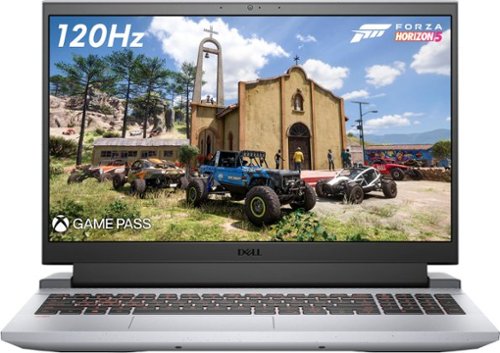
Experience the thrill of the game with the new Dell G15 gaming laptop. Featuring AMD~ Ryzen processors, NVIDIA~ GeForce~ graphics, improved thermal design and Game Shift technology.
Customer Rating
5
EXCELLENT ENTRY LEVEL GAMING LAPTOP – (add RAM)
on September 20, 2021
Posted by: TheOffice1234
from Lake Orion, MI
DELL - G15 - 15.6" FHD GAMING LAPTOP - AMD RYZEN 7 - 8GB MEMORY - NVIDIA GEFORCE RTX 3050 TI GRAPHICS - 512GB SSD - GRAY
MODEL:G15RE-A954GRY-PUS
EXCELLENT ENTRY LEVEL GAMING LAPTOP – (needs more RAM)
At its foundation the DELL - G15 has the makings of an excellent entry-level gaming laptop. It has a great processor (AMD Ryzen 7 5800H). It has a relatively powerful Nvidia 3050TI GPU, it has all the right ports (usb 3.2, hdmi, physical ethernet connectivity and more). The screen is fantastic. It is one of the best screens I have ever seen on a laptop. It is well designed for maximum cooling and seems sturdy.
If you want to play top tier games at better quality, you will need to invest a small amount in upgrading (at least doubling) the system RAM. Some games won’t even load with only 8GB of system RAM (for example FORZA 4). Most games run pretty well (DOOM Eternal, Star Wars Squadrons, more) at HIGH and even Ultra settings at around +/- 100fps. Although on DOOM for example if you try to put settings above HIGH it will remind you that you don’t have enough VRAM (only 4GB of Video RAM on the 3050ti more on this later).
Overall, the DELL - G15 has a good solid build and high quality components throughout. You will want to invest is more RAM (inexpensive upgrade). Anytime that you can find a gaming computer at this price point with discrete graphics, especially a current generation RTX card you should grab it.
PRO’s
- Fantastic screen, very sharp and crips text and graphics
- Lots of Ports for external connectivity
- Lots of fans and vents for cooling
- Good Performing CPU and GPU
- Fantastic screen, very sharp and crips text and graphics
- Lots of Ports for external connectivity
- Lots of fans and vents for cooling
- Good Performing CPU and GPU
SETUP / MISC
The DELL - G15 was easy enough to setup and get started, with the usual windows update and reboot cycles. The DELL - G15 update software also found upgrades that windows missed and loaded them easily enough. There were the normal few bloatware programs included that are easily removed. Due to the power hungry GPU there is a giant power brick (120 watts). Pressing the “G” button instantly puts the laptop into high performance mode and it works as expected. The keyboard had a good feel and felt right for gaming and the RED backlights are a nice touch. It is a heavy laptop (nearly 6 lbs) but for some reason it does not feel that heavy. The screen is mounted a little forward on the base which makes it better balanced. I was able to use the laptop outside and still see the screen very well. I tried not to get too bogged down in test results / benchmarks and focus instead of its intended usability (A Gaming Laptop). See my pics for various benchmarks if you are curious. I did not extensively test the battery life, as if you are gaming you are going to want it plugged in to power the GPU at full speed. It lasted at least a few hours while I was outside. The cooling is fantastic, even when running it “on my lap” it was not too hot. The cooling system is well thought out and probably accounts for the added weight.
The DELL - G15 was easy enough to setup and get started, with the usual windows update and reboot cycles. The DELL - G15 update software also found upgrades that windows missed and loaded them easily enough. There were the normal few bloatware programs included that are easily removed. Due to the power hungry GPU there is a giant power brick (120 watts). Pressing the “G” button instantly puts the laptop into high performance mode and it works as expected. The keyboard had a good feel and felt right for gaming and the RED backlights are a nice touch. It is a heavy laptop (nearly 6 lbs) but for some reason it does not feel that heavy. The screen is mounted a little forward on the base which makes it better balanced. I was able to use the laptop outside and still see the screen very well. I tried not to get too bogged down in test results / benchmarks and focus instead of its intended usability (A Gaming Laptop). See my pics for various benchmarks if you are curious. I did not extensively test the battery life, as if you are gaming you are going to want it plugged in to power the GPU at full speed. It lasted at least a few hours while I was outside. The cooling is fantastic, even when running it “on my lap” it was not too hot. The cooling system is well thought out and probably accounts for the added weight.
SUMMARY / RECOMMENDATION
As it is configured at this time of review the DELL G15 (MODEL:G15RE-A954GRY-PUS) would be ideal for most any student (through college level), and casual gamers who want some portability. For a “student” computer is punches way above others in a similar price range. For a gaming computer it has a good base to start with, and can be expanded for more memory / storage hungry games. I think overall it is one of the better values to performance and potential performance out there is this form factor.
As it is configured at this time of review the DELL G15 (MODEL:G15RE-A954GRY-PUS) would be ideal for most any student (through college level), and casual gamers who want some portability. For a “student” computer is punches way above others in a similar price range. For a gaming computer it has a good base to start with, and can be expanded for more memory / storage hungry games. I think overall it is one of the better values to performance and potential performance out there is this form factor.
ONE AREA OF CAUTION ABOUT THE GPU:
Although it has a powerful GPU (Nvidia RTX 3050ti) with RAY TRACING and DLSS, this eventually will be the limiting factor for heavy gaming, as it only has 4GB of video RAM (VRAM), which can’t be expanded. This is a problem from NVIDIA (not Dell), as the GPU is plenty powerful, benchmarks well, and normally plays well. In some cases like DOOM it forces you into lower quality settings.
I hate to label this as an “entry level” gaming laptop, as the CPU is fantastic and very high end, the screen is fantastic and very high end, but the GPU has bottlenecks keeping it from ever being much more than an upper “entry level” gaming laptop. The next Tier of GPU’s will probably increase your costs by about 25-50%.
Although it has a powerful GPU (Nvidia RTX 3050ti) with RAY TRACING and DLSS, this eventually will be the limiting factor for heavy gaming, as it only has 4GB of video RAM (VRAM), which can’t be expanded. This is a problem from NVIDIA (not Dell), as the GPU is plenty powerful, benchmarks well, and normally plays well. In some cases like DOOM it forces you into lower quality settings.
I hate to label this as an “entry level” gaming laptop, as the CPU is fantastic and very high end, the screen is fantastic and very high end, but the GPU has bottlenecks keeping it from ever being much more than an upper “entry level” gaming laptop. The next Tier of GPU’s will probably increase your costs by about 25-50%.
FINAL WORD
Overall, it is a great gaming laptop for the price. If this is your price point, then this is probably the best laptop you can get in today’s market.
Overall, it is a great gaming laptop for the price. If this is your price point, then this is probably the best laptop you can get in today’s market.
Mobile Submission: False
I would recommend this to a friend!


Share this review:


+14points
23of 32voted this as helpful.
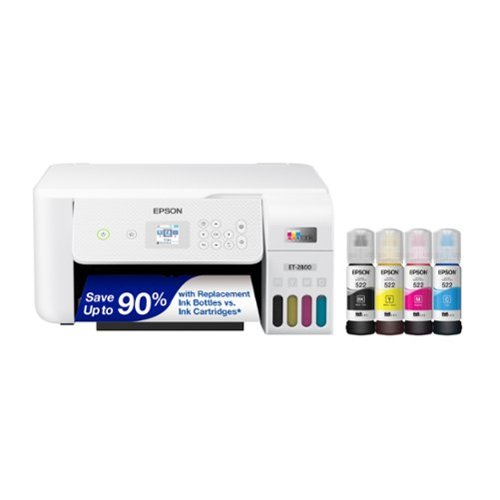
Your family needs a printer that~s fast, affordable, and easy to use. That~s why we developed the EcoTank ET-2800 ~ an innovative cartridge-free solution that uses high-capacity, easily refillable ink tanks. So you~ll worry less about running out of ink, and save a lot on replacement ink (1). The ET-2800 features genuine Epson print quality, a high-resolution flatbed scanner, and convenient color display ~ making it the ideal basic home printer.
Customer Rating
5
GOOD QUALITY – BASIC SUPERTANK ALL-IN-ONE PRINTER
on September 17, 2021
Posted by: TheOffice1234
from Lake Orion, MI
REVIEW: EPSON - ECOTANK ET-2800 WIRELESS COLOR ALL-IN-ONE CARTRIDGE-FREE SUPERTANK PRINTER WITH SCAN AND COPY
MODEL:C11CJ66202
GOOD QUALITY – BASIC SUPERTANK ALL-IN-ONE PRINTER / SCANNER
The ECOTANK ET-2800 WIRELESS COLOR ALL-IN-ONE CARTRIDGE-FREE SUPERTANK is winning me over. The scan quality is actually very good, and the print quality is good. Actually, the color printing is more clear than the black printing in my tests.
If you need a good no frills all around color printer / scanner the - ECOTANK ET-2800 WIRELESS COLOR ALL-IN-ONE CARTRIDGE-FREE SUPERTANK is a safe bet.
It does not win any speed records, but the quality is overall pretty good. When I compare scans at 600DPI to other scanners I have, it is almost identical (see pics). The scans from the Epson were a touch softer, but the Epson did better at capturing brighter images.
The print speed is slow, especially at high quality, but within stated specs (so no points off). As an example, I printed our 15 page appraisal report from our realtor. It contains a mixture of text, pictures, and charts. It took about 10 minutes to complete the printout.
The print speed is slow, especially at high quality, but within stated specs (so no points off). As an example, I printed our 15 page appraisal report from our realtor. It contains a mixture of text, pictures, and charts. It took about 10 minutes to complete the printout.
I would suggest you download and install the PC software from the Epson site to be able to use advanced features when scanning. I used the suggested Android app to scan and print which worked easily enough, but the results were poor, event when set to HQ. Still, if you need to print from your phone, it is probably not a situation that requires high quality.
PRO’s
- Very Good Scanning
- Good Enough Printing Quality for Occasional use
- WiFi Connectivity
- Copy Feature does not require a pc and works very well (see pic)
- Very Good Scanning
- Good Enough Printing Quality for Occasional use
- WiFi Connectivity
- Copy Feature does not require a pc and works very well (see pic)
WHAT IS A SUPERTANK PRINTER?
Back in the olden days (5-15 years ago), you bought a color ink jet printer for $59, but then the ink cartridges were up to $80 each (possibly even for each color). For infrequent users, often times, the ink would dry up before you came anywhere near using all the ink. So, off to the store to spend another $100 on ink. My solution at the time (15 years ago) was to get a color laser printer although more expensive ($500) initially, it allowed me to run 1-2 years before needed to replace cartridges. A few years ago all the ink jet makers started to switch to a supertank method where you initially pay a little more for the printer, but it usually comes with enough ink (via poured in bottles of ink) to last a few years for average home use. We probably print 5-10 pages per week. We have a different supertank printer (without scanner) and after 1.5 years we have only used about 1/2 of the included ink.
Back in the olden days (5-15 years ago), you bought a color ink jet printer for $59, but then the ink cartridges were up to $80 each (possibly even for each color). For infrequent users, often times, the ink would dry up before you came anywhere near using all the ink. So, off to the store to spend another $100 on ink. My solution at the time (15 years ago) was to get a color laser printer although more expensive ($500) initially, it allowed me to run 1-2 years before needed to replace cartridges. A few years ago all the ink jet makers started to switch to a supertank method where you initially pay a little more for the printer, but it usually comes with enough ink (via poured in bottles of ink) to last a few years for average home use. We probably print 5-10 pages per week. We have a different supertank printer (without scanner) and after 1.5 years we have only used about 1/2 of the included ink.
I have a small concern about how fast I’m already burning through ink on the ECOTANK ET-2800 WIRELESS COLOR ALL-IN-ONE CARTRIDGE-FREE SUPERTANK. I’ve printed about 30 pages (HQ and lots of pics) and my ink levels are already down about 20% from where I started. Fortunately, INK is only $14 / bottle. I normally don’t print pics or HQ, so I assume my consumption rate will decline.
SETUP
I’m not going to lie, just about every device (this one included) that tries to make you do setup over the phone app is a huge hassle.
My advice is to do the setup manually from the control panel screen on the printer and save yourself from pulling your hair out. (I don’t have that much to lose anymore).
My advice is to do the setup manually from the control panel screen on the printer and save yourself from pulling your hair out. (I don’t have that much to lose anymore).
I followed the quick start guide and tried to do the install form the phone app. At first it could not see the printer on the default screen. Then I hit “menu” and “+” to add a printer, and it still was not seeing the printer. Then, as I started to power down the printer and suddenly it showed up in the phone app. I restarted the printer, and using the “+” method, it found the printer and nicely walked me step by step filling the ink and so on. Then it came time to enter my wifi information in the phone app for the phone to configure the printer. As soon as I hit “OK/SAVE” the phone lost contact with the printer and I could never get it back.
Finally, I used the control panel on the printer to complete the WIFI setup, and this time it worked. The printer connected to my network, and it even found and downloaded new firmware without needing a screen.
This time when I launched the phone app, the printer was found and I could scan / print from my phone, which was nice.
SUMMARY / RECOMMENDATION
If like me, you don’t print a lot (for home use) and sometimes need to scan, then the ECOTANK ET-2800 WIRELESS COLOR ALL-IN-ONE CARTRIDGE-FREE SUPERTANK does a very good job, without breaking the bank. If you need speed, then you need look at higher end models. The scanner is only a flatbed, so if you need a document feeder for scanning, then you need to look at a higher model. These are not negatives as the box even says right on the label “BASIC HOME PRINTER”. I can’t say it any better.
If like me, you don’t print a lot (for home use) and sometimes need to scan, then the ECOTANK ET-2800 WIRELESS COLOR ALL-IN-ONE CARTRIDGE-FREE SUPERTANK does a very good job, without breaking the bank. If you need speed, then you need look at higher end models. The scanner is only a flatbed, so if you need a document feeder for scanning, then you need to look at a higher model. These are not negatives as the box even says right on the label “BASIC HOME PRINTER”. I can’t say it any better.
Mobile Submission: False
I would recommend this to a friend!


Share this review:


+4points
14of 24voted this as helpful.

La Specialista Prestigio is a beautifully designed espresso machine that gives you more control to handcraft consistently great espresso-based coffee drinks from the comfort of your home. We~ve incorporated Sensor Grinding Technology, Smart Tamping, Dynamic pre-infusion and Active Temperature Control with three temperature profiles to make the process more streamlined and personalized, while preserving the hands-on creativity and satisfaction of brewing espresso the right way. With no additional heat-up time, and minimal cleanup, La Specialista Prestigio empowers you to handcraft your espresso the right way.
Customer Rating
5
ESPRESSO MACHINE GOODNESS 4 YOUR INNER BARISTA
on September 12, 2021
Posted by: TheOffice1234
from Lake Orion, MI
REVIEW: DE'LONGHI - LA SPECIALISTA PRESTIGIO ESPRESSO MACHINE WITH DUAL HEATING SYSTEM - STAINLESS STEEL
Model:EC9355M
Model:EC9355M
Best Buy Tech Insider Network
ESPRESSO MACHINE GOODNESS 4 YOUR INNER BARISTA
The DE'LONGHI - LA SPECIALISTA PRESTIGIO ESPRESSO MACHINE is a great balance of manual processes and automatic (hybrid) brewing that lets you control the major aspects good coffee making, without needing to become an engineer. Once you get the hang of it, fantastic coffee drinks await you.
The DE'LONGHI - LA SPECIALISTA PRESTIGIO ESPRESSO MACHINE gets us closer to the process and more involved in the making of a perfect cup of espresso / coffee including lattes and cappuccinos. There is a small learning curve to produce the coffee we liked best. It is not hard to use, but takes some patience experimenting with Temps, Grinds, Levels, and so on to zero in on the perfect cup (it took us about 4 hours and 1 pound of beans). Fortunately, there are handy pictorial guides in the quick start manual that show you what to do if your drink it too strong or weak or bitter, etc.
The main thing that you need to know is that every type (roast and blend) of bean is a little different, so your settings for one style of bean, won’t work for the next style bean. In general, our advice is to pick the bean you want for a period of time then take your time to zero in on the perfect cup, and then leave your settings alone until the next time you switch up your beans. Because the DE'LONGHI - LA SPECIALISTA PRESTIGIO ESPRESSO MACHINE is semi-manual, you can also easily grind your own beans, outside the automatic grind process, and still brew a custom cup of specialty coffee now and then (just spin the level knob to the picture of the scoop).
The water gets plenty hot (just under 200 degrees) on max temp setting.
BEST FEATURES
- Built-in Burr Grinder and a Decent Sized Hopper
- High Quality Overall Build
- Semi Automatic + Semi Manual puts you closer to the experience
- Large water reservoir
- High Quality Accessories
- “My Menu” for your own tweaks to the built-in recipes (eg more / less water etc)
- Dual heaters means no waiting to use the frothing wand for lattes and cappuccinos
- Built in Tamper for perfect presses
- Relatively Quiet Operation compared to other models we have owned.
- Separate hot water output for tea or cocoa (not mixed with coffee grounds)
- Built-in Burr Grinder and a Decent Sized Hopper
- High Quality Overall Build
- Semi Automatic + Semi Manual puts you closer to the experience
- Large water reservoir
- High Quality Accessories
- “My Menu” for your own tweaks to the built-in recipes (eg more / less water etc)
- Dual heaters means no waiting to use the frothing wand for lattes and cappuccinos
- Built in Tamper for perfect presses
- Relatively Quiet Operation compared to other models we have owned.
- Separate hot water output for tea or cocoa (not mixed with coffee grounds)
RESULTS
The DE'LONGHI - LA SPECIALISTA PRESTIGIO ESPRESSO MACHINE makes some of the best coffee we have had. It takes experimentation to get the settings just right. The crema is not especially tall, but it is strong and appropriate for a non-aerated crema. It is full bodied with a great aroma. The foaming wand works very well, and it make very good steamed or frothed milk.
SUMMARY / RECOMMENDATION
Overall, the DE'LONGHI - LA SPECIALISTA PRESTIGIO ESPRESSO MACHINE gives you all the tools you need to make a great cup of espresso, coffee, or americano as well as other specialty drinks. As a semi-automatic (hybrid) machine, it has a little longer learning curve then De’Longhi’s other fully automatic models, but it is worth the effort. Besides, what a great way to spend a fall weekend day, experimenting and sampling coffee with your significant other. I think it is best suited for those who tend to use the same bean for longer periods of time, instead of changing bean types 4 times per day. If you do change beans a lot, then you probably also want to invest in a separate dedicated grinder so you can run the machine in manual mode without changing up your standard grind settings.
I fully recommend the DE'LONGHI - LA SPECIALISTA PRESTIGIO ESPRESSO MACHINE for anyone wanting a better coffee drink and an overall more immersive experience but is not yet ready for a 100% manual machine.
---------
SOME TIPS:
- Follow the picture guides in the quick start where it shows you how to adjust your grind level based on your brew results (color, crema, etc).
- It is important that each time you change the grind (only change the setting when the grinder is running) that you also adjust the fill level knob to completely fill the portafilter to the “perfect brew line” inside the filter basket. Finer grinds take up less space so then you need to increase the fill level. Also keep in mind it will take about 2 cycles to see the full effect of your changes.
- The manual says to start at lowest fill level and work your way up. This took us forever. We ended with a grind of about 2.5 and a fill level of about 95% (estimates on the knob position) for our medium dark roast decaf to produce the desired results. This was far from the guide’s suggested starting points for this bean roast type.
- Be prepared to toss out a lot of beans and lot of coffee while you zero in on your perfect cup. There is no shortcut. You can’t start with a cheap grocery store bean and plan to switch to your $20 / lb bean after you zero in on the cheap stuff. Because every bean roast is different, you need to experiment with the beans you plan to use (keep a log). Maybe once you are an expert you can look at a bean and know that you need x,y,z settings. Still, that will just be a starting point. We used about 1 pound of beans getting it perfect for that particular bean.
- You can’t start the brew process with the portafilter already in place under the grinder. Snaping the portafilter in, is what starts the grind process.
- There is a small wire “ring” inside the portafilter. This is needed to hold the filter basket in place, don’t remove it or your filter basket will get stuck on the group head (the output pipes) and not stay in the portafilter assembly. The portafilter has a small indent on the right side where you can force off the single cup filter basket and replace it with the dual cup filter basket. We could find no mention of this ring clip anywhere, so we took it out thinking it was not needed, but later had to reinstall it.
- If you want to customize your brewer (eco mode, auto off, custom recipes) you will need to pay close attention to the cryptic instructions in the bigger manual. Example, press and hold 2 buttons for 10 seconds, press coffee for auto on, etc. You won’t be able to do this without the manual. Manual change all the time, but in my manual it is page 13 under “Menu Settings”.
- It is a tall unit (about 17 inches) so although it would fit under our cabinets, we could not reach the water reservoir (in the back) or refill the beans (with only ½ inch clearance to our cabinets). We ended up putting it at an angle which gave us just enough room to access both the reservoir and the bean hopper. (see pics)
- To get only hot water, (for tea or instant hot chocolate) once the machine is on, just lightly tap the “tea cup” picture. I could not find this mentioned in any manual. I guess it is too obvious to mention, but I kept triggering rinse mode instead by pressing it for too long.
- To Rinse the unit (which you should do daily at least), press and hold the tea cup picture. It will show some red raindrops and take a few minutes to run its cycle. There is also a stopper of some sort for a more advanced cleaning. I did not recall seeing the process in the manual, but maybe it is in there and I’ll look again. I assume you use it force water to backflush the group head assembly.
- ALWAYS USE A GOOD QUALITY WATER FILTER WITH HIGH TEMP / HIGH PRESSURE DEVICES. I can’t emphasize this enough. You can get a cheap inline water filter to put under your sink for about $40 at any big box or local hardware store. At work (and home) we used to burn out our single cup coffee makers about every 9 months. After installing a simple filter, we are now 3 years without losing a single maker (5 in total). Plus, your coffee will taste better with most of the fluoride and other chemicals filtered out.
- Follow the picture guides in the quick start where it shows you how to adjust your grind level based on your brew results (color, crema, etc).
- It is important that each time you change the grind (only change the setting when the grinder is running) that you also adjust the fill level knob to completely fill the portafilter to the “perfect brew line” inside the filter basket. Finer grinds take up less space so then you need to increase the fill level. Also keep in mind it will take about 2 cycles to see the full effect of your changes.
- The manual says to start at lowest fill level and work your way up. This took us forever. We ended with a grind of about 2.5 and a fill level of about 95% (estimates on the knob position) for our medium dark roast decaf to produce the desired results. This was far from the guide’s suggested starting points for this bean roast type.
- Be prepared to toss out a lot of beans and lot of coffee while you zero in on your perfect cup. There is no shortcut. You can’t start with a cheap grocery store bean and plan to switch to your $20 / lb bean after you zero in on the cheap stuff. Because every bean roast is different, you need to experiment with the beans you plan to use (keep a log). Maybe once you are an expert you can look at a bean and know that you need x,y,z settings. Still, that will just be a starting point. We used about 1 pound of beans getting it perfect for that particular bean.
- You can’t start the brew process with the portafilter already in place under the grinder. Snaping the portafilter in, is what starts the grind process.
- There is a small wire “ring” inside the portafilter. This is needed to hold the filter basket in place, don’t remove it or your filter basket will get stuck on the group head (the output pipes) and not stay in the portafilter assembly. The portafilter has a small indent on the right side where you can force off the single cup filter basket and replace it with the dual cup filter basket. We could find no mention of this ring clip anywhere, so we took it out thinking it was not needed, but later had to reinstall it.
- If you want to customize your brewer (eco mode, auto off, custom recipes) you will need to pay close attention to the cryptic instructions in the bigger manual. Example, press and hold 2 buttons for 10 seconds, press coffee for auto on, etc. You won’t be able to do this without the manual. Manual change all the time, but in my manual it is page 13 under “Menu Settings”.
- It is a tall unit (about 17 inches) so although it would fit under our cabinets, we could not reach the water reservoir (in the back) or refill the beans (with only ½ inch clearance to our cabinets). We ended up putting it at an angle which gave us just enough room to access both the reservoir and the bean hopper. (see pics)
- To get only hot water, (for tea or instant hot chocolate) once the machine is on, just lightly tap the “tea cup” picture. I could not find this mentioned in any manual. I guess it is too obvious to mention, but I kept triggering rinse mode instead by pressing it for too long.
- To Rinse the unit (which you should do daily at least), press and hold the tea cup picture. It will show some red raindrops and take a few minutes to run its cycle. There is also a stopper of some sort for a more advanced cleaning. I did not recall seeing the process in the manual, but maybe it is in there and I’ll look again. I assume you use it force water to backflush the group head assembly.
- ALWAYS USE A GOOD QUALITY WATER FILTER WITH HIGH TEMP / HIGH PRESSURE DEVICES. I can’t emphasize this enough. You can get a cheap inline water filter to put under your sink for about $40 at any big box or local hardware store. At work (and home) we used to burn out our single cup coffee makers about every 9 months. After installing a simple filter, we are now 3 years without losing a single maker (5 in total). Plus, your coffee will taste better with most of the fluoride and other chemicals filtered out.
Mobile Submission: False
I would recommend this to a friend!


Share this review:


+8points
8of 8voted this as helpful.
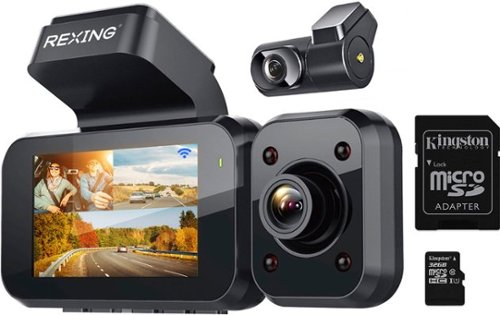
REXING V5 Plus, The ultimate modular 4K camera. The V5 Plus includes a 4K UHD 3840x2160@30fps front facing camera that has 170~ ultra-wide-angle lenses and can record everything in front of your vehicle in crystal clear 4K quality. Added hardware includes a 32GB SD Card, 1080p resolution cabin camera and a 1080p rear facing camera to cover you on the inside and the back. Record all three front, rear and cabin cameras together at the same time at 1080p resolution. Keep your hands on the wheel & use the special voice control commands such as "take a picture" or "start recording" etc. Other notable features include built-in GPS, mirophone, speaker, enhanced night vision, WiFi, mobile app, loop recording, G-sensor and parking monitor.
Customer Rating
5
GOOD VALUE 4K DASHCAM 3 CAMERA PACKAGE REXING V5
on August 28, 2021
Posted by: TheOffice1234
from Lake Orion, MI
REXING - V5 PLUS 3-CHANNEL 4K DASH CAM 2.7 LCD WITH VOICE CONTROL, WI-FI, GPS - BLACK
Model:BBYV5PLUS
Model:BBYV5PLUS
Best Buy Tech Insider Network
GOOD VALUE 4K DASHCAM 3 CAMERA PACKAGE REXING V5
The REXING - V5 PLUS DASHCAM is an attractive and affordable bundle of gear, with 3 cameras, included memory card and more.
There is a lot to like about the REXING - V5 PLUS DASHCAM. For example, all the camera lenses are adjustable to allow for optimal aiming. Everything you need to get up and running is included. There is also a “starter” 32 GB SD memory card and cables, and mounting gear.
There is a lot to like about the REXING - V5 PLUS DASHCAM. For example, all the camera lenses are adjustable to allow for optimal aiming. Everything you need to get up and running is included. There is also a “starter” 32 GB SD memory card and cables, and mounting gear.
A few things you should know that are not obvious from the description. If you choose to operate all 3 cameras at the same time, then all your images are all downgraded from 4K to 1080p. If you want 4K then you can only record one 4K image and up to one other 1080P image (for example front 4K and rear 1080p). In my case, I really don’t need the cabin camera, so I’m fine with just using front and rear view.
The 4K vs 1080p issue probably does not matter as much as it might sound. The image sensor listed on the REXING - V5 PLUS website is rated for 5MP (megapixels). To get a true 4K image you need at least an 8MP sensor. So, if this information is correct, then the 4K image is being upscaled anyway (which is common on many cameras in this range and not necessarily a show stopping issue).
To use the rear camera, you need to snake a cable from the camera head unit to the rear window (it is not wireless).
You should also know that there is no suction cup installation, only the industrial sticky tape mounts are provided. Since I lease my car, (and it is due to be turned in shortly), I did not want to risk permanently mounting the dashcam. I assume there is a solvent that would remove the tape if needed. On the plus side this means the REXING - V5 PLUS DASHCAM is not likely to fall from your windshield and cause a distraction as I have experienced with other suction cup mounted dashcams. The camera can be removed from the window mount, the window mount is more or less permanently stuck to the window. (a little 2 inch square).
Picture Quality [PQ] on the REXING - V5 PLUS DASHCAM is good. The front facing camera has the best image quality of the 3 cameras. The rear camera is also very good. However, the interior camera is not that good at all. Everything in the cabin has a purple tint that is very easy to notice (see pics). My roof is black but shows as bright purple in the recordings. In a side-by-side test with a different 4K camera my wife and I both preferred the overall appearance of the REXING - V5 PLUS DASHCAM image, but it was artificially softened and thus missing enough detail to easily read license plate numbers on the car in front of you.
The Voice Control Commands work well for example “Turn on the Screen”, “Turn on WiFi”.
PROS
- Three Included Cameras (Front, Rear, Cabin) for Three Streams 3-channel recording
- All Cameras can be angled or rotated once in place to fine tune where they are pointed
- Cables are plenty long enough and the rear cable is in two parts for easily hiding wires
- Seems like a Sturdy Unit Overall
- Includes all required mounting hardware
- Includes Memory Card
- Voice Commands that actually work well
- Three Included Cameras (Front, Rear, Cabin) for Three Streams 3-channel recording
- All Cameras can be angled or rotated once in place to fine tune where they are pointed
- Cables are plenty long enough and the rear cable is in two parts for easily hiding wires
- Seems like a Sturdy Unit Overall
- Includes all required mounting hardware
- Includes Memory Card
- Voice Commands that actually work well
Rexing support was excellent and we were able to work together to find a bug preventing the phone app to connect via WiFi to the dashcam. This updated app version will probably be released by the time this review is published. The app is primarily used to view or download videos to your phone. If you want to do real movie processing you will probably be better off removing the SD card from the dashcam and editing movies on a real computer. I do wish the app allowed you to change all the dashcam settings instead of only a few, but again, once you have it set the way you want, you probably wont need the settings anyway.
Physically, the installation of the REXING - V5 PLUS DASHCAM was easy and straight forward. The menu keys (not touch screen) were a little cumbersome, though you probably only have to use them for initial setup. There is no tilt or swivel of the screen itself, so wherever you stick the mounting bracket that is where it goes. Really, you don’t want the distraction anyway, so my suggestion is to put as far away from you as possible.
RECOMMENDATION
If you are after an affordable and complete all in one 3 stream camera system (maybe you drive a car for hire), then the REXING - V5 PLUS DASHCAM is a great choice for consideration. If you just want the best forward facing dashcam image you can get, you might want to shop for better optics in other models.
Mobile Submission: False
I would recommend this to a friend!


Share this review:


+3points
4of 5voted this as helpful.
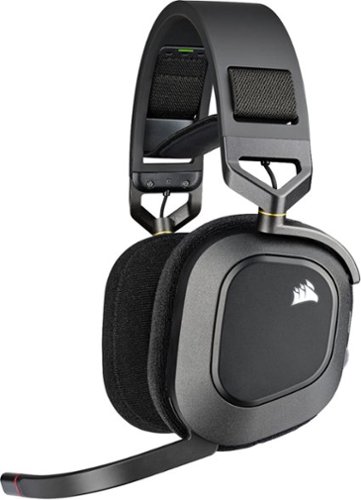
The CORSAIR HS80 RGB WIRELESS Gaming Headset connects with hyper-fast SLIPSTREAM WIRELESS, delivering incredibly detailed sound through custom-tuned 50mm neodymium audio drivers. Immersive Dolby Atmos on PC puts you into the game with three-dimensional precision, while a broadcast-grade omni-directional microphone captures your voice with outstanding clarity. Play in plush comfort with memory foam earpads and a stress-free floating headband design, with years of durability thanks to sturdy construction reinforced with aluminum. Connect to PC with USB wired for 24bit/96kHz sound or wirelessly to PC, PS5, and PS4. Powerful CORSAIR iCUE software enables in-depth customization of audio settings and RGB lighting, letting you hear every shot, step, and shout like never before.
Customer Rating
4
GOOD WIRELESS ATMOS RGB GAMING HEADSET FRM CORSAIR
on August 18, 2021
Posted by: TheOffice1234
from Lake Orion, MI
CORSAIR HS80 RGB WIRELESS GAMING HEADSET
Best Buy Tech Insider Network
GOOD WIRELESS ATMOS RGB GAMING HEADSET FROM CORSAIR
The CORSAIR HS80 RGB WIRELESS headset is a nice all-around wireless gaming headset. It has plenty of features and an overall good quality build and sound. It is not as heavy (~370 grams) as other headsets in a similar price range (which is a good thing), and the fact it is wireless (cordless) makes it good and comfortable for long gaming sessions. I did find a noticeable difference between using it wirelessly and wired (via the included USB direct plug). In wireless mode (PC or PS5) the sound quality was pretty good (let’s call it 7 / 10 as an example). Once I plugged it in wired mode it really jumped up in fidelity (maybe 8 / 10). By way of an analogy, this is like if you only listed to satellite radio (which is highly compressed), then suddenly switch to a lossless format like FLAC and then you realize you were missing a good amount of detail. Anyway, I recommend wired mode for the best sound detail, and wireless for untethered comfort. The CORSAIR SLIPSTREAM WIRELESS technology did a good job of keeping up with the games. The manual suggests wired mode for HD audio.
The CORSAIR HS80 continues the trend of “floating” headsets, by having a secondary strap inside the main headset band that moves some of the weight from your ears to the top of your head. This makes the HS80 feel lighter than it is (again, a good thing). The adjustments for the inside strap is fabric and it is secured via Velcro like fasteners. I can see the value of a light weight fabric that is breathable where it touches your head. I welcome the fact that it can be adjusted as I have a larger head and at first it was too tight.
The microphone is good quality and flips up out of the way to mute. There are pleasant audio prompts in the headset that tell you for example if your mic is muted, or the headset is charging, etc.
The ear cups are a little smaller than I’ve experienced on other brands and the padding is a little firmer (not good or bad, just different). On one hand a firmer ear cup means some air movement so that your ears don’t sweat. On the other hand I found sounds leaked in a little more on the HS80, so it was not as immersive. One side note, there is not 3.5mm analog input, incase that is important to you.
The battery life lasted through my 8 hours of testing. I think it is rated for up to 20 hours.
SOUND QUALITY
Audio is highly subjective; you have to test for yourself and work your way through speakers and headsets until you find that sweet spot for your tastes. My sweet spot is strong bass (but not muffled) and crisp high notes. I downloaded and installed the ATMOS software. I also ran several ATMOS test videos (instead of just games) to test the surround sound experience. I compared the CORSAIR HS80 to 3 other wired and wireless headsets using the same audio tracks / games, just to make sure I was hearing what I thought I was hearing. Here are my subjective ratings. (10 = Best)
Audio is highly subjective; you have to test for yourself and work your way through speakers and headsets until you find that sweet spot for your tastes. My sweet spot is strong bass (but not muffled) and crisp high notes. I downloaded and installed the ATMOS software. I also ran several ATMOS test videos (instead of just games) to test the surround sound experience. I compared the CORSAIR HS80 to 3 other wired and wireless headsets using the same audio tracks / games, just to make sure I was hearing what I thought I was hearing. Here are my subjective ratings. (10 = Best)
SURROUND SEPARATION (Spatial Placement of Sound Objects) = 9/10
OVERALL SOUND CLARITY (was anything muddy sounding) = 8/10
BASS NOTES / RUMBLING / EXPLOSIONS = 6/10
CRISP HIGH NOTES = 8/10
ENVELOPING SOUND (immersive sound envelope) = 7/10
OVERALL SOUND CLARITY (was anything muddy sounding) = 8/10
BASS NOTES / RUMBLING / EXPLOSIONS = 6/10
CRISP HIGH NOTES = 8/10
ENVELOPING SOUND (immersive sound envelope) = 7/10
I played a little with mixer settings, but with the ATMOS software enabled it pretty much takes over all the sound settings. The HS80 has better surround separation than any other headsets I’ve tested. I did find the bass was a little lacking for my particular taste. If you disable the ATMOS controls you can get more bass, but at the cost of more spatial awareness brought by ATMOS.
MICROPHONE QUALITY
The microphone quality is very good, and others could hear me clearly. They also could hear some of the background noise around me as the microphone is very sensitive. I was testing in my basement and they could tell when the furnace was running.
The microphone quality is very good, and others could hear me clearly. They also could hear some of the background noise around me as the microphone is very sensitive. I was testing in my basement and they could tell when the furnace was running.
SETUP / ICUE SOFTWARE
Before I plugged anything in, I made sure to download the latest ICUE Software from CORSAIR and then I plugged in the headset. It found the headset easily and updated the firmware on my HS80 and my CORSAIR keyboard. With the ICUE software, you can adjust the LED’s on the headset as you would any other Corsair device, such as keyboards or fans. The lights can be disabled to save battery life.
Before I plugged anything in, I made sure to download the latest ICUE Software from CORSAIR and then I plugged in the headset. It found the headset easily and updated the firmware on my HS80 and my CORSAIR keyboard. With the ICUE software, you can adjust the LED’s on the headset as you would any other Corsair device, such as keyboards or fans. The lights can be disabled to save battery life.
RECOMMENDATION
The CORSAIR HS80 RGB WIRELESS headset is best suited for gamers who want better spatial awareness in their game play. Of course, the games you are playing will make the biggest difference in how much value the HS80 and Dolby ATMOS add to your gaming experience. It seems to be well built, and well supported. The overall audio quality is very good, especially when wired and with ATMOS enabled content. I wish it had more bass or a bass boost mode that could be activated with ATMOS.
Mobile Submission: False
I would recommend this to a friend!


Share this review:


+5points
6of 7voted this as helpful.
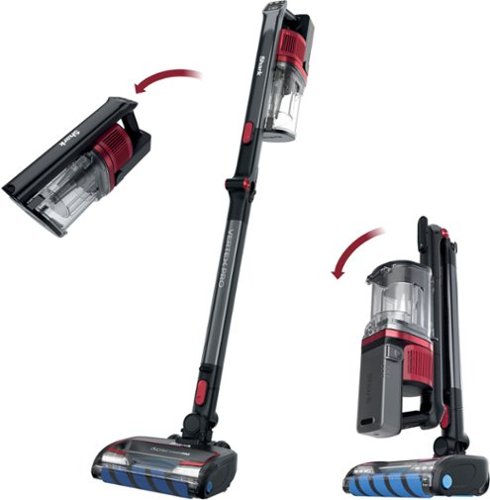
The Shark Vertex Pro combines the power and performance of a full-size vacuum* with the ease of a cordless stick. It features deep-cleaning DuoClean PowerFins and a self-cleaning brushroll to get rid of hair wrap. *Tested in Boost mode vs. ZU360.
Customer Rating
5
POWERFUL CORDLESS UPRIGHT VACCUM FROM SHARK
on August 9, 2021
Posted by: TheOffice1234
from Lake Orion, MI
SHARK CORDLESS VERTEX PRO VACUUM – Model IZ662H
Best Buy Tech Insider Network
POWERFUL CORDLESS UPRIGHT VACCUM FROM SHARK
Between home and office I have 4 shark vacs and each one is better than the last. Thus, I can easily say with confidence that the SHARK CORDLESS VERTEX PRO VACUUM is the best one yet in terms of power and performance and ease of use. What makes the SHARK CORDLESS VERTEX PRO VACUUM unique is that it is more powerful than many corded models, of course it goes without saying that it is cordless, and the best part is how the wand bends for easier cleaning under tables. The SHARK CORDLESS VERTEX PRO VACUUM folds in half so that it is perfectly balanced and does not fall over.
INITIAL IMPRESSIONS
Everything is carefully packaged (each piece is wrapped in its own bag), easy to assemble and intuitive to utilize. On the SHARK CORDLESS VERTEX PRO VACUUM, the controls and LED readouts are simple and have a common sense layout. We seem to be getting about 30 minutes in average upright use. For us this means, do a room or two then recharge. Usually this is OK as we are not usually vacuuming the entire house at one go. The built-in meter shows how much power is left in the battery. It looks like you will be able to buy extra batteries. In boost mode (more power) I was measuring about 80 decibels (equivalent to a lawnmower). The control panel is also where you select between carpet and hard floor.
Everything is carefully packaged (each piece is wrapped in its own bag), easy to assemble and intuitive to utilize. On the SHARK CORDLESS VERTEX PRO VACUUM, the controls and LED readouts are simple and have a common sense layout. We seem to be getting about 30 minutes in average upright use. For us this means, do a room or two then recharge. Usually this is OK as we are not usually vacuuming the entire house at one go. The built-in meter shows how much power is left in the battery. It looks like you will be able to buy extra batteries. In boost mode (more power) I was measuring about 80 decibels (equivalent to a lawnmower). The control panel is also where you select between carpet and hard floor.
PRO’s
- Super Flexible Main Wand (Stick) – for under furniture
- Very Powerful Suction
- Stands by itself
- Good assortment of tools
- Self Cleaning Roller
- Swappable Battery (extra battery not included)
- Super Flexible Main Wand (Stick) – for under furniture
- Very Powerful Suction
- Stands by itself
- Good assortment of tools
- Self Cleaning Roller
- Swappable Battery (extra battery not included)
RECCOMENDATION
The SHARK CORDLESS VERTEX PRO VACUUM is one of the most powerful upright (stick) vacuums I’ve used. The cordless convenience is very nice, but it comes at a trade off in run time. As long as you are not trying to vacuum the entire house at one time it should perform well or most people. If you do need a longer run time, then you can get optional extra batteries. As I’ve said, I’ve had many Shark products and they all run great. If you are looking for cordless vac convenience, then give the SHARK CORDLESS VERTEX PRO VACUUM a closer look.
Mobile Submission: False
I would recommend this to a friend!


Share this review:


+1point
1of 1voted this as helpful.
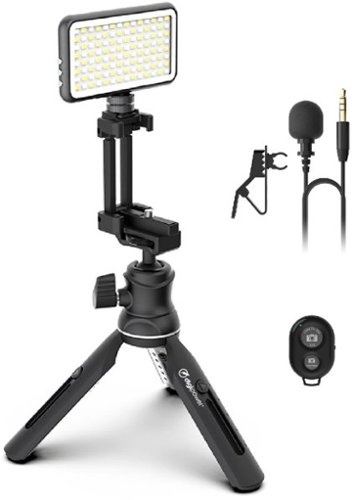
The Instructor Video Call Pro Kit features a professional lavalier omni-directional microphone, a 112 LED light that works up to 16 hours of continuous use with a built-in 1500mAh Li-Poly battery, an adjustable tripod (6.5" to 8.5").
Customer Rating
5
FANTASTIC LIGHT KIT FOR PHONE CAMERA WEBCAM ZOOM
on August 8, 2021
Posted by: TheOffice1234
from Lake Orion, MI
DIGIPOWER - THE INSTRUCTOR - 8.5" TRIPOD PROFESSIONAL VIDEO KIT -WORK, TEACH & LEARN FROM HOME - BLACK
MODEL:DP-VLX100
MODEL:DP-VLX100
Best Buy Tech Insider Network
FANTASTIC LIGHT KIT FOR PHONE CAMERA WEBCAM ZOOM VLOG
The star of this show is the DIGIPOWER light unit. First, you can adjust the temperature between 3100 and 5500 Kelvin (yellow to pure white). Next, you can adjust the brightness output from barely there to “land a plane” levels of brightness. Finally, all these settings are easily changed from the built in display on the back.
I’ve used several budget similar lights and none can hold a candle to the DIGIPOWER (pun intended)
The additional accessories (tripod, remote control, lapel mic) included in the DIGIPOWER - THE INSTRUCTOR are the icing on the proverbial cake.
PRO’s
- Amazing Light
- Included Tripod can be used with a phone or camera
- Long Cord on MIC
- Remote Control
- Amazing Light
- Included Tripod can be used with a phone or camera
- Long Cord on MIC
- Remote Control
SETUP and USAGE
Everything in the DIGIPOWER - THE INSTRUCTOR was well packaged and seems to be of reasonable quality. It was easy to test and setup everything without the instructions. To pair the remote to your phone, just go into settings and add it like any other device (it shows as a keyboard on my android). You do have to stretch the phone bracket pretty hard to fit in a medium or larger phone, but it is very secure. I was easily able to use the tripod, light, and mic to record some short videos and even take still pictures. I enjoy the longer cord to allow me to stand up while recording. The mic does a good job overall.
Everything in the DIGIPOWER - THE INSTRUCTOR was well packaged and seems to be of reasonable quality. It was easy to test and setup everything without the instructions. To pair the remote to your phone, just go into settings and add it like any other device (it shows as a keyboard on my android). You do have to stretch the phone bracket pretty hard to fit in a medium or larger phone, but it is very secure. I was easily able to use the tripod, light, and mic to record some short videos and even take still pictures. I enjoy the longer cord to allow me to stand up while recording. The mic does a good job overall.
The clip on the lapel mic does not quickly spring back into shape, so it keeps falling off my collar unless I wait a few seconds before letting go. I assume it will correct itself over time. The light takes a little force to attach to the stand, and is very secure.
RECCOMENDATION
The DIGIPOWER light is fantastic (did I mention that), THE INSTRUCTOR accessories are good for every day video use. The tripod is a versatile desktop unit. The phone/camera mounts is simple and sturdy. I can recommend DIGIPOWER - THE INSTRUCTOR for person vloggers, creating instructional videos, and anyone who just wants some better lighting for videos, photos, and web conferences. I will be using the kit for my daily calls at work where I can never get the lighting just right.
The DIGIPOWER light is fantastic (did I mention that), THE INSTRUCTOR accessories are good for every day video use. The tripod is a versatile desktop unit. The phone/camera mounts is simple and sturdy. I can recommend DIGIPOWER - THE INSTRUCTOR for person vloggers, creating instructional videos, and anyone who just wants some better lighting for videos, photos, and web conferences. I will be using the kit for my daily calls at work where I can never get the lighting just right.
Mobile Submission: False
I would recommend this to a friend!


Share this review:


+1point
1of 1voted this as helpful.
TheOffice1234's Review Comments
TheOffice1234 has not submitted comments on any reviews.
TheOffice1234's Questions
TheOffice1234 has not submitted any questions.

Give your movies, TV shows and games the great sound they deserve. This ultra-slim SR-B20 sound bar fits discreetly in front of your TV or on a shelf or can be rotated for a low-profile wall mount. Setup is a breeze with a simple connection to your TV while Bluetooth lets you wirelessly stream from your mobile devices.
What is the subwoofer for? What do subwoofers do?
without getting too technical it provides the low volume rumble for audio. (deep bass). the bar has built in small subwoofers, but you can also add a separate detached subwoofer for even more bass and rumbles.
5 years, 5 months ago
by
TheOffice1234
Give your movies, TV shows and games the great sound they deserve. This ultra-slim SR-B20 sound bar fits discreetly in front of your TV or on a shelf or can be rotated for a low-profile wall mount. Setup is a breeze with a simple connection to your TV while Bluetooth lets you wirelessly stream from your mobile devices.
Is this sound bar Alexa compatible?
You can connect alexa to it via bluetooth but by itself it is not alexa enabled
5 years, 5 months ago
by
TheOffice1234
Give your movies, TV shows and games the great sound they deserve. This ultra-slim SR-B20 sound bar fits discreetly in front of your TV or on a shelf or can be rotated for a low-profile wall mount. Setup is a breeze with a simple connection to your TV while Bluetooth lets you wirelessly stream from your mobile devices.
Can this be mounted to a Samsung TV?
If you mean physically mounted, you would need some sort of generic mounting kit. Generally they are about $30 from various sources
5 years, 5 months ago
by
TheOffice1234
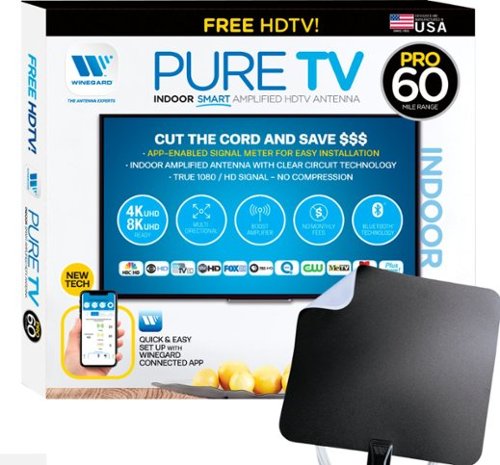
The PureTV Pro 60 is the only antenna with an actual signal meter integrated into the antenna to provide the best possible customer experience when installing. The PureTV Pro 60 has a dual-band, optimized antenna element that captures signals up to 60 miles away, while the antenna~s Clear Circuit Technology boosts the available signal, cuts dropout, and clears pixelation. The integrated, Bluetooth technology signal meter makes you the pro at installation. The PureTV Pro 60 uses a built-in tuner to get real-time signal data. Pair with the Winegard Connected app for no-fuss antenna positioning. Available for iOS and Android phones, the free, user-friendly Winegard Connected app quickly pairs with the PureTV Pro 60. Using both visual and audio indicators, you~ll get real-time feedback on the optimal antenna position for the best signal possible. The app shows a summary of available channels, and you can even fine-tune individual channels for maximum reception. Once you~re done, run a channel scan on TV, and start watching FREE TV.
my tv doesnt have a coax connector plug so what would i use?
Triple check that it does not have one. I've never heard of a TV without one. However, if that is the case then you need a real TV Tuner Box to interface with your TV. There are lots to chose from just google TV Tuner Box. TIVO OTA on the high end, AMAZON Fire TV ReCast on the medium end, and several others that just Tune, no additional functions for $30 or so.
5 years, 5 months ago
by
TheOffice1234
The PureTV Pro 60 is the only antenna with an actual signal meter integrated into the antenna to provide the best possible customer experience when installing. The PureTV Pro 60 has a dual-band, optimized antenna element that captures signals up to 60 miles away, while the antenna~s Clear Circuit Technology boosts the available signal, cuts dropout, and clears pixelation. The integrated, Bluetooth technology signal meter makes you the pro at installation. The PureTV Pro 60 uses a built-in tuner to get real-time signal data. Pair with the Winegard Connected app for no-fuss antenna positioning. Available for iOS and Android phones, the free, user-friendly Winegard Connected app quickly pairs with the PureTV Pro 60. Using both visual and audio indicators, you~ll get real-time feedback on the optimal antenna position for the best signal possible. The app shows a summary of available channels, and you can even fine-tune individual channels for maximum reception. Once you~re done, run a channel scan on TV, and start watching FREE TV.
What kind of range have this antenna?
In theory the 60 in the model number means 60 miles, I generally cut that in half for any stated antenna rage. I assume that means if you are in a desert with no obstructions you might get 60 miles.
5 years, 5 months ago
by
TheOffice1234
The PureTV Pro 60 is the only antenna with an actual signal meter integrated into the antenna to provide the best possible customer experience when installing. The PureTV Pro 60 has a dual-band, optimized antenna element that captures signals up to 60 miles away, while the antenna~s Clear Circuit Technology boosts the available signal, cuts dropout, and clears pixelation. The integrated, Bluetooth technology signal meter makes you the pro at installation. The PureTV Pro 60 uses a built-in tuner to get real-time signal data. Pair with the Winegard Connected app for no-fuss antenna positioning. Available for iOS and Android phones, the free, user-friendly Winegard Connected app quickly pairs with the PureTV Pro 60. Using both visual and audio indicators, you~ll get real-time feedback on the optimal antenna position for the best signal possible. The app shows a summary of available channels, and you can even fine-tune individual channels for maximum reception. Once you~re done, run a channel scan on TV, and start watching FREE TV.
Why does the app that is integral to the proper functioning of this antenna have a 1.6 rating in the App Store?
I assume because this one app covers many devices, reading the reviews on the app store most seem to be focused on WIFI devices that have nothing to do with the Antenna device. I used it, it is only OK, but in all reality you will use it one time to find your best location then never use it again.
5 years, 5 months ago
by
TheOffice1234
The PureTV Pro 60 is the only antenna with an actual signal meter integrated into the antenna to provide the best possible customer experience when installing. The PureTV Pro 60 has a dual-band, optimized antenna element that captures signals up to 60 miles away, while the antenna~s Clear Circuit Technology boosts the available signal, cuts dropout, and clears pixelation. The integrated, Bluetooth technology signal meter makes you the pro at installation. The PureTV Pro 60 uses a built-in tuner to get real-time signal data. Pair with the Winegard Connected app for no-fuss antenna positioning. Available for iOS and Android phones, the free, user-friendly Winegard Connected app quickly pairs with the PureTV Pro 60. Using both visual and audio indicators, you~ll get real-time feedback on the optimal antenna position for the best signal possible. The app shows a summary of available channels, and you can even fine-tune individual channels for maximum reception. Once you~re done, run a channel scan on TV, and start watching FREE TV.
What is the usb connector for?
This is a "powered" antenna, so you need the USB cable and included power supply to provide amplification to the antenna to improve signal strength.
5 years, 5 months ago
by
TheOffice1234
The PureTV Pro 60 is the only antenna with an actual signal meter integrated into the antenna to provide the best possible customer experience when installing. The PureTV Pro 60 has a dual-band, optimized antenna element that captures signals up to 60 miles away, while the antenna~s Clear Circuit Technology boosts the available signal, cuts dropout, and clears pixelation. The integrated, Bluetooth technology signal meter makes you the pro at installation. The PureTV Pro 60 uses a built-in tuner to get real-time signal data. Pair with the Winegard Connected app for no-fuss antenna positioning. Available for iOS and Android phones, the free, user-friendly Winegard Connected app quickly pairs with the PureTV Pro 60. Using both visual and audio indicators, you~ll get real-time feedback on the optimal antenna position for the best signal possible. The app shows a summary of available channels, and you can even fine-tune individual channels for maximum reception. Once you~re done, run a channel scan on TV, and start watching FREE TV.
Will having a metal roof on my house reduce the effectiveness of this antenna?
Maybe, but since this is more of a wall / window mount antenna, probably not as much impact as long as you have a window facing your stations.
5 years, 5 months ago
by
TheOffice1234
The PureTV Pro 60 is the only antenna with an actual signal meter integrated into the antenna to provide the best possible customer experience when installing. The PureTV Pro 60 has a dual-band, optimized antenna element that captures signals up to 60 miles away, while the antenna~s Clear Circuit Technology boosts the available signal, cuts dropout, and clears pixelation. The integrated, Bluetooth technology signal meter makes you the pro at installation. The PureTV Pro 60 uses a built-in tuner to get real-time signal data. Pair with the Winegard Connected app for no-fuss antenna positioning. Available for iOS and Android phones, the free, user-friendly Winegard Connected app quickly pairs with the PureTV Pro 60. Using both visual and audio indicators, you~ll get real-time feedback on the optimal antenna position for the best signal possible. The app shows a summary of available channels, and you can even fine-tune individual channels for maximum reception. Once you~re done, run a channel scan on TV, and start watching FREE TV.
does it connect with local networks, abc, cbs, nbc etc? How many channels or what stations maybe seen in the Frisco, TX area?
Google Antennaweb and enter your information for estimates of what channels you can receive. Just know that there many factors that go into good reception. The Antenna is just one of many factors such as do you have a window that faces your stations.
5 years, 5 months ago
by
TheOffice1234
The PureTV Pro 60 is the only antenna with an actual signal meter integrated into the antenna to provide the best possible customer experience when installing. The PureTV Pro 60 has a dual-band, optimized antenna element that captures signals up to 60 miles away, while the antenna~s Clear Circuit Technology boosts the available signal, cuts dropout, and clears pixelation. The integrated, Bluetooth technology signal meter makes you the pro at installation. The PureTV Pro 60 uses a built-in tuner to get real-time signal data. Pair with the Winegard Connected app for no-fuss antenna positioning. Available for iOS and Android phones, the free, user-friendly Winegard Connected app quickly pairs with the PureTV Pro 60. Using both visual and audio indicators, you~ll get real-time feedback on the optimal antenna position for the best signal possible. The app shows a summary of available channels, and you can even fine-tune individual channels for maximum reception. Once you~re done, run a channel scan on TV, and start watching FREE TV.
My TV is mounted on one wall. If the antenna gets optimal reception on another wall, is there enough cable to run from antenna to TV. How much cable is allowed? How have buyers dressed the cable to be unseen?
It comes with a good long cable, about 15-20 feet. It is very thin. I think anything you to try to hide it would make it look worse.
5 years, 5 months ago
by
TheOffice1234