
Share xbluejayx's profile


xbluejayx
xbluejayx's stats
- Review count3
- Helpfulness votes4
- First reviewJanuary 30, 2014
- Last reviewOctober 28, 2015
- Featured reviews0
- Average rating5
Reviews comments
- Review comment count0
- Helpfulness votes0
- First review commentNone
- Last review commentNone
- Featured review comments0
Questions
- Question count0
- Helpfulness votes0
- First questionNone
- Last questionNone
- Featured questions0
Answers
- Answer count0
- Helpfulness votes0
- First answerNone
- Last answerNone
- Featured answers0
- Best answers0
xbluejayx's Reviews
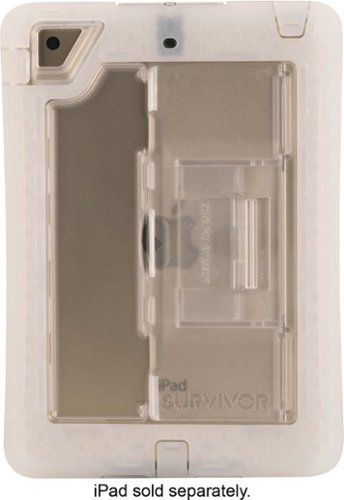
Keep your iPad mini, iPad mini 2 or iPad mini 3 safe with this Griffin Technology Survivor Slim GB41195 case, which delivers defense against drops up to 6.6', windblown rain, splashes, dirt and smudges. A touch-through shield protects the display.
Posted by: xbluejayx
from San Diego, CA
I needed a case for my new budget iPad mini 2. I picked this case up in store. This item was on clearance. Installing the iPad mini 2 into the case required a little finesse. The hardest part was installing the snap on cover and to make it flush with case. The trick is to start near the home button and slowly branch out along the edges until you hear faint snaps which locks the screen cover in place. Once you reach to the top center, roll your thumbs up and over each edge starting from the rear of the edge. This will create a few more faint snaps. Roll you thumbs from rear side to front of each edge a few more times. Eventually the unit will be flush and completely sealed.
I would recvomend this to anyone that is on a budget.
Pros: Price (alike cases are almost double in price). Solid feel. Not as bulky/heavy as other cases.
Cons: Patience is needed while installing the front cover.
Cons: Patience is needed while installing the front cover.
My Best Buy number: 0599531602
I would recommend this to a friend!
Share this review:


+1point
1of 1voted this as helpful.
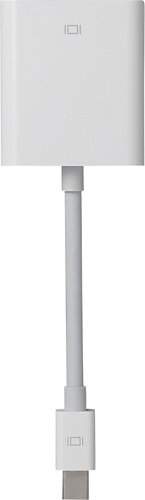
Apple~ Mini DisplayPort to VGA Adapter - Proprietary, HD-15 Female
Customer Rating

5
Mini-Display Port to VGA Mac Mini
on January 30, 2014
Posted by: xbluejayx
from San Diego, CA
Upon my decision to break free from the Microsoft world, I decided that I would be using my old 1366x768 VGA monitor for my new Mac Mini. I was a little hesitant on purchasing an expensive premium adapter such as this. I know I've had had problems in the past with 3rd party adapters from various manufactures for multiple devices. I didn't want to risk anything and shoved out the few extra dollars for the Apple brand converter. Make sure you purchase the Mini-Display Port to VGA. DO NOT purchase a Mini-DVI to VGA adapter/converter (error in my review history). Set-up was very simple. I unboxed the adapter from the box, screwed my VGA cable from my monitor into the adaptor, plug the smaller end of the adapter into my Mac Mini, and hit the power button on the back side of my Mac Mini. I was up and running in within a few minutes.
The adapter cable can be on the shorter end for a larger desk. But no complaints. The adapter displays a clear image upon my 1366x768 VGA monitor. No shadows or interference from my day to day use. All Apple products are high quality even down to basic adapters. I'm sure this adapter will last me for years to come.
The adapter cable can be on the shorter end for a larger desk. But no complaints. The adapter displays a clear image upon my 1366x768 VGA monitor. No shadows or interference from my day to day use. All Apple products are high quality even down to basic adapters. I'm sure this adapter will last me for years to come.
(Sorry i got Mini-DVI and Mini-Display Port mixed up in my review history. Honest mistake.)
My Best Buy number: 0599531602
What's great about it: Connects Mac Mini to VGA Monitor
What's not so great: Apple Pricing, Short cable
I would recommend this to a friend!
Durability

5
Ease of Use
5
Share this review:


+1point
1of 1voted this as helpful.
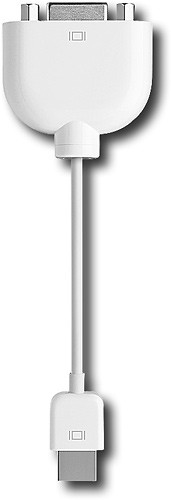
This handy adapter lets you connect your Apple iMac, MacBook or 12" PowerBook G4 notebook to an external VGA monitor or projector, so you can enjoy a larger display at home, or give outstanding presentations at work.
Posted by: xbluejayx
from San Diego, CA
Upon my decision to break free from the Microsoft world, I decided that I would be using my old 1366x768 VGA monitor for my new Mac Mini. I was a little hesitant on purchasing an expensive premium adapter such as this. I know I've had had problems in the past with 3rd party adapters from various manufactures for multiple devices. I didn't want to risk anything and shoved out the few extra dollars for the Apple brand converter. Set-up was very simple. I unboxed the adapter from the box, screwed my VGA cable from my monitor into the adaptor, plug the smaller end of the adapter into my Mac Mini, and hit the power button on the back side of my Mac Mini. I was up and running in within a few minutes.
The adapter cable can be on the shorter end for a larger desk. But no complaints. The adapter displays a clear image upon my 1366x768 VGA monitor. No shadows or interference from my day to day use. All Apple products are high quality even down to basic adapters. I'm sure this adapter will last me for years to come.
My Best Buy number: 0599531602
What's great about it: Easy to set up, Made by Apple.
What's not so great: Apple Pricing, Short cable
I would recommend this to a friend!
Durability
5
Ease of Use
5
Share this review:


+2points
2of 2voted this as helpful.
xbluejayx's Review Comments
xbluejayx has not submitted comments on any reviews.
xbluejayx's Questions
xbluejayx has not submitted any questions.
xbluejayx's Answers
xbluejayx has not submitted any answers.