
Share MaxArtist's profile


MaxArtist
MaxArtist's stats
- Review count1
- Helpfulness votes3
- First reviewMarch 29, 2010
- Last reviewMarch 29, 2010
- Featured reviews0
- Average rating2
Reviews comments
- Review comment count0
- Helpfulness votes0
- First review commentNone
- Last review commentNone
- Featured review comments0
Questions
- Question count0
- Helpfulness votes0
- First questionNone
- Last questionNone
- Featured questions0
Answers
- Answer count0
- Helpfulness votes0
- First answerNone
- Last answerNone
- Featured answers0
- Best answers0
MaxArtist's Reviews
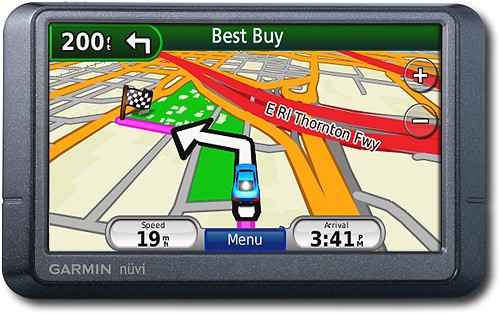
Navigate the United States and Canada with ease with this GPS that features free lifetime traffic updates, up to 1,000 waypoints and customizable points of interest for easy route planning. The "Where Am I?" emergency locator and travel assistant tools provide additional support.
Customer Rating

2
Decent GPS but lacks some very basic featuers
on March 29, 2010
Posted by: MaxArtist
from Memphis, TN
This is my first portable GPS. I normally use my Honda's in-built GPS so I had something to compare this one against. I bought this one for when I fly to other cities to visit client sites.
Now about the GPS.
-- The GPS was a good bargain given that I got it for $40 less than the listed price. While I do not expect it to perform at par with a standard Honda GPS, it lacks the very basic feature of displaying the remaining distance and time on the main navigation screen. You can look at it by clicking on "Menu" and then on "Map" but then you will have to back out by clicking "Back" again twice. That's four clicks while you are still driving the vehicle. And that's when the GPS makes you agree to not operate it while you are driving. Go figure! The other way you can determine the remaining time is that the main navigation screen tells you the estimated arrival time. So you can look at that, then look at your watch or the time on the dashboard and do the math. Even though I might sound petty complaining about the lack of this feature, I can't see a reason for not having it display on the main navigation screen.
I expected better from Garmin. By the way, I checked out other Garmin GPSs and it seems to be a standard thing with them all. I guess it's just bad designing on their part
-- The touch screen can get a little frustrating to use because it's hard to click on the correct key even when you think you did
-- You type a little fast and the GPS has trouble keeping up with you. So while it will register the key strokes, the beep on every key press doesn't play and that gets confusing if you are concentrating on pressing the right key and going by the beep to confirm that you did press it
-- Garmin does some strange things with the keyboard too. While using an arrow pointing left as the icon for backspace is pretty much the standard throughout the world, Garmin's GPS has an icon of a rubber at the end of a pencil. While it's just a matter of getting used to, it's rather strange as to why would they do something like that and confuse the users. And here I thought the world was moving more towards standardizing things and making people's lives easier
-- Finally, I found it extremely surprising that while Bestbuy.com mentioned a discounted price of $159.99, when I visited the store, it was selling for $199.99. Although the staff was very helpful and billed me only 159.99, they had no explanation as to why was it selling without the discount at the store. I never expected this from Best Buy and am very disappointed
-- The GPS was a good bargain given that I got it for $40 less than the listed price. While I do not expect it to perform at par with a standard Honda GPS, it lacks the very basic feature of displaying the remaining distance and time on the main navigation screen. You can look at it by clicking on "Menu" and then on "Map" but then you will have to back out by clicking "Back" again twice. That's four clicks while you are still driving the vehicle. And that's when the GPS makes you agree to not operate it while you are driving. Go figure! The other way you can determine the remaining time is that the main navigation screen tells you the estimated arrival time. So you can look at that, then look at your watch or the time on the dashboard and do the math. Even though I might sound petty complaining about the lack of this feature, I can't see a reason for not having it display on the main navigation screen.
I expected better from Garmin. By the way, I checked out other Garmin GPSs and it seems to be a standard thing with them all. I guess it's just bad designing on their part
-- The touch screen can get a little frustrating to use because it's hard to click on the correct key even when you think you did
-- You type a little fast and the GPS has trouble keeping up with you. So while it will register the key strokes, the beep on every key press doesn't play and that gets confusing if you are concentrating on pressing the right key and going by the beep to confirm that you did press it
-- Garmin does some strange things with the keyboard too. While using an arrow pointing left as the icon for backspace is pretty much the standard throughout the world, Garmin's GPS has an icon of a rubber at the end of a pencil. While it's just a matter of getting used to, it's rather strange as to why would they do something like that and confuse the users. And here I thought the world was moving more towards standardizing things and making people's lives easier
-- Finally, I found it extremely surprising that while Bestbuy.com mentioned a discounted price of $159.99, when I visited the store, it was selling for $199.99. Although the staff was very helpful and billed me only 159.99, they had no explanation as to why was it selling without the discount at the store. I never expected this from Best Buy and am very disappointed
Since, I only intend to use it occasionally, I will not return this for another, but it sure suffers from some serious drawbacks.
What's not so great: The navigation screen does not show the remaining distance or time
No, I would not recommend this to a friend.
Ease of Use

2
Features
2
Share this review:


+1point
3of 5voted this as helpful.
MaxArtist's Review Comments
MaxArtist has not submitted comments on any reviews.
MaxArtist's Questions
MaxArtist has not submitted any questions.
MaxArtist's Answers
MaxArtist has not submitted any answers.