
Share BenGeekn's profile


BenGeekn
BenGeekn's stats
- Review count11
- Helpfulness votes84
- First reviewOctober 12, 2007
- Last reviewFebruary 6, 2017
- Featured reviews0
- Average rating3.8
Reviews comments
- Review comment count0
- Helpfulness votes0
- First review commentNone
- Last review commentNone
- Featured review comments0
Questions
- Question count0
- Helpfulness votes0
- First questionNone
- Last questionNone
- Featured questions0
- Answer count2
- Helpfulness votes0
- First answerFebruary 6, 2017
- Last answerFebruary 6, 2017
- Featured answers0
- Best answers0
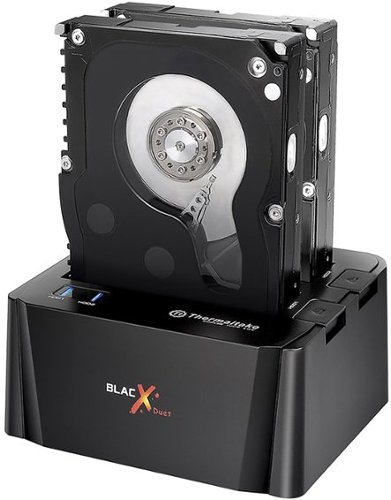
Read and write to two 2.5" or 3.5" SATA hard drives or solid state drives at once with this Thermaltake BlacX ST0014U-C docking station, which offers a hot-swappable design to ensure rapid file transfers via the USB interface.
Customer Rating

1
So much potential, so much disappointment.
on February 6, 2017
Posted by: BenGeekn
from Oregon, USA
I don't like writing negative reviews, and I really, really, wanted - needed - this to work but sadly, it just didn't.
Just in case there's a newer model or something, the exact unit I had was model ST0014U-C, copyright 2016 on the box.
It worked fine for reading from a hard drive, but extended attempts to write to the drive - two different ones that worked fine in other environments - resulted in errors.
The dock would disconnect from my Windows 10 laptop randomly, and the activity light would just flash non-stop, requiring me to power-cycle the dock to get it to recognize in Windows again.
I had hoped that this was just a lemon, but searching online resulted in many other users encountering the same problem.
Yes, I tried multiple different drives.
Yes, I tried only connecting one drive.
Yes, I tried both ports.
Yes, my laptop was plugged in with power-saving off.
Yes, I tried multiple USB ports.
Yes, I tried different software.
Yes, I checked Thermaltake's site for a firmware update.
Yes, I tried only connecting one drive.
Yes, I tried both ports.
Yes, my laptop was plugged in with power-saving off.
Yes, I tried multiple USB ports.
Yes, I tried different software.
Yes, I checked Thermaltake's site for a firmware update.
Yet all had the same result. It would run fine for a few hours with constant writes, then it would suddenly fall off the bus and fail.
I'm not sure if it's just an issue with the Jmicron controller the dock uses or what, but it just didn't work reliably.
I have other Thermaltake products (cases, power supplies, CPU coolers) and they are great, but this dock was a disappointing dud for me.
Others online noted the single-drive BlacX non-Duet version didn't have the same problem, but I was on a deadline and couldn't chance if having the same problem. So I ended up returning the BlacX Duet and buying an Insignia USB 3.0 3.5-inch drive enclosure and that worked fine using the same drives and operations that failed on the BlacX Duet.
My Best Buy number: 0541674357
No, I would not recommend this to a friend.
Share this review:


+5points
6of 7voted this as helpful.
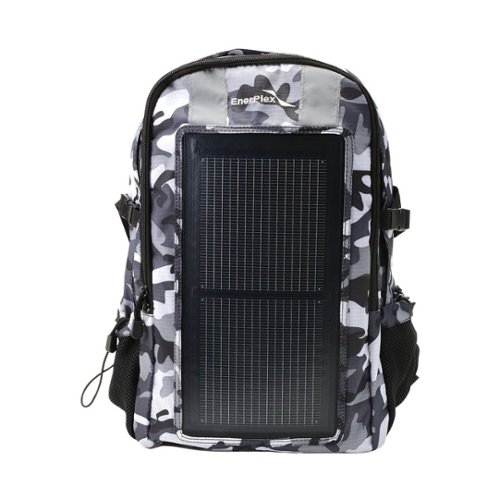
Keep your smartphone powered up when you travel with this EnerPlex Packr Base solar backpack. This backpack has a lightweight solar panel and USB output to charge any USB-enabled mobile device. With a padded interior in its laptop sleeve, this EnerPlex Packr Base solar backpack protects your electronics, making it a safe, convenient way to do business on the go.
Customer Rating

4
Good if you have sun and a battery
on October 5, 2016
Posted by: BenGeekn
from Oregon, USA
It's Camo GRAY, not green. Trust the picture, not the words.
This has become my everyday backpack. It's not huge, but more than big enough to hold a number of battery packs, my Bluetooth keyboard, tablet, jacket, umbrella, and other essentials.
It is *NOT* a power bank or battery pack, it is a solar cell with 5V USB (standard Type A port) output. Therefore it cannot "hold" or "store" a charge.
If there's enough light hitting the solar panel, it generates electricity and outputs it from the USB port.
If there's no light or not enough, there is no electricity provided to the port.
If there's enough light hitting the solar panel, it generates electricity and outputs it from the USB port.
If there's no light or not enough, there is no electricity provided to the port.
SO, for BEST RESULTS, pair this backpack with a battery (power bank), but MAKE SURE the power bank CAN BE CHARGED WHILE SIMULTANEOUSLY OUTPUTTING. Not all power banks can do this, and if you get one that can only do one at a time, you will need to (re)charge the battery, then disconnect it and connect to your phone. which is inconvenient.
The panel is flexible, the sticker says it's "solar on plastic" - it's not foldable, and I avoid situations where it might crease, but it definitely flexes with the backpack and its content, and is tolerant of bumps and such.
The actual charge port is on the inside of the outer (smaller) pocket and has a rubber port cover. There are pockets (two half-width, one full) immediately under the port which are meant to hold your devices. The half-width pockets hold my LifeCharge 16800 mAh battery with a little wiggle room. More than enough space for a 5-inch screen phone.
The pack itself advertises "1/2 the charge rate of normal charger" - but it doesn't seem to define what "normal" rate is.
In full Pacific Northwest daylight through a window I measured 1100 mA current from the panel (directly to my phone, measured with Ampere and GSam Battery Monitor) which was surprising, actually.
It's definitely NOT enough current to direct-charge devices that require 1.2 A or 2 A charging, which is why I recommend using it to charge a power bank, that way the power bank will provide constant amperage to your device and the pack will just recharge the battery.
BE CAREFUL though, as this will make the power bank warm.
BE CAREFUL though, as this will make the power bank warm.
The media passthrough port is near the charge port and pockets, so I use it to run a USB cable from my power bank out. That way I can charge my phone while using it. There's also a passthrough from the small compartment to the bigger compartment.
Not sure I'd buy this at full price as there are other, larger solar panels available, but as a Deal of the Day I think it was a great deal, especially if you already need a backpack.
My Best Buy number: 0541674357
I would recommend this to a friend!
Share this review:


+3points
4of 5voted this as helpful.
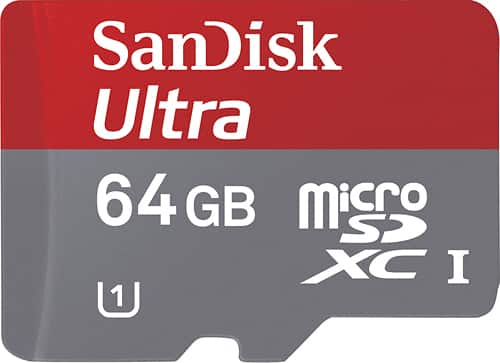
Easily store and access your media with this 64GB SanDisk Ultra microSDXC Class 10 memory card that includes a SD/SDHC adapter to provide expanded compatibility options.
Customer Rating

5
Works great on my Samsung Galaxy S III
on September 5, 2012
Posted by: BenGeekn
from Oregon, USA
I use it with:Cell phone
I got this on a Deal of the Day for a great price, and my (AT&T) Samsung Galaxy S III natively supports SDXC, so there's was no need to reformat or do anything special.
It feels just as fast, if not faster than my old Class 10 32 GB Micro SDHC card
Performance of the card is great, video recording and camera shots are smooth. I'm very happy with this card so far.
What's great about it: SDXC, huge capacity, great speed
What's not so great: Normal price is a bit high
I would recommend this to a friend!
Capacity

5
Share this review:


+5points
5of 5voted this as helpful.
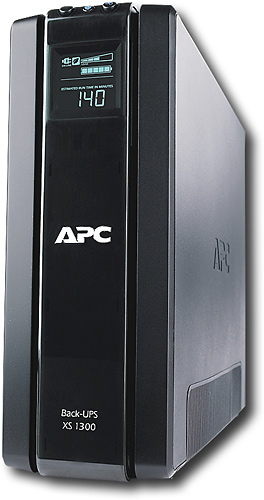
APC Back-UPS XS 1300 VA Tower UPS - 1300VA/780W - 4.2 Minute Full Load - 5 x NEMA 5-15R - Battery Backup System, 5 x NEMA 5-15R - Surge-protected
Posted by: BenGeekn
from Oregon, USA
I bought this UPS to replace a Belkin unit that could not be monitored by my Windows Home Server machine.
This one works great with Windows Home Server (using Grid Junction), and the load/runtime/condition display is quite handy to see how much power you're actually using.
While I'm not using the load-controlled outlets for my server, I'm considering another unit to use on my desktop machine where I could plug the display and peripherals into the load-controlled outlets for additional power savings.
The unit seems to run cooler than the Belkin unit (with AVR) it replaced, and the size and shape looks great too.
What's great about it: Nice display, power-saving features, small form-factor
I would recommend this to a friend!
Features
5
Share this review:


+2points
2of 2voted this as helpful.
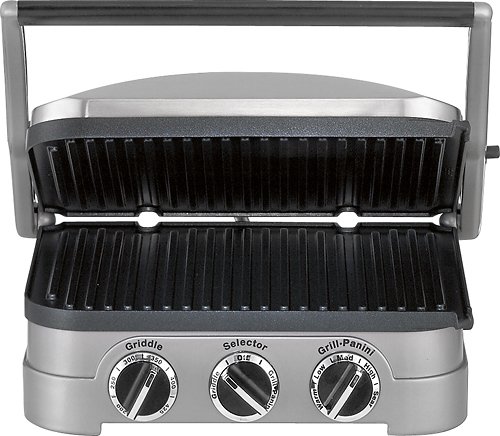
Cuisinart GR-4N Griddler: Make quick and easy meals four different ways with this versatile grilling machine. The reversible grilling plates allow you to cook breakfast meats on the grill while you're also making pancakes on the griddle.
Posted by: BenGeekn
from San Jose, California
This is a great unit. Griddle mode lets you choose the temperature, while Grill/Panini has traditional Low/Medium/High temperature setting.
It's great for meats and the floating design lets it grill/press items of varying thickness.
It heats up very quickly - I started grilling a sausage and bacon within 10 minutes (after washing it, of course).
The drip cups are pretty good capacity. I grilled 1.5 lbs of bacon and filled most of the two included drip cups.
Clean-up was quite easy because of the removable plates. I hand-wash mine, but they're also dishwasher safe. Just be sure they're not scratching/rubbing against anything when washing or drying so the non-stick coating is safe. I plan to get a pair of bags or laptop sleeves to keep the other set of plates safe in when not in use.
Just three things to watch out for:
1. The grill plates are a bit shallow. If you're cooking something that has particles that come off (like peppered bacon, for example), you should monitor the drip spout so it doesn't get clogged and bathe the food in its oil/fat or overflow.
1. The grill plates are a bit shallow. If you're cooking something that has particles that come off (like peppered bacon, for example), you should monitor the drip spout so it doesn't get clogged and bathe the food in its oil/fat or overflow.
2. Like one of the other reviews mentioned, when cooking oily/fatty foods some oil collects on the top plate and will drip off the back of the unit when you open the cover. I had the same problem with my Foreman grill, but in its design the oil dripped onto the back of the bottom plate. On the Griddler, because the top plate floats, the oil actually drips off behind the unit.
Easy solution though - I rolled up a paper towel loosely and stuck it in the cord holder at the back - that caught the extra drips. Maybe Cuisinart will include an "open drip" tray to put there in a future model.
3. Perhaps it was just the thickness of my bacon, but I did notice that the center of the grill plates didn't cook quite as much as the outer sections. We'll see if it evens out as I use it more.
What's great about it: Removable plates, grill AND griddle, flip-open for dual-cooking
What's not so great: Grill plate is a bit shallow, top plate drips off back when opened, a slightly cooler in center.
I would recommend this to a friend!
Quality

4
Features
5
Performance
4
Share this review:


+38points
41of 44voted this as helpful.

Now you can put together a powerful, high-speed network on a small scale. NETGEAR's GS116 Copper Gigabit Ethernet Switch lets you build a system that can move even very large files across your network instantly - up to 2000Mbps on each port. The standards-based GS116 helps to protect customers' existing and future network infrastructure investments by painlessly integrating other 10, 100, 1000 devices as well as honoring layer 2 802.1p priority tags. Packed with ease-of-use features, this adaptable switch supports either PC or Macintosh operating systems. The compact size makes it ideal for home, small office, workgroups, departments and conference room environments. Its durable metal case has no fan for silent operation.
Posted by: BenGeekn
from San Jose, California
I have the 5-port and 8-port versions of this same switch. Ran out of ports on my 8-port GS108, so decided to get the 16-port version.
Not much to install - it's a switch. DO NOTE HOWEVER, that the power supply for the GS116 is *different* from the GS108 (at least from what I got). The GS108 had a 12V, 1.0A power supply. The GS116 on the other hand has a 12V, 1.5A power supply, so if you're upgrading be sure to swap BOTH the switch itself AND the power supply.
Other than that, not much else to say. It's a ProSafe product, so it has a lifetime guarantee. A single 16-port switch costs more than two 8-port switches, but it's more convenient to have a single 16-port switch for me.
I would recommend this to a friend!
Ease of Use
5
Performance
5
Share this review:


+15points
15of 15voted this as helpful.

SynopsisClassic arcade fans ~ prepare for re-entry! This popular arcade shooter returns with more enemies, bigger powerups and a brand-new Battle Drone to help you tear through the first-ever Geometry Wars campaign mode. Do you have the quick reflexes and smart strategies to rescue the whole galaxy?Brand-new controls enable you to pull off daring hot-shot moves throughout each aerial standoff. Keep your cool as the chaos ensues across the screen, with shapes and ships darting every which way. An upgradable Battle Drone helps you in the struggle. As an added bonus, you'll also receive the full version of Geometry Wars: Retro Evolved. Link up with a Nintendo DS to unlock bonus content and be on exclusive leaderboard rankings.

Posted by: BenGeekn
from San Jose, California
If you like games with impossible odds, are a fan of older "two-handed" arcade games like Berzerk, Robotron and Smash TV, this is right up your alley! If you like games with a long story or quest, then this isn't for you.
The game itself is simple - geometric bad guys continually appear and chase you within a limited-area playfield. Each enemy has different characteristics and there's music and lots of explosions and stuff to distract you.
Your ship can shoot independently of its heading, so can play with the Wii Remote and Nunchuk, or with the Wii Classic Controller. I prefer the dual-sticks of the Wii Classic Controller as it reminds me of Robotron. Besides, as the game progresses there are so many explosions and stuff on the screen that you really can't see what you're aiming at anyway, so I find it easier to use the stick rather than the point-to-aim with the Wii Remote.
It's a very pretty game with all the colors and space-warping and the soundtrack is decent. I'd like to have more music in it though.
Think of it like Dance Dance Revolution, but instead of dancing, you're moving around and shooting at stuff.
I find it surprisingly addictive, but it's definitely not for all types of gamers. It's definitely a very "flat" game though the options for your battle drone (collect items, attack, etc) do add a bit of variety to the levels.
Try a demo or watch some videos online (there are many) to get a feel for the game before you make a decision.
What's great about it: Colorful and intense, good use for Classic Controller
What's not so great: Gets repetitive and frustrating as difficulty increases
I would recommend this to a friend!
Share this review:


0points
0of 0voted this as helpful.
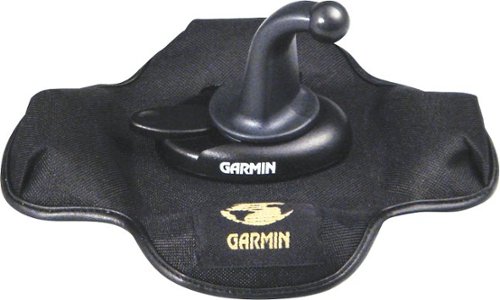
Set your n??vi on the dash of the car with the help of this portable media.
Posted by: BenGeekn
from San Jose, California
I bought this mount after seeing it in action in a rental car (with rented GPS).
I had been using a windshield suction-mount arm with my GPS and always found it difficult to position "just right" and virtually impossible to just hand over to my passenger.
Prior to the suction mount, I had also tried an adhesive dashboard mount - that held for about a week.
When I saw this dashboard friction mount I was skeptical - but it held up for sudden stops and hard turns very well. In fact, as long as it was fully on the dashboard and not hanging off, it was great. Better yet, it was easy to pick up and reposition, or pass over to a passenger for navigation on-the-go.
The portability keeps your car from being a target (sometime thieves think you might have left the GPS in the car).
To explain this review's title... I actually don't have a Garmin GPS, but I liked this mount so much that I modified my GPS so I could attach it to this mount, and it's working great!
I had been using a windshield suction-mount arm with my GPS and always found it difficult to position "just right" and virtually impossible to just hand over to my passenger.
Prior to the suction mount, I had also tried an adhesive dashboard mount - that held for about a week.
When I saw this dashboard friction mount I was skeptical - but it held up for sudden stops and hard turns very well. In fact, as long as it was fully on the dashboard and not hanging off, it was great. Better yet, it was easy to pick up and reposition, or pass over to a passenger for navigation on-the-go.
The portability keeps your car from being a target (sometime thieves think you might have left the GPS in the car).
To explain this review's title... I actually don't have a Garmin GPS, but I liked this mount so much that I modified my GPS so I could attach it to this mount, and it's working great!
What's great about it: Stable, well-constructed, simple
I would recommend this to a friend!
Share this review:


+7points
7of 7voted this as helpful.
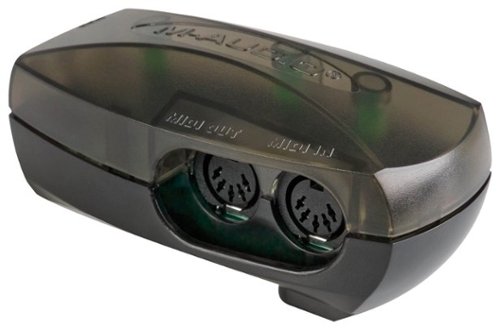
Enhance your recording capabilities with this M-Audio MIDISPORT 1x1 99005071200 MIDI interface, which is compatible with select Apple~ computers and allows simple USB connectivity for rapid data transfer. MIDI activity indicators keep you informed.
Posted by: BenGeekn
from San Jose, California
While this product is geared toward folks with instruments and microphones, I'm just using it for the microphone input.
The FastTrack USB was very easy to set up and use. It doesn't require an external power supply, so it's equally adept on the road or on a table.
I don't keep it connected all the time and my laptop seamlessly switches between the FastTrack when connected and internal audio when it's not connected.
I use it with Adobe Audition with Sennheiser headphones and haven't had any problems so far.
My only change would be to use a 7.0mm (1/4-inch) headphone jack instead of the 3.5mm (1/8-inch) jack.
What's great about it: Portable, high-quality audio
What's not so great: 3.5mm headphone jack
I would recommend this to a friend!
Share this review:


0points
1of 2voted this as helpful.
![Jericho: The First Season [6 Discs] (DVD)](https://pisces.bbystatic.com/prescaled/500/500/image2/BestBuy_US/images/products/304b2327-370a-41e7-956a-951dd4939472.png)
Posted by: BenGeekn
from San Jose, California
Jericho just seems to have the right mix of elements to make it, but a fan base alone doesn't keep a show from getting canceled these days.
At first glance, Jericho seems to be the typical "what would happen if something terrible happened" story often played out in B movies. However, Jericho's story is more than just a story of survival. It is a multi-dimensional story that shows not only the basic survival elements, but contains a complex mystery (who attacked us?), shows how families can come together or be torn apart in a changed world and how human nature can be our greatest ally - and our greatest enemy.
Don't discount this show as "Lost with fallout." Though equally enjoyable to me, Jericho is a much different story, one that is not so distant and far-fetched.
It's definitely worth watching and worth viewer support to keep on the air!
At first glance, Jericho seems to be the typical "what would happen if something terrible happened" story often played out in B movies. However, Jericho's story is more than just a story of survival. It is a multi-dimensional story that shows not only the basic survival elements, but contains a complex mystery (who attacked us?), shows how families can come together or be torn apart in a changed world and how human nature can be our greatest ally - and our greatest enemy.
Don't discount this show as "Lost with fallout." Though equally enjoyable to me, Jericho is a much different story, one that is not so distant and far-fetched.
It's definitely worth watching and worth viewer support to keep on the air!
What's great about it: Tight, multi-layer story
What's not so great: Fans alone don't keep a show on the air these days
I would recommend this to a friend!
Share this review:


0points
0of 0voted this as helpful.
BenGeekn's Review Comments
BenGeekn has not submitted comments on any reviews.
BenGeekn's Questions
BenGeekn has not submitted any questions.
BenGeekn's Answers
Read and write to two 2.5" or 3.5" SATA hard drives or solid state drives at once with this Thermaltake BlacX ST0014U-C docking station, which offers a hot-swappable design to ensure rapid file transfers via the USB interface.
would my windows 10 pc detect this as a normal hdd if i bought this and a hard drive? idk if my specs are needed but they are intel core i7 3770 16gb ram amd radeon r7 370 graphics card (i think its msi) also would i be able to install games
It detects as a drive in Disk Management, under the ID "Jmicro SCSI device"
So it looks like what it is - a USB 3.0 to SATA bridge.
You can use it as a normal hard drive as long as your software doesn't reject removable media devices. If it does, there are ways to "trick" Windows to mounting a removable device as a fixed device, but if that's the case you should probably just get a fixed drive enclosure. This is meant more for folks who are swapping between drives often.
So it looks like what it is - a USB 3.0 to SATA bridge.
You can use it as a normal hard drive as long as your software doesn't reject removable media devices. If it does, there are ways to "trick" Windows to mounting a removable device as a fixed device, but if that's the case you should probably just get a fixed drive enclosure. This is meant more for folks who are swapping between drives often.
9 years, 4 months ago
by
BenGeekn
Read and write to two 2.5" or 3.5" SATA hard drives or solid state drives at once with this Thermaltake BlacX ST0014U-C docking station, which offers a hot-swappable design to ensure rapid file transfers via the USB interface.
Will this clone the registered programs without having to re-register them (i.e.: a registered Office 2010 from one drive to another without having to re-register? I have a couple one time install programs I'd like to keep w/o buying them again)?
No, the dock does not have any duplication functionality, nor does it come with duplication software. It's just a dual-drive USB 3.0 dock for SATA drives.
Even with a bit-for-bit duplicator, unless you are simply replacing the drive in the same system, you will likely have to register or at least reactivate your software again. Software activation typically factors a number of things about the system - network MAC, CPU ID, etc.
Some software has the option to deactivate/unregister so you can reinstall it elsewhere. If your software is truly one-time install only licensed for the system it is initially installed on, you may not be able to use it on another machine even if you do manage to duplicate your drive.
Also, if you are migrating to a significantly different machine, your OS may not be able to even start up successfully on the new system.
For Office 2010 in particular, most times you can uninstall it on one system and install and activate it on another system, but if you do it too many times you'll have to call to get activated and may be denied depending on your license.
Even with a bit-for-bit duplicator, unless you are simply replacing the drive in the same system, you will likely have to register or at least reactivate your software again. Software activation typically factors a number of things about the system - network MAC, CPU ID, etc.
Some software has the option to deactivate/unregister so you can reinstall it elsewhere. If your software is truly one-time install only licensed for the system it is initially installed on, you may not be able to use it on another machine even if you do manage to duplicate your drive.
Also, if you are migrating to a significantly different machine, your OS may not be able to even start up successfully on the new system.
For Office 2010 in particular, most times you can uninstall it on one system and install and activate it on another system, but if you do it too many times you'll have to call to get activated and may be denied depending on your license.
9 years, 4 months ago
by
BenGeekn