
Share SanFranciscoHoosier's profile


SanFranciscoHoosier
SanFranciscoHoosier's stats
- Review count3
- Helpfulness votes16
- First reviewAugust 17, 2013
- Last reviewDecember 24, 2013
- Featured reviews0
- Average rating5
- Review comment count2
- Helpfulness votes25
- First review commentAugust 1, 2013
- Last review commentAugust 6, 2013
- Featured review comments0
Questions
- Question count0
- Helpfulness votes0
- First questionNone
- Last questionNone
- Featured questions0
- Answer count2
- Helpfulness votes2
- First answerAugust 1, 2013
- Last answerAugust 1, 2013
- Featured answers0
- Best answers1
SanFranciscoHoosier's Reviews

Customer Rating

5
Entertaining Belushi/Aykroyd Film with Great Music
on December 24, 2013
Posted by: SanFranciscoHoosier
from San Francisco, California
As a college student during the original Saturday Night Live series, I was thoroughly entertained by these Belushi/Aykroyd characters. It is truly a joy to view this fun film again in its remastered Blu-ray format. The music of my generation sounds fantastic as it is performed on-screen by the great Arethra Franklin, James Brown, Ray Charles, and Cab Calloway!
My Best Buy number: 2137797877
I would recommend this to a friend!
Share this review:


0points
0of 0voted this as helpful.
![Platoon [Blu-ray] [1986]](https://pisces.bbystatic.com/prescaled/500/500/image2/BestBuy_US/images/products/8475c834-89cf-480f-a6d7-20d506841a2f.jpg)
Customer Rating
5
Excellent Vietnam War Drama Improved in Blu-ray
on December 24, 2013
Posted by: SanFranciscoHoosier
from San Francisco, California
For many years I have enjoyed this excellent Vietnam war drama on the remastered 20th Anniversary Edition DVD (2006). This newer Blu-ray edition (2011) has significantly improved contrast, definition, and color balance. Well worth the upgrade!
My Best Buy number: 2137797877
I would recommend this to a friend!
Share this review:


0points
0of 0voted this as helpful.
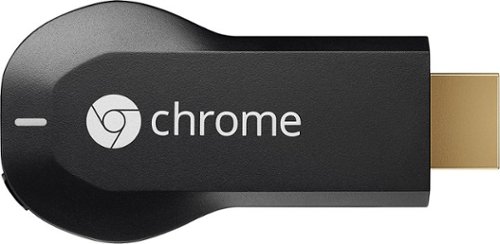
Google Chromecast: Easily stream your favorite apps and media to your TV via Wi-Fi with Chromecast. Use the included USB cable to plug the Chromecast into your TV, and control streaming content using your compatible smartphone, tablet or computer.
Customer Rating
5
Works great with MacBook Pro Retina and Nook HD+
on August 17, 2013
Posted by: SanFranciscoHoosier
from San Francisco, California
Chromecast works great with my 2012 Apple MacBook Pro Retina and my wife's B&N Nook HD+. This ingenious little device allows us to remotely control YouTube and Netflix videos on our HDTVs with the convenient user interface of a computer/tablet/smartphone, which is much easier than navigating with a standard TV remote. It "casts" to the HDTV via Internet servers, not directly from the computer/tablet/smartphone, without tying it up while the videos play.
The computer/tablet/smartphone can be turned off after launching a video, thereby conserving battery power, or it can be used for other tasks without competing for CPU/memory resources. Browsing and selecting additional videos can occur while viewing without interruption, so multiple videos can be queued. Friends and family can add videos to the queue using their computer/tablet/smartphone connected to our private Wi-Fi network.
I can also "cast" the Chrome browser on my MacBook Pro Retina to our HDTVs, which is a great way to display my photo collection or share web sites with family and friends in the comfort of our living room. This will be a very useful teaching aid, as I am a technical instructor.
It was tough to find Chromecast because of the limited supply, but persistence succeeded. Best Buy was already sold out the day after Chromecast was released, but I snagged our first one early the next morning (26 July) when they were available again on bestbuy.com for only one hour. It shipped on 29 July, arrived on 01 August, and I immediately plugged it into our 2012 Samsung PN51E7000 Plasma Smart TV. I liked it so much that I ordered another for our ancient 2006 Samsung HL-R4667W DLP HDTV. This time bestbuy.com was backordered, but they shipped our second Chromecast on 07 August, and it arrived on 09 August. Both of them included three months of NetFlix credit.
We really enjoy Chromecast and think it is a wonderful alternative to our other media players. The YouTube and Netflix apps built into our Smart TV and Blu-ray player were always problematic because of our slow Internet connection (2.5 Mbps DSL), but Chromecast performance is excellent and never stutters. I expect more video streaming services will be available as the Chromecast market grows.
My Best Buy number: 2137797877
I would recommend this to a friend!
Features

5
Ease of Use
5
Share this review:


+16points
16of 16voted this as helpful.
SanFranciscoHoosier's Review Comments
Google Chromecast: Easily stream your favorite apps and media to your TV via Wi-Fi with Chromecast. Use the included USB cable to plug the Chromecast into your TV, and control streaming content using your compatible smartphone, tablet or computer.
Overall 4 out of 5
4 out of 5Awesome Device with tremendous upside
By iowaGuy2
from Iowa
Pros
1.Takes under 30 seconds to connect and start streaming. This does not stream from device, it streams through Wifi, therefore saving battery on your devices. You use the device as a remote.
2.I tested using: all worked great!
a.Nexus 7
b.Laptop
c.Motorola Atrix HD
3.Streaming Netflix is flawless, but Subtitles do not work on the device. I have contacted Netflix, even though the Chromecast says it will display subtitles, it does not. Netflix has reported this up the chain so hopefully this will be addressed soon.
4.Can multitask on the device while streaming Netflix. Does not affect the quality of the streaming.
5.Youtube streams flawlessly too, sound is better than I thought it would be.
Cons:
1.You do have to have power going to the device by usb connection(included), so it’s one extra cord behind TV. I thought I wouldn’t need this., but not a big deal.
a.This might be a reason why the TV doesn’t turn on when I play my Netflix? I read somewhere as soon as you connect, it should automatically on tv and switch to that input.
2. Limited (for now) to only Netflix, YouTube, Google play media and Chrome browser with extension installed on laptop.
3. Can’t access local/personal movies on Google Move & TV
4. Can’t play personal music on google play (has to be in the cloud only or purchased from Google) This is my biggest Conflict with the device
5. Using the Chromecast extension for browsing in Chrome is quite laggy, but I believe it is still in Beta testing stage. Playing videos from here does not work well at all, even on the lowest video quality setting. I found this as a workaround to play personal movies from computer, but it is very laggy and unwatchable. I don’t know if this is due to my Internet(which is 20gb) or laptop which is only 1 year old?
1.Takes under 30 seconds to connect and start streaming. This does not stream from device, it streams through Wifi, therefore saving battery on your devices. You use the device as a remote.
2.I tested using: all worked great!
a.Nexus 7
b.Laptop
c.Motorola Atrix HD
3.Streaming Netflix is flawless, but Subtitles do not work on the device. I have contacted Netflix, even though the Chromecast says it will display subtitles, it does not. Netflix has reported this up the chain so hopefully this will be addressed soon.
4.Can multitask on the device while streaming Netflix. Does not affect the quality of the streaming.
5.Youtube streams flawlessly too, sound is better than I thought it would be.
Cons:
1.You do have to have power going to the device by usb connection(included), so it’s one extra cord behind TV. I thought I wouldn’t need this., but not a big deal.
a.This might be a reason why the TV doesn’t turn on when I play my Netflix? I read somewhere as soon as you connect, it should automatically on tv and switch to that input.
2. Limited (for now) to only Netflix, YouTube, Google play media and Chrome browser with extension installed on laptop.
3. Can’t access local/personal movies on Google Move & TV
4. Can’t play personal music on google play (has to be in the cloud only or purchased from Google) This is my biggest Conflict with the device
5. Using the Chromecast extension for browsing in Chrome is quite laggy, but I believe it is still in Beta testing stage. Playing videos from here does not work well at all, even on the lowest video quality setting. I found this as a workaround to play personal movies from computer, but it is very laggy and unwatchable. I don’t know if this is due to my Internet(which is 20gb) or laptop which is only 1 year old?
Overall:
It’s a good start, but if there is a way we can stream our ‘on- device’ personal movies/music, this I think will be a big step up. I don’t want to post all my recorded videos of my son’s Tball game on youtube. This would be time consuming.
It’s a good start, but if there is a way we can stream our ‘on- device’ personal movies/music, this I think will be a big step up. I don’t want to post all my recorded videos of my son’s Tball game on youtube. This would be time consuming.
But for $35 you can’t really go wrong, with getting 3 months free Streaming Netflix. You can’t get any technology for this price. This is just the beginning of the Chromecast and I believe there will be more apps and programs to work with this. One comes to mind , is Pandora or maybe some games? Rumors are that Pandora is close. I expect the app market for this device to grow fast.

SanFranciscoHoosier
San Francisco, California
Re: Your "Cons" Item 1.a.
August 1, 2013
You need to enable HDMI-CEC in your television for the Chromecast to control television power and input selection. This feature is known by varyious names, depending on your manufacturer. For example, it is called AnyNet+ in my Samsung HDTV. Good luck!
+7points
7of 7voted this comment as helpful.
Google Chromecast: Easily stream your favorite apps and media to your TV via Wi-Fi with Chromecast. Use the included USB cable to plug the Chromecast into your TV, and control streaming content using your compatible smartphone, tablet or computer.
Overall 2 out of 5
2 out of 5Why is this liked?
By SteveAtHome
from Minneapolis
Seriously who likes this - have you ever tried another product.
I am currently typing this review on my TV, through Chromecast, after spending hours trying to get an apple product to recognize it. After giving up, and using my Android phone and Windows 7 laptop the setup was a breeze. That said after looking at Netflix, YouTube and sort of Google play, I switched back to a DVR, and then Apple TV.
For $35 you can buy a DVR that can do a lot more, yes you can even cast your phone window if you have a DVR that has a remote app on your phone.
In the end my ranking of this product is at the bottom below
1) ROKU
2) Apple TV
3) DVR
4) DVD
5) Old cable connected to TV
6) SmartTV
7) Chromecast
2) Apple TV
3) DVR
4) DVD
5) Old cable connected to TV
6) SmartTV
7) Chromecast
For the price take your wife or girlfriend to a movie - you will get a lot more enjoyment out of it.
SanFranciscoHoosier
San Francisco, California
Works great with my 2012 Apple MacBook Pro Retina!
August 6, 2013
Chromecast works great with my 2012 Apple MacBook Pro Retina, so your generalized statement about incompatibility with all Apple products is inaccurate. I use most of the products in your list, but you are making an "apples and oranges" comparison.
Chromecast serves an entirely different purpose than other products. Apparently you do not understand that it "casts" to an HDTV via Internet servers, not directly from a computer/tablet/smartphone. It allows one to remotely control YouTube and Netflix videos with the convenient user interface of a computer/tablet/smartphone without tying it up while the videos play.
The computer/tablet/smartphone can be turned off after launching a video, thereby conserving battery power, or it can be used for other tasks without competing for CPU/memory resources. Browsing and selecting additional videos can occur while viewing without interruption, so multiple videos can be queued. Other friends and family can add videos to the queue using their computer/tablet/smartphone connected to the same Wi-Fi network.
I really enjoy my Chromecast and think it is a wonderful complement to my other media players connected to the same HDTV (2012 Samsung PN51E7000 Smart TV). I expect more video streaming services will be available as the Chromecast market grows.
+18points
18of 18voted this comment as helpful.
SanFranciscoHoosier's Questions
SanFranciscoHoosier has not submitted any questions.
SanFranciscoHoosier's Answers
Smart TVs & Devices
Smart TVs & Devices
Is there a wireless keyboard that is compatible with my Samsung 3D Smart TV?
I have a Samsung 3D smart TV , I asked at the store where I purchased the TV if there was a wireless keyboard available for the Samsung TV and they said no. Is there an available keyboard for this product? Will the TV support blue tooth? Thanks
I use the Logitech Tablet Keyboard Lite (920-004440) with my 2012 Samsung 3D Smart TV (PN51E7000), and it works great! It is described as a Bluetooth keyboard for iPad, but is very flexible. It is compatible with my 2010 iPad and 2012 MacBook Pro with Retina display. Best Buy does not sell it, so I bought it from Amazon for only $29.99. Good luck!
12 years, 10 months ago
by
SanFranciscoHoosier
San Francisco, California
Smart TVs & Devices
Smart TVs & Devices
what tv's have the feature DLNA digital liviing network alliance
I need a TV that will work with my Samsung Galaxy tab 3 model SM-T21OR
Any Samsung Smart TV manufactured in the last few years should have this feature. For example, my 2012 Samsung PN51E7000 supports DLNA. Good luck!
12 years, 10 months ago
by
SanFranciscoHoosier
San Francisco, California