
Share DeadPlasmaCell's profile


DeadPlasmaCell
DeadPlasmaCell's stats
- Review count3
- Helpfulness votes5
- First reviewJuly 24, 2009
- Last reviewMarch 10, 2012
- Featured reviews0
- Average rating4.7
Reviews comments
- Review comment count0
- Helpfulness votes0
- First review commentNone
- Last review commentNone
- Featured review comments0
Questions
- Question count0
- Helpfulness votes0
- First questionNone
- Last questionNone
- Featured questions0
Answers
- Answer count0
- Helpfulness votes0
- First answerNone
- Last answerNone
- Featured answers0
- Best answers0
DeadPlasmaCell's Reviews

Dual HDMI inputs make it easy to connect a Blu-ray Disc player or high-definition game console to this Insignia 39" Insignia LCD HDTV, letting you enjoy your favorite movies and games in stunning 1080p resolution with 6000:1 dynamic contrast.

Posted by: DeadPlasmaCell
from Spring, Tx
Internet Connectable?No
We had a old 32" Proview LCD TV that just bit the dust and decided to look around for a replacement and happened upon this set at a really good price. I ordered it online for in-store pick up and unpacked it and mounted it on the wall and that was about it. The first thing that struck me was how light the set is. Without the stand, it's only about 22lbs! The 32" we just took down was about 40lbs. The picture is very nice, but the sound is lacking. It's just a TV for the bedroom, so it's not a big deal, but it's pretty weak sounding for the most part. That won't be an issue if you're using a sound system or something. There are plenty of standard connections to hook up a handful of devices as well. Overall I'm enjoying the TV very much!
What's great about it: Picture quality, features, did I mention it's light weight? hah
What's not so great: Sound is pretty weak
I would recommend this to a friend!
Picture Quality

5
Sound Quality

2
Features

3
Share this review:


+2points
2of 2voted this as helpful.
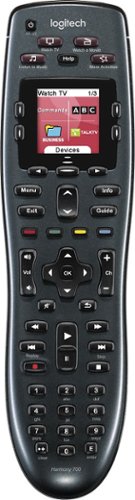
Manage up to 8 of your home theater electronics devices with this Logitech Harmony 700 915-000162 universal remote, which features a brilliant color command screen for easy navigation. One-touch activity buttons simplify device selection.

Posted by: DeadPlasmaCell
from Spring, Tx
I've been thinking about getting a Logitech Harmony remote for a while now. I currently have about 6 devices and of those 6 devices 4 of them have remotes that I have to use for various reasons. My Cable box (SA 8300HD) is my main remote, but wouldn't fully control my AV Receiver (Kenwood VR-615) It worked mostly every button except one major button.. an old Cable box remote worked that one. Then none of them worked my TV (Toshiba 32" LCD) or my Blu-ray Player (Sony BDP-S350) So I said screw it, i'm getting a Logitech Harmony remote. A good friend of mine has one and he loves it so I after much research I decided to go for the Harmony 700 after Best Buy had it on sale last week.
I unboxed the remote and let it charge (took about 3 hours) in the mean time I wrote down the model numbers to all the devices I would be using. Once the charging was complete I installed the software from Logitech's website (not physically included with this particular remote) installation took a couple of minutes and then it took me through the setup wizard. Setup was a breeze and once I inputed all my devices It took me through the "Activity" setup. Activities are buttons on your remote that do multiple functions. For example the "Watch TV" button will tell the remote to switch the TV's input to whatever input you've specified, be it cable box, antenna, etc. Then it will tell the receiver to switch to the proper audio input (All of which are asked specifically during the setup wizard) the remote will then act as a hybrid. For me the remote lets me control the volume through my AV receiver and control the cable box for watching TV.
Once you have all your activities setup you'll be good to go. The remote knows what to turn on and off depending on what activity you want to do. Say I'm watching TV and decide I want to play my Xbox 360, i just hit the activity button for it and it will switch my TV input to the Xbox 360, the stereo receivers output to the 360's and turn my cable box off (If I choose it to do so) The remote also controls my Xbox 360 as if it were an Xbox 360 DVD remote. If I want to go back and watch TV i just hit "Watch TV" and it shuts my Xbox off and switches everything back to the TV settings. It's very very simple and cool.
I've had the remote for only about a week so I can't comment on the battery life, but according to Logitech it should last 2 to 3 weeks on a full charge. 2 rechargeable batteries are included as well. It comes with a AC Plug that has a USB input to it for charging. Also note that the Mini-USB plug isn't your standard looking plug. I've included a comparison shot of a normal Mini-USB plug and the one that it comes with, so you might want to keep a good eye out on the cable it comes with. So far this remote seems to be a fantastic purchase and does exactly what I need it to do and then some. I am very happy with my purchase.
What's great about it: Easy to setup, Great Price, Tons of Features, Great feel
What's not so great: Unique Mini-USB input, can be a bit overwhelming if you aren't prepared.
I would recommend this to a friend!
Ease of Use
5
Durability
5

Share this review:


+1point
2of 3voted this as helpful.
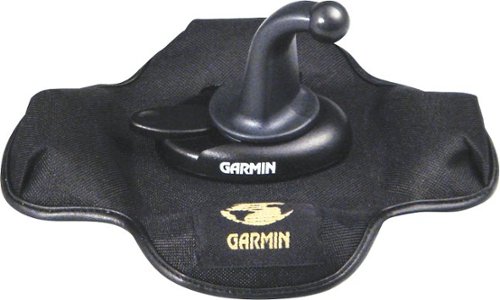
Set your n??vi on the dash of the car with the help of this portable media.
Posted by: DeadPlasmaCell
from Spring, Tx
I bought a Garmin Nuvi 770 and wasn't fond of mounting it on the windshield.. it just seemed like too many things could go wrong, so I checked into this dash mount and picked it up on sale and it's perfect. There's no suction anything so you don't have to worry about your GPS flying off or anything.
You just attach the GPS like normal to the mount arm and the arm slides in to the mount and you can turn it 360 degrees and you can lock it in place so it doesn't move. We've been using it for a few months not and it hasn't moved an inch. It looks a bit clunky, but that really isn't an issue. I love it and would recommend using this instead of a window mount or any kind of suction mount.
What's great about it: Easy setup, doesn't move.
What's not so great: Nothing really
I would recommend this to a friend!
Quality
5
Share this review:


+1point
1of 1voted this as helpful.
DeadPlasmaCell's Review Comments
DeadPlasmaCell has not submitted comments on any reviews.
DeadPlasmaCell's Questions
DeadPlasmaCell has not submitted any questions.
DeadPlasmaCell's Answers
DeadPlasmaCell has not submitted any answers.