


mobilelawyer's stats
- Review count132
- Helpfulness votes425
- First reviewAugust 25, 2010
- Last reviewApril 15, 2026
- Featured reviews0
- Average rating4.8
Reviews comments
- Review comment count0
- Helpfulness votes0
- First review commentNone
- Last review commentNone
- Featured review comments0
Questions
- Question count0
- Helpfulness votes0
- First questionNone
- Last questionNone
- Featured questions0
- Answer count14
- Helpfulness votes9
- First answerMarch 24, 2014
- Last answerMay 26, 2021
- Featured answers0
- Best answers0
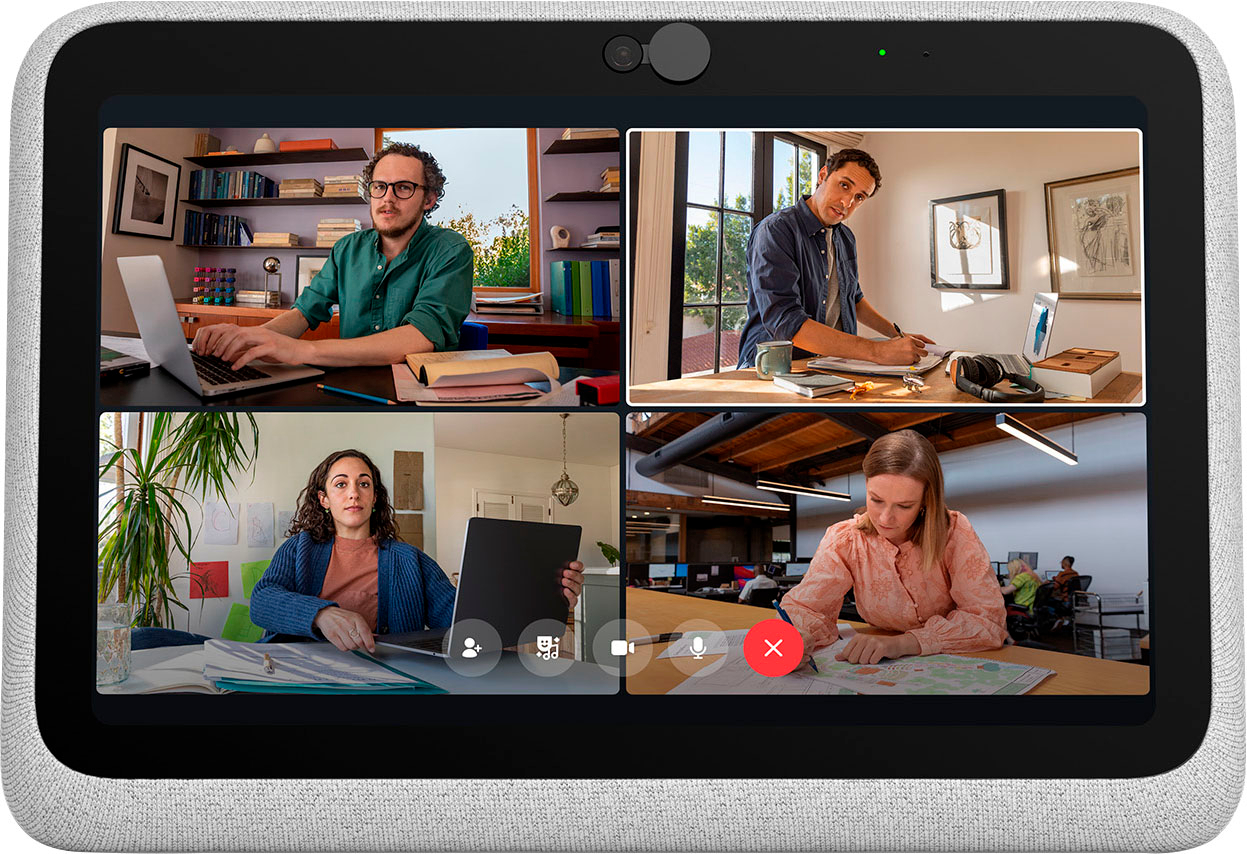
The entire Meta Portal family is video calling designed to bring people closer.Portal Go makes the best of Portal portable, so you~re free to see where the conversation takes you. Whether you~re chasing a toddler or just want a change of scenery, Portal Go~s built-in battery and integrated carry handle help keep the conversation going as you move from room to room. Connect to anyone~even if they don~t have a Portal~with Messenger, WhatsApp, Zoom and more. Portal~s Smart Camera will pan and zoom to keep you in frame so you can move and talk naturally, whatever the task at hand. High fidelity audio fills any room with sound whether you~re on a call, watching entertainment, listening to music with Spotify, Pandora or Tidal, or even using Portal Go as a portable Bluetooth speaker around the home. You can take your office anywhere with a dedicated calling screen to free up your laptop with screen sharing, calendars and conference calling on Zoom, Microsoft Teams, Webex, or Workplace. An ever-expanding AR library lets you blur backgrounds or add effects to liven up calls, while StoryTime uses AR, animation and music to let you tell immersive bedtime stories to loved ones anywhere in the world. Portal Go brings the good times to any room in your house even when it~s not in use with an HD display showing all your favorite photos from Instagram, Facebook or uploaded from your phone via the Portal app. You can explore with Portal~s browser or enjoy entertainment via a range of apps. And with Alexa Built-in, you can ditch the remote and control your smart home and connected devices with the sound of your voice. When you~re done, simply set your Portal Go on its Charging Dock until you need it next. Portal~s simple privacy settings mean you can easily disable the camera and microphone, or block the with the camera cover. All Messenger and WhatsApp calls are encrypted.
Customer Rating

5
Let's Video Conference!
on November 29, 2021
Posted by: mobilelawyer
from Mobile, Alabama
I was intrigued by this device when I first read about it and jumped at the chance to review it. I can’t think of any other device to directly compare it to. It is a portable all in one device for video conferencing of any type, whether through Zoom, Facebook Messaging, or other means. I used it extensively with Zoom and Facebook messenger with great success.
You must have either a Facebook or WhatsApp account to set it up, and you can’t get around that requirement. Set up is done in minutes.
Every participant that I conferenced with commented on how crisp and sharp my image was as I spoke with them. The camera is great. It is as sharp as any video cam I have used, and the software allows the camera to follow your face as you move about. That was a well-liked feature by all my conference members.
It is an attractive device that is self-supporting on a flat surface, and it is battery powered. You charge it up and, in my experience, you can use it all day. Want to go to a different location? Pick up the device and carry it to another room. It has a built-in recessed grip for carrying, and it only weighs 3 pounds. The 10-inch screen is sharp and bright, and no one ever complained about the audio delivered by the device’s microphone. Everyone sounded crisp and clear, and the speaker is more than adequate to fill my room with clean sound.
There is also a Household mode if you want to share the device between family members. You have total control over what contacts and apps can be shared among your family. I added my family members to my home screen, and a conference with any of them was only a click away. You can protect access to the device’s settings with a passcode.
I was able to easily install the Zoom app and conference with others for both business and pleasure. I understand that a Microsoft Teams app is on the way, but not yet available. I will certainly use that feature when available.
I have not tried the voice control yet with Alexa. She needs a rest after the holidays, but this is a potential convenience I will be able to enjoy later. There are also Spotify, Pandora and iHeart Radio apps for musical enjoyment, and the device can be used as a digital photo frame when not in use for conferencing.
I have one slight criticism of the design. The battery charger does not snap into place and is not held in place by any magnet. You must position the device on top of the charger like a hen sitting carefully on her nest. You do get an audio tone when the device is getting power. If you move the device around while it is charging, you can dislodge the charger. This never caused my any real problems, but it should be addressed in the future.
The price makes this Portal Go even more attractive. I highly recommend it. It is a one-of-a-kind self-contained conferencing tool that is fun to use and practical.
Mobile Submission: False
I would recommend this to a friend!


Share this review:


0points
0of 0voted this as helpful.
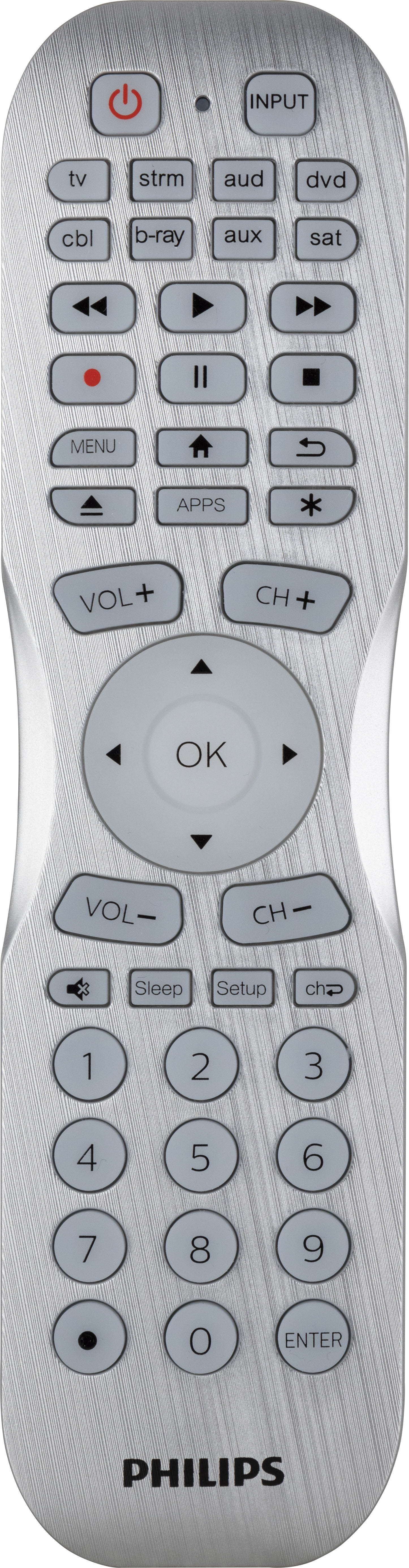
Be the conductor of your home theater with the stylish Philips 8-Device Bluetooth Programmable Remote Control. Coated in a brushed silver finish, this remote is designed for effortless programming and ultimate control of your audio and video devices. It is fully backlit with white LEDs and is equipped to ensure your home theater equipment works in perfect harmony to give you the ultimate entertainment experience. Simply download the user-friendly myTouchSmart~ Remote Control app to your smartphone and pair it with the remote. Through the app, you can easily program your universal remote to control up to eight devices, including your TV, Blu-ray~ player, streaming media player, cable, satellite, soundbar and more. Scene control allows you to input a string of up to 40 commands to operate multiple devices in seconds ~ all at the touch of a button. And, when the remote goes missing, the app~s handy Find-It feature definitely proves its worth! Compatible with all major brands, this universal remote supports thousands of the latest audio and video devices and will scan your equipment using its extensive remote code library. No matter which entertainment device is in play, master volume control gives you the power to adjust your TV~s audio. Access your favorite digital content through your Roku~, Apple TV~ or other streaming device (not compatible with Roku Streaming Stick and Amazon~ devices). Gain unmatched control of your remote and all your home entertainment devices with the Philips 8-Device Bluetooth Programmable Remote Control. *Does not work with RF remote controls

Posted by: mobilelawyer
from Mobile, Alabama
This programable remote from Philips has an attractive brushed metal appearance and backlighted keys and can control up to eight devices. The packaging describes it as a "Universal" remote, but a close reading of the package warns that although it is pre-programed to work with Samsung TVs and Roku boxes, it will not work with the Roku stick or Amazon devices. That limitation alone significantly limits it universality.
As best I can determine, the main use for Bluetooth with this remote is to pair it with your smartphone for programming. You download an app to program the remote, and, the app selects IR codes for the device you want to control. It was easy to use it to control my TV, my Blu-ray player and my Apple TV box, as seperate devices, but its utility stopped there. The code initially chosen by the software for my Onkyo Receiver turned it on, but could not turn it off. I downloaded several different codes for the Onkyo, but none of them worked completely. And the manual downloading is rather cumbersome. If you wanted to be able to turn the receiver on and off and control the volume, there was a code for that. But if you used a code that let you cycle through the inputs on the receiver, you lost the ability to turn the receiver off. I called tech support and confirmed that there were only four available codes for the Onkyo at the time I tested the device, and, unfortunately, none of them worked completely with the Onkyo. I feel confident that limitation will be addressed over time as more codes are made available but lack of codes and lack of a learning feature erased the utility of the device for me.
You can also create "scenes" with this remote, which allow it to control several devices which are used together, like your TV, your home theatre receiver, and a streaming device. But in my set up, the scene programming was rather useless. I use the Onkyo as a switcher between my devices to feed a single input on my Vizio TV. If I wanted to set up several different scenes, say, one to stream from the Apple TV, and another to watch a Blu-Ray, I could do that, but I would still have to cycle through the Onkyo inputs on each scene to select the proper device to watch by multiple button presses on the input button programmed for the Onkyo. It was impossible to set up scenes where the proper Onkyo input was automatically selected by the remote. In my set up, this rendered scene feature as useless. I was relegated to cycling through the programmed Onkyo input button to get to the device I wanted for each seperate use of the remote. And I still had to walk up the the Onkyo receiver and manually turn it off when I got through watching anything because of the limited codes available to control it.
The final kicker was that the remote always defaulted to the input control for the TV, not the Onkyo, when I wanted to tell it to switch inputs. Press the TV button, then power on the TV. Check. Press the button to control the Onkyo, then power on the Onkyo. Check. Then try to cycle through the inputs on the Onkyo by pressing the input button on the remote. Failure. The remote would only cycle through the input for the TV. Even if I hit the button to control the Onkyo again, I sill got the inputs from the Vizio on my screen, not the Onkyo inputs.
A further limitation of this universal remote is that it's IR transmitter seemed to be rather weak. My couch is about 10 feet from my TV and Apple TV box. I had to lift up the tested remote to the exact level of the Apple TV and point it precisely at the box for the button commands to be read correctly. My other remotes do not demand that level of precision to control the Apple TV.
I question whether a person unfamiliar with my livingroom devices would be able to pick up this device after it had been properly programmed and use it to turn on all the various devices and successfully watch them, and then get all the devices turned off after they finished. I do know one thing. They would still have to walk up to the Onkyo receiver and turn it off manually.
Becuase of the limitations described, I could not reccomend this device generally. You might have better luck with your particular devices if all the codes are available via the software, but you would have to be luckier than me for that to happen. And even if all the codes are available to you, the scene feature is of limited utility without the availablity of a learning feature.
Mobile Submission: False
No, I would not recommend this to a friend.
Share this review:


+2points
3of 4voted this as helpful.
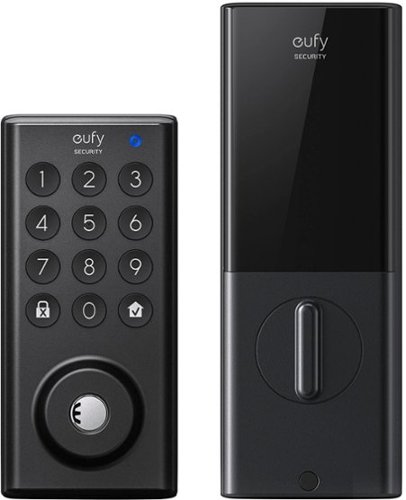
Feel safe and protected with eufySecurity Solo Smart Lock D20. Securely open your front door with built-in Wi-Fi to only let trusted friends and family enter your home when you allow it. And when you are outside your front door, connect with Bluetooth via the eufy Security app, so you don~t need to fumble for your keys. Solo Smart Lock is tough, too, with stainless steel construction that earned it a BMHA certification. Plus, the IPX3 weatherproof rating ensures it can endure wild temperature swings and heavy rain. Give yourself peace of mind with Solo Smart Lock, and you~ll always feel your home is secure.
Posted by: mobilelawyer
from Mobile, Alabama
This Smart Lock was so easy to install. If you have a standard deadbolt in your door, and almost every home does, this lock will fit. You simply remove your old lock and replace it with this one.
If you want to meet the BHMA Grade 2 standard, you can also install a strengthened strike plate on the door frame, which is also included in the box. I finished the initial installation using my existing strike plate and can come back later to install the reinforced one.
When you have installed the lock, you must install the eufy Security software app on your iPhone or Android, and pair the lock with your phone. Be prepared to register for a username and password on the app, with all the usual confirmatory emails for security purposes. You then can add this device to the software and configure it using the step by step set up on the software.
I ran into one glitch and had to call eufy Security support. The friendly rep got me up and running quickly. During the process of pairing Bluetooth, the eufy software instructed the user to wait for a voice prompt from the small speaker on the side of the interior assembly before proceeding. I did not get the prompt, and you had to tic a box on the software indicating that you heard the voice prompt before you could proceed to the next step. I was instructed to ignore that prompt and tic the box anyway, and when I did, the software prompted me to enter a PIN for the font keypad and proceeded to fully configure the device for the eufy Security software. After finishing the setup, I was prompted to download a software update and did so.
The lock has been a joy to use. You can unlock from the outside using the keypad, the supplied key, or from your smartphone using the eufy Security app. If you have other eufy Security devices, this lock works with them through the software. If you are conversing with someone through the video doorbell, you can press a button in the eufy software to unlock the door and let them in without having to leave the app.
If you want to do so, you can set up the lock to work with Alexa or the Google voice assistant to unlock the door.
Easy, simple security. Highly recommended!
Mobile Submission: False
I would recommend this to a friend!


Share this review:


0points
0of 0voted this as helpful.

The improved moisture-wicking fabric technology in our Dri-Tec Performance Sheets has a silkier texture with less dry feel to help you sleep more comfortable throughout the night
Customer Rating
5
Solving a problem I didn't know I had
on October 18, 2021
Posted by: mobilelawyer
from Mobile, Alabama
This Bedgear sheet set was the perfect color for our queen size bed and we were anxious to try them out. They are very soft and pleasant to the touch, and the fitted sheet acutally has extra- strong elastic straps to hold it in place on the mattress pad.
I have been using them for a couple of weeks, and have been extra comfortable under the covers during the evaluation. Until I read the product description, I had never heard of a moisture wicking sheet. All I can say is that they must work. I have slept in total comfort with no sweating or any urge to get out from underneath the covers.
I am the tester here, but my wife heartily concurs. These sheets are a great investment for long term comfort and a very pleasant sleeping experience. Well done, Bedgear!
Mobile Submission: False
I would recommend this to a friend!
Share this review:


0points
0of 0voted this as helpful.
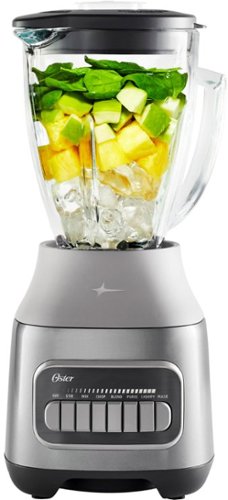
The Oster Pulverizing Power Blender with High-Speed Motor is perfect for creating delicious and nutritious smoothies, frozen drinks, sauces, and more. This blender features a premium metallic finish, and a powerful 800-watt motor with ice-crushing power. It effortlessly takes ice from cubed to crushed in seconds. Its durable 6-cup Boroclass glass jar is thermal shock-resistant, shatter-resistant, and dishwasher-safe for easy cleanup. This versatile Oster blender has a Crush Pro 4 stainless steel blade, as well as 8 speeds (including Stir, Mix, Chop, Blend, Liquify, Puree, and Pulse) to easily pulverize and chop a wide variety of ingredients for all your kitchen needs. It includes a convenient 2-ounce filler cap that has built-in markings for easy measuring and pouring of ingredients. This blender is built to last. It is designed with an all-metal drive for increased durability and also comes with a 3-year satisfaction guarantee.
Posted by: mobilelawyer
from Mobile, Alabama
We have used this blender for several important kitchen functions in the past several days, and have been impressed by its power and speed. It is easy to diassemble the the base so that the blades can be throughly cleaned. The Oster is attractive and functional, and the heavy glass jar is much appreciated. I would expect this blender to serve well beyond its generous three year satisfaction guarantee.
Mobile Submission: False
I would recommend this to a friend!
Share this review:


0points
0of 0voted this as helpful.
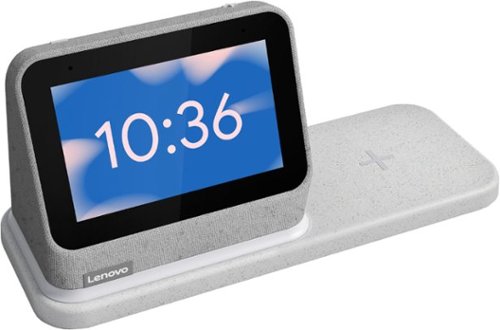
The best bedroom Smart Clock just got even better. The Lenovo Smart Clock Gen 2 with Wireless Charging Dock keeps your nightstand clutter free. Charge up to two additional devices at once: your phone (using the wireless dock) and another accessory, like a smart watch (using the USB port). The 4~ color touchscreen showcases the time, weather and your family photos with a choice of customizable clock faces or check in on your smart cameras feeds before bed. Enhanced with a built-in nightlight when docked, the light is just bright enough to illuminate your way without waking your partner. With multiroom audio, you can add your Lenovo Smart Clock Gen 2 to a speaker group and play media across multiple devices and rooms.
Posted by: mobilelawyer
from Mobile, Alabama
Lenovo redesigned its original Smart Clock with a few major changes and some minor ones as well, and now gives us the Smart Clock 2. Like the original, you will use it every day and never think about it. It is not built to dazzle. It’s built to serve, and it does its job well.
The configuration of the clock is similar, but different from the original. The screen is raised up about an inch and the speakers fire forward. The screen is just a little smaller, but it is hardly noticeable. This is an audio centric device. I think the front spacing speakers have improved clarity. Otherwise, the surround materials seem to be like the original: a gray, coarse fabric that makes the device easy to pick up and manipulate. The only visible controls on the phone are the plus and minus symbols on top which control volume. Other controls are available with the swipe of a finger on the screen.
You will be up and running in minutes. Plug in the clock and you will be guided through the process of setting up the device using the Google home app. Select a clock face. Decide whether you want to set up an alarm, and you are set. The alarm can be the default wake up or you can choose a You Tube Music song of your choice. You can repeat the alarm or set up a single instance. Tell Google what you want to hear, or when you want to set an alarm. Think of this device as a smart speaker and morning information center. You can also view family pictures, but don’t expect to watch videos- there are other products for that. You can also ask Google for a plethora of other audio services like weather or news.
My favorite new feature is the wireless charging dock. It cradles the Smart clock and charges up your device while you sleep. I had never used wireless charging with my iPhone before, but it works perfectly with the dock. Lay the iPhone down on its sweet spot and a white surround led on the dock lights up to let you know you have hit it. I am now using this dock exclusively to top up my iPhone every night. There is also a USB-A port on the back of the dock if you don’t want to charge wirelessly and want to use your device’s own charging cord. One caveat- don’t expect to use both wireless charging and wired at the same time as there probably won’t be enough juice for that.
Both I and my wife like the visibility of the clock face whether you are in the bed or checking the time from another part of the room. Lenovo made an already good device into something even better. I love it!
Mobile Submission: False
I would recommend this to a friend!

Share this review:


+4points
4of 4voted this as helpful.
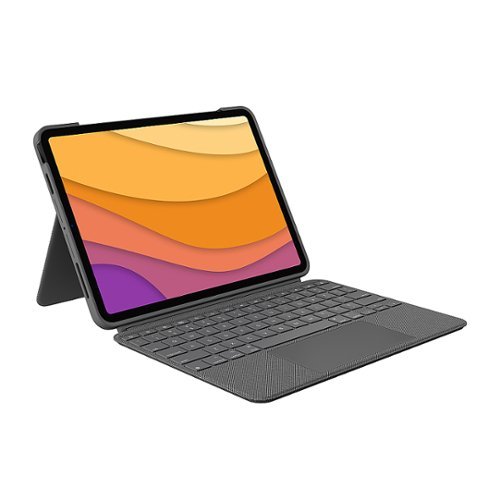
This is not a laptop. It~s so much more. Meet Combo Touch, the keyboard case with trackpad that enables new levels of versatility with iPad Air. Navigate and work in apps like never before with a new click-anywhere trackpad ~ our largest ever* ~ that gives you more space and allows for Multi-Touch trackpad gestures. SMART CONNECTOR technology helps to deliver an incredibly responsive trackpad experience and also makes powering and pairing the keyboard instant. Type comfortably for hours with laptop-like backlit keys that automatically adjust to your environment. You can always see what you're typing thanks to 16 levels of brightness. Enjoy convenient access to volume controls and more with a full row of iPadOS shortcut keys. The iPad Air meets its aesthetic match with a slim, sleek design ~ the thinnest keyboard case we've ever designed with a trackpad. * The elegant woven outer fabric feels as great as it looks and the case is molded to fit your iPad Air, protecting the front, back, and corners from scrapes and bumps. Your iPad Air is held securely in place so you can have peace of mind that it won~t slip out and focus on what matters most ~ getting things done. *Compared to Logitech keyboard cases with trackpad released in 2020.
Posted by: mobilelawyer
from Mobile, Alabama
As an iPad Air Fourth Generation owner, I have a dilemma. I want to protect my beloved tablet from harm, I want to add a keyboard for productivity, but I don’t want to add unnecessary weight to the tablet when I travel. An added plus would be that the whole package be attractive and not break the bank.
Believe me, I have tried several of the alternatives, and now Logitech has offered a product to serve all my wants with the Logitech Combo Touch.
First, the case. It is an attractive hard rubber-like surround with a tactile woven fabric back and an adjustable kickstand. It can be used without the keyboard. I found it to be particularly useful and rather unique among the competing offerings. There is a cut out at the top so that the Apple Pencil’s magnet can firmly attach to the top of the iPad and recharge.
Second, the keyboard. Its magnets instantly and firmly snap into place at the bottom of the iPad, and once attached, you are in business. There is no Bluetooth to pair, and the keyboard gets its juice from the iPad battery. There was literally nothing to set up. You are typing instantly with lighted keys that automatically adjusts to the ambient light in your location.
It would be totally unfair to review this product without typing the review on its keyboard. I am doing so, and the feel is just perfect. Nice key travel and responsiveness.
And the Combo Touch is beautiful to behold. When closed, the keypad protects the iPad and puts it to sleep. And the components fit together beautifully. Yes, there as added weight, but not to the extent that it detracts from the Air’s utility. I will accept the slight weight gain for the protection and the utility of the Combo Touch.
My sole gripe is that the kickstand is sometimes lacking in stability when used on your lap. On a stable surface, I have no complaints whatsoever. And, of course, there is a large and functional touchpad, and function keys which make the Combo Touch even more versatile.
It’s pretty and functional and I highly recommend the Logitech Combo Touch.
Mobile Submission: False
I would recommend this to a friend!


Share this review:


+2points
2of 2voted this as helpful.
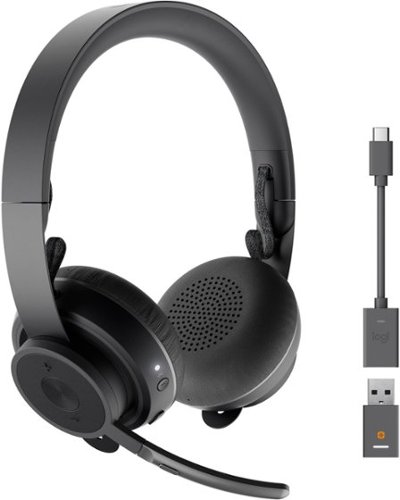
Take control of your acoustic experience with Logitech Zone 900, the wireless headset specifically designed to enhance focus and productivity at home. Connect to your smartphone and computer, and seamlessly switch between them to experience great audio, suitable for conference calls and immersive music. Active noise cancelation blocks out the noise around you. With comfort, simple controls, and wireless Qi charging, Zone 900 helps you define your workplace soundscape and stay in your zone. Logitech Unifying technology connects up to six compatible devices with one receiver. Stay focused, stay connected, and stay in your zone no matter where you work.
Posted by: mobilelawyer
from Mobile, Alabama
This is a business class headset from Logitech. It is light, comfortable and attractive, and it has noise suppression built in. The design and construction exude Logitech quality.
It can be used with the supplied USB dongle to mate to your device, or, if you want, you can simply pair the headset via Bluetooth. I chose Bluetooth, and had the headset paired as headphone and microphone under Windows 10 in a matter of seconds after I took it out of the box. According to the headset’s built-in voice, the battery had an several hour charge on it before I attempted to plug in the charging cord. The assistant in the headset orally told me how much charge was left when I pressed the button to turn on the phone. The headset ships with the mentioned USB dongle, USB-C charging cord, a USB-C to USB-A adapter, and an attractive carrying pouch for the headset and all accessories. The headset folds up for storage in the pouch. The pouch has a smaller inner pouch shaped to hold the dongle.
I was able to use the headset immediately for a Zoom call, and the other participants heard me loud and clear. This was done without the benefit of installing any software at all. I checked the Zoom app to make sure the Logitech microphone and earphones were set to serve as audio sources.
I was easily able to install the LogiTune software on both my MacBook Air and Lenovo desktop computer at work. My iPhone was a different story. The app was easily downloadable from the App Store, but when I fired up the app, it was never able to pair the headset with the phone after several tries, using the set-up interface built into the app. I resorted to using the native system app in the phone to pair up the device.
When I tested the phone over the road, however, the headset and mike worked perfectly without any help from the app for phone calls. Conversations were crystal clear on both sides of the call and the noise suppression was fantastic. Callers said they could not tell I was calling from a car.
Controls are dead simple. A power button serves to turn the unit on or off, and you simply hold it down to put the device into pairing mode. An LED rapidly flashes to let you know the device is in paring mode, and your digital assistant confirms that with an announcement. Another button turns the automatic noise compensation off. There are buttons on the microphone side to pause, play, and turn volume up and down, as well as to start/end a telephone call. There is also a mute button on the mike.
Controls are dead simple. A power button serves to turn the unit on or off, and you simply hold it down to put the device into pairing mode. An LED rapidly flashes to let you know the device is in paring mode, and your digital assistant confirms that with an announcement. Another button turns the automatic noise compensation off. There are buttons on the microphone side to pause, play, and turn volume up and down, as well as to start/end a telephone call. There is also a mute button on the mike.
I rate the headphone sound quality as excellent. Leave them on to listen to music until a call comes in. Continue with music after completion of the call, never taking your eyes off the road. The specs say that a full battery charge gives 14 hours of use. I do not doubt that spec but have not had the chance to fully confirm it through testing. I have already used the headset for hours with pleasure and have never charged them up once.
This fine headset is definitely a keeper.
Mobile Submission: False
I would recommend this to a friend!


Share this review:


+1point
1of 1voted this as helpful.
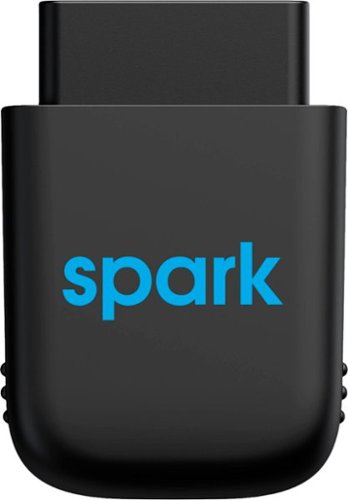
Diagnose automobile mechanical issues with this AT&T Harman Spark smart car device. Compatibility with Android and iOS mobile devices offers convenient control and monitoring, while a 4G LTE receiver brings Wi-Fi to your ride. This AT&T Harman Spark smart car device features an accelerometer and gyroscope sensors for vehicle tracking.
Customer Rating
5
Convenience, Safety, Peace of Mind
on May 26, 2021
Posted by: mobilelawyer
from Mobile, Alabama
I have been using this interesting product for almost two months. It is shaped somewhat like a fat thumb drive and plugs into the OBD-II port on your car. The OBD port, you say, where is that? It is usually underneath your dashboard, and sometimes hard to find. The Spark device plugs into it and receives both voltage to power it as well as the diagnostic data from your car. One problem I have had during its usage is getting the Spark to stay in place. Because of the position of the OBD-2 port on my Honda Accord, it was easy to knock the device out of the port an onto the floor of the car as I got out of the car. This happened four or five times and was probably unique to my vehicle. I did not feel the contact with the unit or hear anything when this happened. The included software immediately sent me a phone message, alerting me to plug the unit back in.
What does the Spark do? Lots. It contains an LTE 4G SIM from AT&T and provides an in-vehicle hotspot for both your devices and those of your passengers to keep a constant connection to the internet. This is a great convenience on the road, and the quality of the connection depends on the distance between your car and AT&T towers offering service. Speed was more than serviceable in our area, and more than adequate for mobile devices, usually averaging about 30mps for downloads and 10 to 15gbs for uploads. You can connect up to 8 devices.
The Spark records every aspect of your vehicle’s performance and notifies you of a problem or an issue that needs to be serviced. I have not had any major problems with my car during my testing but would have been notified had they arisen. The alerts are issued to your smartphone by the Harmon software. You are reminded of the status of your fuel, whether the device has been removed, whether you have exceeded the speed limit, whether your vehicle is being towed, running idle for an inordinate amount of time, and whether there has been any disturbance while the vehicle is parked. When you go to your car and open the door, you may get a notice that there has been a disturbance. This warning would certainly be triggered if someone tried to break into your car.
As I type this, the software tells me my fuel level is at 23 per cent and normal, battery is at 13.1 volts and normal, engine coolant temperature is 190 degrees and normal, and air intake temperature was recorded at 125 degrees and normal.
The software also provides navigation services and tells you from your office or your home the exact location of your vehicle. I am sitting in my office, and the software now shows my car parked with a map of its location. It does without saying that if you had a small fleet of vehicles, you would be able to monitor their location at all times using this software. You can also set up boundaries for usage and be alerted if the driver exceeds the defined area. The software records the driving habits of the operator and makes recommendations for safety. If you must know, I scored well and was never reprimanded or told to slow down.
You can also summon roadside assistance and make parking reservations and pay for both inside the app.
The monthly charge to use this service may be a small premium to pay for the great utility, convenience and safety it offers to the users of the protected vehicles.
Mobile Submission: False
I would recommend this to a friend!


Share this review:


+1point
1of 1voted this as helpful.
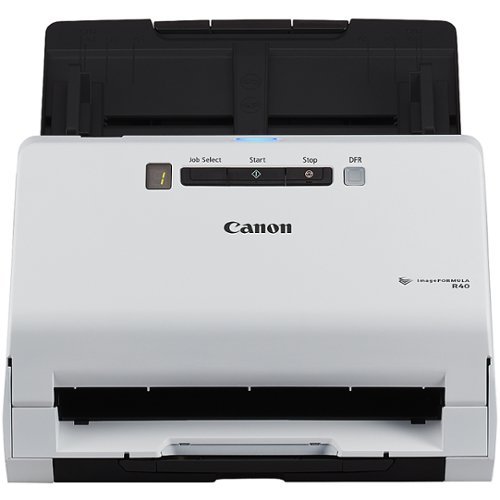
The Canon imageFORMULA R40 scanner, easy to set up and use, allows users to increase productivity and organization at home or in the office. Quickly convert paper documents to searchable digital files using the bundled software.
Posted by: mobilelawyer
from Mobile, Alabama
This little scanner is a workhorse and a great illustration of the benefit gained from a stand-alone scanner. I had it out of the box and hooked up on no time. You are advised to first download the appropriate software first, and then attach the scanner to your computer, via USB, which I did. Rediris software is furnished for optical recognition and document management and can also convert the pdf into a Word or Excel document. Cardiris is also offered for business card management. Time will tell if this software will be able to compete with Adobe Acrobat DC for my management needs. I liked what I saw in the documents I opened and converted using Rediris.
The one touch operation is so simple. You place the stack of documents you want to scan in the feeder, press the scan button, and boom: As the scan starts, the software opens and shows the progress and when you confirm that the job is finished, the document is saved to the default location you set. I set my default folder as the same folder used for our networked office scanner without issue. No matter which I use, the scanned product is in the same folder.
Operation is speedy: up to 40 pages per minute for black and white and 30 pages per minute in color is specified, and I have no reason to argue. Double those figures for the two-sided mode.
I have experienced no jams or miscues in the two days I have used the device. The default resolution settings are fine for my use. If I wanted greater detail, I could so specify as the expense of speed. I have never felt the need to do so. Nor have I been constrained by the lack of an ethernet connection on the R40. I am the only one who will be using this scanner, but since I am storing its output on a network drive attached to my computer, anyone else in the office could map a drive on their computer to get to the document, if needed.
I have experienced no jams or miscues in the two days I have used the device. The default resolution settings are fine for my use. If I wanted greater detail, I could so specify as the expense of speed. I have never felt the need to do so. Nor have I been constrained by the lack of an ethernet connection on the R40. I am the only one who will be using this scanner, but since I am storing its output on a network drive attached to my computer, anyone else in the office could map a drive on their computer to get to the document, if needed.
Small footprint, efficient scanner. No complaints whatsoever. If you think you might need this, you probably do!
Mobile Submission: False
I would recommend this to a friend!
Share this review:


0points
0of 0voted this as helpful.
mobilelawyer's Review Comments
mobilelawyer has not submitted comments on any reviews.
mobilelawyer's Questions
mobilelawyer has not submitted any questions.
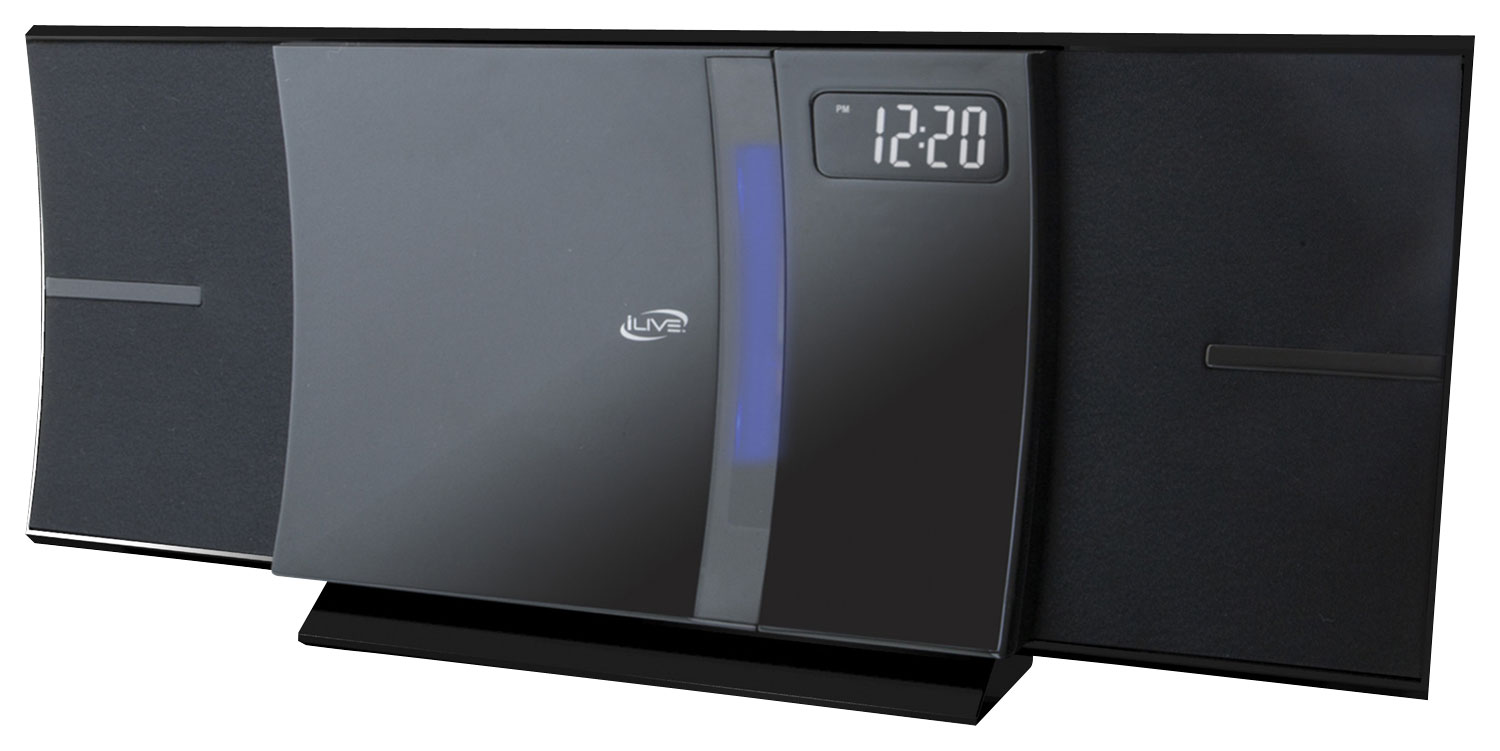
Enjoy your favorite tracks with this iLive IHB603B stereo system, which supports Bluetooth 2.1 and features an FM radio, CD player and 3.5mm auxiliary input for a variety of listening options. A remote ensures simple operation.
Can you play the CD through a detached bluetooth speaker?
If I understand your question correctly, no. You have to have a means to get the sound from the CD: either from a corded or wireless connection. If you have a physical cord from the CD that terminates in a mini jack connection to the Sony, you could use that to connect the two, and, of course, the speaker has a Bluetooth radio as well, but I am not familiar with CD players with Bluetooth radios. So far, I have only used the speaker to stream from my smartphone through Bluetooth.
8 years, 2 months ago
by
mobilelawyer
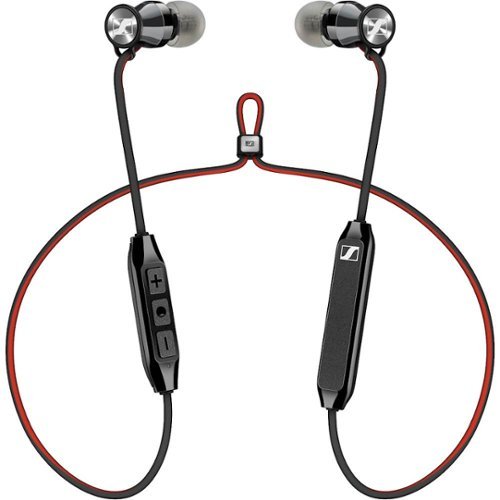
Enjoy playlists in private with these Sennheiser wireless earbuds. The three-button remote lets you take calls or cycle through music with a single touch, and the earpieces are magnetic, so they stick to one another to prevent loss while not in use. These Sennheiser wireless earbuds have a range of up to 30 feet from a paired device.
Are these earbuds sweat or waterproof?
They are not advertised as such, so I would not count on it. The are great sounding and light, but they are not listed as sport phones or waterproof.
8 years, 3 months ago
by
mobilelawyer
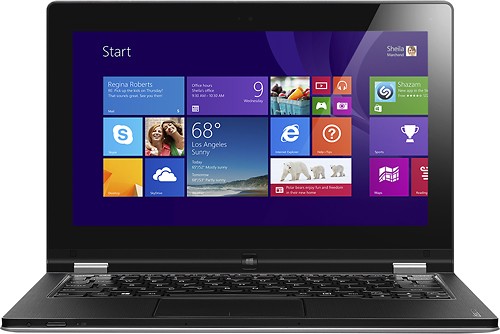
Learn more about the New WindowsFeaturing a 2-in-1 design, this Lenovo IdeaPad Yoga Refurbished Lenovo Yoga 11s - 59RF0542 laptop allows you to easily transition between 4 different modes to suit your needs. The 11.6" 10-point capacitive multitouch screen enables responsive navigation.This product has been refurbished. Learn more.
Is there a manufacturer's warranty on this?
Product page shows no warranty, just the standard Best Buy return policy.
Yes. One year depot through Lenovo. I upgraded to two years in home for only $69, which I think is a great deal.
12 years, 2 months ago
by
mobilelawyer
Mobile, Alabama
Learn more about the New WindowsFeaturing a 2-in-1 design, this Lenovo IdeaPad Yoga Refurbished Lenovo Yoga 11s - 59RF0542 laptop allows you to easily transition between 4 different modes to suit your needs. The 11.6" 10-point capacitive multitouch screen enables responsive navigation.This product has been refurbished. Learn more.
can the hard disc of this machine be upgraded to 256g ?
Yes it can, if you are adept at carefully taking small things apart. Look in the Lenovo community website for discussion on how it is done. Many have upgraded to 256GB ssd's and some have increased the memory to 8GB.
Try here first:
http://forums.lenovo.com/t5/Idea-Windows-based-Tablets-and/Lenovo-Yoga-11s-SSD-and-RAM-Upgrade-Great-Results/m-p/1195545#M7255
Try here first:
http://forums.lenovo.com/t5/Idea-Windows-based-Tablets-and/Lenovo-Yoga-11s-SSD-and-RAM-Upgrade-Great-Results/m-p/1195545#M7255
12 years, 2 months ago
by
mobilelawyer
Mobile, Alabama