
Share Goody2013's profile


Goody2013
Goody2013's stats
- Review count3
- Helpfulness votes6
- First reviewJune 24, 2008
- Last reviewNovember 26, 2013
- Featured reviews0
- Average rating4.3
- Review comment count2
- Helpfulness votes0
- First review commentNovember 28, 2013
- Last review commentNovember 25, 2014
- Featured review comments0
Questions
- Question count0
- Helpfulness votes0
- First questionNone
- Last questionNone
- Featured questions0
- Answer count1
- Helpfulness votes2
- First answerNovember 26, 2014
- Last answerNovember 26, 2014
- Featured answers0
- Best answers1
Goody2013's Reviews
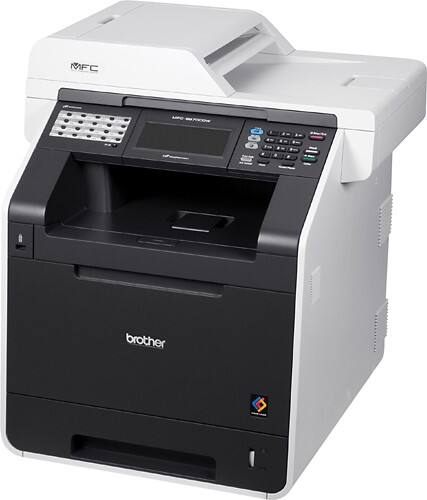
Print documents up to 30 ppm* in black-and-white and color with this all-in-one printer that features a 5" color touch screen for simple operation and up to 2400 x 600 dpi resolution.
Customer Rating

5
Document publishing for home schooling parents
on November 26, 2013
Posted by: Goody2013
from New Jersey
I use it for:Document printing
"Brother is best known for monochrome and color laser printers. In 2013, they decided to stop manufacturing all-in-one inkjet printers and solely focus on the laser market." - Consumer Reports (in my conclusion, have a link reference to www.consumerreports.org for the MFC-9970CDW that is tested/reviewed, a review that is complete with recommendations and estimations of the real world cost of ownership).
I wish to cite just my experience. Why purchased? My needs, in having been around the block a few times, is to address the issues of home schooling and assist those in the work of home schooling with document production supporting continuously changing curriculum planning and goals. While needing the gamut of document production needs (from faxing of mark-up to final print ready production of PDF files), I specialize in the need for producing booklet printed materials utilizing legal-sized paper. The purchase decision: Speed does matter. This printer performs with a print speed of up to 30 ppm. Of course, no where near that speed can be had when using legal-sized paper in a duplex printing of graphic embedded booklets. Still, best possible speed as well as quality of print, reliability and economy of usage are very important considerations. With increased paper handling speed, it should be unquestionably accepted that mishaps will be much more horrific than those occurring in the use of low speed printer.
I offer this review because I had more than 50 variable length booklets to immediately print upon completing set-up of the MFC-9970CDW printer. I had read of excessive paper curling, jams, and worse re the experience of some in having the MFC-9970CDW printer. I judged that over-heating could very much relate to not considering the environmental requirements of such seemingly innocuous need as the space between machine and structures such as a wall or a cabinet. I know that the selection of paper used is also critical. One is not an expert by merely placing fanned paper from a single ream of paper in the paper tray of an all-in-one printer. Following recommended best practice is important if not wishing to incur careless, perhaps even thoughtless mishaps. Some reviewers review the product as though they were a dentist working without a good doctor-patient relationship first being established.
Who is with the most misfortune? Certainly, it is the patient (in this instance, the MFC-9970CDW printer). The reader of such offerings finds their interest piqued by the demise seemingly proven by a picture of accordion pleated jams, but the reader is not any better off in his/her buying decision if the decision is thwarted by unexplained processes.
Before taking the opinion of another (especially regarding an item as critical to the experience of a workplace as is a multifunction, all-in-one printer) do have some indication of the reviewer's basis for reporting.
I have just donated a work-horse of a printer of more than 5 years vintage: the Dell 3100CN with duplex upgrade, a truly one function laser printer. While still in working condition, thanks to my many under-the-hood experiences with the printer and with Dell, I must offer a disclaimer to anyone reading this review because my length of experience with my new printer of choice is very short. My MFC-9970CDW is only just unboxed.
But it is precisely that... the merit found even in just the setup of this printer that requires me to offer my review. The Quick Set-up Guide was just that! Clear, with good organization. I had a fax of the warranty off in under 30 minutes of its big box receipt having occurred.
The MFC-9970CDW is over 70 pounds, including its packaging. But much more than weight alone, my receipt was a factory boxed item complete with many measures relating to secure packaging of the delicate machine inside. Do be wary. The Basic User's Guide in only the preface offers the full disclosure on the machine's one year on site limited warranty. Key to all is that the Warranty is "given only the the original end-user/ retail purchaser." Very specifically, if the product was used, you are not the Original Purchaser. Well, I am the Original Purchaser. Removing the packing material from the machine offered a certain reward in knowing that this item is especially not something to consider buying as an open box purchase.
I took time to follow each step and to re-check what I had done. I note that I was working essentially without assistance (but under the watchful guise of my significant other - my wife - in handling the moving of the printer from its box to its resting place on a well-built, heavy duty file cabinet specifically designed to be a heavy object holder and offering rollers allowing mobility.
This printer has need for complete access to its rear paper tracking mechanism. I know the experience very well in having owned the Dell 3100CN with its add-on duplex unit which of course attached to the rear of the printer.
The Quick Setup Guide clearly notes that the printer must have 10 inch clearance from its back side to any wall and 4 inches on either side. That's when it is in operation. Of course, the wheeled base and the extra length power cord and connection type of choice (LAN but you may choose USB or a Wireless network connection), allow for the printer (with its 60 lb., unboxed weight) to be moved out into an area allowing easy access as needed. That's just smart planning.... There is no need for photos of accordion-shaped paper removed from paper jams or citing the need to use pliers to remove paper bits. If adhering to best practices of folks having years of involvement with all types of printers, one should know that one must report on the multiple facets of just how the machine is used, its environment, and one's own credentials. If wishing to have just the facts, open www.consumerreports.org and read their "All-in-one printer Recommendations" at http://www.consumerreports.org/cro/electronics-computers/computers-internet/printers/all-in-one-printer-ratings/models/user-reviews/brother-mfc-9970cdw-99040836.htm#readReview ...
And do keep on keeping on.... This printer produced my needed supply of booklets in time for important continuing endeavors. For my needs as I view them for the next 5-8 years, the MFC-9970CDW printer has the quality of manufacture to meet my needs. And though my usage experience is minimal, I rely on the expertise of the likes of Consumer Reports.
The process for certification of a product is generally summed up in four steps:
1) Application (including testing of the product)
2) Evaluation (does the test data indicate that the product meets qualification criteria)
3) Decision (does a second review of the product application concur with the Evaluation)
4) Surveillance (does the product in the marketplace continue to meet qualification criteria)
1) Application (including testing of the product)
2) Evaluation (does the test data indicate that the product meets qualification criteria)
3) Decision (does a second review of the product application concur with the Evaluation)
4) Surveillance (does the product in the marketplace continue to meet qualification criteria)
What's great about it: Booklet printing on legal sized paper
What's not so great: Need to be choosey in paper choice: Brother Paper and recommended Xerox 4200DP 20 lb., Hammermill Laser Print 24 lb.
I would recommend this to a friend!
Features

5
Speed
5

Share this review:


-1point
2of 5voted this as helpful.
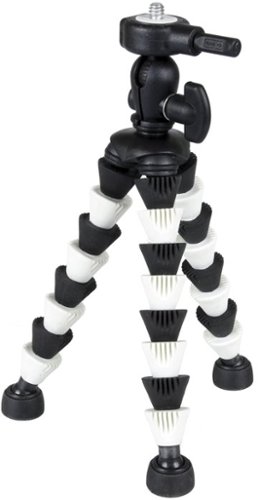
Get the camera position and stability you need for your digital footage with this compact tripod that features 9 flexible aluminum and thermoplastic elastomer leg segments and a double-lock quick-release system for easy positioning.
Customer Rating

4
Black, blue or orange, the Flexpod is helpful
on June 25, 2008
Posted by: Goody2013
from New Jersey
Perhaps, the pros and cons are only to be found in its appearance: the product is not a toy and is not intended for use by children.
|
This tripod features a 'Double-Lock' quick-release mechanism that may not be fully considered by someone new to using tripods. But once figuring out how it works, the camera can be readily carried apart from the tripod while requiring only a moment for the camera's reconnection to the tripod. Indeed, the tripod should not be carried or transported with the camera attached. If not handled reasonably for its designed purpose, I am sure that the tripod's design will easily fail.
|
A one-year warranty requiring pre-paid (and insured) shipping to a NJ address will not be of interest to many who shell out the equivalent of the price of 4 gallons of gas (or less) for this item. The mileage you get really does depend upon you!
|
Having owned it for only a few days, I fully expect that its design will continue to be serviceable for quite some time.
|
I find great utility in this item as my steadiness in holding the lighter than air digital camera is not so good.
|
And as my need for pictures is seldom other than with my wife and friends, I do like to be included in the picture. It is amazing how often a "knob" of some sort becomes available for use with this flexible tripod with its appendages that really can get a grip.
|
At under $20, it seems well worth the price. You can read more about the ToCAD product line on the Sunpak flexpod plus web page, www.tocad.com .
|
This tripod features a 'Double-Lock' quick-release mechanism that may not be fully considered by someone new to using tripods. But once figuring out how it works, the camera can be readily carried apart from the tripod while requiring only a moment for the camera's reconnection to the tripod. Indeed, the tripod should not be carried or transported with the camera attached. If not handled reasonably for its designed purpose, I am sure that the tripod's design will easily fail.
|
A one-year warranty requiring pre-paid (and insured) shipping to a NJ address will not be of interest to many who shell out the equivalent of the price of 4 gallons of gas (or less) for this item. The mileage you get really does depend upon you!
|
Having owned it for only a few days, I fully expect that its design will continue to be serviceable for quite some time.
|
I find great utility in this item as my steadiness in holding the lighter than air digital camera is not so good.
|
And as my need for pictures is seldom other than with my wife and friends, I do like to be included in the picture. It is amazing how often a "knob" of some sort becomes available for use with this flexible tripod with its appendages that really can get a grip.
|
At under $20, it seems well worth the price. You can read more about the ToCAD product line on the Sunpak flexpod plus web page, www.tocad.com .
What's great about it: Perfect companion for digital cam/camcorder; mount cam to a fence, a limb of tree, a rail; even use as tabletop tripod!
What's not so great: None noted: will update if any experienced...
I would recommend this to a friend!
Share this review:


+1point
2of 3voted this as helpful.
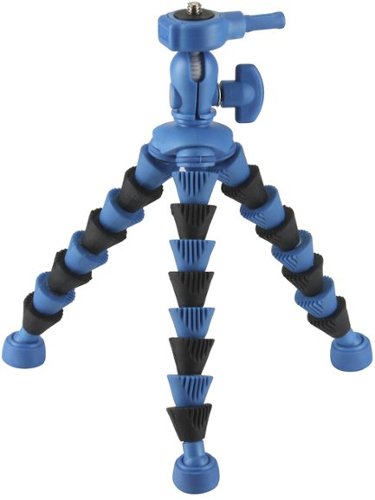
Enjoy steady camera action with this tripod that features segmented legs that wrap around objects, offering a secure base to take pictures.
Posted by: Goody2013
from New Jersey
This tripod features a 'Double-Lock' quick-release mechanism that may not be fully considered by someone new to using tripods. But once figuring out how it works, the camera can be readily carried apart from the tripod while requiring only a moment for reconnection to the tripod. Indeed, the tripod should not be carried or transported with the camera attached. If not handled reasonably for its designed purpose, I am sure that the tripod's design will easily fail.
|
A one-year warranty requiring pre-paid (and insured) shipping to a NJ address will not be of interest to many who will shell out the equivalent of the price of 4 gallons of gas (or less) for this item.
|
Having owned it for only a few days, I fully expect that its design will continue to be serviceable for quite some time.
|
I find great utility in this item as my steadiness in holding the lighter than air digital camera is not so good.
|
And as my need for pictures is seldom other than with my wife and friends, I do like to be included in the picture. It is amazing how often a "knob" of some sort becomes available for use with this flexible tripod with its appendages that really can get a grip.
|
On sale at $18, it seems well worth the price. You can read more about the ToCAD product line on the Sunpak flexpod plus web page of www.tocad.com
|
A one-year warranty requiring pre-paid (and insured) shipping to a NJ address will not be of interest to many who will shell out the equivalent of the price of 4 gallons of gas (or less) for this item.
|
Having owned it for only a few days, I fully expect that its design will continue to be serviceable for quite some time.
|
I find great utility in this item as my steadiness in holding the lighter than air digital camera is not so good.
|
And as my need for pictures is seldom other than with my wife and friends, I do like to be included in the picture. It is amazing how often a "knob" of some sort becomes available for use with this flexible tripod with its appendages that really can get a grip.
|
On sale at $18, it seems well worth the price. You can read more about the ToCAD product line on the Sunpak flexpod plus web page of www.tocad.com
What's great about it: Perfect companion for digital cam/camcorder; mount cam to a fence, a limb of tree, a rail; even use as tabletop tripod!
What's not so great: Appearance of being a toy may result in misuse by children
I would recommend this to a friend!
Share this review:


+2points
2of 2voted this as helpful.
Goody2013's Review Comments
Print documents up to 30 ppm* in black-and-white and color with this all-in-one printer that features a 5" color touch screen for simple operation and up to 2400 x 600 dpi resolution.
Overall5 out of 5
5 out of 5Document publishing for home schooling parents
By Goody2013
from New Jersey
"Brother is best known for monochrome and color laser printers. In 2013, they decided to stop manufacturing all-in-one inkjet printers and solely focus on the laser market." - Consumer Reports (in my conclusion, have a link reference to www.consumerreports.org for the MFC-9970CDW that is tested/reviewed, a review that is complete with recommendations and estimations of the real world cost of ownership).
I wish to cite just my experience. Why purchased? My needs, in having been around the block a few times, is to address the issues of home schooling and assist those in the work of home schooling with document production supporting continuously changing curriculum planning and goals. While needing the gamut of document production needs (from faxing of mark-up to final print ready production of PDF files), I specialize in the need for producing booklet printed materials utilizing legal-sized paper. The purchase decision: Speed does matter. This printer performs with a print speed of up to 30 ppm. Of course, no where near that speed can be had when using legal-sized paper in a duplex printing of graphic embedded booklets. Still, best possible speed as well as quality of print, reliability and economy of usage are very important considerations. With increased paper handling speed, it should be unquestionably accepted that mishaps will be much more horrific than those occurring in the use of low speed printer.
I offer this review because I had more than 50 variable length booklets to immediately print upon completing set-up of the MFC-9970CDW printer. I had read of excessive paper curling, jams, and worse re the experience of some in having the MFC-9970CDW printer. I judged that over-heating could very much relate to not considering the environmental requirements of such seemingly innocuous need as the space between machine and structures such as a wall or a cabinet. I know that the selection of paper used is also critical. One is not an expert by merely placing fanned paper from a single ream of paper in the paper tray of an all-in-one printer. Following recommended best practice is important if not wishing to incur careless, perhaps even thoughtless mishaps. Some reviewers review the product as though they were a dentist working without a good doctor-patient relationship first being established.
Who is with the most misfortune? Certainly, it is the patient (in this instance, the MFC-9970CDW printer). The reader of such offerings finds their interest piqued by the demise seemingly proven by a picture of accordion pleated jams, but the reader is not any better off in his/her buying decision if the decision is thwarted by unexplained processes.
Before taking the opinion of another (especially regarding an item as critical to the experience of a workplace as is a multifunction, all-in-one printer) do have some indication of the reviewer's basis for reporting.
I have just donated a work-horse of a printer of more than 5 years vintage: the Dell 3100CN with duplex upgrade, a truly one function laser printer. While still in working condition, thanks to my many under-the-hood experiences with the printer and with Dell, I must offer a disclaimer to anyone reading this review because my length of experience with my new printer of choice is very short. My MFC-9970CDW is only just unboxed.
But it is precisely that... the merit found even in just the setup of this printer that requires me to offer my review. The Quick Set-up Guide was just that! Clear, with good organization. I had a fax of the warranty off in under 30 minutes of its big box receipt having occurred.
The MFC-9970CDW is over 70 pounds, including its packaging. But much more than weight alone, my receipt was a factory boxed item complete with many measures relating to secure packaging of the delicate machine inside. Do be wary. The Basic User's Guide in only the preface offers the full disclosure on the machine's one year on site limited warranty. Key to all is that the Warranty is "given only the the original end-user/ retail purchaser." Very specifically, if the product was used, you are not the Original Purchaser. Well, I am the Original Purchaser. Removing the packing material from the machine offered a certain reward in knowing that this item is especially not something to consider buying as an open box purchase.
I took time to follow each step and to re-check what I had done. I note that I was working essentially without assistance (but under the watchful guise of my significant other - my wife - in handling the moving of the printer from its box to its resting place on a well-built, heavy duty file cabinet specifically designed to be a heavy object holder and offering rollers allowing mobility.
This printer has need for complete access to its rear paper tracking mechanism. I know the experience very well in having owned the Dell 3100CN with its add-on duplex unit which of course attached to the rear of the printer.
The Quick Setup Guide clearly notes that the printer must have 10 inch clearance from its back side to any wall and 4 inches on either side. That's when it is in operation. Of course, the wheeled base and the extra length power cord and connection type of choice (LAN but you may choose USB or a Wireless network connection), allow for the printer (with its 60 lb., unboxed weight) to be moved out into an area allowing easy access as needed. That's just smart planning.... There is no need for photos of accordion-shaped paper removed from paper jams or citing the need to use pliers to remove paper bits. If adhering to best practices of folks having years of involvement with all types of printers, one should know that one must report on the multiple facets of just how the machine is used, its environment, and one's own credentials. If wishing to have just the facts, open www.consumerreports.org and read their "All-in-one printer Recommendations" at http://www.consumerreports.org/cro/electronics-computers/computers-internet/printers/all-in-one-printer-ratings/models/user-reviews/brother-mfc-9970cdw-99040836.htm#readReview ...
And do keep on keeping on.... This printer produced my needed supply of booklets in time for important continuing endeavors. For my needs as I view them for the next 5-8 years, the MFC-9970CDW printer has the quality of manufacture to meet my needs. And though my usage experience is minimal, I rely on the expertise of the likes of Consumer Reports.
The process for certification of a product is generally summed up in four steps:
1) Application (including testing of the product)
2) Evaluation (does the test data indicate that the product meets qualification criteria)
3) Decision (does a second review of the product application concur with the Evaluation)
4) Surveillance (does the product in the marketplace continue to meet qualification criteria)
1) Application (including testing of the product)
2) Evaluation (does the test data indicate that the product meets qualification criteria)
3) Decision (does a second review of the product application concur with the Evaluation)
4) Surveillance (does the product in the marketplace continue to meet qualification criteria)

Goody2013
New Jersey
Have the Consumers Report tested report...
November 28, 2013
http://www.consumerreports.org/cro/search.htm?query=mfc-9970cdw
0points
0of 0voted this comment as helpful.
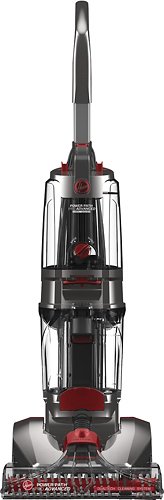
Power Path Pro Advanced Carpet Cleaner: This versatile floor cleaner scrubs, washes and rinses your carpet for a deeper clean than a standard vacuum cleaner can provide. It also includes a Heated Cleaning mode to apply heat to tough stains, and a squeegee tool for use on hard surfaces.
Overall5 out of 5
5 out of 5Great product
By tjb4life11
Great product, my dog made a huge mess and it cleaned it right up
Goody2013
New Jersey
20-year carpet & Hoover "total home" care product
November 25, 2014
Cleaning carpet/hard floors with this total home cleaner is way better than prior experiences using a now retired early edition Hoover carpet/ hard floor washer and even a commercial rental, very large "pro" machine.
The last time total floor care occurred, six months ago, I opted to use a very large rental machine. What a mistake to try a professional grade machine believing that its large capacity water and waste tanks, coupled with heft and top notch power could make the job a ticket to fame in completing a most important "Honey Do" project. It was almost a ticket to my own demise! The rental machine made the noise of almost twice that of my 15-year old previous Hoover product. And slowness and inefficiencies made me doubt that any pro could ever have a paid carpet cleaning success from their use of similar grade products. While having more than double tank holding capability (actually 2.5 times), the tanks were so large that only a bathtub could be used (as my condo has no utility sink).
Out with the old and in with the new Hoover FH51102....
What a stunner of a total home cleaner is the Hoover Power Path Pro Advanced product! With reasonably sized clean water and waste water tanks, the trade-off of frequent need to empty and refill the tanks when compared to the weight and size of working with larger tanks was welcomed! (I have learned from professional, bulky machine rental that size is not as critical as the need of a magical like experience of being granted 3 wishes.) My first wish: a quieter, gentler, "whistle while I work" experience. Got it! The new Hoover is quiet enough to use even as my wife slept. My second wish: ease of transitioning from carpet to hard floors. Got it! The new Hoover requires only the change of cleaning solutions and the lightning quick attachment of a squeegee part when moving from carpet to hard floors. (My first Hoover had need for changing the carpet brush to that of a hard floor brush plus attachment of a squeegee.) My third wish: a finished job with stellar approval by all of the work performed. GOT IT! I note that while I liked the sample 16 oz container included of the Hoover Pro Plus carpet and upholstery detergent, I was even happier upon finishing the sample and then again using the Bissell DeepClean Pro carpet and upholstery detergent coupled with the Bissell Stain Pretreat before deep cleaning. The two Bissell products produced a noticeably improved appearance over that of the Hoover carpet and upholstery detergent used alone. For hard floors, the new Hoover Multifloor Plus hardfloor cleaning solution's 16 oz. sample is easily the good choice over the prior Hoover product of similar name but omitting the "Plus" in its name. The new Plus has made a noticeable improvement in its fragrance, "Fresh Linen," as its fragrance approximates that of Bissell DeepClean Pro just mentioned as my preference in cleaning solution used for the carpet.
What a stunner of a total home cleaner is the Hoover Power Path Pro Advanced product! With reasonably sized clean water and waste water tanks, the trade-off of frequent need to empty and refill the tanks when compared to the weight and size of working with larger tanks was welcomed! (I have learned from professional, bulky machine rental that size is not as critical as the need of a magical like experience of being granted 3 wishes.) My first wish: a quieter, gentler, "whistle while I work" experience. Got it! The new Hoover is quiet enough to use even as my wife slept. My second wish: ease of transitioning from carpet to hard floors. Got it! The new Hoover requires only the change of cleaning solutions and the lightning quick attachment of a squeegee part when moving from carpet to hard floors. (My first Hoover had need for changing the carpet brush to that of a hard floor brush plus attachment of a squeegee.) My third wish: a finished job with stellar approval by all of the work performed. GOT IT! I note that while I liked the sample 16 oz container included of the Hoover Pro Plus carpet and upholstery detergent, I was even happier upon finishing the sample and then again using the Bissell DeepClean Pro carpet and upholstery detergent coupled with the Bissell Stain Pretreat before deep cleaning. The two Bissell products produced a noticeably improved appearance over that of the Hoover carpet and upholstery detergent used alone. For hard floors, the new Hoover Multifloor Plus hardfloor cleaning solution's 16 oz. sample is easily the good choice over the prior Hoover product of similar name but omitting the "Plus" in its name. The new Plus has made a noticeable improvement in its fragrance, "Fresh Linen," as its fragrance approximates that of Bissell DeepClean Pro just mentioned as my preference in cleaning solution used for the carpet.
Whole house cleaning should mean what it says. And my journey using the FH51102 is one that I look forward to repeating in having had the initial, very good experience.
0points
0of 0voted this comment as helpful.
Goody2013's Questions
Goody2013 has not submitted any questions.
Goody2013's Answers
Power Path Pro Advanced Carpet Cleaner: This versatile floor cleaner scrubs, washes and rinses your carpet for a deeper clean than a standard vacuum cleaner can provide. It also includes a Heated Cleaning mode to apply heat to tough stains, and a squeegee tool for use on hard surfaces.
Can you empty the dirty water using one arm?
Using one arm? Yes and one hand with five naturally flowing movements needed to complete the emptying action. 1) Lift off the waste water tank while having the machine in its locked upright position. (With machine's handle in its locked, upright position, the waste water tank requires the pressing down of the red tab by pinching the tab and the carrying indentation below the red tab using the thumb and 4 fingers). 2) moving the container by fingers inserted in the lift bar of the indented area below the red tab. 3) setting the container in a sink (or on a flat surface next to a water receptacle) and opening the c-clamp of the container which secures its top to the tank of dirty water within. 4) lifting off the container's lid and placing it nearby. 5) tilting the waste water tank to empty it after having separated its lid from the container. After emptying, the tank should be 6) rinsed and the filter screen cleared of any debris by letting clean water run into the container, 7) replacing the top and attaching the c-clamp, 8) lifting the tank again using the indented finger-grip area that is below the red tab, and placing it into the upright, locked machine by first placing the bottom of the container in front of the red accessory door (where the accessory hose is attached) and with the bottom of the tank at a 30- to 45-degree angle with the upright machine and lifting upwards on the now emptied tank, once again pinching the red tab downwards as the tank is lifted upwards to where it is secured,
11 years, 6 months ago
by
Goody2013
New Jersey