
Share JohnnyBawesome's profile


JohnnyBawesome
JohnnyBawesome's stats
- Review count1
- Helpfulness votes0
- First reviewNovember 23, 2008
- Last reviewNovember 23, 2008
- Featured reviews0
- Average rating5
Reviews comments
- Review comment count0
- Helpfulness votes0
- First review commentNone
- Last review commentNone
- Featured review comments0
Questions
- Question count0
- Helpfulness votes0
- First questionNone
- Last questionNone
- Featured questions0
- Answer count2
- Helpfulness votes2
- First answerNovember 23, 2008
- Last answerNovember 23, 2008
- Featured answers0
- Best answers0
JohnnyBawesome's Reviews
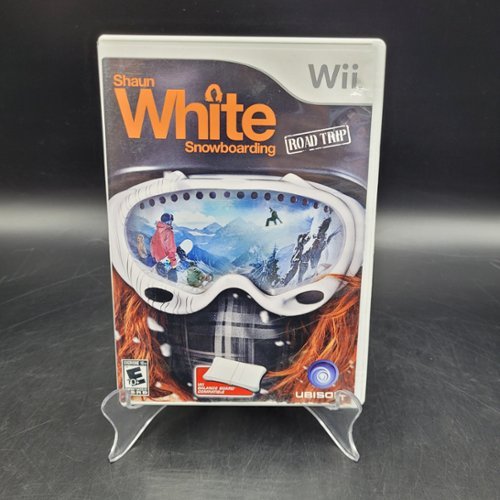
Includes Nintendo Wii original game disc and may come with the original instruction manual and cover art when available. All Nintendo Wii games are made for and play on the Wii system. All DK's games are in good used condition, cleaned, tested, guaranteed to work, and backed by our 1 year warranty.

Posted by: JohnnyBawesome
from Hyde Park, UT
This is an awesome snowboarding game. The balance board adds to the experience; although the difficulty to pull off tricks is increased while using the balance board. The graphics are awesome. The developer made the graphic design for this game unique to the wii. (i.e. more cartoonish than realistic) You can also just use the wii remote to control. This control scheme is great for newcomers. My wife and I have played it for awhile in co-op mode and it is a blast. I would recommend this game to anyone looking to carve the digital mountain.
What's great about it: It is easy to pick-up and play.
What's not so great: Not really sure :)
I would recommend this to a friend!
Share this review:


0points
0of 0voted this as helpful.
JohnnyBawesome's Review Comments
JohnnyBawesome has not submitted comments on any reviews.
JohnnyBawesome's Questions
JohnnyBawesome has not submitted any questions.
JohnnyBawesome's Answers
Wii
Wii
How do you setup the internet on the wii?
i have gone into the setup but its starts telling me things so i end up exiting. i would much appreciate those who answer. it would be nice to have internet on my wii. my computer takes much to long to load.
Here is a tutorial by nintendo you can check out:
http://us.wii.com/connect/
I will show you the steps I went through for a wireless connection.
Go to the Wii settings menu. Go right in menu until you find internet. Choose connection settings. Select either connection 1, 2, or 3. (Your wii can save the connection settings of 3 locations, so you can easily connect to your friends wi-fi if you go to their house etc..) Choose wireless if you are connecting via wi-fi. The wii has a built in wi-fi so you don't need to purchase any more hardware for the wii :) If you already have a router connected to your computer than select "find an access point". Select Ok to choose your router from a list of visible access points. If your router needs a password to connect than enter the password. (You will need to verify which encryption your router is using and select that encryption in the change security settings. i.e. my router is set using WEP) Save your connection and it will test it. I haven't used any of the other connection types, so for those I recommend looking at the link I gave you. Hope this helps.
http://us.wii.com/connect/
I will show you the steps I went through for a wireless connection.
Go to the Wii settings menu. Go right in menu until you find internet. Choose connection settings. Select either connection 1, 2, or 3. (Your wii can save the connection settings of 3 locations, so you can easily connect to your friends wi-fi if you go to their house etc..) Choose wireless if you are connecting via wi-fi. The wii has a built in wi-fi so you don't need to purchase any more hardware for the wii :) If you already have a router connected to your computer than select "find an access point". Select Ok to choose your router from a list of visible access points. If your router needs a password to connect than enter the password. (You will need to verify which encryption your router is using and select that encryption in the change security settings. i.e. my router is set using WEP) Save your connection and it will test it. I haven't used any of the other connection types, so for those I recommend looking at the link I gave you. Hope this helps.
17 years, 6 months ago
by
JohnnyBawesome
Hyde Park, UT
Wii
Wii
NEED WIFI
Yea hi! I have had my wii for a year ang i finally decided that i want wifi 4 it. But I also hace an Ipod Touch. I've done research but it hasn't helped much. Is their a way i can get wifi on my Wii and my Ipod Touch with the same devise and please keep i under a $100
Thanx
Thanx
If you buy a router (was $60 when I bought mine) than you can have wi-fi with any wireless device wi-fi compatible. I have the Linksys wireless-g broadband router and have never had a problem. It is a snap to hookup. Just follow the directions when you install the software on your computer. You can also hook up a computer via a network cable. My desktop computer is connected with a cabel and my laptop, wii, and anything else people bring over connects to the internet via wi-fi with ease. You can also make a password so only you can connect to it.
17 years, 6 months ago
by
JohnnyBawesome
Hyde Park, UT