
Share Easy2Use's profile


Easy2Use
Easy2Use's stats
- Review count1
- Helpfulness votes5
- First reviewJuly 23, 2010
- Last reviewJuly 23, 2010
- Featured reviews0
- Average rating5
- Review comment count2
- Helpfulness votes0
- First review commentMarch 3, 2012
- Last review commentMarch 3, 2012
- Featured review comments0
Questions
- Question count0
- Helpfulness votes0
- First questionNone
- Last questionNone
- Featured questions0
Answers
- Answer count0
- Helpfulness votes0
- First answerNone
- Last answerNone
- Featured answers0
- Best answers0
Easy2Use's Reviews
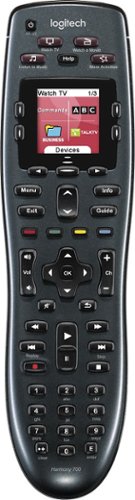
Manage up to 8 of your home theater electronics devices with this Logitech Harmony 700 915-000162 universal remote, which features a brilliant color command screen for easy navigation. One-touch activity buttons simplify device selection.
Customer Rating

5
Fantastic, but PC app is initially a bit confusing
on July 23, 2010
Posted by: Easy2Use
from Chicago
The setup is:
Go to the web site, download the big software application onto your PC and install it. This application lets you choose your devices (TV,DVD etc), it then pushes all their settings and your choices into the remote using the USB cable you plug into the front of the remote.
Go to the web site, download the big software application onto your PC and install it. This application lets you choose your devices (TV,DVD etc), it then pushes all their settings and your choices into the remote using the USB cable you plug into the front of the remote.
Using it:
The buttons on the remote will control virtually all the features of each device. The way you use it is primarily by "activity". When I choose to "Watch TV", it turns on the TV, the Cable Box and my Amplifier. It does not turn on my DVD. The volume control uses the amplifier, the channel change uses the cable box. The Guide, Info and Menu all work on the Cable box.
The buttons on the remote will control virtually all the features of each device. The way you use it is primarily by "activity". When I choose to "Watch TV", it turns on the TV, the Cable Box and my Amplifier. It does not turn on my DVD. The volume control uses the amplifier, the channel change uses the cable box. The Guide, Info and Menu all work on the Cable box.
On my cable box I like to use the Favorites button, but there is no such button on the remote, so they have setup the screen with one of the unlabeled buttons as "Fav".
Another thing I needed to do is to use closed captioning. On my TV's remote that is the "display" button. I was easily able to configure the "Watch TV" activity to use the unused BLUE button on the remote, to send the appropriate closed captioning command to my TV.
Similarly I was able to setup my DVD's subtitle button on the same unused BLUE button on the remote for the activity of "Watch a Movie".
I still had to keep my old remotes handy while I was doing the configuration, because after you reprogram the remote it expects all the devices to be powered off. However, after my setup is perfected I will take the batteries out of the remotes and store them away.
I am looking forward to getting my new flat screen HD TV and Media Player and I know that it will be a simple process to reprogram my remote to use these new devices.
By the way, the Western Digital Media Player (model "WD TV Live Plus") was listed in the Logitech PC application as a Media Center PC. Once I guessed this I was happy, but they need to add a new category.
What's great about it: Total Configuration, it gets better every day! So intuitive to use.
What's not so great: Nothing :-)
I would recommend this to a friend!
Ease of Use

5
Durability
5
Share this review:


+5points
5of 5voted this as helpful.
Easy2Use's Review Comments
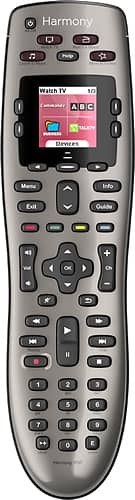
Control up to 8 devices using this Logitech Harmony 650 915-000159 universal remote that is compatible with more than 225,000 devices across more than 5,000 brands for wide-ranging use. One-touch activity buttons simplify option selection.
Overall 4 out of 5
4 out of 5Simplifies all the mess...
By Bruce99
from Seminole, FL
A good remote so far, had it for almost 2 months. Bought it to replace my Harmony 510 remote which I picked up refurbed and lasted 2 years, the down button finally stopped working.... I do have to hit the help button more than I think I should when switching between different functions.....We'll see.

Easy2Use
Chicago
I solved this problem by adding delays
March 3, 2012
I had the same problem which I solved by adding delays. Take a look in the user manual under the section titled "Adjusting delays and speed settings on your Harmony remote". Also useful is the logitech support site and online forums.
0points
0of 0voted this comment as helpful.
Control up to 8 devices using this Logitech Harmony 650 915-000159 universal remote that is compatible with more than 225,000 devices across more than 5,000 brands for wide-ranging use. One-touch activity buttons simplify option selection.
Overall 1 out of 5
1 out of 5Waste of money
By RubenH
from Greer, SC
Definitely a waste of money. I set it up, had to use the "learning"feature once or twice. Not really a problem. However the remote tends to forget how things work. For example, when using the power off button it powers off everything but not my TV, using the "Help" button the remotes finds the right signal to switch off the TV. Unfortunately it does not retain this signal for the next time, so this is a procedure I have to go through every time I switch off my system. There are a couple other scenarious where it does not work. Actually thinking about throwing this one away and using my 4 remotes.
Easy2Use
Chicago
Adjust the software settings if you use HELP a lot
March 3, 2012
There are detailed configuration settings in the software for adding delays and for sending the same command multiple times.
For your problem with turning off the TV, you could program it to send the sequence :
TV off, delay 0.2 seconds, TV off.
TV off, delay 0.2 seconds, TV off.
Out of the box I found it works doing 90% of what I want, getting that last 10% was a learning curve. The software is sometimes hard to use to find the correct advanced programming features.
Try the manual first, and searching the logitech support site and online forums also.
0points
0of 0voted this comment as helpful.
Easy2Use's Questions
Easy2Use has not submitted any questions.
Easy2Use's Answers
Easy2Use has not submitted any answers.