
Share xpocoastie's profile


xpocoastie
xpocoastie's stats
- Review count5
- Helpfulness votes2
- First reviewSeptember 21, 2011
- Last reviewFebruary 23, 2014
- Featured reviews0
- Average rating4.2
- Review comment count1
- Helpfulness votes0
- First review commentSeptember 21, 2011
- Last review commentSeptember 21, 2011
- Featured review comments0
Questions
- Question count0
- Helpfulness votes0
- First questionNone
- Last questionNone
- Featured questions0
- Answer count3
- Helpfulness votes0
- First answerFebruary 23, 2014
- Last answerFebruary 23, 2014
- Featured answers0
- Best answers0
xpocoastie's Reviews
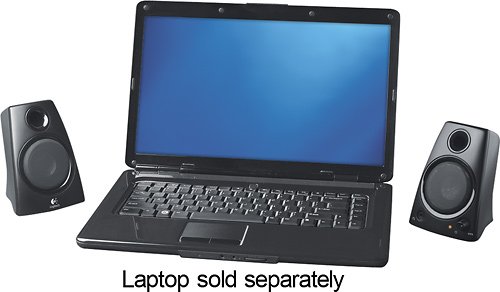
Experience your music, movies and games in rich stereo sound with these speakers that feature 5 watts total system power. The 3.5mm auxiliary input and headphone output allow easy connections.
Customer Rating

4
Logitech - Z130 2.0 Speaker System (2-Piece
on February 23, 2014
Posted by: xpocoastie
from Vancouver Wa
Verified Purchase:Yes
Purchased the to replace Insignia - 2.0 Stereo Computer Speaker System (2-Piece) - Black that were dead out of the box, happy with the Logitech - Z130 2.0 Speaker System (2-Piece
My Best Buy number: 0064261218
My Best Buy number: 0064261218
What's great about it: Price, sound
What's not so great: None
I would recommend this to a friend!
Sound Quality

4
Share this review:


+1point
1of 1voted this as helpful.
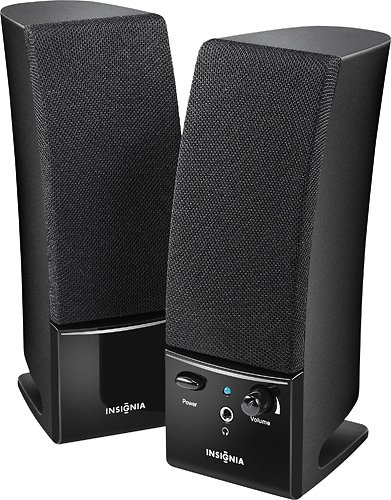
Only at Best BuyAmplify your computer's sound with these 2.0 powered speakers that feature controls on the unit and a headphone jack for private listening.
Customer Rating

3
Insignia - 2.0 Stereo Computer Speaker System (2-P
on February 23, 2014
Posted by: xpocoastie
from Vancouver Wa
Verified Purchase:Yes
The left speaker was dead out of the box. Returned for a better pair. You get what you pay for.
My Best Buy number: 0064261218
My Best Buy number: 0064261218
What's great about it: Price
What's not so great: DOA
No, I would not recommend this to a friend.
Sound Quality

2
Share this review:


0points
0of 0voted this as helpful.
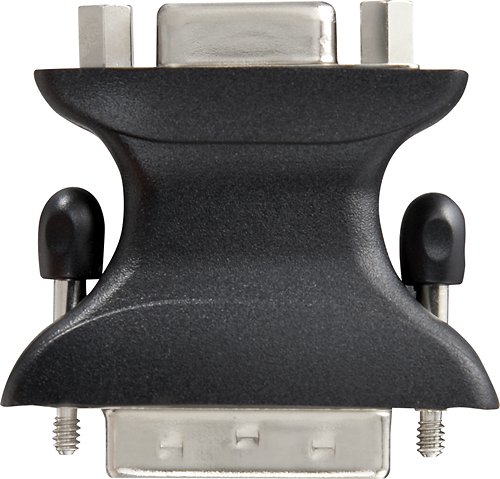
This adapter featuring copper contacts converts DVI-I video signals into VGA analog.
Customer Rating

5
Dynex - DVI-to-VGA Adapter
on February 23, 2014
Posted by: xpocoastie
from Vancouver Wa
Verified Purchase:Yes
My son bought this for a pc build to use with an older monitor. Worked fine.
My Best Buy number: 0064261218
My Best Buy number: 0064261218
What's great about it: Price
What's not so great: None
I would recommend this to a friend!
Durability

5
Ease of Use
5
Share this review:


0points
0of 0voted this as helpful.
It's the twenty-first century: multitasking is a way of life. Cell phones, laptops and tablets and their ever-expanding networks, apps and programs make it so we can almost always be doing at least two things at once. You send an e-mail while you're out to lunch. You call your clients while you're finishing up that presentation. You send your brother a birthday e-card while you're walking to your next appointment. Technology allows us to stay connected to the people and things we care about. It also creates a world where work and play are constantly overlapping ~ where creativity, productivity and recreation often go hand-in-hand. With that in mind, Windows 8.1 has been designed to bring you one operating system that can handle all of life's demands ~ no matter what it throws at you. Whether you're at work, at play or just looking for some inspiration, Windows 8.1 is there to deliver. Windows 8.1 personalizes your experience so can work and play in a way that allows you to access what truly matters to you. Beginning at your Start screen, you see a new layout that features your favorite news, friends, social networks and apps. You can customize colors, backgrounds and tile sizes to make your device unique to you. You can even access your familiar Windows desktop with just one click, so all the features you love are never far away. All your old apps, files and settings easily transfer and run on Windows 8.1. Your productivity will reach new heights thanks to Windows 8.1's ability to work harmoniously with your devices, whether they are touch screen or mouse-and-keyboard. You can stay connected to important photos and files by accessing them on your phone, tablet or PC with SkyDrive. Just sign in to your Microsoft account and your desktop will appear with all your personal preferences and settings so you can keep working wherever you are. In addition to the enhanced built-in apps and features, you can also discover more of your favorite apps with access to the Windows Store, which puts Netflix, ESPN, Skype, Halo: Spartan Assault, and other features conveniently at your fingertips. The new Windows 8.1 also makes searching, browsing and sharing faster and safer than ever. Use your device's power more efficiently for quick start-ups and app-switching as you stay up to date with security features, including Windows Defender, Windows Firewall and Windows Update. Life won't wait, so why should you? Access what is important to you ~ your way ~ so you get the best of work and play with Windows 8.1.
Customer Rating
5
Windows 8.1
on February 22, 2014
Posted by: xpocoastie
from Vancouver Wa
Verified Purchase:Yes
Easy to install on a new build, my son built his first computer.
My Best Buy number: 0064261218
My Best Buy number: 0064261218
What's great about it: easy upgrade
What's not so great: None
I would recommend this to a friend!
Ease of Use
5
Share this review:


+1point
1of 1voted this as helpful.
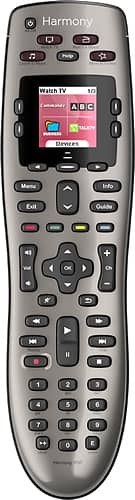
Control up to 8 devices using this Logitech Harmony 650 915-000159 universal remote that is compatible with more than 225,000 devices across more than 5,000 brands for wide-ranging use. One-touch activity buttons simplify option selection.
Posted by: xpocoastie
from Vancouver Wa
This is a very good remote, with the online setup it is easy to find the the product that you want to control, you just need the make and model of the device you want to control.
The only issue I have is that it losses connection sometimes, ( couple of times a week). This is fixed by pressing help, and following the on screen (remote screen) menu.
What's great about it: ease of function
What's not so great: looses conection with some devices
I would recommend this to a friend!
Ease of Use

3
Durability
5
Share this review:


0points
0of 0voted this as helpful.
xpocoastie's Review Comments
Control up to 8 devices using this Logitech Harmony 650 915-000159 universal remote that is compatible with more than 225,000 devices across more than 5,000 brands for wide-ranging use. One-touch activity buttons simplify option selection.
Overall5 out of 5
5 out of 5An Excellent Remote that is easy to use
By zeus1972
from Portage, In
I picked up this remote because I found out I could not replace my Kenwood RC-R0805. Witch I have had for almost 20 years. Thought it would take me a while to program and get use to but it only took 10 min to program 5 devices. That is 5 min faster then it took me to program 1 device in my Kenwood. The only problem I had getting use to the remote is the volume and the channel buttons. Kenwood is vol right and ch left and it is opposite on the Logitech. Everything else was easy to use. I have problems with the life of the rechargeable battery's. The remote lights up all the time you touch or move the remote if you could turn that option off I think the batter's would last a lot longer. Everything else was great I kinda wish I would of purchased a Logitech Harmony 650 years ago.

xpocoastie
Vancouver Wa
September 21, 2011
You can change the settings for how long the light is on. Start the online programming mode, I set mine to only be on for five seconds.
0points
0of 0voted this comment as helpful.
xpocoastie's Questions
xpocoastie has not submitted any questions.
xpocoastie's Answers
Only at Best BuyAmplify your computer's sound with these 2.0 powered speakers that feature controls on the unit and a headphone jack for private listening.
Are these speakers compatibable with a Dell Inspirion 660
Yes, they will work for any thing that has the same speaker connection.
12 years, 3 months ago
by
xpocoastie
Vancouver Wa
Only at Best BuyAmplify your computer's sound with these 2.0 powered speakers that feature controls on the unit and a headphone jack for private listening.
need to replace the Class 2 power supply
Replace the speakers. Cheaper than trying to find the correct power supply.
12 years, 3 months ago
by
xpocoastie
Vancouver Wa
It's the twenty-first century: multitasking is a way of life. Cell phones, laptops and tablets and their ever-expanding networks, apps and programs make it so we can almost always be doing at least two things at once. You send an e-mail while you're out to lunch. You call your clients while you're finishing up that presentation. You send your brother a birthday e-card while you're walking to your next appointment. Technology allows us to stay connected to the people and things we care about. It also creates a world where work and play are constantly overlapping ~ where creativity, productivity and recreation often go hand-in-hand. With that in mind, Windows 8.1 has been designed to bring you one operating system that can handle all of life's demands ~ no matter what it throws at you. Whether you're at work, at play or just looking for some inspiration, Windows 8.1 is there to deliver. Windows 8.1 personalizes your experience so can work and play in a way that allows you to access what truly matters to you. Beginning at your Start screen, you see a new layout that features your favorite news, friends, social networks and apps. You can customize colors, backgrounds and tile sizes to make your device unique to you. You can even access your familiar Windows desktop with just one click, so all the features you love are never far away. All your old apps, files and settings easily transfer and run on Windows 8.1. Your productivity will reach new heights thanks to Windows 8.1's ability to work harmoniously with your devices, whether they are touch screen or mouse-and-keyboard. You can stay connected to important photos and files by accessing them on your phone, tablet or PC with SkyDrive. Just sign in to your Microsoft account and your desktop will appear with all your personal preferences and settings so you can keep working wherever you are. In addition to the enhanced built-in apps and features, you can also discover more of your favorite apps with access to the Windows Store, which puts Netflix, ESPN, Skype, Halo: Spartan Assault, and other features conveniently at your fingertips. The new Windows 8.1 also makes searching, browsing and sharing faster and safer than ever. Use your device's power more efficiently for quick start-ups and app-switching as you stay up to date with security features, including Windows Defender, Windows Firewall and Windows Update. Life won't wait, so why should you? Access what is important to you ~ your way ~ so you get the best of work and play with Windows 8.1.
Will Windows 8.1 work on XP. I have upgraded my RAM. I have gone to Windows manager and they evaluated my XP 27 where compatable and 17 where not.
Window XP I have upgraded my RAM. Gone to Windows manager and they evaluaed my XP and 27 where compitable and 17 wher not. Is Windows 8.1 an option for me?
Probably not, to many driver issues.
12 years, 3 months ago
by
xpocoastie
Vancouver Wa