
Share JP61567's profile


JP61567
JP61567's stats
- Review count1
- Helpfulness votes2
- First reviewFebruary 16, 2010
- Last reviewFebruary 16, 2010
- Featured reviews0
- Average rating5
Reviews comments
- Review comment count0
- Helpfulness votes0
- First review commentNone
- Last review commentNone
- Featured review comments0
Questions
- Question count0
- Helpfulness votes0
- First questionNone
- Last questionNone
- Featured questions0
Answers
- Answer count0
- Helpfulness votes0
- First answerNone
- Last answerNone
- Featured answers0
- Best answers0
JP61567's Reviews
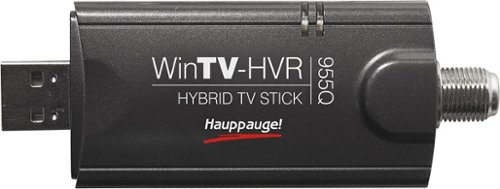
Tune in to live television broadcasts on your PC with this PCTV USB 2.0 stick and watch and record your favorite TV shows with ease.

Posted by: JP61567
from Tonawanda, NY
* Setup is as easy as plugging the stick into a USB port, cancelling the Windows "New Hardware Found" wizard, running the "Install Drivers" app from the included CD, and running the WinTV setup. WinTV will scan your available cable stations, HDTV, and analog TV stations.
* Connection input options include composite video (RCA jack), L and R audio RCA jacks, a standard "F" connector, and an S-video jack.
* The included antenna picked up all HDTV stations in my area.
* The software will also scan analog TV stations, if any are still broadcasting.
* Default video is in the form of .ts files, which my copy of Nero encoded with easily. I have yet to see any dropped frames.
* USB powers the device, so there's no additional power needed.
* Connection input options include composite video (RCA jack), L and R audio RCA jacks, a standard "F" connector, and an S-video jack.
* The included antenna picked up all HDTV stations in my area.
* The software will also scan analog TV stations, if any are still broadcasting.
* Default video is in the form of .ts files, which my copy of Nero encoded with easily. I have yet to see any dropped frames.
* USB powers the device, so there's no additional power needed.
I couldn't be happier with this device. Not only can I copy old tapes to video for DVD burns, but I can also watch HDTV on my laptop in airports.
What's great about it: Easy setup, good interface, flawless operation
What's not so great: -
I would recommend this to a friend!
Features

5
Share this review:


+2points
2of 2voted this as helpful.
JP61567's Review Comments
JP61567 has not submitted comments on any reviews.
JP61567's Questions
JP61567 has not submitted any questions.
JP61567's Answers
JP61567 has not submitted any answers.