
Share WiiDSFan's profile


WiiDSFan
WiiDSFan's stats
- Review count2
- Helpfulness votes3
- First reviewDecember 18, 2009
- Last reviewDecember 3, 2013
- Featured reviews0
- Average rating4.5
Reviews comments
- Review comment count0
- Helpfulness votes0
- First review commentNone
- Last review commentNone
- Featured review comments0
Questions
- Question count0
- Helpfulness votes0
- First questionNone
- Last questionNone
- Featured questions0
Answers
- Answer count0
- Helpfulness votes0
- First answerNone
- Last answerNone
- Featured answers0
- Best answers0
WiiDSFan's Reviews
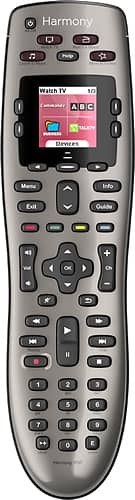
Control up to 8 devices using this Logitech Harmony 650 915-000159 universal remote that is compatible with more than 225,000 devices across more than 5,000 brands for wide-ranging use. One-touch activity buttons simplify option selection.
Customer Rating

4
Excellent 'few-device' remote
on December 3, 2013
Posted by: WiiDSFan
from Chattanooga, TN
I purchased this remote after sitting back and watching the $39 price slip by a year ago during Black Friday sales, so I picked up 3 this year first thing. I have been using a Harmony One for about 4 years now, and love that remote. Yes, it was expensive, quite a bit more than this 650 model, but it also has tons more features, better build quality and really set the standard for me for what an all-in-one remote can & should do. For this purchase, I wanted to de-clutter our living room much like the One did for my media room (PS3/XBox/Apple TV/Cable Box/Receiver/Projector). Luckily, though & due to the 5-device limit of the 650, I was able to easily set up control for a Samsung plasma, Apple TV, Sony BluRay, Cable Box & a Sony Soundbar AV unit. Initially, the old Silverlight software wasn't recognized by my computer and wouldn't let me complete the set up. Logitech has since I last updated my One, moved to an online cloud based software, which I like a LOT better than the old interface. Everything is still there, but it's accessible by any computer now. Once the install was done, the setup was a breeze, just keying in the Name & Model Number of most devices. Nothing came back with any errors and I was able to nail all 5 settings (Watch TV, Watch BluRay, Watch Apple TV, Listen to Radio, Listen to AirPlay) on the first try.
Overall, the build quality is sub-par to the One, but that's expected for the price. The retail of $79 to me is a bit steep, and feel that $49 or $59 should be the msrp. Overall, the screen is also less attractive but does the job. The feel is much of the Harmony One, but you do know the thinner feeling plastic & edges that it's the cheaper version. But again, for the $39 price, these aren't complaints as much as comparisons. I'd easily suggest this to anyone looking to de-clutter their living area to a single remote.
So, is it perfect...no. It's no Control 4 and will only control your AV equipment and again, it's ONLY 5 total pieces of kit, so make sure you know that before diving in. If you have more than 5 devices you want to control, you will need to look at the more expensive models. Otherwise, for a less AV based area (living room, bedroom), this is perfect. The other 2 we purchased were for a gift & for our bedroom TV/Apple TV/BluRay set up. Simply put, it's a hard remote to beat. But, for $79, there may be better choices. At $39, this is a no brainer.
My Best Buy number: 328601880
What's great about it: Ease of set up, does it's job well, uses standard AA's
What's not so great: Build quality, only 5 device control, screen could be better
I would recommend this to a friend!
Ease of Use

4
Durability

3
Share this review:


+2points
2of 2voted this as helpful.
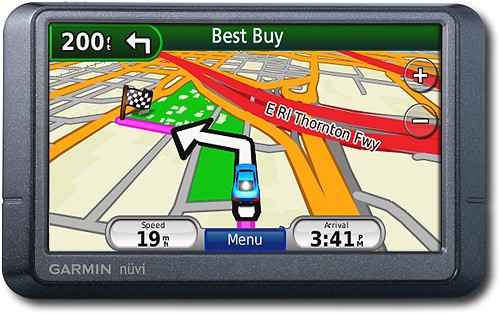
Navigate the United States and Canada with ease with this GPS that features free lifetime traffic updates, up to 1,000 waypoints and customizable points of interest for easy route planning. The "Where Am I?" emergency locator and travel assistant tools provide additional support.
Customer Rating

5
Great unit at a great price
on December 18, 2009
Posted by: WiiDSFan
from Chattanooga, TN
I have moved up to the Nuvi 255W from a Nuvi 205 (square screen) and I'm very happy for the upgrade. When I was a bit disappointed w/ the performance of my 205 -- slow to search for destinations by name, re-routing not the fastest -- the 255W came on sale for $129 and I picked one up. I had considered the 205w, but just the wider screen wasn't enough for me, even at the great $89 price it's at right now. The 255w does ADD over the 205 FM traffic updates, a new economy driving feature that takes in current gas prices & your specific vehicles MPG for city/hwy & gives you up to date info on your driving style & efficiency. I do believe this is now a free download from Garmin.com for older units, but it's a nice feature that was pre-installed.
Also, this unit seems to respond faster for re-routes and searching for destinations by name than the 205. Overall, it was a great upgrade for my needs. I don't see BluTooth being that valuable, I've never desired it nor do I need it. I wear an ear piece & that's more than perfect for me. For the price, whether you got the Black Friday or the current 3-day sale @ $129, this unit is well worth it, especially if you are considering it against the 205. For the extra $40, if you have not used the 205 before, you may not appreciate the new features. For those who have the 205, this is a slight upgrade, well worth the money for a 2nd unit.
What's great about it: wide display, ease of use, clear directions w/ spoken street name, traffic updates
What's not so great: None as of yet
I would recommend this to a friend!
Durability

5
Ease of Use
5
Features
5
Share this review:


+1point
1of 1voted this as helpful.
WiiDSFan's Review Comments
WiiDSFan has not submitted comments on any reviews.
WiiDSFan's Questions
WiiDSFan has not submitted any questions.
WiiDSFan's Answers
WiiDSFan has not submitted any answers.