
Share PghMike2's profile


PghMike2
PghMike2's stats
- Review count1
- Helpfulness votes28
- First reviewMay 13, 2010
- Last reviewMay 13, 2010
- Featured reviews0
- Average rating5
Reviews comments
- Review comment count0
- Helpfulness votes0
- First review commentNone
- Last review commentNone
- Featured review comments0
Questions
- Question count0
- Helpfulness votes0
- First questionNone
- Last questionNone
- Featured questions0
Answers
- Answer count0
- Helpfulness votes0
- First answerNone
- Last answerNone
- Featured answers0
- Best answers0
PghMike2's Reviews
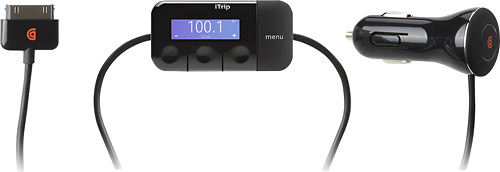
Put your favorite tunes at your fingertips when you get behind the wheel with this FM transmitter that allows you to play music from your iPod or iPhone through your car stereo system.

Posted by: PghMike2
from Pittsburgh, PA
I've got a 2010 iTrip Auto, replacing a 2 year old Monster equivalent that just stopped working one day while playing.
The sound quality is somewhat better than the Monster, especially on the high frequencies.. I've been running it in mono mode, since a # of readers have suggested that, and it's been fine there.
The "scan" function to find unused radio station slots is pretty much useless. But fortunately, you won't need to use it.
If you have a car radio that goes below 88.1 (as does my civic's), you can put the iTrip into European Union (EU) mode, and it'll let you use frequencies below 88.1. I set mine to 87.9 and it's been great. No interference (there are no radio stations broadcasting there), so you get totally clear sound.
To put it in EU mode, use the Menu button to get to the Preferences screen, and then press the Reset key (leftmost) for about 5-6 seconds,until you see US or EU show up. You can then select EU mode and then you can go back to the frequency selection, and select 87.9 or whatever you want. For some reason, the new frequency didn't get used (even though it looked like it was selected) by the iTrip until after I unplugged and replugged the iTrip from the car power supply once. Since then, its been fine. The iTrip remembers that it's in EU mode and it remember 87.9, so you don't really have to change its settings again.
What's great about it: Good sound quality when there's no radio station sharing your frequency. International mode is wonderful.
What's not so great: No better than average in US mode; "scan for unused frequencies" doesn't work well
I would recommend this to a friend!
Performance

5
Ease of Use
5
Share this review:


+22points
28of 34voted this as helpful.
PghMike2's Review Comments
PghMike2 has not submitted comments on any reviews.
PghMike2's Questions
PghMike2 has not submitted any questions.
PghMike2's Answers
PghMike2 has not submitted any answers.