


Kelby's stats
- Review count149
- Helpfulness votes1,296
- First reviewSeptember 27, 2009
- Last reviewMay 14, 2026
- Featured reviews0
- Average rating4.8
Reviews comments
- Review comment count0
- Helpfulness votes0
- First review commentNone
- Last review commentNone
- Featured review comments0
Questions
- Question count0
- Helpfulness votes0
- First questionNone
- Last questionNone
- Featured questions0
- Answer count13
- Helpfulness votes2
- First answerSeptember 22, 2016
- Last answerDecember 9, 2021
- Featured answers0
- Best answers0

Our most advanced and customizable Ledger yet, enjoy a curved E Ink touchscreen crypto-experience unlike ever before. The wallet comes with a folio to protect your device.
Customer Rating

5
A Stylish and Secure Crypto Companion
on February 3, 2025
Posted by: Kelby
----- SUMMARY -----
Verdict:
The Ledger Stax isn't just a crypto wallet. It's a sleek, palm-sized statement piece with a practical, eye-catching E Ink touchscreen. The intuitive design extends to setup, which was surprisingly easy thanks to clear on-screen instructions. Beyond its good looks, the Stax prioritizes security with a Secure Element chip, features like Protection Mode and Clear Signing, and even doubles as a versatile security key for website logins. The Ledger Live app provides a user-friendly interface for managing crypto, and the optional Ledger Recover service offers added peace of mind for backup. Overall, the Stax delivers a premium experience, blending style, security, and usability into one impressive package.
The Ledger Stax isn't just a crypto wallet. It's a sleek, palm-sized statement piece with a practical, eye-catching E Ink touchscreen. The intuitive design extends to setup, which was surprisingly easy thanks to clear on-screen instructions. Beyond its good looks, the Stax prioritizes security with a Secure Element chip, features like Protection Mode and Clear Signing, and even doubles as a versatile security key for website logins. The Ledger Live app provides a user-friendly interface for managing crypto, and the optional Ledger Recover service offers added peace of mind for backup. Overall, the Stax delivers a premium experience, blending style, security, and usability into one impressive package.
Pros:
- Sleek, palm-sized design with a curved E Ink touchscreen
- Premium build quality
- Lightweight and thin, easy to carry around
- Long battery life of up to 10 hours
- Clear and easy-to-read E Ink screen
- Intuitive setup process
- Robust hardware and software security features
- Ledger Security Key app for two-factor authentication and passwordless logins
- Ledger Live app with a clean, user-friendly interface for managing crypto assets
- Sleek, palm-sized design with a curved E Ink touchscreen
- Premium build quality
- Lightweight and thin, easy to carry around
- Long battery life of up to 10 hours
- Clear and easy-to-read E Ink screen
- Intuitive setup process
- Robust hardware and software security features
- Ledger Security Key app for two-factor authentication and passwordless logins
- Ledger Live app with a clean, user-friendly interface for managing crypto assets
Cons:
- No backlight on the E Ink screen
- Ledger Recover backup service costs $9.99/month
- No backlight on the E Ink screen
- Ledger Recover backup service costs $9.99/month
----- DETAILS -----
Design & Display:
Unboxing the Ledger Stax was a real treat. This thing is seriously sleek. It's got a palm-sized design with a curved E Ink touchscreen. My wife, who could care less about crypto or tech, even said the Stax "looks really cool." It's incredibly lightweight and thin, so if you're planning to carry it around, it'll slip right into your pocket without a problem. Despite its compact size, it feels surprisingly solid and premium in hand. Honestly, the Ledger Stax isn't just a crypto wallet. It's a statement piece. I'm usually an introvert and avoid attention, but I find myself low-key showing off the Stax whenever I use it in public.
Unboxing the Ledger Stax was a real treat. This thing is seriously sleek. It's got a palm-sized design with a curved E Ink touchscreen. My wife, who could care less about crypto or tech, even said the Stax "looks really cool." It's incredibly lightweight and thin, so if you're planning to carry it around, it'll slip right into your pocket without a problem. Despite its compact size, it feels surprisingly solid and premium in hand. Honestly, the Ledger Stax isn't just a crypto wallet. It's a statement piece. I'm usually an introvert and avoid attention, but I find myself low-key showing off the Stax whenever I use it in public.
The E Ink screen is definitely the star of the show. It's not just some flashy design choice though. It's actually practical. The way it wraps around the device lets you see things like your wallet's name, whether it's locked, and the battery level, even when it's off. You can also customize the lock screen with personal photos, downloaded images, or NFTs. Some people might miss a backlight, but honestly, the screen is clear enough in most lighting that I haven't found myself needing one.
Battery Life:
That E Ink screen does double duty by helping with battery life. Ledger says a single charge can last up to 10 hours, but since it's not something you're using constantly, those 10 hours stretch a long way. Depending on how often you use it, you could easily go weeks without charging.
That E Ink screen does double duty by helping with battery life. Ledger says a single charge can last up to 10 hours, but since it's not something you're using constantly, those 10 hours stretch a long way. Depending on how often you use it, you could easily go weeks without charging.
Setup:
Setting up the Ledger Stax was a breeze. The on-screen instructions were clear, and I didn't even have to crack open a manual or Google anything. The touchscreen definitely makes the whole process more intuitive than other wallets I've used that just have clunky buttons.
Setting up the Ledger Stax was a breeze. The on-screen instructions were clear, and I didn't even have to crack open a manual or Google anything. The touchscreen definitely makes the whole process more intuitive than other wallets I've used that just have clunky buttons.
Security Features:
Let's be real, security is what matters most in a crypto wallet, and the Ledger Stax delivers. It's got some serious hardware and software security features that give me real peace of mind. On the hardware side, there's a Secure Element chip, which is basically a tamper-proof vault for your private keys. It's designed to withstand all sorts of attacks.
Let's be real, security is what matters most in a crypto wallet, and the Ledger Stax delivers. It's got some serious hardware and software security features that give me real peace of mind. On the hardware side, there's a Secure Element chip, which is basically a tamper-proof vault for your private keys. It's designed to withstand all sorts of attacks.
Then there are the software features. "Protection Mode" automatically locks the device if it thinks something fishy is going on. "Clear Signing" is another great one. It shows you all the important details of a transaction in plain English before you approve it, like who you're sending to and what assets are involved. No cryptic code to decipher.
One feature I use almost daily is the Ledger Security Key. You can install an app on your Stax, then use it as a security key for websites that support them. It works for two-factor authentication, or even passwordless logins, which is super convenient. I love that the Stax is more than just a crypto wallet. It's a versatile security tool.
It's also worth mentioning Ledger Recover, which is a backup service for your Secret Recovery Phrase (that super important 24-word phrase you need to recover your wallet). It's provided by CoinCover. So, if you lose your Stax and your written-down recovery phrase, you're not totally out of luck. It's the kind of thing you hope you never need, but it's nice to know it's there. Unfortunately, it does cost $9.99 a month (at the time of this review), which is a bit of a bummer.
Ledger Live App:
The Ledger Live app (available on desktop and mobile) is where you manage all your crypto stuff. I'm a big fan of this app. It's got a clean, user-friendly interface that makes it easy to track your portfolio, buy/sell crypto, swap coins, stake, and even manage your NFTs.
The Ledger Live app (available on desktop and mobile) is where you manage all your crypto stuff. I'm a big fan of this app. It's got a clean, user-friendly interface that makes it easy to track your portfolio, buy/sell crypto, swap coins, stake, and even manage your NFTs.
----- WHAT’S IN THE BOX -----
1 x Ledger Stax Wallet
1 x USB-C to USB-C Cable
3 x Recovery Sheets
1 x Magnet Shell - Midnight Black
1 x User Manual
1 x USB-C to USB-C Cable
3 x Recovery Sheets
1 x Magnet Shell - Midnight Black
1 x User Manual
I would recommend this to a friend!






Share this review:


0points
0of 0voted this as helpful.

The Blueair Humidifier rapidly provides humidification up to 500 sqft. Designed to create more comfortable sleep air through an easier, cleaner humidification experience. This humidifier uses cutting-edge InvisibleMist Technology, a technology that delivers up to 48 hours of clean moisture by first trapping water impurities within our anti-microbial coated wick, then releases pure water vapor into the air. No more stickiness, water residue or white dust - only pure water vapor released into the air without the mist. With the UV-powered water pump that recirculates water, the risk of bacteria growth in the water is heavily reduced. Easy maintenance with two ways to refill and an easy clean tank, which has a large opening for no hard-to-reach spots, or is dishwasher safe for a deeper clean of the unit. Achieve better sleep with the highly rated Blueair app, as the AutoHydrate feature uses sensors to monitor and adjust your specific environment. Want it to run through the night? Activate night mode for continuous, quiet humidification that works throughout the night for uninterrupted sleep.
Customer Rating
5
Perfect for Toddler Rooms
on December 8, 2024
Posted by: Kelby
----- SUMMARY -----
Verdict:
The Blueair InvisibleMist Humidifier has been a fantastic addition to my daughter's room, and I highly recommend it to other parents, especially those with small to medium-sized rooms. It effectively combats dryness without any of the downsides I've experienced with other humidifiers, like white dust or noisy operation. I get about 48 hours of runtime before needing to refill the tank, which is plenty for my needs. The top-fill design, dishwasher-safe tank, and child lock make it incredibly practical for families with young children. And with the added convenience of the Blueair app, I can easily monitor and control the humidity levels from anywhere. If you're looking for a safe, effective, and user-friendly humidifier, the Blueair InvisibleMist is a top-notch choice.
The Blueair InvisibleMist Humidifier has been a fantastic addition to my daughter's room, and I highly recommend it to other parents, especially those with small to medium-sized rooms. It effectively combats dryness without any of the downsides I've experienced with other humidifiers, like white dust or noisy operation. I get about 48 hours of runtime before needing to refill the tank, which is plenty for my needs. The top-fill design, dishwasher-safe tank, and child lock make it incredibly practical for families with young children. And with the added convenience of the Blueair app, I can easily monitor and control the humidity levels from anywhere. If you're looking for a safe, effective, and user-friendly humidifier, the Blueair InvisibleMist is a top-notch choice.
Pros:
- Effective humidification
- Quiet operation
- Safe and child-friendly
- Easy to use and maintain
- Convenient app control
- Stylish design
- Good runtime
- Effective humidification
- Quiet operation
- Safe and child-friendly
- Easy to use and maintain
- Convenient app control
- Stylish design
- Good runtime
Cons:
- Not ideal for large spaces
- Not ideal for large spaces
----- DETAILS -----
Design & Build Quality:
Living in Phoenix with a toddler means I need a humidifier that's both effective and safe. The Blueair InvisibleMist checks both boxes. Its compact, round design with a smooth, matte white finish blends seamlessly into her bedroom. It's ideal for small to medium-sized rooms, and while it might not humidify an entire floor, it's perfect for her space. The build quality is solid. It feels sturdy and well-made. But what I appreciate most is the top-fill design. It not only makes refilling incredibly easy – I just pour water through the grated opening – but it also keeps the water tank safely out of my little one's reach. Plus, the quiet operation means no more bubbling and dripping noises disrupting naptime. As a busy parent, I also love that the tank is dishwasher-safe. After removing the top portion with the electrical components, I can just pop the tank in the dishwasher for hassle-free cleaning. This humidifier is a real win for both design and practicality.
Living in Phoenix with a toddler means I need a humidifier that's both effective and safe. The Blueair InvisibleMist checks both boxes. Its compact, round design with a smooth, matte white finish blends seamlessly into her bedroom. It's ideal for small to medium-sized rooms, and while it might not humidify an entire floor, it's perfect for her space. The build quality is solid. It feels sturdy and well-made. But what I appreciate most is the top-fill design. It not only makes refilling incredibly easy – I just pour water through the grated opening – but it also keeps the water tank safely out of my little one's reach. Plus, the quiet operation means no more bubbling and dripping noises disrupting naptime. As a busy parent, I also love that the tank is dishwasher-safe. After removing the top portion with the electrical components, I can just pop the tank in the dishwasher for hassle-free cleaning. This humidifier is a real win for both design and practicality.
Features:
What sets this humidifier apart is its InvisibleMist Technology. I used to have a real problem with white dust from my old humidifier, but with the InvisibleMist, I haven't noticed any residue at all, even after weeks of use. It uses a special filter to trap impurities, so only clean water vapor is released into the air.
What sets this humidifier apart is its InvisibleMist Technology. I used to have a real problem with white dust from my old humidifier, but with the InvisibleMist, I haven't noticed any residue at all, even after weeks of use. It uses a special filter to trap impurities, so only clean water vapor is released into the air.
Another thing I love is how incredibly quiet it is. Even when it's running on high, I can barely hear it. And in night mode, it's practically silent – my daughter sleeps right through it. The night mode also dims the display lights, creating a peaceful sleep environment for her.
The humidifier has a user-friendly touchscreen interface. It's bright, responsive, and easy to navigate. I can easily adjust the fan speed, enable Auto Mode or Night Mode (perfect for ensuring a peaceful sleep environment when my daughter goes to bed), or activate the Display Lock, which prevents little fingers from changing the settings. I call this the 'child lock,' and it's a lifesaver with a curious toddler who loves to push buttons. It gives me peace of mind knowing she can't accidentally change the settings or turn the humidifier off.
Blueair App:
The Blueair app makes this humidifier incredibly easy to use and monitor. I can reliably control it from anywhere, which is great for a busy parent like me. I often turn it on from my office before leaving for the day, so my daughter's room is comfortably humidified by the time we get home in the evening.
The Blueair app makes this humidifier incredibly easy to use and monitor. I can reliably control it from anywhere, which is great for a busy parent like me. I often turn it on from my office before leaving for the day, so my daughter's room is comfortably humidified by the time we get home in the evening.
The app also lets me schedule the humidifier to run at different times and intensities. I have it set to run at a lower speed during the day when we're out, and then ramp up in the evening for a more comfortable sleep. The app even monitors the filter life and sends me a notification when it's time for a replacement, which takes the guesswork out of maintenance.
And speaking of monitoring, the app provides a clear and colorful graph of the humidity levels in the room, so I can see how the humidifier is performing over time.
----- WHAT’S IN THE BOX -----
1 x Blueair InvisibleMist Humidifier
1 x Detachable Power Cord
1 x Replacement Water Pump Sponge
1 x User Manual
1 x Filter Subscription & Warranty Pamphlet
1 x Detachable Power Cord
1 x Replacement Water Pump Sponge
1 x User Manual
1 x Filter Subscription & Warranty Pamphlet
I would recommend this to a friend!






Share this review:


+2points
2of 2voted this as helpful.
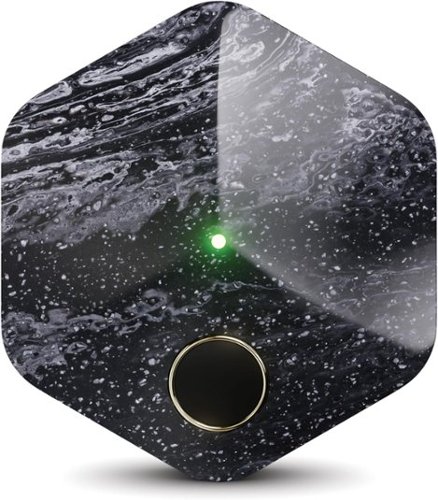
Bitkey is the simplest way to securely buy and hold your bitcoin, managed from a mobile app without the complexity of traditional hardware wallets.
Customer Rating
5
Security Meets Simplicity
on November 19, 2024
Posted by: Kelby
----- SUMMARY -----
Verdict:
The Bitkey is a premium Bitcoin hardware wallet that excels in simplicity, security, and user experience. Its minimalist design and robust build quality inspire confidence, while the intuitive app makes managing Bitcoin a breeze. The integration with popular exchanges, detailed transaction history, and convenient spending limit feature enhance its practicality. While the lack of a screen and support for only Bitcoin might deter some, the Bitkey's focus on core functionality and security, combined with its comprehensive recovery options, make it a compelling choice for both beginners and experienced Bitcoin users.
The Bitkey is a premium Bitcoin hardware wallet that excels in simplicity, security, and user experience. Its minimalist design and robust build quality inspire confidence, while the intuitive app makes managing Bitcoin a breeze. The integration with popular exchanges, detailed transaction history, and convenient spending limit feature enhance its practicality. While the lack of a screen and support for only Bitcoin might deter some, the Bitkey's focus on core functionality and security, combined with its comprehensive recovery options, make it a compelling choice for both beginners and experienced Bitcoin users.
Pros:
- Premium feel and solid construction
- Sleek and minimalist design
- Compact and portable
- Comfortable to hold and easy to carry
- Robust build quality
- Clean and intuitive app design
- Supports essential Bitcoin functions
- Integration with popular exchanges for convenient in-app purchases
- Detailed transaction history
- Daily spending limit feature for added convenience
- Secure backup options for peace of mind
- Recovery process in case of lost hardware
- "Trusted contacts" feature for comprehensive recovery
- Premium feel and solid construction
- Sleek and minimalist design
- Compact and portable
- Comfortable to hold and easy to carry
- Robust build quality
- Clean and intuitive app design
- Supports essential Bitcoin functions
- Integration with popular exchanges for convenient in-app purchases
- Detailed transaction history
- Daily spending limit feature for added convenience
- Secure backup options for peace of mind
- Recovery process in case of lost hardware
- "Trusted contacts" feature for comprehensive recovery
Cons:
- No screen or buttons, which some users might prefer
- Only supports Bitcoin (no other cryptocurrencies)
- Requires a mobile phone for initial setup and some transactions
- No screen or buttons, which some users might prefer
- Only supports Bitcoin (no other cryptocurrencies)
- Requires a mobile phone for initial setup and some transactions
----- DETAILS -----
Design & Build Quality:
Unboxing the Bitkey, I was immediately struck by its premium feel and solid construction. This is a device that exudes quality and durability. Its sleek and minimalist design features only a fingerprint reader and a USB-C charging port, emphasizing its focus on essential functionality. A small LED in the center illuminates when the fingerprint sensor is activated, providing a subtle yet effective visual cue.
Unboxing the Bitkey, I was immediately struck by its premium feel and solid construction. This is a device that exudes quality and durability. Its sleek and minimalist design features only a fingerprint reader and a USB-C charging port, emphasizing its focus on essential functionality. A small LED in the center illuminates when the fingerprint sensor is activated, providing a subtle yet effective visual cue.
The absence of a screen or buttons might surprise some, but I appreciate this minimalist approach. While some users might prefer a device with an LCD touchscreen for added visual feedback, Bitkey's design prioritizes simplicity and security. All the complexities of managing your Bitcoin are handled seamlessly within the excellent Bitkey app, leaving the hardware to focus on secure authentication.
The device's compact size and smooth finish make it comfortable to hold and easy to carry. It feels substantial without being bulky, striking a perfect balance between portability and a reassuring sense of security. The build quality inspires confidence, suggesting that the Bitkey is designed to withstand the rigors of daily use.
Overall, the Bitkey's design philosophy resonates with me. Its minimalist aesthetic, combined with robust build quality, creates a device that feels both modern and reliable. By offloading most functionality to the app, Bitkey achieves a streamlined hardware experience focused on secure access to your Bitcoin.
App & Features:
The Bitkey app boasts a clean design and intuitive navigation that make managing my Bitcoin a breeze. It seamlessly handles essential functions like purchasing, receiving, and sending Bitcoin, all within a user-friendly interface. While Bitcoin is the only supported cryptocurrency, the app's integration with popular exchanges like Cash App, Coinbase, and MoonPay allows for convenient in-app purchases.
The Bitkey app boasts a clean design and intuitive navigation that make managing my Bitcoin a breeze. It seamlessly handles essential functions like purchasing, receiving, and sending Bitcoin, all within a user-friendly interface. While Bitcoin is the only supported cryptocurrency, the app's integration with popular exchanges like Cash App, Coinbase, and MoonPay allows for convenient in-app purchases.
The transaction history, located below your Bitcoin balance and its corresponding dollar value, offers a clear and detailed record of your Bitcoin activity. Each transaction includes an icon indicating the action type (such as sending, receiving, or Cash App transfers), along with the date and amount. This comprehensive overview makes it simple to track your Bitcoin transactions accurately.
Sending Bitcoin is just as simple as buying it. Bitkey offers a unique feature that allows you to set a daily spending limit. For transactions below this limit, you can send Bitcoin without needing the hardware wallet for authentication, adding a layer of convenience for everyday purchases. For larger transactions, you'll use your fingerprint on the Bitkey to authenticate and then touch it to the back of your phone for secure authorization.
Bitkey offers several robust recovery options that provide real peace of mind. If you lose your phone, simply download the Bitkey app on a new device, sign into your Google Drive or iCloud account, and tap the Bitkey hardware to the back of your phone to instantly regain access to your funds. This secure backup system ensures that your Bitcoin is always protected. If you lose the Bitkey hardware itself, there's no need to worry. A recovery process within the app allows you to set up a new Bitkey device, pair it, and seamlessly transfer your wallet balance. In the unfortunate event that you lose both your phone and the Bitkey hardware, you can leverage the "trusted contacts" feature. This allows a designated person to download the Bitkey app and assist you in recovering your Bitcoin. The Bitkey developers seem to have thought of everything to guarantee you never lose access to your money.
----- WHAT’S IN THE BOX -----
1 x Bitkey Hardware Device
1 x USB-C to USB-A Charging Cable
1 x Getting Started Guide
1 x USB-C to USB-A Charging Cable
1 x Getting Started Guide
I would recommend this to a friend!






Share this review:


+1point
1of 1voted this as helpful.

Sound worth obsessing over. VIRTUOSO MAX harnesses the passion of audio experts and the power of cutting-edge technology to produce immersive acoustics across multiple platforms. State-of-the-art Graphene drivers produce spectacularly clear and precise audio, broadening the highs and lows of every soundscape. Dolby Atmos expands the play past the screen and into your world, with each conflict, conversation, and cutscene unfolding around you. Personalize your preferred balance of bass and treble with Sonarworks SoundID, so your soundtracks can become your main character theme music. Band together with friends and strategize over voice channels with the broadcast-grade omni-directional microphone. Active noise cancellation eliminates all other distractions, leaving you with all-encompassing gaming audio that sounds so good.
Customer Rating

4
A Premium Headset for Gaming and Work
on November 1, 2024
Posted by: Kelby
----- SUMMARY -----
Verdict:
The Corsair Virtuoso MAX delivers a premium gaming headset experience with stylish design, exceptional comfort, versatile connectivity, and a top-notch microphone. While the default sound profile may require some tweaking out of the box, the audio quality is excellent with customizable EQ settings and Dolby Atmos support. The active noise cancellation and transparency mode are well-implemented, adding to the headset's versatility. Overall, the Virtuoso MAX is a worthy contender for those seeking a high-quality headset for both gaming and work.
The Corsair Virtuoso MAX delivers a premium gaming headset experience with stylish design, exceptional comfort, versatile connectivity, and a top-notch microphone. While the default sound profile may require some tweaking out of the box, the audio quality is excellent with customizable EQ settings and Dolby Atmos support. The active noise cancellation and transparency mode are well-implemented, adding to the headset's versatility. Overall, the Virtuoso MAX is a worthy contender for those seeking a high-quality headset for both gaming and work.
Pros:
- Stylish design with premium build quality
- Comfortable even during long gaming sessions
- Good active noise cancellation and transparency mode
- Excellent microphone quality with background noise rejection
- Versatile connectivity with 2.4GHz wireless and Bluetooth
- Sonarworks SoundID integration for personalized audio
- Stylish design with premium build quality
- Comfortable even during long gaming sessions
- Good active noise cancellation and transparency mode
- Excellent microphone quality with background noise rejection
- Versatile connectivity with 2.4GHz wireless and Bluetooth
- Sonarworks SoundID integration for personalized audio
Cons:
- Default sound profile leans too heavily on the bass
- EQ settings might require some tweaking out of the box
- Controls might be confusing at first
- Default sound profile leans too heavily on the bass
- EQ settings might require some tweaking out of the box
- Controls might be confusing at first
----- DETAILS -----
Design & Comfort:
The Corsair Virtuoso MAX is truly a standout headset. Whether you're an avid gamer or simply need a stylish headset for work calls, it excels in both aesthetics and functionality. From the moment I unboxed it, I was impressed by its sleek design and premium build quality. The brushed aluminum earcups and plush memory foam earpads are comfortable, and the faux leather on the headband is of high quality. I chose the "Carbon" color, which is a sophisticated dark gray with subtle shiny details. When I showed the headset to my wife, who isn’t a gamer, she remarked, "Those are really cool!" This was unexpected praise coming from someone who usually rolls her eyes at my gaming gear.
The Corsair Virtuoso MAX is truly a standout headset. Whether you're an avid gamer or simply need a stylish headset for work calls, it excels in both aesthetics and functionality. From the moment I unboxed it, I was impressed by its sleek design and premium build quality. The brushed aluminum earcups and plush memory foam earpads are comfortable, and the faux leather on the headband is of high quality. I chose the "Carbon" color, which is a sophisticated dark gray with subtle shiny details. When I showed the headset to my wife, who isn’t a gamer, she remarked, "Those are really cool!" This was unexpected praise coming from someone who usually rolls her eyes at my gaming gear.
No surprise, the Corsair Virtuoso MAX offers RGB lighting. There’s a ring on the outside of each earcup that illuminates with a subtle yet captivating glow, perfect for late-night gaming sessions. The ring has three zones that you can customize using the Corsair iCUE software. I like that I can easily turn off the RGB for virtual work meetings. I'd rather not draw attention and be a distraction because of my flashy lighting.
Initially, I was concerned about the headset's weight. It has a reassuringly solid feel, but I worried it might become uncomfortable during long gaming sessions. However, the excellent weight distribution and plush padding make it surprisingly comfortable, even after hours of use. There’s a good amount of clamping force that makes them stay put, but not so much that I feel like I need to take them off to give my head and ears a rest.
Overall, the Corsair Virtuoso MAX delivers exceptional comfort and style, making it a pleasure to wear whether I'm immersed in a game or taking a work call.
Sound Quality & ANC:
Corsair boldly claims the Virtuoso MAX offers "sound worth obsessing over," and with dynamic 50mm graphene drivers and Dolby Atmos support, it certainly has the pedigree. While the audio quality is undeniably good, it didn't initially live up to that lofty claim for me. The bass response is undeniably powerful. Explosions, rumbling sound effects, and bass-heavy music all sound fantastic. However, I found that the default sound profile leaned a bit too heavily on the low end, overpowering the mid-range frequencies. This proved problematic in competitive FPS games where a detailed soundscape is crucial for pinpointing enemy locations.
Corsair boldly claims the Virtuoso MAX offers "sound worth obsessing over," and with dynamic 50mm graphene drivers and Dolby Atmos support, it certainly has the pedigree. While the audio quality is undeniably good, it didn't initially live up to that lofty claim for me. The bass response is undeniably powerful. Explosions, rumbling sound effects, and bass-heavy music all sound fantastic. However, I found that the default sound profile leaned a bit too heavily on the low end, overpowering the mid-range frequencies. This proved problematic in competitive FPS games where a detailed soundscape is crucial for pinpointing enemy locations.
Thankfully, the EQ settings in Corsair's iCUE software allowed me to tame the bass and boost the mids, resulting in a much more balanced and nuanced sound. While I'm happy with the audio now, it did take a fair bit of tweaking to get there. This echoes the experience of some other reviewers, and it would be great if Corsair could refine the default EQ in a future firmware update to deliver a more balanced sound out of the box. Despite this initial hurdle, I have no doubt that the Virtuoso MAX has the hardware capabilities to truly deliver "sound worth obsessing over."
The active noise cancellation (ANC) on the Virtuoso MAX is a welcome addition. Enabling ANC effectively silences background noise, creating a quiet and immersive experience whether I'm gaming or just trying to block out distractions while working from home. The low hum of my computer, the air conditioning, and even the distant sounds of traffic were all significantly reduced. While dedicated ANC headphones might offer a more complete noise cancellation experience, the Virtuoso MAX strikes a good balance between noise reduction and breathability, ensuring comfort during long gaming sessions.
On the flip side, the transparency mode works well too. It amplifies surrounding sounds, allowing me to be more aware of my environment without removing the headset. This feature is invaluable when I want to pay attention to my wife or daughter while simultaneously relishing the immersive audio experience offered by the Virtuoso MAX.
Ultimately, while ANC might not be the primary selling point for a gaming headset, the Virtuoso MAX's implementation is well-executed and adds another layer of versatility to an already impressive package.
Microphone:
Corsair hyped up the microphone on the Virtuoso MAX, and I'm happy to report that it lives up to the hype. This omnidirectional microphone delivers impressive quality, capturing my voice with clarity and naturalness. Both my gaming friends and work colleagues have commented on how crisp and clear I sound.
Corsair hyped up the microphone on the Virtuoso MAX, and I'm happy to report that it lives up to the hype. This omnidirectional microphone delivers impressive quality, capturing my voice with clarity and naturalness. Both my gaming friends and work colleagues have commented on how crisp and clear I sound.
Background noise rejection is also excellent. While those with clicky mechanical keyboards might find some of that sound bleeding through, the microphone does a great job of filtering out other ambient noises. No one on the other end of the call has complained about hearing my HVAC system, fan, or other common household sounds. Of course, louder noises like nearby conversations, construction, or lawnmowers might still be audible, but that's to be expected with any microphone.
For those with compatible NVIDIA graphics cards, the Virtuoso MAX also supports NVIDIA Broadcast technology, which further reduces background noise and echo. This is a fantastic feature that elevates the microphone's performance even further.
While it won't replace a dedicated studio microphone, the Virtuoso MAX boasts one of the best microphones I've encountered on a gaming headset. It's more than capable of providing crystal-clear communication for both gaming and work calls, and those on the receiving end will undoubtedly appreciate the difference.
Other Features & Controls:
The Corsair Virtuoso MAX is packed with features, going above and beyond what I expect from a gaming headset. Connectivity is excellent, offering both 2.4GHz wireless (via the included dongle) and Bluetooth. You can even connect to multiple devices simultaneously, like your PC and phone, making it easy to switch between gaming, music, and calls seamlessly. I experienced no latency issues regardless of the connection method.
The Corsair Virtuoso MAX is packed with features, going above and beyond what I expect from a gaming headset. Connectivity is excellent, offering both 2.4GHz wireless (via the included dongle) and Bluetooth. You can even connect to multiple devices simultaneously, like your PC and phone, making it easy to switch between gaming, music, and calls seamlessly. I experienced no latency issues regardless of the connection method.
One standout feature is Sonarworks SoundID integration, accessed through the iCUE software. This was a new concept for me, and I was pleasantly surprised by its effectiveness. SoundID guides you through a quick and engaging audio survey to create a personalized sound profile tailored to your unique hearing abilities. It's a fantastic alternative to manually tweaking EQ settings, though that option is still available within iCUE for those who prefer it.
While most of the controls on the Virtuoso MAX are intuitive, it did take me a little while to decipher some of them. I'll admit, I'm the type who avoids manuals at all costs. The headset has several buttons and dials, and I eventually had to consult the manual (accessed via a handy QR code on the packaging) to understand their full functionality.
The USB-C charging port, removable microphone, and power button (which also activates Bluetooth pairing) were all straightforward. I also appreciated the media rocker button, which allows you to answer/end calls, play/pause music, and skip tracks with a simple press or rock of the switch. However, the rotating rings on each earcup initially stumped me. The manual revealed that the left ring controls the 2.4GHz wireless volume, while the right adjusts Bluetooth volume, a handy feature once I understood it.
The button that cycles through EQ modes and toggles ANC/transparency mode was another initially cryptic control. A short press cycles through EQ presets, while a long press toggles between ANC on/off and transparency mode. While it took a moment to figure out, I appreciate Corsair's decision to keep this button unlabeled, as it can be remapped within iCUE to suit individual preferences.
Overall, the Corsair Virtuoso MAX offers a comprehensive and impressive feature set. While some controls might require a quick glance at the manual, the learning curve is minimal, and the versatility and functionality this headset provides are truly remarkable.
Battery Life:
The battery life of the Corsair Virtuoso MAX has been a pleasant surprise. With RGB lighting disabled and using the 2.4GHz wireless connection, I consistently get around 60 hours of use on a single charge. This is on par with other high-end wireless headsets and more than enough to satisfy my needs.
The battery life of the Corsair Virtuoso MAX has been a pleasant surprise. With RGB lighting disabled and using the 2.4GHz wireless connection, I consistently get around 60 hours of use on a single charge. This is on par with other high-end wireless headsets and more than enough to satisfy my needs.
What's even more impressive is the fast charging capability. Just 15 minutes of charging provides around 6 hours of listening time, which is perfect for those times when I forget to charge overnight or need a quick boost before a gaming session. I also appreciate that the headset can be used while charging, though it's worth noting that the charging cable itself doesn't transmit audio. You still need to be connected wirelessly via 2.4GHz or Bluetooth.
Overall, the Corsair Virtuoso MAX delivers exceptional battery life and convenient charging options, ensuring that I can enjoy uninterrupted audio for extended periods, whether I'm gaming, working, or listening to music.
I would recommend this to a friend!






Share this review:


+2points
2of 2voted this as helpful.

Designed for a seamless experience, the fully automatic Magnifica Plus guides you through the brewing process. Easily craft drinks with the touch of a button with 18 recipes to choose from, including Latte Macchiatos, Cappuccinos, Americanos & Iced Coffee. The built-in conical burr grinder and brewing unit deliver espresso with the perfect grind, dose, and brew every time, saving you time and effort. De~Longhi~s proprietary LatteCrema technology automatically froths milk and milk alternatives, allowing you to personalize your drink with 3 different frothing settings - light, creamy, or dense. The full touch screen display and soft touch buttons make navigation intuitive and guide you to craft and customize your beverage quickly. With up to 4 unique user profiles, adjust size and intensity to fit your preferences. Find your favorite drinks faster with Smart One-Touch intelligence, programmed to remember your most popular choices. Clean-up is simple with our auto-clean function and detachable, dishwasher-safe parts. With the Magnifica Plus, enjoy your caf~ favorites at home, at the touch of a button.
Customer Rating
5
Customization and Quality in One Machine
on October 21, 2024
Posted by: Kelby
----- SUMMARY -----
Verdict:
The De’Longhi Magnifica Plus is a standout addition to any kitchen. Its sleek design and intuitive features make it a hit with guests and coffee lovers alike. The impressive customization options and variety of drink settings ensure that you can always find your perfect cup. Maintenance is simple and hassle-free, adding to the overall convenience of this machine. Whether you're an espresso enthusiast, a fan of milk drinks, or someone who enjoys a great cup of tea, the Magnifica Plus delivers high-quality results every time. This machine has truly elevated my coffee experience and is a worthwhile investment for anyone looking to enjoy barista-quality drinks at home.
The De’Longhi Magnifica Plus is a standout addition to any kitchen. Its sleek design and intuitive features make it a hit with guests and coffee lovers alike. The impressive customization options and variety of drink settings ensure that you can always find your perfect cup. Maintenance is simple and hassle-free, adding to the overall convenience of this machine. Whether you're an espresso enthusiast, a fan of milk drinks, or someone who enjoys a great cup of tea, the Magnifica Plus delivers high-quality results every time. This machine has truly elevated my coffee experience and is a worthwhile investment for anyone looking to enjoy barista-quality drinks at home.
Pros:
- Sleek, stylish design that complements any kitchen
- User-friendly color touchscreen interface
- Customizability with multiple drink options, sizes, intensities, and profiles
- Excellent drink quality, including espresso shots and milk-based beverages
- Simple maintenance process with easy-to-clean components
- Automatic milk frothing with the LatteCrema Hot milk carafe
- Sleek, stylish design that complements any kitchen
- User-friendly color touchscreen interface
- Customizability with multiple drink options, sizes, intensities, and profiles
- Excellent drink quality, including espresso shots and milk-based beverages
- Simple maintenance process with easy-to-clean components
- Automatic milk frothing with the LatteCrema Hot milk carafe
Cons:
- Some plastic parts may feel cheap to the touch
- Cold drinks are limited to Americano over ice
- Requires regular cleaning and descaling to maintain performance
- Some plastic parts may feel cheap to the touch
- Cold drinks are limited to Americano over ice
- Requires regular cleaning and descaling to maintain performance
----- DETAILS -----
Design:
The De’Longhi Magnifica Plus looks fantastic on my kitchen counter. The sleek silver color and modern design give it a stylish, premium look, and its compact size means it fits nicely wherever I put it. While some of the plastic parts feel a bit cheap to the touch, the machine still seems well-made. It's been a hit with guests, who often compliment its appearance. The color touchscreen is not only visually appealing but also user-friendly. I genuinely enjoy using the machine and find it fun to share the coffee-making experience with others. It has definitely elevated my kitchen setup and impressed fellow coffee lovers.
The De’Longhi Magnifica Plus looks fantastic on my kitchen counter. The sleek silver color and modern design give it a stylish, premium look, and its compact size means it fits nicely wherever I put it. While some of the plastic parts feel a bit cheap to the touch, the machine still seems well-made. It's been a hit with guests, who often compliment its appearance. The color touchscreen is not only visually appealing but also user-friendly. I genuinely enjoy using the machine and find it fun to share the coffee-making experience with others. It has definitely elevated my kitchen setup and impressed fellow coffee lovers.
Features:
If I had to pick one word to describe my favorite thing about the De’Longhi Magnifica Plus, it would be "customization." Here’s why: First, the number of drinks you can make is astonishing. It can make 18 different ones at the touch of a button. Most of it is automatic, with the only manual step being prepping the LatteCrema Hot milk carafe for milk drinks.
If I had to pick one word to describe my favorite thing about the De’Longhi Magnifica Plus, it would be "customization." Here’s why: First, the number of drinks you can make is astonishing. It can make 18 different ones at the touch of a button. Most of it is automatic, with the only manual step being prepping the LatteCrema Hot milk carafe for milk drinks.
To complement the 18 drink options, the Magnifica Plus offers four drink sizes and five intensity settings, allowing you to find your perfect drink and cater it to your glass or mug size. Additionally, the bean grinder has a dial with 13 settings for a more coarse or finely ground output. With so many customization options, user profiles are incredibly helpful. Once you've found your perfect result for any of the 18 drinks, you can save it to your profile, making it quick and easy to brew your perfect cup every time. My wife and I have very different coffee preferences, so having our own profiles keeps us both happy without needing to manually adjust settings all the time. The Magnifica Plus supports up to four profiles, all managed through a very intuitive touchscreen interface.
Drink Quality:
I’m consistently impressed with the drinks produced by the De’Longhi Magnifica Plus. All 18 recipes are excellent, which is a real testament to the machine's capabilities.
I’m consistently impressed with the drinks produced by the De’Longhi Magnifica Plus. All 18 recipes are excellent, which is a real testament to the machine's capabilities.
As an espresso enthusiast, I have to highlight how well it handles espresso shots. The five intensity settings let you customize your drink to perfection. I love my espresso intense, and the fifth setting is as strong as I hoped. Plus, there's even a button for an extra shot.
The milk drinks are equally impressive. With the LatteCrema Hot milk carafe attached, I’ve enjoyed everything from Latte Macchiatos to Flat Whites. The onscreen instructions and the carafe make the process simple. Just fill it with milk, attach it, adjust the spout above your glass, and press brew. The screen guides you to adjust the milk frothiness or lets you choose your preference. Whether I use dairy or plant-based milk, the foam is always smooth and creamy.
For cold drinks, it's basically an Americano over ice. You select the drink preset and choose between regular or extra ice. Although it's not the same as cold brew, it's still a great iced coffee.
While I prefer freshly ground beans, the Magnifica Plus also takes pre-ground coffee. Select the pre-ground button in the drink recipe settings, add a scoop in the chute, and brew. It's nice to have the option for occasional flavored coffee that's not available in whole-bean form.
And for those who enjoy tea, the machine dispenses hot water at just the right temperature. Since it comes out of a different spout, there’s no coffee taste in your tea.
This machine's ability to cater to diverse tastes and preferences is truly remarkable.
Maintenance:
De’Longhi clearly put a lot of thought into the maintenance steps of the Magnifica Plus, and I really appreciate it. Automatic espresso machines are a joy to use, but a cumbersome maintenance process can overshadow that convenience. Thankfully, the Magnifica Plus is designed to be simple to maintain. The LatteCrema milk carafe disassembles easily, can be rinsed, and then placed in the dishwasher so that there’s no leftover milk residue. Cleaning the drip tray and grounds container is just a matter of emptying and rinsing them. If needed, you can wash the main parts of the drip tray in the dishwasher, with clear instructions indicating which parts are dishwasher-safe.
De’Longhi clearly put a lot of thought into the maintenance steps of the Magnifica Plus, and I really appreciate it. Automatic espresso machines are a joy to use, but a cumbersome maintenance process can overshadow that convenience. Thankfully, the Magnifica Plus is designed to be simple to maintain. The LatteCrema milk carafe disassembles easily, can be rinsed, and then placed in the dishwasher so that there’s no leftover milk residue. Cleaning the drip tray and grounds container is just a matter of emptying and rinsing them. If needed, you can wash the main parts of the drip tray in the dishwasher, with clear instructions indicating which parts are dishwasher-safe.
The water tank doesn’t get very dirty, but an occasional rinse is advised. The exterior of the machine can be wiped down as needed, just avoid harsh chemicals. The inside, accessible after removing the drip tray and grounds container, will eventually have some coffee deposits. To prevent buildup, just use a vacuum. The infuser should be cleaned once a month by removing the water tank, opening the infuser door, and taking out the infuser. Immerse it in water for about five minutes, then rinse it under the sink.
Additionally, the machine will display a message on its screen when a descale is needed. Although I haven't had to do it yet, the instructions say it takes about 25 minutes, and it's a guided process, so it should be simple. There's even a bottle of descaler included in the box. The ease of cleaning the infuser and descaling is a big plus for me because my previous machine had an overly complicated process that made it difficult to clean.
Overall, De’Longhi has made the maintenance of this machine straightforward and stress-free. It adds to the joy of using the Magnifica Plus without the hassle.
----- WHAT’S IN THE BOX -----
1 x De’Longhi Magnifica Plus Espresso Machine
1 x Pre-ground Coffee Measuring Scoop
1 x Water Hardness Test
1 x Water Filter
1 x Descaler (100ml)
1 x Removable Waterspout
1 x Milk Carafe
1 x Pre-ground Coffee Measuring Scoop
1 x Water Hardness Test
1 x Water Filter
1 x Descaler (100ml)
1 x Removable Waterspout
1 x Milk Carafe
I would recommend this to a friend!






Share this review:


0points
0of 0voted this as helpful.

Each iconic pair of Marshall headphones is built on over 60 years of mastering the craft of head-turning sound. And Monitor III A.N.C. tops the lot. Every time you hit play, get ready to be fully immersed in thunderous bass and screaming highs. Monitor III A.N.C. also comes equipped with enhanced active noise cancelling technology, and reduced wind noise. It~ll almost feel like it~s only you and your favourite musician in the room, on the street or in the train carriage. With 70 hours of wireless playtime, that~s one legendary private listening session, and 40 hours more than our last model. When you~re ready to let the outside world in on the party, simply switch over to Transparency mode. These features are also matched by chart-topping design. The foldable construction along with the premium hard case mean Monitor III A.N.C. is ready to go whenever you are.
Customer Rating
5
Rock-Solid Sound and Style
on October 16, 2024
Posted by: Kelby
----- SUMMARY -----
Verdict:
The Marshall Monitor III ANC headphones deliver a winning combination of iconic style, exceptional comfort, and impressive audio performance. While the bold design may not appeal to everyone, the intuitive controls, long-lasting battery life, and effective noise cancellation make these headphones a fantastic choice for music lovers and frequent travelers alike. The rich, detailed sound quality truly shines across all genres, making the Monitor IIIs a worthy investment for those seeking a premium listening experience.
The Marshall Monitor III ANC headphones deliver a winning combination of iconic style, exceptional comfort, and impressive audio performance. While the bold design may not appeal to everyone, the intuitive controls, long-lasting battery life, and effective noise cancellation make these headphones a fantastic choice for music lovers and frequent travelers alike. The rich, detailed sound quality truly shines across all genres, making the Monitor IIIs a worthy investment for those seeking a premium listening experience.
Pros:
- Sleek black leatherette, iconic logo, and subtle gold accents
- Intuitive physical control knob
- Comfortable earcups and headband
- Surprisingly lightweight
- Compact and portable
- Adaptive Loudness feature
- Soundstage feature
- Clean and simple app interface
- Rich, detailed sound with powerful bass response
- Excellent noise cancellation
- Transparency mode
- Impressive 70-hour battery life with ANC enabled
- Sleek black leatherette, iconic logo, and subtle gold accents
- Intuitive physical control knob
- Comfortable earcups and headband
- Surprisingly lightweight
- Compact and portable
- Adaptive Loudness feature
- Soundstage feature
- Clean and simple app interface
- Rich, detailed sound with powerful bass response
- Excellent noise cancellation
- Transparency mode
- Impressive 70-hour battery life with ANC enabled
Cons:
- Bold look might not be for everyone
- Soundstage feature is not as immersive as some other spatial audio implementations
- Bold look might not be for everyone
- Soundstage feature is not as immersive as some other spatial audio implementations
----- DETAILS -----
Design & Comfort:
The Monitor III ANC headphones immediately capture your attention with Marshall's classic aesthetic: sleek black leatherette, the iconic cursive logo, and subtle gold accents. I love how Marshall has incorporated elements of their iconic amplifier design into these headphones. It's definitely a statement piece. One of my friends loved the vintage vibe, while another thought they looked a bit too 'rockstar' for her everyday style. It's definitely a bold look that might not be for everyone, but I appreciate its unique character.
The Monitor III ANC headphones immediately capture your attention with Marshall's classic aesthetic: sleek black leatherette, the iconic cursive logo, and subtle gold accents. I love how Marshall has incorporated elements of their iconic amplifier design into these headphones. It's definitely a statement piece. One of my friends loved the vintage vibe, while another thought they looked a bit too 'rockstar' for her everyday style. It's definitely a bold look that might not be for everyone, but I appreciate its unique character.
What I think is undeniable is the practicality of the design and the outstanding comfort. The physical control knob is a joy to use. Much like a joystick, it moves up, down, left, and right to adjust volume and skip songs, and you can press it to pause or hang up calls. It's incredibly intuitive. Other physical buttons, like the customizable "M" button (which I primarily use for Spotify Tap or activating my voice assistant, but it can also control Equalizer and Soundstage), and the ANC button, are cleverly integrated into the design. They’re subtle yet easy to find and use.
Speaking of comfort, these headphones practically disappear on my head, a remarkable feat for over-ear headphones. The earcups are incredibly plush, almost like memory foam, and the headband has just the right amount of padding. They're also surprisingly lightweight. All these factors combine to deliver outstanding comfort, even during long listening sessions.
The Monitor IIIs twist and fold neatly into a compact form, making them surprisingly portable for over-ear headphones. They come with a sturdy hard case that's perfect for travel. The case itself is a thing of beauty, with a matching black leatherette exterior and a luxurious red velvet lining that evokes the inside of a classic guitar case.
Features & App:
The Monitor III ANC headphones offer some cool features that enhance the listening experience. One is Adaptive Loudness, which automatically adjusts the volume based on the surrounding noise. I found this especially useful when transitioning from a noisy street to a quiet cafe. The music volume subtly lowered as I stepped inside, ensuring it never became too loud.
The Monitor III ANC headphones offer some cool features that enhance the listening experience. One is Adaptive Loudness, which automatically adjusts the volume based on the surrounding noise. I found this especially useful when transitioning from a noisy street to a quiet cafe. The music volume subtly lowered as I stepped inside, ensuring it never became too loud.
Another interesting feature is Soundstage, Marshall's version of spatial audio. While not as immersive as some other spatial audio implementations, it adds a subtle sense of spaciousness to the music, which I find enjoyable for certain tracks, especially orchestral pieces.
The "Marshall Bluetooth" app is essential for getting the most out of these headphones. Within the app, you can customize the "M" button, adjust the EQ, and manage other settings. I easily customized the EQ to my preferences and found the controls intuitive. The app also provides firmware updates and allows you to fine-tune settings like auto-play/pause and audio prompts. I appreciate the clean and simple app interface, which makes it quick and easy to make adjustments.
Sound Quality & ANC:
I've been consistently impressed by the design and features of the Monitor III headphones, and the sound quality certainly lives up to the same high standard. These headphones deliver a rich, detailed sound with a powerful bass response that I really enjoy. While Marshall might be known for their rock 'n' roll heritage, I've found that every genre sounds fantastic on these headphones. I was particularly impressed by how clearly I could hear the subtle nuances of the acoustic guitar and tambourine in Wonderwall from Oasis. Compared to my old headphones, which sounded muffled and lacked clarity, listening to my favorite music on the Monitor IIIs is a completely new experience.
I've been consistently impressed by the design and features of the Monitor III headphones, and the sound quality certainly lives up to the same high standard. These headphones deliver a rich, detailed sound with a powerful bass response that I really enjoy. While Marshall might be known for their rock 'n' roll heritage, I've found that every genre sounds fantastic on these headphones. I was particularly impressed by how clearly I could hear the subtle nuances of the acoustic guitar and tambourine in Wonderwall from Oasis. Compared to my old headphones, which sounded muffled and lacked clarity, listening to my favorite music on the Monitor IIIs is a completely new experience.
Noise cancellation is also excellent. In a bustling coffee shop, the ANC effectively minimized the distracting chatter and allowed me to focus on my work. When walking down the street, the lower-frequency noises like distant traffic seemed to vanish. Louder sounds, like car horns, were still audible but significantly muted. I haven't had a chance to test the Monitor IIIs on a flight yet, but based on my experience so far, I'm confident they'll handle the drone of a jet engine with ease.
On the other hand, when I want to be more aware of my surroundings, the transparency mode does a great job of letting outside noise in. This is handy when crossing the street or chatting with someone while still wearing the headphones. While it doesn't amplify sounds, it creates a natural listening experience, almost as if I'm not wearing headphones at all.
Battery Life:
The battery life on the Marshall Monitor III ANC headphones is definitely a highlight. I consistently get around 70 hours of listening time with ANC enabled, and nearly 100 hours when it's turned off. This easily surpasses many other popular ANC headphones on the market, some of which only offer half the listening time. In the past, I've had headphones that needed frequent charging, which was always a hassle. But with the Monitor IIIs, I rarely find myself reaching for the charger. Marshall emphasizes the impressive 70-hour battery life right on the box, and it's clear they're proud of this feature. It's a major convenience that I've really come to appreciate.
The battery life on the Marshall Monitor III ANC headphones is definitely a highlight. I consistently get around 70 hours of listening time with ANC enabled, and nearly 100 hours when it's turned off. This easily surpasses many other popular ANC headphones on the market, some of which only offer half the listening time. In the past, I've had headphones that needed frequent charging, which was always a hassle. But with the Monitor IIIs, I rarely find myself reaching for the charger. Marshall emphasizes the impressive 70-hour battery life right on the box, and it's clear they're proud of this feature. It's a major convenience that I've really come to appreciate.
----- WHAT’S IN THE BOX -----
1 x Monitor III ANC Wireless Headphones
1 x Carrying Case
1 x USB-C to 3.5mm Removable Audio Cord
1 x USB-C Charging Cable
1 x Quick Start Guide
1 x Legal and Safety Information
1 x Carrying Case
1 x USB-C to 3.5mm Removable Audio Cord
1 x USB-C Charging Cable
1 x Quick Start Guide
1 x Legal and Safety Information
I would recommend this to a friend!






Share this review:


0points
0of 0voted this as helpful.
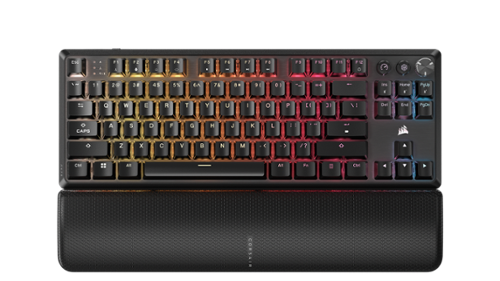
Make your best plays and leave more room for your mouse. The CORSAIR K70 CORE TKL WIRELESS gaming keyboard offers amazing gaming and typing on a compact tenkeyless footprint, free from wires via ultra-fast SLIPSTREAM WIRELESS v1.5 or versatile Bluetooth. Enjoy silky-smooth, wobble-free keystrokes with pre-lubricated CORSAIR MLX Red v2 linear switches, lit by ultra-bright per-key RGB. The K70 CORE TKL WIRELESS typing experience is in a league of its own, as two layers of sound dampening create an ultra-satisfying sound and feel. A multi-function dial and programmable button put media control at your fingertips, while the game mode button activates settings that reduce input lag and maximize performance while competing. Your ambition starts with K70 CORE TKL WIRELESS.
Customer Rating
5
A Top-Tier Wireless Choice
on October 9, 2024
Posted by: Kelby
----- SUMMARY -----
Verdict:
The Corsair K70 CORE TKL Wireless Mechanical Gaming Keyboard is an excellent choice for gamers who demand the best. With its sleek design, customizable RGB lighting, Corsair's MLX Red v2 linear switches, Multi-Function Dial, impressive 1,000Hz polling rate, and low-latency Slipstream Wireless connection, this keyboard offers a combination of performance, features, and style that is unmatched in its class. While the RGB lighting can significantly reduce battery life, the outstanding battery life with RGB lighting off and the option for Bluetooth connectivity make this keyboard a versatile and convenient option for both gaming and everyday use. Overall, the Corsair K70 CORE TKL Wireless Mechanical Gaming Keyboard is a top-tier choice for gamers looking for a premium wireless keyboard.
The Corsair K70 CORE TKL Wireless Mechanical Gaming Keyboard is an excellent choice for gamers who demand the best. With its sleek design, customizable RGB lighting, Corsair's MLX Red v2 linear switches, Multi-Function Dial, impressive 1,000Hz polling rate, and low-latency Slipstream Wireless connection, this keyboard offers a combination of performance, features, and style that is unmatched in its class. While the RGB lighting can significantly reduce battery life, the outstanding battery life with RGB lighting off and the option for Bluetooth connectivity make this keyboard a versatile and convenient option for both gaming and everyday use. Overall, the Corsair K70 CORE TKL Wireless Mechanical Gaming Keyboard is a top-tier choice for gamers looking for a premium wireless keyboard.
Pros:
- Sleek and modern design
- Maximizes desk space
- Dedicated function and arrow keys
- Customizable RGB lighting
- Corsair's new MLX Red v2 linear switches
- Multi-Function Dial
- Impressive 1,000Hz polling rate
- FlashTap technology
- Low-latency Slipstream Wireless connection
- Bluetooth connectivity
- Outstanding battery life
- Sleek and modern design
- Maximizes desk space
- Dedicated function and arrow keys
- Customizable RGB lighting
- Corsair's new MLX Red v2 linear switches
- Multi-Function Dial
- Impressive 1,000Hz polling rate
- FlashTap technology
- Low-latency Slipstream Wireless connection
- Bluetooth connectivity
- Outstanding battery life
Cons:
- RGB lighting significantly reduces battery life
- RGB lighting significantly reduces battery life
----- DETAILS -----
Design:
The Corsair K70 CORE TKL Wireless Mechanical Gaming Keyboard's sleek and modern design exudes elegance. The aluminum top plate and detachable magnetic cushioned palm rest make it look and feel like a premium product. Despite being a tenkeyless keyboard, it maximizes desk space while still incorporating essential function keys and shortcuts. As a user of smaller keyboards, I’ve learned to appreciate the dedicated function and arrow keys, which significantly enhance my productivity and efficiency. The customizable RGB lighting adds a personal touch and vibrancy to my workstation or gaming setup, making it not only functional but also aesthetically pleasing.
The Corsair K70 CORE TKL Wireless Mechanical Gaming Keyboard's sleek and modern design exudes elegance. The aluminum top plate and detachable magnetic cushioned palm rest make it look and feel like a premium product. Despite being a tenkeyless keyboard, it maximizes desk space while still incorporating essential function keys and shortcuts. As a user of smaller keyboards, I’ve learned to appreciate the dedicated function and arrow keys, which significantly enhance my productivity and efficiency. The customizable RGB lighting adds a personal touch and vibrancy to my workstation or gaming setup, making it not only functional but also aesthetically pleasing.
Features:
Beyond the customizable RGB lighting, which can be controlled down to each key, the Corsair K70 CORE TKL keyboard also boasts several other features that have greatly enhanced my gaming and typing experience.
Beyond the customizable RGB lighting, which can be controlled down to each key, the Corsair K70 CORE TKL keyboard also boasts several other features that have greatly enhanced my gaming and typing experience.
One of the standout features for me is the Corsair's new MLX Red v2 linear switches. They're pre-lubricated, which makes for smooth keystrokes and the updated stem structure ensures minimal wiggle. This has made typing and fast-paced gaming much more comfortable and enjoyable for me.
Another feature I appreciate is the Multi-Function Dial in the top right corner. It's incredibly versatile and allows me to control volume, music playback, and more with ease. The two buttons to the left of the dial are also very useful. The Media Button is programmable using iCUE software, so I can customize it to my liking, and the Game Mode Button deactivates keyboard effects that could introduce latency and disables keys like the Windows button to prevent accidental presses during gameplay. I love that these buttons are cleverly positioned in an empty space, so they don't add any unnecessary bulk to the keyboard.
Performance:
As a gamer, I can tell you that the Corsair K70 CORE TKL is a game-changer. Its impressive 1,000Hz polling rate ensures that my inputs are registered instantly, providing me with an unparalleled level of precision and control. The FlashTap technology is pretty cool, enabling me to perform evasive maneuvers like counter-strafing and jiggle-peeking with ease, giving me a significant competitive advantage. Whether I choose to connect wirelessly via the low-latency Slipstream Wireless connection or opt for the convenience of Bluetooth, I can trust the K70 CORE TKL to deliver a seamless and responsive gaming experience every time.
As a gamer, I can tell you that the Corsair K70 CORE TKL is a game-changer. Its impressive 1,000Hz polling rate ensures that my inputs are registered instantly, providing me with an unparalleled level of precision and control. The FlashTap technology is pretty cool, enabling me to perform evasive maneuvers like counter-strafing and jiggle-peeking with ease, giving me a significant competitive advantage. Whether I choose to connect wirelessly via the low-latency Slipstream Wireless connection or opt for the convenience of Bluetooth, I can trust the K70 CORE TKL to deliver a seamless and responsive gaming experience every time.
Battery Life:
I’ve been thoroughly impressed with the battery life of the Corsair K70 CORE TKL keyboard. Corsair claims you can get about 890 hours of Slipstream Wireless use on a single charge with RGB lighting off. That’s pretty outstanding compared to other wireless gaming keyboards I’ve seen on the market. I’ve been loosely tracking my hours of use throughout work and gaming sessions, and that claim seems pretty spot on. With RGB lighting on at 100% brightness, you’re looking at around 35-40 hours based on my experience, a significant reduction but in line with other wireless RGB keyboards.
I’ve been thoroughly impressed with the battery life of the Corsair K70 CORE TKL keyboard. Corsair claims you can get about 890 hours of Slipstream Wireless use on a single charge with RGB lighting off. That’s pretty outstanding compared to other wireless gaming keyboards I’ve seen on the market. I’ve been loosely tracking my hours of use throughout work and gaming sessions, and that claim seems pretty spot on. With RGB lighting on at 100% brightness, you’re looking at around 35-40 hours based on my experience, a significant reduction but in line with other wireless RGB keyboards.
----- WHAT’S IN THE BOX -----
1 x K70 CORE TKL Wireless RGB Mechanical Gaming Keyboard
1 x Detachable Magnetic Cushioned Palm Rest
1 x Braided USB Type-C Cable
1 x USB Wireless Receiver
1 x Safety Leaflet
1 x Warranty Card
1 x Detachable Magnetic Cushioned Palm Rest
1 x Braided USB Type-C Cable
1 x USB Wireless Receiver
1 x Safety Leaflet
1 x Warranty Card
I would recommend this to a friend!






Share this review:


0points
0of 0voted this as helpful.

Meet the new shape of sound ~ Galaxy Buds3 Pro ~ now completely redesigned with improved hardware to bring you deeper into your audio.~ With Galaxy AI,~ your Buds create a great listening experience by optimizing sound based on your surroundings and how you wear them ~ while providing a snug fit for all-day comfort, no matter what you do. Buds3 Pro get how much you love your audio. From jamming while cooking to listening to your favorite show on a crowded subway to taking a work call, your Buds will adjust to the different sounds around you using Adaptive Active Noise Cancellation so you always hear what~s important. Plus, they~re packed with features to create a convenient listening experience ~ from auto-switching~ your audio between your Galaxy phone and your Galaxy PC to immersing you in the latest TV shows with 360 Audio, now available on Samsung TVs.~ And it doesn~t stop there ~ Buds make perfect companions for your Galaxy phone as you travel. Real-time Interpreter with Galaxy AI~ allows you to speak like a local as your phone translates speech right in your Buds so you never miss a word from your local tour guide. No matter what you listen to or how you listen, we~ve redesigned our Buds to give you a great immersive audio experience with Galaxy Buds3 Pro.
Customer Rating
5
Excellent Sound, Noise Cancellation, and Features
on September 16, 2024
Posted by: Kelby
----- SUMMARY -----
Verdict:
The Samsung Galaxy Buds 3 Pro are a premium pair of wireless earbuds that offer exceptional sound quality, impressive Active Noise Cancellation (ANC), and a comfortable design. While the Adaptive Noise Control feature powered by AI is not always consistent and the translation feature is imperfect, the Buds 3 Pro deliver a well-rounded audio experience with a wide range of features. The long battery life and intuitive gesture controls add to their appeal. Overall, the Samsung Galaxy Buds 3 Pro are a solid choice for anyone seeking a high-quality and feature-rich pair of wireless earbuds.
The Samsung Galaxy Buds 3 Pro are a premium pair of wireless earbuds that offer exceptional sound quality, impressive Active Noise Cancellation (ANC), and a comfortable design. While the Adaptive Noise Control feature powered by AI is not always consistent and the translation feature is imperfect, the Buds 3 Pro deliver a well-rounded audio experience with a wide range of features. The long battery life and intuitive gesture controls add to their appeal. Overall, the Samsung Galaxy Buds 3 Pro are a solid choice for anyone seeking a high-quality and feature-rich pair of wireless earbuds.
Pros:
- Comfortable and lightweight design
- Intuitive gesture controls on the stems
- Impressive Active Noise Cancellation (ANC)
- Adaptive Noise Control adjusts ANC in real-time
- Ambient Sound Mode amplifies external sounds
- AI-based real-time translation
- Voice commands for hands-free control
- Exceptional sound clarity and balance
- Impressive battery life up to 30 hours
- Comfortable and lightweight design
- Intuitive gesture controls on the stems
- Impressive Active Noise Cancellation (ANC)
- Adaptive Noise Control adjusts ANC in real-time
- Ambient Sound Mode amplifies external sounds
- AI-based real-time translation
- Voice commands for hands-free control
- Exceptional sound clarity and balance
- Impressive battery life up to 30 hours
Cons:
- Adaptive Noise Control is not always consistent
- Translation feature is not perfect
- More expensive than some other similar earbuds
- Adaptive Noise Control is not always consistent
- Translation feature is not perfect
- More expensive than some other similar earbuds
----- DETAILS -----
Design & Comfort:
Samsung gave their Galaxy Buds a drastic design change. Instead of the in-ear design, the Galaxy Buds 3 Pro have stems. I like the change for two main reasons. They feel better in my ears and the gesture controls are easier.
Samsung gave their Galaxy Buds a drastic design change. Instead of the in-ear design, the Galaxy Buds 3 Pro have stems. I like the change for two main reasons. They feel better in my ears and the gesture controls are easier.
The Galaxy Buds 3 Pro are lightweight and comfortable. Even when I wear them for long periods of time, I don’t have any ear discomfort. They fit well too. Thanks to the different ear tip sizes, you can find the perfect fit and test the seal quality with the Galaxy Wear app.
The stems of the Buds 3 Pro are angled which gives them a distinct look and also makes gesture controls feel natural. Running your finger up the side of either buds raises or lowers the volume. Using a mixture of pinch or pinch-and-hold touch controls allows you to play, pause and navigate through songs or switch sound modes (Active Noise Cancellation and Ambient/Transparency). Once you get the hang of it, the controls are intuitive, and I like having full control on the earbuds so that I don’t have to get my phone out.
The stems also have lights. I wasn’t sure I’d like them, but they look subtle and they’re also practical. They’ll glow to indicate they’re in pairing mode or flash if you use the Find My feature. The latter is especially useful if you’re in a dark room and can’t find your buds. You can also choose to turn off the lights on the stems, have them fade in and out, or remain fully lit.
The case has a solid feel to it, and I like that the lid is transparent. It makes it easy to see if your buds are in the case at a glance. With other buds, there’s been a few times where I left the house with the case assuming the buds were in there only to find out later that I had placed them elsewhere. Not sure if this is what Samsung was trying to solve with the transparent lid, but I appreciate the design choice.
Features:
The Samsung Galaxy Buds 3 Pro boast impressive Active Noise Cancellation (ANC), effectively muffling sounds like traffic noise, HVAC units, and airplane cabin noise. While not as powerful as over-the-ear headphones, the Buds 3 Pro deliver exceptional ANC for earbuds.
The Samsung Galaxy Buds 3 Pro boast impressive Active Noise Cancellation (ANC), effectively muffling sounds like traffic noise, HVAC units, and airplane cabin noise. While not as powerful as over-the-ear headphones, the Buds 3 Pro deliver exceptional ANC for earbuds.
Adaptive Noise Control, powered by AI, dynamically adjusts noise cancellation in real time. It aims to enhance situational awareness, allowing you to hear someone speaking to you or approaching alarms and sirens. While the feature generally works well, it's not always consistent, sometimes mistaking random noises for voices. For a more reliable ANC experience, I recommend sticking with the regular ANC mode.
For the opposite of noise cancellation, the Buds 3 Pro offer an Ambient Sound Mode. This mode amplifies external sounds, enabling you to stay alert to your surroundings while listening to music or podcasts. The sound quality is crisp, making it a useful feature for various environments.
A unique AI-based feature of the Buds 3 Pro is real-time translation. Using the Interpeter app, you can translate your words and hear the other person's translated words through your earbuds. There's also a mode that translates speech from videos. While not perfect, the translation works surprisingly well in most situations.
Voice commands provide hands-free control, allowing you to perform actions like stopping music, adjusting volume, or answering calls without activating a voice assistant. This feature is convenient and enhances the overall user experience.
Sound Quality:
Listening to music or other audio on the Buds 3 Pro is an absolute delight. The sound clarity is exceptional, offering a perfect balance between treble and bass. I've decided to stick with the default EQ settings, though adjustments can be made to personal preference. The level of detail in both instruments and vocals is truly impressive. Compared to other earbuds in this price range, the Buds 3 Pro stand out as a superior choice. Bass-heavy tracks are impressively punchy without any distortion, ensuring a satisfying listening experience. Each song delivers a rich and natural audio experience that truly brings music to life. Without a doubt, the Buds 3 Pro have become my go-to audio device when I want to immerse myself in the true essence of music.
Listening to music or other audio on the Buds 3 Pro is an absolute delight. The sound clarity is exceptional, offering a perfect balance between treble and bass. I've decided to stick with the default EQ settings, though adjustments can be made to personal preference. The level of detail in both instruments and vocals is truly impressive. Compared to other earbuds in this price range, the Buds 3 Pro stand out as a superior choice. Bass-heavy tracks are impressively punchy without any distortion, ensuring a satisfying listening experience. Each song delivers a rich and natural audio experience that truly brings music to life. Without a doubt, the Buds 3 Pro have become my go-to audio device when I want to immerse myself in the true essence of music.
Battery Life:
The Samsung Galaxy Buds 3 Pro have impressive battery life, offering up to 6 hours of playtime with active noise cancellation (ANC) turned off and 5 hours with ANC enabled. The charging case can recharge the buds multiple times, providing a total listening time of up to 30 hours. This aligns with Samsung's claims and is comparable to many other wireless earbuds in the market. For most users, the battery life of the Buds 3 Pro should be more than adequate for daily use and extended listening sessions.
The Samsung Galaxy Buds 3 Pro have impressive battery life, offering up to 6 hours of playtime with active noise cancellation (ANC) turned off and 5 hours with ANC enabled. The charging case can recharge the buds multiple times, providing a total listening time of up to 30 hours. This aligns with Samsung's claims and is comparable to many other wireless earbuds in the market. For most users, the battery life of the Buds 3 Pro should be more than adequate for daily use and extended listening sessions.
----- WHAT’S IN THE BOX -----
1 x Pair of Earbuds
1 x Charging Case
3 x Pairs of Ear Tips (Different Sizes)
1 x USB-C Cable
1 x Quick Start Guide
1 x Charging Case
3 x Pairs of Ear Tips (Different Sizes)
1 x USB-C Cable
1 x Quick Start Guide
I would recommend this to a friend!






Share this review:


0points
0of 0voted this as helpful.

Samsung's 34" Odyssey OLED G8 Ultra-WQHD Gaming Monitor features OLED technology for a wider color spectrum and vibrant images. 175Hz refresh rate, 0.03ms response time (GtG), and AMD FreeSync Premium Pro allows for faster, exhilarating gameplay without image tearing. 34" 21:9 Ultra-WQHD display with 110 pixels per inch for stunning detail and clarity. Glare Free technology significantly reduces glare from external light sources, so the OLED screen~s perfect black and color experience are presented without distractions. OLED Safeguard includes Thermal Modulation System, Logo and Taskbar Detection & Screen Saver to help prevent burn-in. A Slim Metal Design and Ergonomic Stand provides unparalleled style and comfort, with connectivity that enables access a variety of input options. Gaming Hub offers instant access to streaming with Smart TV Apps for access to mustsee shows and free live content. 3-Year warranty.
Customer Rating
5
A Stunning OLED Gaming Experience
on September 12, 2024
Posted by: Kelby
----- SUMMARY -----
Verdict:
The Samsung Odyssey OLED G8 offers a fantastic gaming experience with its stunning OLED display, vibrant colors, and smooth performance. The design is sleek and modern, with a versatile range of connectivity options. The monitor's built-in OLED safeguards and Smart TV Apps add convenience and value. The price is on the higher end, but the overall quality makes it a worthwhile investment for serious gamers and enthusiasts alike.
The Samsung Odyssey OLED G8 offers a fantastic gaming experience with its stunning OLED display, vibrant colors, and smooth performance. The design is sleek and modern, with a versatile range of connectivity options. The monitor's built-in OLED safeguards and Smart TV Apps add convenience and value. The price is on the higher end, but the overall quality makes it a worthwhile investment for serious gamers and enthusiasts alike.
Pros:
- Stunning OLED display with vibrant colors
- Smooth performance with AMD FreeSync Premium Pro
- Sleek and modern design with a versatile range of connectivity options
- Built-in OLED safeguards to prevent screen burn-in
- Smart TV Apps for entertainment and productivity
- 110 pixels per inch for exceptional clarity
- Customizable viewing experience with height-adjustable stand and tiltable screen
- Stunning OLED display with vibrant colors
- Smooth performance with AMD FreeSync Premium Pro
- Sleek and modern design with a versatile range of connectivity options
- Built-in OLED safeguards to prevent screen burn-in
- Smart TV Apps for entertainment and productivity
- 110 pixels per inch for exceptional clarity
- Customizable viewing experience with height-adjustable stand and tiltable screen
Cons:
- High price tag
- High price tag
----- DETAILS -----
Design:
When I unboxed the Odyssey OLED G8, I was immediately struck by its incredibly thin screen. The overall design is sleek and modern, giving my desk setup a significant upgrade. Beyond its aesthetics, the design is also highly practical. The height-adjustable stand and tiltable screen ensure ergonomic comfort, allowing for a customized viewing experience.
When I unboxed the Odyssey OLED G8, I was immediately struck by its incredibly thin screen. The overall design is sleek and modern, giving my desk setup a significant upgrade. Beyond its aesthetics, the design is also highly practical. The height-adjustable stand and tiltable screen ensure ergonomic comfort, allowing for a customized viewing experience.
On the back of the monitor, there’s a ring that can illuminate in your desired color or sync with on-screen colors to create an immersive experience. When placed against a wall in a dimly lit room, it creates a captivating ambiance.
Another standout feature of the design is its versatile connectivity. The back of the monitor includes two HDMI 2.1 ports, one DisplayPort, two USB-A ports (Downstream), and a USB-B port (Upstream). This variety of ports makes it easy to connect all my devices seamlessly.
Features:
I appreciate the numerous features packed into the Odyssey OLED G8. The monitor includes several OLED safeguards to prevent screen burn-in, such as adaptive brightness for fixed images, which can detect elements like logos and taskbars and automatically reduce their brightness. Additionally, the screen dims itself after 10 minutes of inactivity, further protecting the display.
I appreciate the numerous features packed into the Odyssey OLED G8. The monitor includes several OLED safeguards to prevent screen burn-in, such as adaptive brightness for fixed images, which can detect elements like logos and taskbars and automatically reduce their brightness. Additionally, the screen dims itself after 10 minutes of inactivity, further protecting the display.
Other notable features include Smart TV Apps, transforming this monitor into an all-encompassing entertainment device. The ability to control smart home devices through a 3D Map View using Samsung SmartThings adds another layer of convenience. This monitor has become more than just a gaming tool; it’s now my hub for entertainment and daily productivity.
Performance:
With 110 pixels per inch, the Odyssey OLED G8 delivers an exceptional level of clarity. Games that I have played on other monitors have never looked better, and I find myself noticing small details that I never had before. The colors are gorgeously vibrant, adding to the immersive experience.
With 110 pixels per inch, the Odyssey OLED G8 delivers an exceptional level of clarity. Games that I have played on other monitors have never looked better, and I find myself noticing small details that I never had before. The colors are gorgeously vibrant, adding to the immersive experience.
Combining these factors with AMD FreeSync Premium Pro ensures that the clarity is smooth, with no noticeable screen-lag or image tearing. Even during fast-paced games, I don’t experience any stuttering. It seems like the only limit would be how powerful your PC is. This monitor can certainly keep up with the demands of high-performance gaming.
----- WHAT’S IN THE BOX -----
1 x Samsung Odyssey OLED G8 Monitor
1 x Remote Controller
1 x Power Cable
1 x HDMI Cable
1 x DisplayPort Cable
1 x USB Type-A to Type-B Cable
1 x Remote Controller
1 x Power Cable
1 x HDMI Cable
1 x DisplayPort Cable
1 x USB Type-A to Type-B Cable
I would recommend this to a friend!






Share this review:


0points
0of 0voted this as helpful.
Exceptionally powerful, ultrathin laptop ~ This Surface Laptop is not just faster~it~s more intuitive. Unlock your creativity and stay productive throughout the day with accelerated performance that powers a new AI era, enabling Copilot experiences deeply integrated with the Windows ecosystem. Enjoy all~day battery life to keep your ideas flowing, and immerse yourself in stunning visuals on its modern, razor~thin touchscreen display.
Customer Rating
5
Sleek Design, AI Features, and Exceptional Battery
on July 28, 2024
Posted by: Kelby
----- SUMMARY -----
Verdict:
The Surface Laptop 7 is an impressive device that excels in various aspects. Its sleek design, comfortable keyboard and touchpad, and stunning display make it a pleasure to use. The addition of AI features such as Image Creator, Restyle, Windows Studio Effects, Live Captions, and Copilot enhances its capabilities. While the glossy screen may cause some glare and it's not specifically designed for gaming, the Surface Laptop 7 offers exceptional performance and battery life. Overall, it's a well-rounded laptop that caters to a wide range of users, especially those looking for a powerful, portable, and visually appealing device.
The Surface Laptop 7 is an impressive device that excels in various aspects. Its sleek design, comfortable keyboard and touchpad, and stunning display make it a pleasure to use. The addition of AI features such as Image Creator, Restyle, Windows Studio Effects, Live Captions, and Copilot enhances its capabilities. While the glossy screen may cause some glare and it's not specifically designed for gaming, the Surface Laptop 7 offers exceptional performance and battery life. Overall, it's a well-rounded laptop that caters to a wide range of users, especially those looking for a powerful, portable, and visually appealing device.
Pros:
- Sleek, contemporary design with thin bezels and rounded corners
- Comfortable keyboard and spacious touchpad
- Stunning display with a 120Hz refresh rate and wide viewing angles
- Modest yet sufficient port selection, including two USB-C ports and one USB-A port
- Impressively snappy performance and excellent multitasking capabilities
- Exceptional battery life, offering up to 20 hours of video playback on a single charge
- AI features such as Image Creator, Restyle, Windows Studio Effects, Live Captions, and Copilot
- Sleek, contemporary design with thin bezels and rounded corners
- Comfortable keyboard and spacious touchpad
- Stunning display with a 120Hz refresh rate and wide viewing angles
- Modest yet sufficient port selection, including two USB-C ports and one USB-A port
- Impressively snappy performance and excellent multitasking capabilities
- Exceptional battery life, offering up to 20 hours of video playback on a single charge
- AI features such as Image Creator, Restyle, Windows Studio Effects, Live Captions, and Copilot
Cons:
- Glossy screen may cause glare in certain lighting conditions
- Not specifically designed for gaming
- Glossy screen may cause glare in certain lighting conditions
- Not specifically designed for gaming
----- DETAILS -----
Design:
The Surface Laptop 7's sleek design is accentuated by its thin bezels and rounded corners, giving it a modern appearance. While it may not be the slimmest laptop available, its thickness is on par with competitors offering similar performance capabilities.
The Surface Laptop 7's sleek design is accentuated by its thin bezels and rounded corners, giving it a modern appearance. While it may not be the slimmest laptop available, its thickness is on par with competitors offering similar performance capabilities.
The laptop comes in a range of colors, including graphite, sapphire, platinum, and dune. I opted for the dune color and am thoroughly impressed. It's a distinctive offering that exudes both elegance and visual appeal.
The keyboard provides a comfortable typing experience, featuring generously sized and spaced keys. The touchpad is equally impressive, offering ample space for effortless navigation and preventing users from running out of room.
Display:
The Surface Laptop 7 boasts a stunning display that is both bright and crisp. The 120Hz refresh rate ensures silky-smooth visuals. While the glossy screen may cause some glare in certain lighting conditions, it is a minor trade-off for the overall excellent display quality. Additionally, the vibrant colors and wide viewing angles make it a pleasure to watch videos or work on creative projects.
The Surface Laptop 7 boasts a stunning display that is both bright and crisp. The 120Hz refresh rate ensures silky-smooth visuals. While the glossy screen may cause some glare in certain lighting conditions, it is a minor trade-off for the overall excellent display quality. Additionally, the vibrant colors and wide viewing angles make it a pleasure to watch videos or work on creative projects.
Ports:
The Surface Laptop 7 features a modest yet sufficient port selection, catering to most users' needs. It includes two USB-C ports, one USB-A port, and a headphone jack. While some competitors offer an additional HDMI port, the Surface Laptop 7's USB-C ports provide versatile connectivity options. By utilizing a USB-C dock, users can expand their connectivity, negating the need for a dedicated HDMI port. This flexibility allows for easy connection to external displays, peripherals, and storage devices, enhancing the laptop's overall functionality.
The Surface Laptop 7 features a modest yet sufficient port selection, catering to most users' needs. It includes two USB-C ports, one USB-A port, and a headphone jack. While some competitors offer an additional HDMI port, the Surface Laptop 7's USB-C ports provide versatile connectivity options. By utilizing a USB-C dock, users can expand their connectivity, negating the need for a dedicated HDMI port. This flexibility allows for easy connection to external displays, peripherals, and storage devices, enhancing the laptop's overall functionality.
Performance:
The Surface Laptop 7 is impressively snappy and excels at multitasking. No matter what I threw at it, it handled everything with ease. Even under an unrealistic workload, I didn't experience any lag. It was only when I pushed the laptop to its absolute limits that I noticed the internal fans. Even at their maximum speed, the fans were barely noticeable. In fact, 90% of the time, the fans didn't kick on at all. Whether the fans were on or off, the bottom of the laptop never became uncomfortably warm on my lap.
The Surface Laptop 7 is impressively snappy and excels at multitasking. No matter what I threw at it, it handled everything with ease. Even under an unrealistic workload, I didn't experience any lag. It was only when I pushed the laptop to its absolute limits that I noticed the internal fans. Even at their maximum speed, the fans were barely noticeable. In fact, 90% of the time, the fans didn't kick on at all. Whether the fans were on or off, the bottom of the laptop never became uncomfortably warm on my lap.
While the Surface Laptop 7 isn't specifically designed for gaming, I did test a few games like Civilization VI. They were playable, but I wouldn't recommend this laptop for gaming. However, if you stick to Windows apps, the experience is fantastic.
Battery Life:
The Surface Laptop 7 excels not only in performance but also in battery life. It offers an impressive 20 hours of video playback on a single charge. In my tests, this was spread over a couple of days. For a more practical scenario, I tested web browsing, which gave me around 14 hours of usage. Since most of my tasks are browser-based, I can easily get through a full day or even two without needing to recharge. Adjusting to this was a pleasant change, as I was accustomed to constantly plugging in my previous Windows laptop. It's incredibly liberating. Now that I've experienced the exceptional battery life of the Surface Laptop 7, I can't imagine going back to anything with less.
The Surface Laptop 7 excels not only in performance but also in battery life. It offers an impressive 20 hours of video playback on a single charge. In my tests, this was spread over a couple of days. For a more practical scenario, I tested web browsing, which gave me around 14 hours of usage. Since most of my tasks are browser-based, I can easily get through a full day or even two without needing to recharge. Adjusting to this was a pleasant change, as I was accustomed to constantly plugging in my previous Windows laptop. It's incredibly liberating. Now that I've experienced the exceptional battery life of the Surface Laptop 7, I can't imagine going back to anything with less.
AI Features:
The Surface Laptop 7 features a range of AI tools designed to enhance creativity and productivity. One notable tool is the Image Creator, found in the Photos and Paint apps. It allows users to generate unique images using text prompts. The Restyle tool, also included in the Photos app, lets users modify existing images with text commands.
The Surface Laptop 7 features a range of AI tools designed to enhance creativity and productivity. One notable tool is the Image Creator, found in the Photos and Paint apps. It allows users to generate unique images using text prompts. The Restyle tool, also included in the Photos app, lets users modify existing images with text commands.
Another feature is Windows Studio Effects, which provides AI-powered webcam effects. It can offer precise background blurring, automatic face framing as you move, portrait lighting, and various filters. While some effects like portrait lighting and filters may seem subtle, the background blur and automatic framing are particularly useful.
Live Captions stands out with its ability to provide real-time translations. It can translate live audio from sources such as sports broadcasts and YouTube videos in over 40 languages, with minimal lag. Notably, Live Captions works even without an internet connection for locally stored video files.
One can't forget about Copilot, Microsoft's conversational chat interface, which comes preinstalled on the Surface Laptop 7 Copilot+ PC. Copilot excels at generating text, including emails and summaries, and searching for information. A dedicated Copilot button adds to the convenience of seamlessly accessing this AI-powered assistant.
----- WHAT’S IN THE BOX -----
1 x Surface Laptop 7
1 x 39W Power Supply
1 x Quick Start Guide
1 x Safety and Warranty Documents
1 x 39W Power Supply
1 x Quick Start Guide
1 x Safety and Warranty Documents
I would recommend this to a friend!






Share this review:


0points
0of 0voted this as helpful.
Kelby's Review Comments
Kelby has not submitted comments on any reviews.
Kelby's Questions
Kelby has not submitted any questions.

Mince, dice, chop, blend and puree with this Ninja Master Prep QB900B food and drink mixer that features Quad Blade technology to help you create creamy frozen beverages and delicious salsas and dips with the touch of a button.
Can it shred.
This depends on what you would like to shred, but the blender will shred/chop almost any food you put in it, even harder foods like nuts. For example, I have used this blender's chop button to shred lettuce for a salad, and I have shredded other foods with the chop button as well.
9 years, 5 months ago
by
Kelby
Orbi Whole Home WiFi System delivers up to 3.0Gbps high-performance WiFi. Sleek, modern design with high-gain internal antennas for up to 5,000 square feet of coverage. FastLane3 Technology creates a dedicated Tri-Band WiFi for seamless 4K streaming and gaming everywhere in your home. Keep a single WiFi name for uninterrupted connections as you move from room-to-room. Circle Smart Parental Controls runs on Orbi Routers for a smart way for families to manage content and time online, on any connected device. Provide internet access to guests without sharing your personal network password. Orbi is ready right out of the box and compatible with your ISP. Just use the Orbi app to get started with better WiFi, everywhere in minutes.
Need 4 Ethernet ports.
There are four ethernet ports on the Orbi satellite and three ethernet ports on the Orbi router, so a total of seven ethernet ports are available for use. I hope this helps!
9 years, 8 months ago
by
Kelby
Orbi Whole Home WiFi System delivers up to 3.0Gbps high-performance WiFi. Sleek, modern design with high-gain internal antennas for up to 5,000 square feet of coverage. FastLane3 Technology creates a dedicated Tri-Band WiFi for seamless 4K streaming and gaming everywhere in your home. Keep a single WiFi name for uninterrupted connections as you move from room-to-room. Circle Smart Parental Controls runs on Orbi Routers for a smart way for families to manage content and time online, on any connected device. Provide internet access to guests without sharing your personal network password. Orbi is ready right out of the box and compatible with your ISP. Just use the Orbi app to get started with better WiFi, everywhere in minutes.
do you have to have an internet service before this will bring in the wi fi
Yes, you must have an internet service for this Orbi system to work. The Orbi transmits WiFi signal so that you can connect wireless devices in your home, but you must have an internet connection for that to work. I hope this helps!
9 years, 8 months ago
by
Kelby