
Share skwira000's profile


skwira000
skwira000's stats
- Review count2
- Helpfulness votes18
- First reviewMay 16, 2008
- Last reviewMay 8, 2011
- Featured reviews0
- Average rating4
- Review comment count1
- Helpfulness votes0
- First review commentMay 8, 2011
- Last review commentMay 8, 2011
- Featured review comments0
Questions
- Question count0
- Helpfulness votes0
- First questionNone
- Last questionNone
- Featured questions0
- Answer count1
- Helpfulness votes1
- First answerJanuary 3, 2010
- Last answerJanuary 3, 2010
- Featured answers0
- Best answers1
skwira000's Reviews
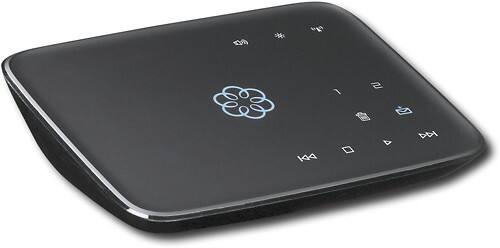
This hub works with your high-speed Internet and your home phones to deliver VoIP phone services and supports up to 4 Ooma Telo handsets. With easy setup, you can enjoy unlimited U.S. calling and low international rates.*

Posted by: skwira000
from White Bear Township, MN
Let me just mention one bad experience. When I activated the Ooma, I orderd the number porting for $40. The fraud prevention called me from my credit card company and they asked me if I authorized this transaction from Ooma. I told them yes. So I know the transaction went through. However, I'm guessing because I didn't include my phone bill (Ooma lets you attach a copy of your phone bill when you activate) they must not of had information needed. I carefuly checked my accounts and say that the transaction was no longer listed in my account after it said pending. It was no big deal. I then attempted the port process again by logging into the Ooma, this time including my phone bill, and it worked.
Now that we got the bad out of the way, let me tall you about the good. The call quality the first day was not impressive I also couldn't make any 10 digit phone calls within my area code, but outside my area code worked fine. Also, my name didn't appear on the caller ID the first day when I called other people. That only happened during the first day. After that, all of those problems went away.
The only issue with the ease of use has absolutely nothing to do with Ooma. Unless you did your own phone wiring, you should have 2 junction boxes outside your home. One will explicitly say customer access. Once your number has been ported or you get the Ooma up and running, you need to disconnect the junction box that says customer access. This cannot be any easier. I went ahead and disconnected both boxes, and then it was a pain to reconnect them in the non customer box out side of my home. You do this so you can distribute dial tone to all phone jacks, and instead of connecting the wall port to the phone, you connect the phone port to the phone, but again make sure your old service is canceled first and you disconnect those cables!!! Once you do this once it's easy to do it again, but if you don't know what you're doing it can get you.
We're very happy with the voice quality. The sound quality if much better than a cell phone. There is very little difference in equality between a land line and this. I've even loaded a 14 minute You Tube video while talking to someone and it didn't cause it to break up at all.
We are Ooma premiere customers. I absolutely love the features where I can filter certain callers to voice mail. I get voice mails emailed to my inbox. I can forward calls to my cell phone if the Internet goes down. The instant second line does really work. However, it's a pain to tell someone who has the Ooma handset next to them that they have a phone call because when they pick it up they will get the other line. I haven't figured out if you can choose what line to pick up on yet.
In the final analysis, this system is very easy to setup for the average user for what most people will use it for. If you have enough expansion phones and don't rely on your phone jacks, the setup and everything else is cake walk. If however, you decide you want your call jacks, you just go out to the CUSTOMER junction box mounted on the ouside wall of your home and disconnect them. Also, this can get complicated if you have DSL. We have cable, so the disconnecting of the phone would have been easy if I had read the Ooma forums more thoroughly. I also highly recommend some kind of battery backup. The one I have listed below is not necessarily the exact one you need. You need your modem, router, and Ooma to have a battery backup so when your power goes down you can still make phone calls.
What's great about it: Keep your current number, better QoS than magic jack, easy activation
What's not so great: Number porting during activation didn't go through. Make sure you include a copy of your phone bill!!!!
I would recommend this to a friend!
Other Best Buy Products I Recommend

APC - 450VA Battery Back-Up System
Ease of Use

5
Features
5
Performance
5
Share this review:


+12points
14of 16voted this as helpful.
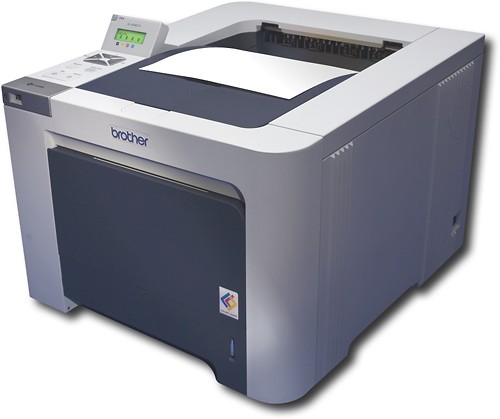
Ideal for small office or home printing, this laser printer features lush resolution up to 2400 x 600 dpi and fast print speeds up to 21 ppm* in black and color. Built-in 10/100Base-TX Ethernet connectivity lets you connect the printer to a network with ease. This model meets our Professional Series criteria Shop all products in our Small Business Center Learn more about the Brother Network Ready Color Laser Printer. (Flash demo)
Posted by: skwira000
The printer works great for people printing documents above the average document length. The average person prints out documents averaging in the 3 to 5 page range. If you are a person who prints out more than that, this might be a good printer. If you are the average user, the HP 3600n is probably a better option. The page per minute is slower, but when you factor instant on technology, the HP 3600n will print the entire document before this prints out the first page. Also, the 3600n comes with a cartridge in the box capable of printing 6000 pages. This printer comes with a cartridge capable of printing 2500 pages. Factor in the total cost of ownership.
The cartridge replacements are more difficult because it uses a 2 piece system. You may also have to clean the corona wires.
The cartridge replacements are more difficult because it uses a 2 piece system. You may also have to clean the corona wires.
What's great about it: fast speed, great for printing large documents
What's not so great: lack of instant on technology, cost of owner ship, cartridge replacements
No, I would not recommend this to a friend.
Share this review:


+4points
4of 4voted this as helpful.
skwira000's Review Comments
This hub works with your high-speed Internet and your home phones to deliver VoIP phone services and supports up to 4 Ooma Telo handsets. With easy setup, you can enjoy unlimited U.S. calling and low international rates.*
Overall 3 out of 5
3 out of 5Good Voice Quality but does not support 2 Lines
By DoogleDB
from Frisco, Texas
Only additional insight I want to give is that this unit does not support 2 Phone Lines. You can set-up multiple phone numbers but it is shared on the same phone line in your house. Or, you could buy a Ooma phone that links to the Telo unit and then you can assign a specific phone number to that Ooma phone (as long as the Ooma phone is within range of the Telo). My VoIP phone service through TimeWarnerCable supports 2 phone lines and looks like I need to port my phone number back to TWC and cut my losses - Just wanted to warn others before you waste your time and money... If you only use one phone line, then I highly recommend this product.

skwira000
White Bear Township, MN
2 Lines
May 8, 2011
It does support 2 lines. You need a subscription to the Premiere service and an Ooma handset. I've used it.
0points
0of 0voted this comment as helpful.
skwira000's Questions
skwira000 has not submitted any questions.
skwira000's Answers
what wireless router do i need to take advantage of a wireless network?
i already have a main computer connected to the internet thru a modem(broadband). i would like to connect a laptop, xbox 360 and playstation 3 to the internet taking full advantage of online gameing. how do i go about doing this? what router do i need to buy that is fast and reliable?
For gaming, I strongly recommend powerline instead. Go here: http://www.bestbuy.com/site/NETGEAR+-+Powerline+Ethernet+Adapter+Kit/8919708.p?id=1214004487426&skuId=8919708&st=powerline and be sure to view the product demo underneath the image.
16 years, 5 months ago
by
skwira000
White Bear Township, MN