
Share jopark23's profile


jopark23
jopark23's stats
- Review count3
- Helpfulness votes28
- First reviewJuly 17, 2014
- Last reviewAugust 3, 2017
- Featured reviews0
- Average rating4.3
Reviews comments
- Review comment count0
- Helpfulness votes0
- First review commentNone
- Last review commentNone
- Featured review comments0
Questions
- Question count0
- Helpfulness votes0
- First questionNone
- Last questionNone
- Featured questions0
Answers
- Answer count0
- Helpfulness votes0
- First answerNone
- Last answerNone
- Featured answers0
- Best answers0
jopark23's Reviews
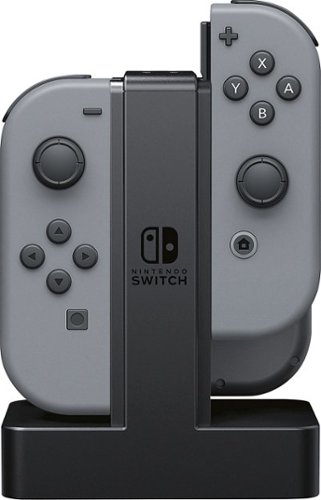
The Joy-Con Charging Dock is the easiest solution for charging your Nintendo Switch Joy-Con Controllers. Charge 4 Joy-Con Controllers at a time for multiple players, or keep an extra pair charged for single players to switch out. Simply slide the Joy-Con Controllers down and wait until each charge LED turns green!
Posted by: jopark23
from Boise, ID
This is my early review of the Joy Con Charging Dock by PowerA. This product is almost perfect for five stars but noticed one flaw with it. First with the good... it's great to charge four joy cons if you have them. With it, you now can charge up to 3 sets of joy cons (4 on the dock, 2 on the Switch). I didn't track of how long it actually takes to charge the joy cons, but when you plug them in before going to bed, they'll all be charged by the time you wake up. Additionally, they make it easy to identify which direction the controllers are to face and since they don't lock in place, you don't have to worry about pushing the small release button. The base has a nice weight to it, so it doesn't feel like a cheap plastic charger that will get pushed around by the cord if controllers are on it to weigh it down. The cord is not removable, however, they made it so you can wrap it around on the bottom for easy transport/storage.
Now, my one and only gripe that I have faced with it is the charging portion. When your controllers are setup in the dock and you place the Switch into its own dock, the lights on the joy con charging dock turn off, flicker and then turn back on. Now, I'm sure it's during the time when the Switch is drawing most of the power and it causes the joy con charging dock to flicker, but when your joy cons are fully charged and it happens, the lights turn red! Does that mean, my joy cons aren't charged and the green light is just a misleading representation of its actually charge? Whatever the case may be, I'm not sure if this is a design flaw or just a mere coincidence with mine, but I do hope it's not a $30 table top decoration that flickers red/green Christmas lights.
My Best Buy number: 2126093904
Mobile Submission: False
I would recommend this to a friend!
Share this review:


+4points
4of 4voted this as helpful.
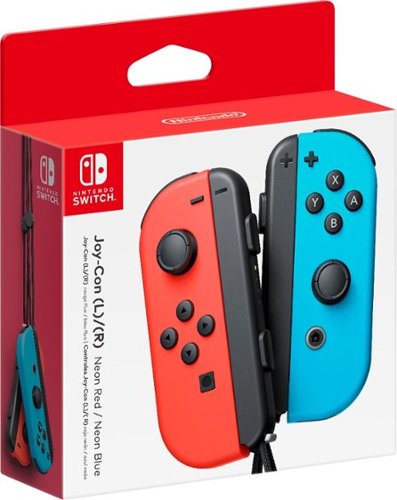
Add a splash of color to your entertainment system with this Nintendo Joy-Con for Nintendo Switch. Its bright neon red and blue hues add a cheerful touch, and it lets you include another player in your games for competition or cooperation. This Nintendo Joy-Con can be separated into two parts for additional control options. Can be used by pairing wirelessly to Nintendo Switch 2. Cannot be attached to Nintendo Switch 2. A Nintendo Switch console or compatible accessory such as a Joy-Con charging grip or Joy-Con charging stand (two-way) is required for charging.
Customer Rating

5
Excellent addition to the Switch
on August 3, 2017
Posted by: jopark23
from Boise, ID
First of all, the neon colored Joy Cons are absolutely difficult to purchase. The inventory of these items practically don't exist and the only way to luck out buying them is to check the website every day or pay a little more on eBay. Persistence surely pays off because I was able to have my pick of the crop among the colors one afternoon when BestBuy received some inventory of Switch accessories.
Secondly, when you do finally get your hands on a set, the neon colored (Red/Blue combo is what I purchased) is absolutely amazing. The bright colors of the physical product are poorly represented on the cardboard box, but maybe it's a good thing because when you take them out of the box and actually see them with your own eyes of how bright the colors are, then you will surely be more impressed! Immediately, you get a rush to play endlessly all night because the colors make you a "better" player. Who cares about work, right? Wrong. Go to work. Playing the Switch all day doesn't pay your bills.
Last, but definitely not least, if you own the Switch with the neon Joy Cons, you now have 4 different color combinations to play with... Red/Blue, Red/Red, Blue/Red, and Blue/Blue. Whatever combination you fancy, the controllers are top-notch quality, albeit some people face issues with the left Joy Con (I have yet to experience the same, knock on wood). Regardless, if you can get your hands on a pair, then it's definitely worth the purchase.
Rumors have it that Nintendo will release various color combinations in the future. Their "latest" offering in the USA is the ARMS neon yellow Joy Cons, while Japan has already seen the Splatoon 2 neon green/pink versions (Autumn 2017 in USA).
My Best Buy number: 2126093904
Mobile Submission: False
I would recommend this to a friend!
Share this review:


+22points
22of 22voted this as helpful.
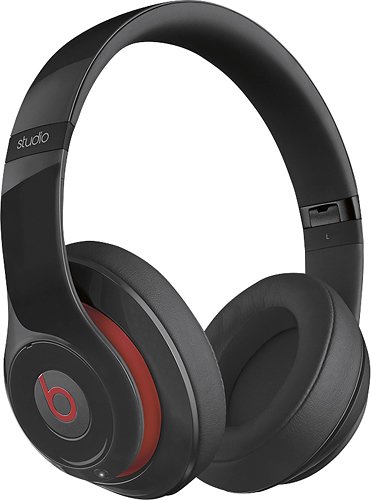
Rock out with these Beats Beats Studio 900-00059-01 headphones that feature adaptive noise cancelling to filter out ambient sound. Leatherette ear cushions and a flexible design ensure a comfortable fit.
Customer Rating

4
Better than expected
on July 17, 2014
Posted by: jopark23
from Boise, ID
How Often Used:Daily
These are first premium headphones (where I paid more than $100) I've owned. It took me a while before I decided to get these. After reading multiple reviews on various headphones and products, I decidedly settled with the Beats. One of the biggest selling point was the sale BestBuy had with the headphones.
People would probably tell me to return the product and get something "better" for the price. However, I don't have anything bad to say about the new Studio. I've heard other Beats products where the bass was heavy, but the new Studio isn't all about the bass, there's a noticeable range. I'm no audiophile, but I do appreciate great sound.
Comfort is great, I've slept with it on and my ears did not get hot nor were they uncomfortable. The only thing I dislike about is the fact I have to power-on the device to listen to music. The 20-hour battery isn't bad, but for long weekends away from a source of power—being an outdoor photographer, it's hard to get power in desolate areas—wouldn't help keep me entertained while waiting for wildlife or beautiful sunrise/set times.
Regardless, a great product to say the least without it being bass-heavy.
My Best Buy number: 2126093904
What's great about it: Sound Quality, Comfort
What's not so great: Expensive, battery life
I would recommend this to a friend!
Sound Quality

4
Comfort
4
Durability
4
Share this review:


+2points
2of 2voted this as helpful.
jopark23's Review Comments
jopark23 has not submitted comments on any reviews.
jopark23's Questions
jopark23 has not submitted any questions.
jopark23's Answers
jopark23 has not submitted any answers.