


RedScorpion's stats
- Review count234
- Helpfulness votes1,564
- First reviewJune 21, 2012
- Last reviewJune 11, 2026
- Featured reviews0
- Average rating4.5
Reviews comments
- Review comment count0
- Helpfulness votes0
- First review commentNone
- Last review commentNone
- Featured review comments0
Questions
- Question count0
- Helpfulness votes0
- First questionNone
- Last questionNone
- Featured questions0
- Answer count14
- Helpfulness votes42
- First answerMay 13, 2016
- Last answerSeptember 30, 2020
- Featured answers0
- Best answers5
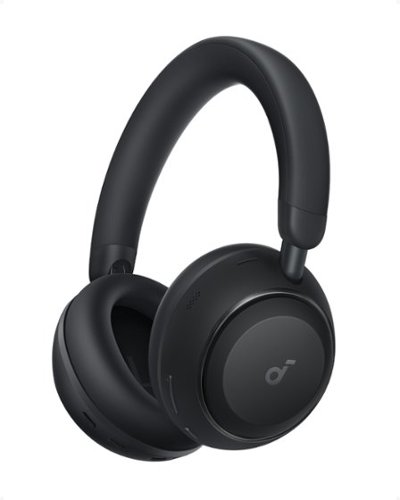
Transform your daily commute and long-haul journeys into a serene escape with the Soundcore by Anker Space 2 true wireless noise cancelling headphones. The advanced 4-stage low-frequency noise cancelling technology doesn't just muffle the world around you ~ it intelligently identifies and eliminates jet engine roar, traffic rumble, and office chatter so you can focus on what matters most. Whether you're traveling across continents or settling into your workday, enjoy up to 50 hours of uninterrupted ANC playtime or an incredible 70 hours in standard mode, meaning fewer charging stops and more moments of pure audio bliss. When you do need power, a quick 5-minute charge delivers 4 hours of listening. The 40mm double-layer diaphragm drivers bring your music to life with Hi-Res Audio certification and LDAC wireless codec support, transmitting three times more data than ordinary Bluetooth for studio-quality sound on the go. Engineered from over 2,000 scanned ear profiles, the Space 2 model features premium protein leather cushions with memory foam that cradles your ears in all-day comfort without pressure points. Need a moment of calm? Activate Nap Mode with one tap to enjoy built-in white noise soundscapes while blocking calls and notifications~your personal sanctuary for power naps anywhere. Crystal-clear AI-enhanced calls powered by a 3-mic system ensure your voice comes through naturally even in bustling environments, making the D1402Z11 perfect for remote professionals and frequent travelers who refuse to compromise on sound quality or comfort.
Customer Rating

4
In Space, Your Ears Will Be Warm
on June 11, 2026
Posted by: RedScorpion
The Anker Soundcore Space 2 headset (try saying that fast five times…) is… fine. I know that is not exactly a ringing endorsement, but the audio quality lands somewhere between fine and good. The headset is light and comfortable, though it does get warm over time. ANC does a solid job blocking nearby noise, but transparency mode can introduce a hiss and some playback distortion. “HearID” is a game changer, while “3D Sound” sounds awful. The default Soundcore tuning is a little flat and lifeless, but once you dial it in with HearID and the EQ, it can sound quite good. If my thoughts seem a little scattered, that is because they are. This headset has some genuinely excellent features such as LDAC, multipoint LDAC, amazing battery life, and wear detection but the audio quality and heat buildup keep me from really heaping on the praise. I cannot call this headset great, but it is good. And, hey, sometimes good is enough.
UNBOXING: Anker includes the headset, a travel pouch, 3.5mm cable, and a small USB-C charging cable.
EXPERIENCE: Users should download the Anker Soundcore App from their Google or Apple app store to complete setup and fine tune the headset. I had a firmware update out of the box.
This headset is light. The cushions are springy. My ear never felt like it was touching the inside of the ear cup. But the cushions and casing itself are fingerprint magnets. The ear cushions look greasy after just a bit of wear. And while light, heat build up is awful. It is summer here and I found it difficult to keep these on for more than an hour at a time due to heat build-up.
This headset is light. The cushions are springy. My ear never felt like it was touching the inside of the ear cup. But the cushions and casing itself are fingerprint magnets. The ear cushions look greasy after just a bit of wear. And while light, heat build up is awful. It is summer here and I found it difficult to keep these on for more than an hour at a time due to heat build-up.
Out of the box, sound quality is a bit flat. Setting up HearID within the Soundcore App does help the experience and tweaking the EQ does help, but it is important to keep audio expectations in check. I also noticed some audible hissing and playback distortions while passthrough audio was enabled.
I must shout out HearID feature which conducts a hearing test to adjust frequencies to your specific hearing needs. I think this feature works well. There is also a 3D Sound mode that just made everything echo and I could not find a point in it.
Anker has a sensor built into the left speaker for wear detection, but you should know that wear detection is not enabled by default out of the box. You need to turn the feature on from within the Anker Soundcore Application. With wear detection on, media playback will pause if you take the headset off.
Google fast pair worked great. After I paired the headset with my phone, my Google TV instantly asked if I wanted to pair with it.
Other positive quality of life features include physical buttons on the headset, an amazing 50+ hour battery life, LDAC support, and a 3.5mm jack for legacy devices like PCs and gaming consoles. I appreciate Anker providing a travel bag for travels, and, speaking of traveling, ANC works well.
Microphone quality is fine. Except for voice calls in wind, the people I spoke with had no problems hearing me.
CONCLUSION: My biggest gripes with this headset are heat build-up, greasy cushions, and good but not great audio playback quality. There is a richness with other headsets that is simply lacking here. Vocals can easily become muffled or drowned out in the signature default mode. Tweaks with HearID help a lot, but even with those tweaks, there is still something lacking in the overall audio quality. Still, I know I will use this headset on travels and at home. I love the battery life and baked in features. I am recommending the Space 2, but be sure to download the app. 4/5
I would recommend this to a friend!





Share this review:


0points
0of 0voted this as helpful.

Customer Rating

3
Great Speed, Okay Prints, and Horrible Scans
on June 1, 2026
Posted by: RedScorpion
The brother MFC-J5110DW Inkvestment Printer is my fourth Brother printer. This is a brand that I have hyped up for years. Is it sad to say that I am a little disappointed with this printer? I will start with the good: this is a fast printer with two large paper trays in addition to a rear multi-purpose tray. The printer has a fast ADF for scans and copies. Print quality for documents is okay to good. But this must be one of the worst scanners in terms of reproduction quality that I have experienced. Photo scans are highly pixelated, limited to 300dpi in my experience, and are often distorted. Copies are good but never look as sharp as the original in part because of the scan quality. Photo prints are bright and screen color accurate but often appear wavy with minor distortions. And photo prints in general appear highly pixelated and flat. On top of that, the Brother Print Support app in Windows 11 seems to be completely pointless. I have never felt this “meh” about a Brother printer before. Perhaps some firmware and software updates in the future will improve things, but at this point, I cannot recommend it.
SETUP: Brother includes a power cable, the printer, setup documentation, a card to help with paper jams, and black, magenta, yellow, and cyan ink cartridges. The printer can be connected via Wi-Fi, Wired Lan, or USB. Brother likes to hide the lan, phone, and USB ports underneath the scanner bed. You then route the cable along an internal guide out the back of the printer.
I believe Brother really wants people to set the printer up via their “Brother Mobile Connect” smart phone application. And that process is straightforward. I normally hook printers up via a wired lan connection, but this time I chose to go with a wireless connection so that I could keep the printer in a more centralized location without a direct lan drop. Using the smart phone application, setup was complete in less than ten minutes.
I believe Brother really wants people to set the printer up via their “Brother Mobile Connect” smart phone application. And that process is straightforward. I normally hook printers up via a wired lan connection, but this time I chose to go with a wireless connection so that I could keep the printer in a more centralized location without a direct lan drop. Using the smart phone application, setup was complete in less than ten minutes.
Experience: Document prints look good. By default, I felt like prints from Windows look a bit lighter than I expected. A few changes in print settings made things look better but also used more ink as a result. Documents print insanely fast.
This printer is huge. It takes up quite a fair amount of space. There are three document trays. You have the two main paper trays and a multi-purpose tray in the rear. The main document trays hold a lot of printer paper. The rear tray is great for more rigid documents like envelopes and photos.
I should take a minute to brag on the touch screen. It is large and easy to use. Any complaints I may have about the printer’s performance do not extend to the screen and aesthetics.
I should take a minute to brag on the touch screen. It is large and easy to use. Any complaints I may have about the printer’s performance do not extend to the screen and aesthetics.
I realize this is not strictly marketed as a photo printer, but I could not help but be a bit disappointed by the quality of photo prints. Phone prints in particular look overly pixelated. Photo prints from Windows look a bit better, but only just a bit on best print settings. Color reproduction is screen accurate. Photos are printed brightly allowing details to come through. But photos also look a bit like a printed postcard. Every image I printed on glossy paper looked flat. Worse, there were often distortions and artifacts in the prints that I did not get when I printed the same photos in other printers.
Scans are complete garbage. When I scanned photos or documents I was limited to 300dpi and every photo I scanned looked pixelated with weird color reproduction. I enjoy photo digitizing, editing, and preserving and I will not be doing that with this scanner. Images just do not scan in well with this scanner.
ADF scans and copies do not fair much better. The copies are just okay. They are functional and the machine is exceptionally fast at reproducing them.
The Brother Print Settings application is installed after first adding the printer in Windows and that application is very basic. Oddly within the Brother Printer Settings application, they will recommend you install Brother iPrint&Scan for more features. I would highly recommend that you do not. As the program tried to download my cloud-based photos from OneDrive and created a weird glitch loop that crashed my PC. After a fun recovery process, I have never uninstalled an application quicker in my life.
There is a front USB-A port I assume to print documents and photos from a thumb drive, but none of my thumb drives worked. I have no explanation, but I received an error message with each drive I connected. I thought it was a file format problem, but the drives were formatted in FAT and should have worked.
The Printer uses Brother’s LC506 cartridges. The cartridges come in standard, XL (high yield), and XXL (Super High Yield). These cartridges can get expensive. The Brother applications estimate I should get close to seven hundred color pages in the amount of ink I have left and 1800 black pages. It should be noted that I have printed 10 4x6 photos at this point that used a fair amount of ink. The ink cartridges retail between $25 and $29 for the standard yield, but the higher yields are much more expensive. Brother does have an ink subscription service.
Conclusion: This printer is all about speed and functionality. In a traditional office that cares more about cranking documents out than the quality of the print job, which may be enough. For me, I found it to be a bit lacking. It is a jack of all trades, but the photo prints, scans, and software glitches really left me scratching my head on this one. It is not good or fast enough for me to recommend it to anyone seeking high quality prints or scans. I have experienced better all-in-one printers. The extra paper tray and print speeds are nice, but I would personally prefer better print quality. While this might be the perfect printer for some situations, I just cannot bring myself to recommend it. 2.5/5
No, I would not recommend this to a friend.





Share this review:


0points
0of 0voted this as helpful.

The Hisense U7 Series is built for speed and clarity, combining ultra-smooth 165Hz motion, powerful MiniLED brightness, and intelligent AI processing for sports, movies, and next-gen gaming. Hi-QLED MiniLED Pro technology, featuring thousands of Mini LEDs, with up to 3,000 local dimming zones and up to 3,000 nits of peak brightness, delivers brighter highlights, deeper blacks, and Pantone Validated color for more natural, accurate detail in every scene. Powered by the Hi-View AI Engine Pro, U7 automatically optimizes color, contrast, and clarity in real time~so everything looks sharp and balanced without over-processing. A Native 165Hz Refresh Rate with AI Smooth Motion keeps fast action fluid and blur-free, while Game Booster 330 with VRR delivers ultra-responsive gameplay with reduced input lag. A 2.1.2 Multi-Channel Sound system tuned by Devialet delivers immersive, room-filling audio, while Google TV with Gemini AI brings personalized content discovery and voice control together in one seamless experience. Bringing together speed, precision, and smart performance, U7 delivers a more balanced, responsive, and lifelike viewing experience across everything you watch.
Customer Rating

5
Hisense Delivers an Impressive Display
on May 6, 2026
Posted by: RedScorpion
The Hisense ULED U7 2026 TV has a lot going for it: bright, pitch perfect colors, near inky blacks, fast variable refresh rates, one of the best speaker systems on a flat panel TV, plenty of input options, and the easy-to-use Google interface. The only cons I encountered were a slightly restrictive viewing angle and a few software glitches when passing audio from internal applications to an external sound bar. Still, whether watching HD or 4K content, everything displayed looks great. Prior to this TV, I have never owned a Hisense TV, but the U7SG has really impressed me with its level of polish and features. This is an easy TV to recommend at its price point and even gives much more expensive TVs a run for their money.
SETUP: Hisense includes the TV, Remote, Power Cable, stand base, stand brackets, and screws for the stand.
I will say that I found set up to be a two-person job. If you are opening the TV from the top as instructed, a few components will be at the top of the box, but the base for the stand will be further down in a lower section of foam. You will need to take the TV out, being careful not to put pressure on the screen. Resting the TV on the foam included will help get the TV off the floor and make installing the stand much easier.
STAND SETUP: The stand itself is designed for two settings. One setting has the TV resting near the base and the other setting raises the TV up enough to give space for soundbars. In my testing, it was enough of a cushion that I could easily set my Sony soundbar with built-in riser underneath without blocking the screen. The adjustment can give you two or three inches. It is a nice touch. You first connect two screws to the TV and the stand slides over. You then secure the TV to the stand with the additional four screws. The included documentation implied that two of the screws were in the stand itself, but I found those screws individually wrapped with the other mounting hardware.
This is an exceptionally thin stand base, and Hisense has included some cable management in each leg of the stand for those that wish to keep their cables more discreet.
WALL MOUNT: The TV comes compatible with standard VESA mounts and secured by M6 screws. I like the stand that came with this TV, but the ability to mount the TV to a swivel base with a bit more height is a great option. I have assessed both the included stand and a separate VESA swivel mount and both options worked great.
EXPERIENCE: The Google TV setup takes about ten minutes out of the box, and it goes without saying that if you are on an Android phone, set up is a breeze as account information is transferred effortlessly with a click of a button on the phone. This is not my first TV with a Google interface, and I genuinely prefer the Google TV interface over nearly every other option out there.
TV FEATURES: The TV comes with a built-in OTA tuner. The tuner is NextGenTV capable. I was able to get local broadcasts with 4K, HDR, and interactive content. The TV is also Apple Airplay compatible. Streaming content from my Apple iPad via Airplay was simple and quick.
The TV comes with 4 HDMI 2.1 ports. One port is designed for eARC / ARC, but all four ports are HDMI 2.1. In addition, there is a USB 3.0 port, a USB 2.0 port, ethernet port, and optical audio out. The TV comes with Alexa capabilities built in. With the USB ports, you can hook up gaming controllers, web cameras, or USB storage options to stream and view content on the TV.
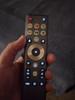
REMOTE: This is one of the bigger remote controls that I have used with a TV in a few years. A few buttons on the remote have backlighting when the remote detects motion. It works, but I would have liked it if the backlighting had lasted a bit longer. Remote is nearly twice the size of a FireTV remote and three times the size of an AppleTV remote; it is bigger. I do not have a problem with that, but users who struggle to keep all their remotes stored in one place might prefer a smaller option. With HDMI CEC enabled, I was able to use the TV’s remote to control devices connected to the TV such as the FireStick while using the TV remote’s volume control to turn the sound bar system up and down.
PICTURE QUALITY: This Hisense TV is branded as a ULED which differs from an OLED. With an OLED, each pixel turns on or off individually whereas the ULED has zone lighting. Prior to testing this Hisense, I would have said I preferred OLED hands down for better contrasts and blacks, but the technology Hisense is employing here works very well to the point that I would honestly say OLED and ULED black levels are a coin toss for me. The contrast was much better than I expected.
Colors just pop on this TV. The Quantum Dot tech produces some of the best colors I have seen on a 4K display and they were pitch perfect after minimal tweaking out of the box. Watching Dolby Vision test videos and 4K versions of color rich content, I was consistently amazed at how good color reproduction was with this TV. If you truly want to impress friends and family while showing the TV off, put on a 4K version of one of Disney’s 2D animated films. The colors are amazing.
One clear winner between this TV and an OLED alternative is with the brightness. This TV gets super bright and I found myself turning down the brightness on all viewing modes. Because of the brightness capabilities, you can rest assured that the TV will look great in bright and dark rooms.
The TV has numerous adjustments that can be made to brightness, color, A.I. enhancements, and motion adjustments. I highly recommend CINEMA mode for motion enhancements. I personally thought Cinema Mode was the most filmic. Turning off motion enhancements entirely resulted in a noticeable stutter in content that operated at lower frames per second.
GAMING / PC CONNECTIVITY: I hooked the TV up to a gaming laptop for several hours of gaming and this display performs great. Hisense advertises that the TV has AMD FreeSync. FreeSync is a technology to synchronize the display with the source to provide smooth motion on screen. If you are like me and have gaming laptops or computers with Nvidia GSYNC, you should know that the two technologies, while not officially recognized as compatible, are essentially backwards compatible. On my NVIDIA based machines, I was able to turn GSYNC on and achieve the desired results. Just make sure you are using a high-quality HDMI 2.1 cable when you hook the TV up to your gaming device. I first used an older cable and while I got picture, HDR did not function on the older cable. With the appropriate cables, my TV detected automatically that I was hooking up a PC, but I still had to enable some game mode features such as enhanced refresh rate.
CON: Viewing Angles are limited. Unfortunately this is one limitation of the traditional LCD display that is still a bit evident here. Having said that, I do not think the viewing angles are awful. Hisense has clearly made great strides here, but the TV clearly looks at its best when you are viewing it from dead center. Realistically, that is how most people will be viewing the TV anyways, but it is something to keep in mind.
AUDIO: Hisense has included some of the best speakers I have ever heard on a flat panel display if not the best. This sound system is great. The TV has a built-in subwoofer and spatial speakers. It sounds incredibly good. Audio can get a bit distorted at higher listening levels, but I cannot think of a better sound system with a TV than this.
I set up a surround soundbar system with this TV. Using the EARC HDMI port (HDMI 3) and a higher quality HDMI cable, using the TV with a soundbar is easy. The TV’s remote works to control the volume. Unfortunately, all I could see when changing the volume of the soundbar was an indicator on screen showing the volume levels were being changed. I could not see a number associated with a volume level.
I detected a glitch with the audio passthrough that I really hope gets fixed in a future software update. The TV is equipped with an audio passthrough option so that a receiver or soundbar can decode the audio and reproduce the sound instead of having the TV process the audio. With external HDMI devices, passthrough audio worked perfectly fine, but if I wanted to watch Disney+ or AppleTV on the apps I downloaded to the TV itself, I could only get a Dolby Digital 5.1 signal when audio was passed directly to the soundbar or receiver. I prefer passthrough audio with TVs because often decoding ATMOS audio with TVs can cause stuttering or performance glitches, but I did not encounter that with this TV. So, having the TV decode the audio instead of passing it through works, but I would have preferred passthrough to be on all the time for the best compatibility with a receiver or soundbar. As of writing this, I have not found a great solution to this problem beyond turning audio passthrough on if I am using a device connected to the TV’s HDMI input.
CONCLUSION: If you stuck around this long, I think it should be obvious that I have really enjoyed this TV. Picture quality has really surprised me. Colors and brightness are great. The built-in speakers make great sound. The stand that comes with the TV is minimalistic and simple to install. My only minor complaints are with the viewing angles and the passthrough audio glitches when using the TVs downloaded or built-in applications. Make sure you are using HDMI 2.1 cables for your devices to get the best features from the TV and be prepared to turn the brightness down a bit lest you wish to go blind. The TV truly is bright.
Hopefully, this breakdown has been helpful. As I said at the intro, this was my first Hisense TV, but I am recommending this model to family and friends. I think it is a great TV.
I would recommend this to a friend!




Share this review:


+3points
3of 3voted this as helpful.
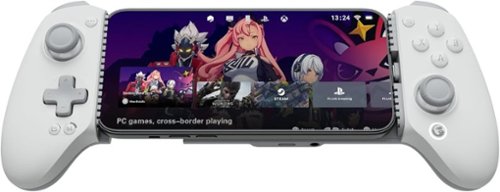
Upgrade your mobile gaming setup with the GameSir G8 Plus MFi Type-C Mobile Controller ~ the official Apple-certified controller built to deliver true console-level performance on your iPhone, iPad, and Android devices. Designed for gamers who demand precision, speed, and comfort, this controller replaces unreliable Bluetooth connections with a stable, low-latency Type-C wired link, giving you instant response time in every match. Featuring Hall Effect joysticks and analog triggers, the G8 Plus offers drift-free accuracy and long-lasting durability, making it perfect for competitive shooters, racing titles, RPGs, and cloud-gaming platforms. Two remappable back buttons let you trigger advanced moves faster, while the ergonomic, textured grip ensures all-day comfort during intense gaming sessions. The adjustable stretch design securely fits most smartphones and compact tablets (125~215 mm), and pass-through charging keeps your device powered while you play ~ so the action never has to stop. With customizable faceplates and interchangeable thumbsticks, you can tailor the controller to your personal style and gameplay preferences. If you~re tired of touchscreen controls and want a premium, console-style experience on mobile, the GameSir G8 Plus MFi is the perfect upgrade.
Customer Rating
5
Stellar Controller for Gaming on the Go
on April 30, 2026
Posted by: RedScorpion
The GameSir G8+ MFI controller is my favorite mobile gaming controller. It even doubles as a PC controller complete with rumble. It is customizable with swappable pads to fit phones with or without cases. Buttons, sticks, and faceplates can be swapped out. GameSir even includes additional thumb sticks. The entire package has weight and feels super polished. This is a great controller for iPhone and Android users. My only major nitpick has been the GameSir application that has been a bit haphazard with connectivity problems and a clunky interface. Also, while the controller has many customizations and modes, those extra modes are often locked behind combination key presses that are not exactly intuitive. Still, out of the box, this is a highly polished offering and is quite easy to recommend.
Unboxing: GameSir includes the controller, three extra thumb sticks, magnetic pads to adjust for phone fit. The extra sticks remind me of the sticks on my old Nintendo GameCube controller. GameSir also included magnetic pads you can swap out for phones with a case. I needed the thinner pads for my S24+ case.
Experience: This controller is Apple MFI certified, but I evaluated the controller with a Samsung Galaxy S24+. The USB-C plug swivels to make it easier to plug the phone into the controller.
This controller has a textured grip and weight too it. Not too much weight, it never felt too heavy, but there was some heft and it all felt super solid with my phone in place.
This controller has a textured grip and weight too it. Not too much weight, it never felt too heavy, but there was some heft and it all felt super solid with my phone in place.
Controller has removable faceplates, swappable buttons, and replaceable sticks. It is all super easy and most of the pieces are held in place with magnets. You can swap the buttons for a more Nintendo friendly layout and can change the default button layout to Nintendo mode via some button presses on the controller (more on that later.)
Experience with games was a bit hit-or-miss, but mostly because controller support for mobile games can be a bit haphazard. The controller itself works great, but since many mobile games are geared for touch controls first, a physical controller can feel like an afterthought. Still, playing the new “Division,” “TMNT: Shredders Revenge,” and “Castlevania Symphony of the Night” all worked well with the control pad.
Those wanting to stream games via Steam Link, GeforceNOW, of XBOX should know that the controller works great. But I never could get the controller’s rumble functions to work unless I plugged the controller into the PC directly.
My biggest complaint is the GameSir application, which was clunky and, frankly, often did not work. I could plug the controller into the phone, and the app would recognize the controller, but if I left the application, played a game, and then came back to the GameSir app, it would not recognize the controller without me physically unplugging and plugging the phone back in. The application would randomly crash and cease working. Unfortunately, the application seems to be the primary method for firmware updates, but my application did not detect an updated firmware for the controller.
That would not be important in and of itself but trying to change controller settings via macro buttons is unintuitive. There is no way I can remember how to change all the controller settings with the combination of start and select or mode plus random button press. During my play testing, I had to have the manual or the online version of said manual nearby at all times. A mode toggle would have been super useful. For instance, some controllers have physical switches for trigger sensitivity.
That would not be important in and of itself but trying to change controller settings via macro buttons is unintuitive. There is no way I can remember how to change all the controller settings with the combination of start and select or mode plus random button press. During my play testing, I had to have the manual or the online version of said manual nearby at all times. A mode toggle would have been super useful. For instance, some controllers have physical switches for trigger sensitivity.
Conclusion: This is a great controller. Software customizations can be a bit clunky and the GameSir application felt broken to me, but the controller itself is great. Anyone wanting a controller for Steam Link, GeforceNOW, or XBOX streaming should give this controller a look. 4.5/5 Recommended
I would recommend this to a friend!






Share this review:


0points
0of 0voted this as helpful.
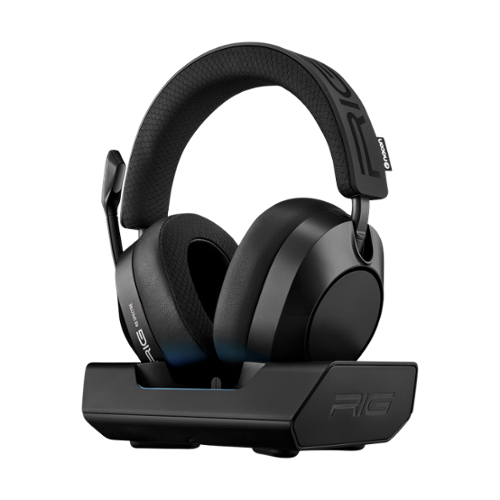
Studio-grade audio meets wireless freedom with the R8 SPECTRE PRO HX, designed for Xbox and PC. Hear the RIG R-SERIES difference with graphene drivers custom-tuned for competitive gaming, delivering ultra-low distortion audio optimized for Dolby Atmos 3D Audio. Take calls while gaming by seamlessly mixing Bluetooth voice audio over low-latency 2.4GHz game sound. Control your audio experience using the RIG Navigator app available for Android and iPhone. The broadcast-grade boom microphone captures your voice and blocks out background noise, with full bandwidth 16 bit / 48 kHz voice capture and enhanced noise-rejection technology. Settle in for marathon gaming sessions with up to 60 hours of battery life and a comfortable memory foam headband and ear cushions. Dock your headset in the dedicated base station with RGB effects and stay charged between gaming sessions. The R8 SPECTRE PRO. Wireless Game Audio Built Different.
Customer Rating
5
Good Sound, Great Battery Life, Amazing Comfort
on April 21, 2026
Posted by: RedScorpion
The R8 Spectre Pro is a well-rounded package. The headset delivers clear and balanced audio, provides excellent comfort during extended use, and features an intuitive smartphone application that enables straightforward customization. The inclusion of a charging base station enhances convenience, while the microphone stands out for its clarity and effective voice isolation. Wireless range is reliable, and the battery life supports prolonged gaming sessions with minimal recharging required. Although the audio could benefit from greater richness and in-game sound complexity may occasionally result in minor distortion, these are minor drawbacks. Overall, the R8 Spectre Pro is a strong contender in its category and can be recommended with confidence.
The RIG series has recently undergone a design update, and the R8 Spectre Pro continues the aesthetic established in recent RIG models. The transition from metal to durable plastic helps with weight and durability. Distinguishing itself from the R5, the R8 Spectre Pro features dual wireless connectivity and is equipped with an RGB equipped charging base station.
Unboxing: RIG includes the headset, a USB-C wireless adapter for XBOX or PC with toggle, a USB-C to USB-A adapter, A USB-C to USB-A cable, and the charging base station with USB-C port to plug in the wireless adapter.
Experience: First thing I should talk about is audio quality. I thought they sounded good. I think the sound could be richer. The EQ is customizable with the “RIG R-Pro Navigator” application. Tweaking the EQ with the smartphone application helped, but I did notice a tiny bit of distortion if too many sounds were going off at the same time. It was not deal breaking and it could just be me, but it is there. My go-to gaming test now is “Arc Raiders.” Sound is incredibly important in that game to keep the player aware of Arc robots and enemy player locations. And the spatial audio is quite convincing. Again, it sounds good, but I felt like some of the bass and the treble could be punched up a bit. But listening to music on my phone sounded good. Movies sound good.
One of the things that caught me off guard is that this headset has smaller earpieces than I was used to. But it fits my fat head very well. In addition, I was afraid my head would get hot, but it did not. These are extremely comfortable for those extended gaming sessions.
Microphone is on the right side of the headset. This is one of the better gaming microphones. Microphone audio is clear. My voice is properly isolated. I love the customization you get in the smartphone application. The microphone has active noise isolation, but I did not detect noise cancellation from the speakers.
Battery life is very impressive. Twenty odd hours of usage only used about 15 percent of the available battery. That is great battery life.
The docking station for the headset is big and has limited RGB lighting. While the headset was charging, the docking station glowed red. When it was finished charging, the station went back to a rainbow RGB effect. There is a USB-C slot in the middle of the charging station, and the wireless dongle can attach here if you want.
I guess I should talk about the wireless dongle for a minute. It is angled to fit the charging station. If you want to plug the dongle into your PC, RIG includes a USB-C to USB-A adapter, or you could just plug the dongle straight into a USB-C port on your PC. But, unlike most wireless dongles I have scene, this dongle is on a right angle and could potentially block other ports on your PC depending on the placement of USB ports on your PC. I would have preferred a smaller dongle, but that is me.
Customization: The speaker cups and outer plates are attached magnetically to the headset. Both the plates and the cups could be swapped out and customized for streamers or esports players. I wish the RGB lights on the base station had a bit more customization options. It would be nice to match the lighting to other devices on the desktop.
Bluetooth 5.2 is an excellent feature and gaming and phone conversations sounded great. Bluetooth range is excellent and covers my entire house.
Conclusion: This is a good headset. I feel like audio quality could be a bit richer, but these do sound good. The EQ customizations within the smartphone application help. RIG has packed a lot of features into this headset. Battery life is great. Comfort really surprised me. This is a smaller headset, but even on my head, the fit is comfortable. Buyers looking for a solid wireless headset with a charging base station should check it out. 4.5/5
I would recommend this to a friend!



Share this review:


0points
0of 0voted this as helpful.
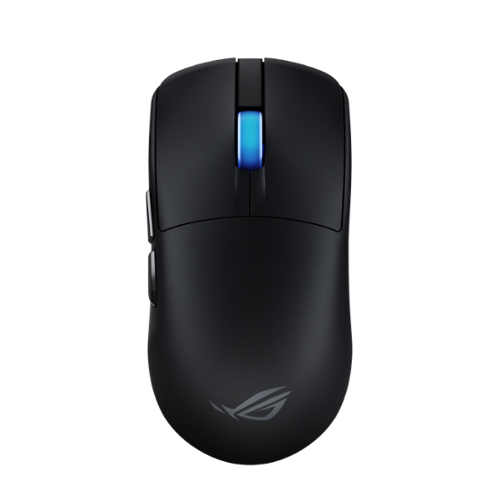
The ROG Harpe II Ace is an ultralight 48-gram semi-symmetrical gaming mouse with a shape developed with the help of esports professionals. It packs a raft of pro-approved technology, including the 42,000-dpi ROG AimPoint Pro optical sensor, ROG Optical Micro Switches and 8,000Hz polling wireless performance with SpeedNova 8K wireless technology.
Customer Rating
5
The Mouse That Clicked All the Right Buttons
on March 25, 2026
Posted by: RedScorpion
The Asus ROG Harpe II Ace Ultralight is great. I have been building computers and gaming for thirty plus years, and this is one of the best performing mice I have ever used. It feels highly tuned. It has excellent features. The web-based configuration utility removes the need to have a third-party app taking up system resources. Asus includes grips, extra feet / skates, and an extender for the wireless dongle that clips to your mouse pad. I am honestly surprised by how much this mouse has wowed me. After a week of heavy use, I have only dropped about 20 percent of my battery life. I have not found anything wrong with this mouse and that might be the most praise I can heap on it. It is solid.
Unboxing: As said above, Asus includes the mouse, USB-C to USB-A braided cable, wireless 2.4ghz dongle, extra feet / skates, the wireless dongle extender with built-in mousepad clip, and texture grips that stick to the mouse if you choose. All-in-all, you get a pretty complete package.
Experience: This mouse feels great in my hand. The weight is perfect, the skates are smooth, the scroll wheel has the perfect level of resistance, the clicks are quiet and snappy, and the side button placement is perfect.
Asus has transitioned the mouse away from Armory Crate (which was a bit bloated IMO) to the web based GearLink. Firmware updates and mouse configuration can be changed from the web-based UI. The mouse has built-in profiles that can be adjusted via button press combinations, but I prefer the web-based UI.
The mouse has RGB lighting in the mouse scroll wheel. It is not much, but I never understood putting a light on a mouse that my hand would cover up. For what it is worth, the lighting is bright and effective.
Battery life has been great. I have fluctuated the polling rate for the mouse, but so far, I have only used around 20 percent of the battery life over a week’s testing.
Surface calibration works well and I noticed a huge improvement in performance after I ran the calibration utility from GearLink. The mouse movement smoothed out after running the calibration utility.
Nitpicks: I have none.
Conclusion: This is an easy mouse to recommend. I have no complaints. After testing numerous games and applications, I truly have nothing negative to say about this mouse. I feel like ASUS made this mouse for people like me and I cannot recommend it highly enough. 5/5
I would recommend this to a friend!




Share this review:


0points
0of 0voted this as helpful.
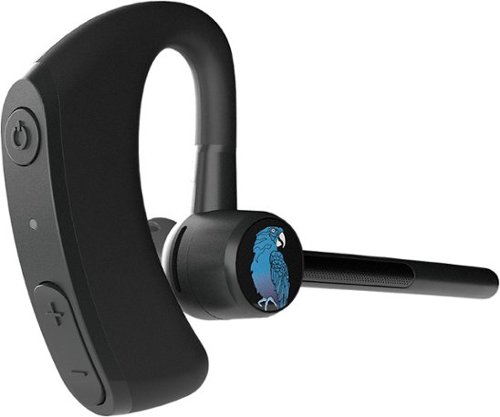
The BlueParrott M300-XT SE Bluetooth driving earpiece headset is designed for superior calls in high-noise environments. Featuring 80% noise cancellation with 2-mic tech, our earpiece for drivers provides 14 hours of talk time on a single charge for those who work long shifts. Our ultra lightweight earpiece weighs just 0.7 oz., making it an excellent option for those who work on the road delivering packages, food delivery drivers, taxi drivers, ride-share drivers, limo drivers, and anyone who drives for a living. In addition, our driving headset earpiece is reversible so that you can wear it on whichever side you prefer. With a wireless range of 300 feet (100 meters), our blue tooth headset for work ensures you can leave your phone in your vehicle as you're dropping off orders, ideal for local truckers, remote workers, or anyone on-the-go. Our hands-free call earpiece with mic provides IP54-rated protection against dust and water, making it a rugged and comfortable accessory for your work mobile phone. And while you're on the road, you can instantly mute calls, speed dial a preferred contact, or Push-to-Talk with your colleague using our customizable BlueParrott Button. Simply program it with your most-used function for instant access without taking your eyes off the road. The wireless earpiece pairs with up to 8 devices, with 2 simultaneous connections, and provides 420 hours of standby time.
Customer Rating
5
Excellent Call Quality and Battery Life
on March 13, 2026
Posted by: RedScorpion
The BlueParrott M500-XT is Bluetooth headset for your phone or PC with excellent battery life, great microphone noise cancellation, and a clear speaker. Controls are intuitive and easy to use. Pairing is simple. The BlueParrott app was simple and easy to use. My only nitpick of this headset is that it was a bit uncomfortable wearing the headset with my glasses. The earpiece on the headset and my glasses were fighting for the same space. Still, I could wear the headset with my glasses, and call quality and battery life have been excellent. Nitpicks aside, this is an easy recommendation.
Unboxing: BlueParrot includes the headset, two additional ear gels, and a USB-A to USB-C charging cable.
Experience: Call quality was quite exceptional. We have had several windy days lately, and I had no difficulties with calls. Battery life is on track for the 11-hour estimate. The buttons on the headset are intuitive and the BlueParrott app allows you to customize the button further.
The ear gel tips can be inverted to get a more secure fit, but this headset does not go into the ear canal itself. It looks like a big headset, but I forgot I was wearing it after a bit.
The only exception to my comfort was that the headset was a tight fit with my glasses. If you do not wear glasses or have thin enough frames, this might not be an issue for you.
Conclusion: I really like the headset. It works well. I have some personal nitpicks about comfort, but, overall, I still feel like this is an easy headset to recommend. 5/5
I would recommend this to a friend!



Share this review:


0points
0of 0voted this as helpful.
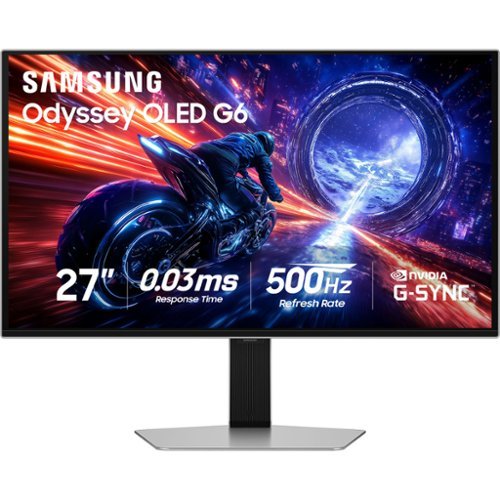
Samsung~s 27" Odyssey G6 QHD Gaming Monitor is the world~s first OLED monitor to feature a 500Hz Refresh Rate for lightning-fast responsiveness with a near-instant reaction time of 0.03ms GtG for crisp, razor-sharp visuals. OLED offers enhanced brightness and a wide range of colors for vibrant scenes in QHD resolution. Glare Free technology keeps screen clear of reflections from external light sources. VESA DisplayHDR TrueBlack 500 delivers ultra-deep blacks and 1000nits peak brightness. Samsung OLED Safeguard+ reduces core temperature, helps prevent burn-ins and overheating, and automatically controls brightness. G-Sync compatibility reduces screen lag and image tearing, creating ultra-smooth scenes along with AMD FreeSync Premium Pro. The slim metal design with a premium finish upgrades any gaming station while the Ergonomic Stand enables the monitor to be tilted, height adjusted, and pivoted for total gaming comfort. CoreSync technology & CoreLighting+ project vibrant on-screen colors into the real world for a fully immersive experience.
Customer Rating
5
A Great Monitor Cranked to 11
on February 23, 2026
Posted by: RedScorpion
The Samsung OLED G6 G60SF monitor feels a bit familiar. As it should as this is an upgrade from the Samsung OLED G6 G60SD. I love that monitor, and this model is even better. A few of my lingering nitpicks from the G60SD such as G-Sync compatibility out of the box have been addressed. The G60SF has a 500hz refresh rate compared to the G60SD’s 360hz. But the stands, the bezel, and the displays themselves look so similar that this feels like taking a remarkable thing and cranking it up to eleven rather than a complete refresh. As such, Samsung has made an already great gaming monitor better.
Setup: The monitor comes with the stand, a DP 1.4 cable, and an HDMI 2.1 cable. I have this unit hooked up to my PC currently via DP, but HDMI works well.
Experience: New monitors are always too bright for me out of the box. I crank the brightness down quite a bit and let my eyes rest before settling in on my preferred settings. I prefer the “Graphic” preset with around 27 brightness and 44 contrast. The monitor has a built-in headphone jack, two HDMI 2.1 ports, a Display Port 1.4, and two USB ports.
Samsung’s stand has some cable management built-in but is limited to just swiveling left and right with height adjustment. If you prefer to use your own stand, you will need a VESA 100x100 mount.
Image Quality: FANTASTIC. I love this display. Samsung OLED displays look amazing and the G60SF is great. Colors are great. HDR works well. I never had any screen tearing in gaming thanks to the monitor’s G-SYNC compatibility.
Image Quality: FANTASTIC. I love this display. Samsung OLED displays look amazing and the G60SF is great. Colors are great. HDR works well. I never had any screen tearing in gaming thanks to the monitor’s G-SYNC compatibility.
One of the first questions my friends ask about OLED monitors is burn-in. Samsung has screen optimization features built into their displays. When you shut off the computer and the monitor ceases to receive a signal, it begins an optimization process. I have not had this monitor long enough to notice any burn-in, but my other Samsung OLED has not had any burn-in in a year and a half of use. I realize the concern exists, but I type, game, and edit photos and videos on my monitors and have never had a problem with Samsung OLED monitors experiencing burn-in.
Is the 500hz better than the 360hz? I cannot tell. I think so? There appears to be a bit more clarity and smoothness in movements. It is rare I ever get close to pushing 300fps on any application. Things could be slightly smoother, but, again, it is hard for me to tell if I am noticing something or if it is just a placebo. Still, with NVIDIA’s DLSS 4.5 Frame Generation, it is quite possible that users with 5000 series NVIDIA GPUs will get close to pushing those limits. Frame Generation has been a game changer in applications that use it and Samsung’s decision to officially support Nvidia’s G-Sync will be great for owners of NVIDIA GPUs. Compared to the G60SD, the G60SF is a bit brighter.
Nitpicks: 1. Power brick is huge. The monitor consumes quite a bit of power. If energy efficiency is a goal, you may need to look at other display options. 2. Power button is located on the back side of the display and feels a bit flimsy to me. It is the same as the G60SD and I never had problems with that button, I wished for that monitor to have better controls, too. Thankfully, there is the Samsung Windows 11 application. 3. Display Port is limited to DP 1.4. That means there might be some compression at the higher refresh rates. I never noticed any graphical anomalies with DP versus HDMI 2.1, but there are limitations with the DP 1.4. But, again, so far, I have not seen those limitations impact the display quality or experience in any way. 4. I wish the CoreSync light was brighter.
Conclusion: This is a great display. Nitpicks aside, this is one of my favorite OLED monitors that has been made better. It looks and performs great and is about as easy of a monitor to recommend as it gets. 5/5
I would recommend this to a friend!




Share this review:


0points
0of 0voted this as helpful.

The ROG Raikiri II Xbox Wireless controller features TMR joysticks, 1KHz polling rate in PC mode, four rear buttons, dual-mode triggers, micro-switch buttons, and tri-mode connectivity.
Customer Rating
4
Trigger Happy, Battery Sad, Customizations Limited
on February 19, 2026
Posted by: RedScorpion
ASUS has given gamers a pro controller that rivals the best controllers out there. Excellent triggers, sticks, low latency, and a great grip make this one of the best controllers I have ever used. On top of that, ASUS has given us a package that includes a case and charging stand. It is a bit of a shame that some of the software features can be a bit buggy to use. Key mapping is limited. I also experienced some charging issues with my controller that I was never able to fully resolve. If those qualms are addressed by software updates in the future, this would be my favorite controller. As is, it is still surprisingly good and easy enough to recommend.
Experience: Let’s get the good stuff out there: the low latency and joy sticks on this controller make this one of the best PC controllers out there. The button presses for the face buttons (A, B, X, Y) have less travel distance than a traditional controller and instead function more like a mouse click. It works very well but took me a bit of time to get used to.
The ability to store the controller’s wireless USB dongle in the controller itself is great. The connectivity options for the controller make it truly versatile. And I love that Asus provides a travel case and charging stand.
I love the ability to change the travel distance for the left and right trigger. The grip feels great.
Some of the additional buttons only benefit gamers who are hooking this controller up to ROG Ally X. For instance, there is an Armory Crate button and a library button on the top front of the controller’s face that are all but useless for XBOX and PC gamers. Even on PCs that have Armory Crate like my Asus desktop and laptop, the Armory Crate button does nothing. It does not bring up armory crate on the PC.
Some of the additional buttons only benefit gamers who are hooking this controller up to ROG Ally X. For instance, there is an Armory Crate button and a library button on the top front of the controller’s face that are all but useless for XBOX and PC gamers. Even on PCs that have Armory Crate like my Asus desktop and laptop, the Armory Crate button does nothing. It does not bring up armory crate on the PC.
It is worth noting that Armory Crate has been replaced with Asus Gear Link, a web-based utility for configuring the controller. In theory I like the idea of not having to download a full software suite or a bloated desktop application for the controller. But I found Gear Link to be extremely buggy and laggy. It often did not work as I expected with delays or features that simply did not. Elements of the website would just not react to mouse clicks or attempts to change a setting. I tried this on multiple PCs with the same experience. Once changes are made, the changes will be saved to the controller.
As said above, you can customize programable buttons on the back and top of the controller. But you are limited to remapping existing buttons for instance, you can set the back buttons to be a single D-Pad, trigger, or face button press, but you cannot set up macros.
Also, there is a capture button on the front of the controller same as any XBOX Series X controller, but the capture button only works on Windows if the controller is in the XBOX controller mode. I am unsure if you lose some of the PC connectivity features in XBOX mode, but I do not understand why the capture button fails to work in PC mode.
Lighting works but is limited. You have light strips on the side of the controller and the ASUS logo which will also change to a pulsing light while charging.
Another nitpick for me is that the D-Pad feels a bit less precise than I would like. For instance, in Helldivers 2, you must make precise button presses to call in stratagems with the D-Pad. I found myself making mistakes more often than I would with a standard XBOX controller. The D-Pad has a fast response, but it just felt less precise.
Comfort: As mentioned above the face buttons took me a bit to get used to. Also, the ability to adjust the trigger distance and map buttons on the back of the controller is great, but, at least at first, I found myself rubbing my fingers a lot on the adjustment knobs on the back of the controller. I eventually got used to it, but first few gaming sessions were a bit rough on my middle fingers.
Charging issues: As mentioned, the Raikiri 2 comes with a charging stand which you can keep in the travel case to charge the controller on the go, or you can plug the controller in directly to charge. I found the charging stand to be too slow to be ineffective. After hours of charging on the wireless pad, the controller’s battery charge barely moved. Plugging the controller in via USB-C did charge but was slow. At this moment, my controller is maxing out at 97 percent charge, and I have no idea why it will not go any higher. I tried different USB ports and chargers. One thing that did seem to improve charging times was to make sure the controller’s lighting was turned off. But then you lose the charging indicator via the logo. I guess what I learned was to make sure lighting on the controller is turned off before charging. Wireless charging, while nice in theory, can be extremely slow if it works at all.
Conclusion: This is a mixed bag for me. I really like many aspects of this controller. I am hoping that my nitpicks can be addressed via software updates in the future. Because if they can be addressed (especially the weird charging issues) then this will be my favorite controller. As it is right now, it is a good one. 4/5 Recommended.
I would recommend this to a friend!





Share this review:


0points
0of 0voted this as helpful.
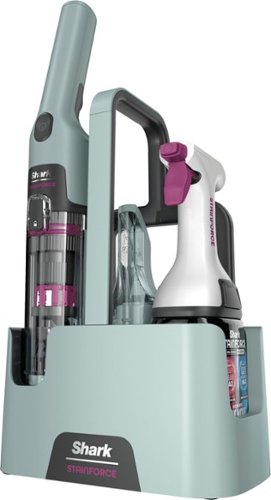
Easily tackle the spills, stains and messes that happen every day throughout your home~ Powerful suction + 30x more stain-fighting power* combine to break down and lift away stains and spills. Cordless and always ready when you need it so you can tackle stains & spills wherever and whenever they happen. +vs portable stain cleaner market using included cleaning solution tested on mustard, ketchup, coffee, chocolate syrup, grape juice, permanent marker, oil and dirt. *vs Shark Deep Clean Pro Formula.
Posted by: RedScorpion
The Shark StainForce Cordless Cleaner is a perfect tool for my household. With two small children and a dog who thinks he is a toddler, stains happen. Space in our household is also currently at a minimum. I was instantly drawn to the Shark StainForce because of its small, lightweight design. And I must say, it works very well. The vacuum on the StainForce itself is quite powerful for such a small device it does an excellent job. But I think the real star of the show lies in the cleaning solution which combines two cleaning solutions to lift set stains out. After a week of testing, I am sold on the cleaner.
Unboxing: Shark has really included a lot with this set up. You have the caddy. The two parts to the vacuum, the crevice tool, cleaning solution, reusable head / nozzle for cleaning solution, and an AC adapter.
Experience: After testing, I went to work with a few different stains in the house. The first and toughest stain was a set-in graphite stain that has given me trouble for a few weeks now. I liberally sprayed the area with the cleaning solution, waited, sprayed the solution again, worked the solution into the fabric with the scrubbing brush, and then lifted the stain out with the StainForce vacuum.
The StainForce did a wonderful job on the stain. Way better than I had been able to achieve up to this point. It did take me a few more passes to get everything, but I was extremely impressed that this stain came out at all.
The StainForce did a wonderful job on the stain. Way better than I had been able to achieve up to this point. It did take me a few more passes to get everything, but I was extremely impressed that this stain came out at all.
The vacuum is light weight. And the vacuum has a surprisingly strong amount of suction. I did not think I sprayed much liquid onto the stain, but the vacuum got a lot out of that carpet.
Charging takes four hours. But once the unit is charged, you do not need to keep it plugged in, which does help with storage.
Charging takes four hours. But once the unit is charged, you do not need to keep it plugged in, which does help with storage.
Cleaning the unit is straightforward. There is a release tab for water inside the unit. The unit also comes apart for deep cleaning. The storage caddy has a fill line that you can use with clean water to run through the vacuum. Once everything is done, you just set pieces out to dry. It is all quite easy and comes apart and goes back together in just a few minutes.
My only real nitpick is I would have preferred a USB charger to the AC adapter that is included. Since there is not any real place in the caddy to store the AC adapter, I have a feeling it could get separated and lost if you are not paying attention.
Conclusion: I really like this little vacuum. The biggest question mark I have is finding more cleaning solution as that really does seem to be one of the key components of this package. Thankfully, you can get more cleaning solution from Best Buy. At the time I wrote this review, I found a two pack of the cleaning solution on Best Buy’s website for around $25. Be sure to hold on to the reusable cleaning head.
I really have enjoyed the StainForce cleaning system. It has already proven its usefulness to me and with small kids and a dog, I am sure I will be using it often. 5/5
I would recommend this to a friend!


Share this review:


0points
0of 0voted this as helpful.
RedScorpion's Review Comments
RedScorpion has not submitted comments on any reviews.
RedScorpion's Questions
RedScorpion has not submitted any questions.
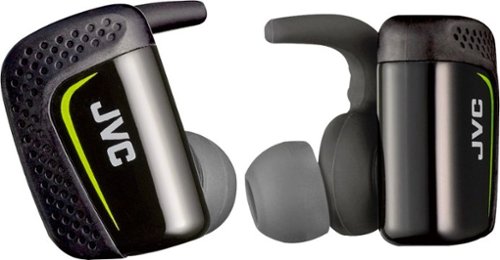
Play cool music while performing your fitness routines with these water-resistant JVC wireless sport headphones. The Pivot Motion Fit provides a secure hold during rigorous workouts, and the JVC Headphones Manager app lets you control audio settings. These JVC wireless sport headphones come with a lightweight charging case that provides three hours of battery life on a single charge.
Hi, how is the sound quality for talking? Do the buttons hurt your ears when you push them in?
I didn't think they sounded that good and the person I called said I sounded very static-y.
8 years ago
by
RedScorpion

Automatically go from hundreds of mystery folders to a visual view in the photo and video Organizer. See your best photos thanks to auto-curation. Effortlessly extract candid photos from your raw footage. Make photos and videos look amazing with automated photo editing and video creation options. And create and share beautiful printed artwork, new dynamic slideshows, photo and video collages, animated GIFs*, and full-length movies. Being creative is even easier with the Elements bundle.
Do you have to purchase a monthly or annual subscription in addition to the software?
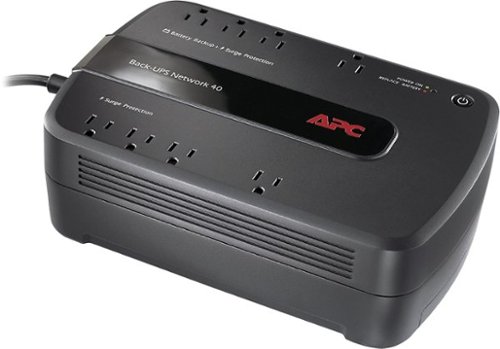
Keep your home networking equipment working when the electricity goes out with this APC Back-UPS Network 40 BN4001 UPS that features 4 battery-backup and surge-protection outlets to ensure electronics remain powered during outages.
Where do I get a new Battery for this?
I'm sure my battery didn't last three years and I need a new one. What size am I looking for and where can I get one?
You can find replacement battery information on APC's website at:
http://www.apc.com/tools/upgrade_selector/
http://www.apc.com/tools/upgrade_selector/
10 years ago
by
RedScorpion
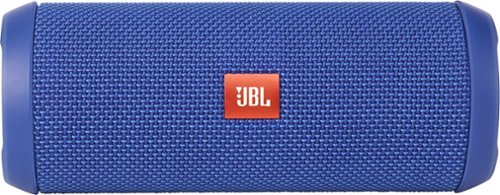
JBL Flip 3 Speaker: Stream your favorite songs and Internet radio stations from your compatible audio device using this speaker, which offers extensive playback with the rechargeable battery. Dual external bass radiators offer booming low tones, and you can enjoy clear phone calls with the integrated speakerphone.
can it be connected to a ipod nano
Yes.
If your iPod Nano has blue-tooth (which the newer models do), then you can connect this to your Nano that way. If your Nano does not have blue-tooth, you can always connect the Flip 3 with an auxiliary 3.5mm audio cable.
If your iPod Nano has blue-tooth (which the newer models do), then you can connect this to your Nano that way. If your Nano does not have blue-tooth, you can always connect the Flip 3 with an auxiliary 3.5mm audio cable.
10 years ago
by
RedScorpion