
Share 15David15's profile


15David15
15David15's stats
- Review count3
- Helpfulness votes11
- First reviewFebruary 5, 2012
- Last reviewFebruary 20, 2013
- Featured reviews0
- Average rating5
Reviews comments
- Review comment count0
- Helpfulness votes0
- First review commentNone
- Last review commentNone
- Featured review comments0
Questions
- Question count0
- Helpfulness votes0
- First questionNone
- Last questionNone
- Featured questions0
Answers
- Answer count0
- Helpfulness votes0
- First answerNone
- Last answerNone
- Featured answers0
- Best answers0
15David15's Reviews
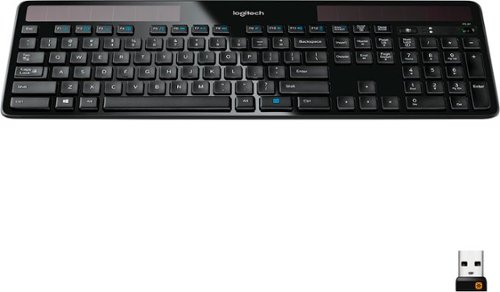
Battery hassles are a thing of the past with the solar-powered Logitech Wireless Solar Keyboard K750. It charges itself whenever there's light, so you can say goodbye to batteries, power bricks and charging cables. With sleek lines and a thin profile, this stylish, streamlined keyboard adds style to your workspace. Combining the best of traditional keyboards, laptops and a Logitech-only concave key cap design, you'll enjoy faster, quieter, feel-good typing -hour after hour. Plus, you'll get wireless freedom thanks to the Logitech Unifying receiver.
Posted by: 15David15
from MaryLand,MD
Hi I just bought this keyboard yesterday and its doing good so far the only complaint I have is no indicator light. I mean why doesn't a keyboard this advanced have a indicator light for the caps lock and num lock but other then that its great to use. The key is kinda loud but I can live with it. The button to check the lighting around you is stupid, also once your connected with this kb you get an app installed on your PC and you can pick whether you wish to install it or not but its only a solar app so kinda useless to me as it only tells you how much battery you have left and whether your in good lighting or not.
What's great about it: Slim, light weight, solar panels, Shiny black finish(don't know what this is called)
What's not so great: no num lock or caps lock indicator light. Only light on keyboard is to check weather your in good lighting.
I would recommend this to a friend!
Design

5
Ease of Use
5
Share this review:


+3points
3of 3voted this as helpful.

Broaden the content you enjoy on your PlayStation system with this convenient $20 PlayStation Network Card. Use the card to purchase downloadable games, game add-ons, full-length movies, TV shows and other content that you can play or view on your PlayStation 4, PlayStation 3 or PS Vita.
Customer Rating

5
Got DLC for my games and games with psn card.
on August 23, 2012
Posted by: 15David15
from MaryLand,MD
Its simple and easy just scratch off the gray thing at the back and input code to your psn account and bam! Couldn't have been any easier.
What's great about it: Buying stuff on PSN without using credit card
What's not so great: I don't know
I would recommend this to a friend!
Share this review:


0points
2of 4voted this as helpful.
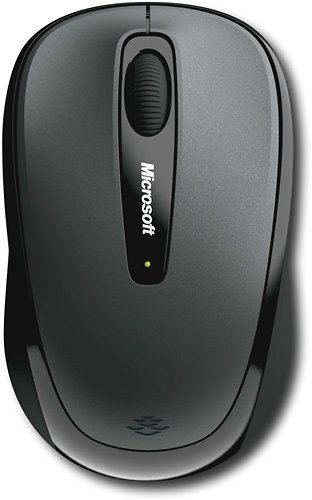
Microsoft Wireless Mobile Mouse 3500: Designed for portability, this wireless mouse features BlueTrack technology for use on nearly any surface, a nano transceiver that can be stored in the mouse or in your laptop for convenience and an ambidextrous design for comfortable use.
Posted by: 15David15
from MaryLand,MD
It is great i bought this for a replacement of my desktop mouse because my desktop mouse keeps making the disconnect and connect noise and it keep disconnecting while i am doing stuff so got tired of that and bought this little mouse and it works better than ever but the only thing i don't like is when i use the mouse wheel. I only scroll once and the internet page scrolls down alot but doesn't bother me much because i now use the internet scroll bar instead of using the scroll bar on the mouse.
What's great about it: mostly everything
What's not so great: the scroll wheel scrolls internet page to much
I would recommend this to a friend!
Design
5
Ease of Use

4
Share this review:


+6points
6of 6voted this as helpful.
15David15's Review Comments
15David15 has not submitted comments on any reviews.
15David15's Questions
15David15 has not submitted any questions.
15David15's Answers
15David15 has not submitted any answers.