
Share NorCalo's profile


NorCalo
NorCalo's stats
- Review count1
- Helpfulness votes8
- First reviewNovember 3, 2008
- Last reviewNovember 3, 2008
- Featured reviews0
- Average rating4
Reviews comments
- Review comment count0
- Helpfulness votes0
- First review commentNone
- Last review commentNone
- Featured review comments0
Questions
- Question count0
- Helpfulness votes0
- First questionNone
- Last questionNone
- Featured questions0
Answers
- Answer count0
- Helpfulness votes0
- First answerNone
- Last answerNone
- Featured answers0
- Best answers0
NorCalo's Reviews
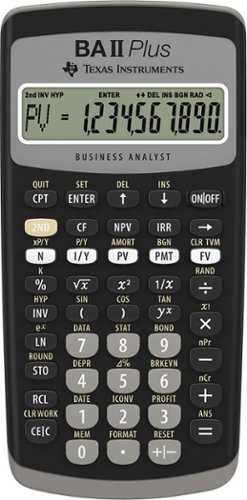
Designed for business professionals and students, this easy-to-use financial calculator delivers powerful computation functions and memory. Easy-to-read, 10-digit display Prompted display shows current variable label and values. Calculate IRR and NPV for cash flow analysis. Store up to 24 uneven cash flows with up to four-digit frequencies. Edit inputs to analyze the impact of changes in variables. Time-value-of-money function.Quickly solve calculations for annuities, loans, mortgages, leases and savings. Depreciation schedules. Choose from six methods for calculating depreciation, book value, and remaining depreciable amount. Interest rate conversions. Convert between annual (nominal) and effective interest rates. Exam acceptance. The BA II Plus calculator is approved for use on the Chartered Financial Analyst*, GARP Financial Risk Manager (FRM)~ exam, and Certified Management Accountants~ exam. *Chartered Financial Analyst is a registered trademark owned by CFA Institute. ~GARP and FRM are registered trademarks owned by Global Association of Risk Professionals, Inc. ~CMA is a registered trademark of the Institute of Management Accountants, Inc. None are affiliated with or endorse TI products.

Posted by: NorCalo
from Hayward, CA
I'm taking a Finance class and I find this calculator much easier to use than the HP-10. If you have a lot of experience with TI calculators, then this one should be fairly easy to learn. TVM keys are easy to to work and and conveniently located. My only concerns are that it doesn't feel as sturdy as my TI-84 and the buttons are a lot stiffer too. Additionally, the button placement is arranged a little differently and I constantly find myself turning the unit off when intending to clear data from the screen.
What's great about it: Easier to use than the HP equivalent; Easy to learn
What's not so great: Buttons are a little stiff; Takes some getting used to
I would recommend this to a friend!
Features

5
Durability

4
Share this review:


+8points
8of 8voted this as helpful.
NorCalo's Review Comments
NorCalo has not submitted comments on any reviews.
NorCalo's Questions
NorCalo has not submitted any questions.
NorCalo's Answers
NorCalo has not submitted any answers.