
Share ftfNavySeals's profile


ftfNavySeals
ftfNavySeals's stats
- Review count2
- Helpfulness votes51
- First reviewOctober 13, 2010
- Last reviewOctober 13, 2010
- Featured reviews0
- Average rating4
Reviews comments
- Review comment count0
- Helpfulness votes0
- First review commentNone
- Last review commentNone
- Featured review comments0
Questions
- Question count0
- Helpfulness votes0
- First questionNone
- Last questionNone
- Featured questions0
- Answer count6
- Helpfulness votes1
- First answerFebruary 25, 2009
- Last answerOctober 13, 2010
- Featured answers0
- Best answers1
ftfNavySeals's Reviews
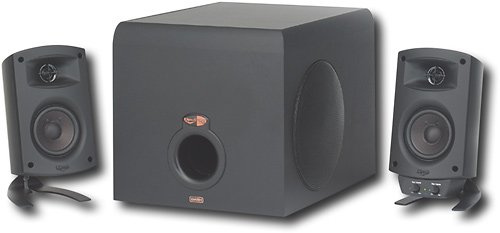
Use this Klipsch ProMedia 3-piece speaker system to enjoy brilliant sound when playing games, listening to music or watching videos on your computer.

Posted by: ftfNavySeals
from Louisiana
If you want to pay for a name, go with Bose or Logitech. If you want to pay for sound quality, go with Klipsch, isn't this the whole reason your buying speakers? Sound quality? Anyways, I'll sum it up for ya.
Unboxing - Set up was sooo easy! 4 items came in the box, 1 sub woofer with power cable attached, 2 speakers with wires attached, and a little bag of rubber circles to put on the bottom of the speakers. Direction's aren't needed whatsoever but they even put in an instruction manual, aw how nice. :)
Features - The features are pretty standard, Subwoofer level and Main Volume knobs. That's it. It would have been nice if you had a treble adjuster too, but it's really not needed with these speakers they are very clear and bright. I'm pretty sure there's not even an on/off button, which is odd, but again, just turn them down to minimum and you'll be fine. One thing that is very nice is since the volume and bass knobs are on one of the speakers I was worried about it being forced to either the left or the right side, but these did not have that issue due to the fact that you plugged the speakers in depending on what side you wanted them! So them being reversible is great! Also the speaker covers do come off, but I'm not sure why you'd take them off because I think they are very classy looking.
Sound - Ok I listen to Rock/Nu Metal/Thrash Metal you know, heavy stuff with lot's of double bass. So the first thing I did after hooking these bad boys up is turn on Down With The Sickness by Disturbed. First of all let me just say the bass was at 35% and the volume was at about 25%, and when this song came on all I could say was wow! I got blasted with sound, in a good way! The bass pedal was was thumping to where I could feel it in my chest, and the speakers blasted with incredible accuracy! Sound is very good on these bad boys! I swear it could compete with my surround sound!
Overall - This is a great set up, and like I said many times it looks and sounds phenomenal! I have a feeling that these are very durable, everything feels solid as a rock, but like everything only time will tell. I'd say that if you have the money to afford these and you like your music/movies/video games to sound good, this is where your money belongs! There may be something better next year, there may be something worse, you never know, but I do know that if these broke on me after my return policy, I'd buy them again in a heartbeat!
What's great about it: Sound, Looks, Best Speakers for $150 for computer
What's not so great: Slightly big, no on/off switch
I would recommend this to a friend!
Sound Quality

5
Share this review:


+8points
9of 10voted this as helpful.
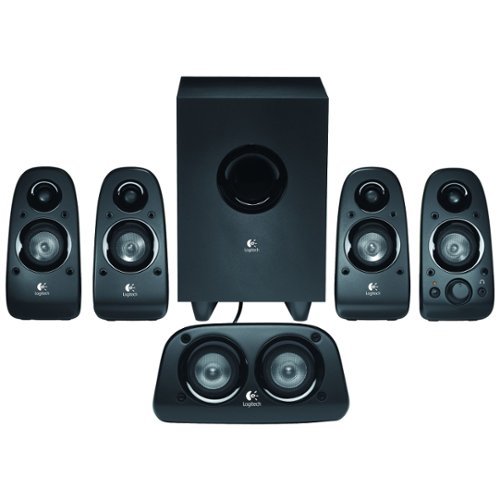
Enjoy rich, lush audio with these surround sound speakers that feature 75W RMS power. A down-firing, ported subwoofer with a 5-1/2" driver controls powerful sound. The dedicated bass controller lets you customize the bass level to your liking.

Posted by: ftfNavySeals
from Louisiana
Unboxing - So I bought this set tonight because I play a lot of video games and want to bring my video games to life, without having to wear a dang headset all the time. I was super excited and got home and set it all up, and setting it up was a snap! It was all color coded and very plug and play! There is the 3.5mm jacks and basic audio red and white connections. No hdmi or optic or any other kind of connection.
Design - I have always been one to like simple speaker designs that are subtle, but these look almost kind of silly to me, there is no covers or even metal covering the speakers, it's just a thin cloth, which is a cool idea, but it's not very protective and kind of looks weird, again personal preference there.
Sound - The speakers sound... OK. Nothing great, not bad, just ok. The sub is nice, but it's the only speaker set up I have had with a sub for my computer so idk what it compares to. The speakers themselves just seem like 5 cheap speakers that you would get with any new desktop, and there is supposedly small tweeters in these but I don't believe it, the little round spot on top isn't a tweeter, it just looks like one... What a waste of money and time on that one Logitech... :/ Now I do have one serious problem with mine that I'm actually planning to return them because of. There is a lot of noise coming through the speakers almost like your phone is about to ring next to speakers and it won't go away, and it's not the connection from the computer to the speakers so I think it has to do with the whole set up... So fair warning, make sure you check when you unbox these bad boys, I may just have a dud, who knows, it happens all the time.
Features - Again there is only 2 types of input, 3.5mm jacks or the A/V style red and white plugs on the sub woofer. The center speaker has sort of a hooking mechanism like a webcam that allows it to sit comfortably and safely on the monitor. There is a bass knob on the back of the sub and a master volume and the on/off switch is on the front right speaker. If I'm not mistaken the last surround sound Logitech made for computer had a separate wired remote that controlled bass, treble, volume, on/off, and had a button that was called Matrix. Matrix would add a nice reverb like tone to it giving it a live feel and softened the sound making it feel surround, even though it was still stereo. But the z506 does not have this wired remote, nor does it have treble control or the matrix control... Also these speakers do not come with covers, and they can't be mounted. Yet, the last model you could do all of these things, AND they all had stands... So features is really lacking...
Overall - I am not really impressed with these speakers. I love the idea of surround sound for playing my video games but these just aren't what I'm looking for. I'm no audiophile but I'm not deaf, and I know what sounds good and what's worth $100, and to me, these aren't worth the price. If you need a budget surround sound, this is you! If you just want good speakers, go with the Klipsch, that's what I'm going to get tomorrow.
What's great about it: Easy set up, Logitech
What's not so great: Sound, lack of features, no mounting, no covers, price
No, I would not recommend this to a friend.
Sound Quality

2
Share this review:


-3points
42of 87voted this as helpful.
ftfNavySeals's Review Comments
ftfNavySeals has not submitted comments on any reviews.
ftfNavySeals's Questions
ftfNavySeals has not submitted any questions.
ftfNavySeals's Answers
When Will the SALE on SAMSUNG 32" LCD TVs END?
Sales start on Sunday, and end on Saturday every week of the year. It may go back on sale next week or in a few weeks but sales are always weekly. I know cause I work there.
15 years, 7 months ago
by
ftfNavySeals
Louisiana
Can I transfer minutes from one service provider to another?
I have a broken tracfone with 700 minutes left on it. It is my second tracfone, and seeing that they have been pretty unreliable, I would like to try another prepaid company. Could I transfer my tracfone minutes to a different prepaid provider, or will my minutes have to stay on the tracfone?
No, because you purchased the minutes from Tracfone, the company. If you want to switch to a different company you will have to buy their phone and their minutes.
16 years, 5 months ago
by
ftfNavySeals
Louisiana
What Is The Best Laptop To Play Civilization 4 on?
Get the blue Asus at best buy with the GeForce 9300m GS for $650. I picked it up yesterday and this laptop can handle most anything you throw at it. Maybe not Crysis but that game is way ahead of technology anyways. I promise you this computer will handle your Civilization game.
17 years, 2 months ago
by
ftfNavySeals
Louisiana
How do I decide what type of TV works best for my family?
What type of tv is best for gamers?
What type of tv is best for viewing movies or to use as a PC monitor?
What type of tv is best for viewing movies or to use as a PC monitor?
Ok this question was made for me. I am a heavy gamer and was currently in the same position. You need to buy a tv that is LCD, NOT plasma!! 720p is perfectly fine, you don't need 1080p unless its over 40". Buy a tv that is fairly decent sized, I own a 32" Insignia($499) and it is perfect because you can read it across the room, and play with more than one person at once(having two or more people play at once becomes a problem because every extra person on the same screen makes it smaller and smaller). I HIGHLY recommend the 32" Insignia, it's the best deal you will find and the picture looks awesome, also if you want the best for your buck make sure you get an HDMI cable, a cheap one will suffice, I own a Dynex cable, otherwise the picture wont be that great. Honestly, you should use HDMI for everything it really makes a difference in picture. If you want to use it for a monitor you have to make sure it has VGA inputs OR DVI inputs. Some computers do allow HDMI outputs and if thats the case use that. I find a bigger tv works good for a monitor if your across the room, duh, makes sense right? If you are sitting right in front of it, 22" is pushing it. It's hard to see the whole screen when your less than 2 feet away. If you want it for computer gaming make sure it has a HIGH resolution, it's not required, but it looks a lot nicer. Mine is a maximum of 1368x768(well pretty close anyways) its not great but it looks good enough for $499.
Like I said RESEARCH.
Like I said RESEARCH.
17 years, 3 months ago
by
ftfNavySeals
Louisiana
what type of tv is best to be used in a semi or rv?
Definitely a small LCD flat-panel tv. They are thin and lightweight. I know that Dynex makes a 19" LCD flat-panel for $199 and it is awesome. I currently own one. Now I suppose it doesn't have to be small but I figured you didn't have room for a big one. I recommend mounting it, however, because if you hit a bump it might jump. You can always way it down with something too.
17 years, 3 months ago
by
ftfNavySeals
Louisiana
what is the best tv for the wall? I want plasma but what one is the best value for the money? Prefer 4 jacks and energy efficient. Also 1080 or 740-i
is there a great difference bet. 1080 and 740? Thanks
1080p is currently the best picture you can get. Then 1080i, 720p, and 480. I'm not sure if there is a 720i, or as you said a 740. Depending on what size you want is what you should buy. If you are getting a 40" screen or higher, you definitely want a 1080i or 1080p. Anything lower and a 720p would look just as great. With a bigger tv you need better resolution otherwise you have a big splotchy picture. It's similar to taking a picture on the computer and trying to make it bigger it becomes blurry. If you play video games stay away from plasma, leaving a still image on a plasma for too long will burn it into the screen permanently. And I don't know if best buy fixes that. However, the picture is better because it has better contrasts. Also I hear plasma dies out over time and gets fuzzy, not quite sure bout that though. LCD is great because it never burns pictures into the screen and they last forever. Most tv's, LCD's for sure, ARE energy efficient nowadays, and they usually flaunt it, just check out the specs online for every tv you consider. Now I won't tell you what the best tv is because that is, I believe, a matter of opinion. However, I purchased a 32" Insignia 720p for $499, and it was worth every penny. You do not have to spend a lot of money for a great tv, as much as people claim you do, but I highly recommend doing online review research. I searched for a month before I bought my Insignia, and I'm glad I did.
Hope this helps you a little bit.
Hope this helps you a little bit.
17 years, 3 months ago
by
ftfNavySeals
Louisiana