
Share ZenKayaker's profile


ZenKayaker
ZenKayaker's stats
Reviews
- Review count0
- Helpfulness votes0
- First reviewNone
- Last reviewNone
- Featured reviews0
- Average rating0
- Review comment count1
- Helpfulness votes0
- First review commentJuly 16, 2010
- Last review commentJuly 16, 2010
- Featured review comments0
Questions
- Question count0
- Helpfulness votes0
- First questionNone
- Last questionNone
- Featured questions0
Answers
- Answer count0
- Helpfulness votes0
- First answerNone
- Last answerNone
- Featured answers0
- Best answers0
ZenKayaker's Reviews
ZenKayaker has not submitted any reviews.
ZenKayaker's Review Comments
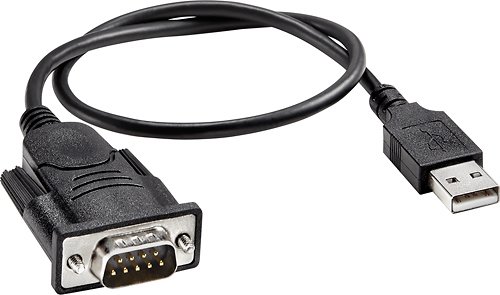
This adapter cable is designed for easy plug-and-play connection of a device with a serial port to a device with a USB port.
Overall 4 out of 5
4 out of 5Windows 7 32 & 64 Bit Drivers are on the web
By PapaSound
from Florida
This adapter will work on Windows 7 32 & 64 bit OS machines but you must manually download and install the driver.
Follow these steps and you should do fine--
1. Do not connect the adapter to your PC - just wait we will connect later
2. Visit this web page: http://www.prolific.com.tw/eng/downloads.asp?ID=31 You can see the link for the driver there.
3. Download the driver file: PL2303_Prolific_DriverInstaller_v110.zip
4. Unzip the download to see the .exe file
5. Run the exe to install the driver
6. After installing, I would suggest a reboot of your PC - can't hurt
7. Connect the adapter
8. All should work, check out he Windows Device Manager to make sure that the hardware is functioning correctly.
Enjoy!
Follow these steps and you should do fine--
1. Do not connect the adapter to your PC - just wait we will connect later
2. Visit this web page: http://www.prolific.com.tw/eng/downloads.asp?ID=31 You can see the link for the driver there.
3. Download the driver file: PL2303_Prolific_DriverInstaller_v110.zip
4. Unzip the download to see the .exe file
5. Run the exe to install the driver
6. After installing, I would suggest a reboot of your PC - can't hurt
7. Connect the adapter
8. All should work, check out he Windows Device Manager to make sure that the hardware is functioning correctly.
Enjoy!

ZenKayaker
New Hampshire
Dynex DX-UBDB9 and Windows 7 (64-bit)
July 16, 2010
I was able to get this cable working the first time.
The link posted by PapaSound is correct. Download and install the driver, then connect the cable.
0points
0of 0voted this comment as helpful.
ZenKayaker's Questions
ZenKayaker has not submitted any questions.
ZenKayaker's Answers
ZenKayaker has not submitted any answers.