
Share CustomerFromPA's profile


CustomerFromPA
CustomerFromPA's stats
- Review count1
- Helpfulness votes7
- First reviewMay 10, 2009
- Last reviewMay 10, 2009
- Featured reviews0
- Average rating5
Reviews comments
- Review comment count0
- Helpfulness votes0
- First review commentNone
- Last review commentNone
- Featured review comments0
Questions
- Question count0
- Helpfulness votes0
- First questionNone
- Last questionNone
- Featured questions0
- Answer count1
- Helpfulness votes0
- First answerMay 10, 2009
- Last answerMay 10, 2009
- Featured answers0
- Best answers0
CustomerFromPA's Reviews
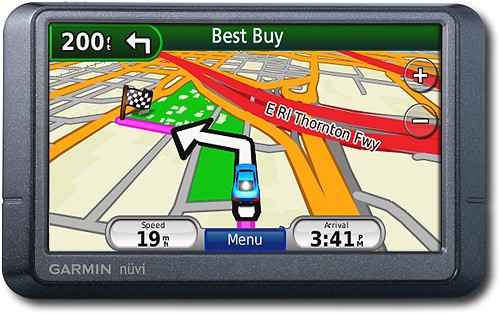
Navigate the United States and Canada with ease with this GPS that features free lifetime traffic updates, up to 1,000 waypoints and customizable points of interest for easy route planning. The "Where Am I?" emergency locator and travel assistant tools provide additional support.

Posted by: CustomerFromPA
from Philadelphia, PA
After doing some research, I decided on this model for the following reasons: wide screen, spoke street names and had real time, free traffic.
The colorful screen is very easy to read. Along the top, it shows you distance to next announcement, the street of the next announcement, and, what I think is invaluable, a picture of what the next turn will look like. This is very helpful when the official name of a street (what 255WT calls it) and the road sign is different. (See below for more info on this.)
The main map is very accurate (I downloaded the free 2010 map. Took 3 hours to download and 3 hours to install, unassisted.) Map page also has zoom in, zoom out, menu button, trip info button, estimated time and icon for traffic. What’s missing is a quick mute function. To mute or unmute the system takes 5-6 taps of the screen.
The system will reroute you when you’re about ½ block off the suggested map, unless you’re on a non-street, such as a parking lot. It does a good job giving you a reasonable route (for example, I’ve chosen different routes because I, personally, know the traffic lights are timed better than the one the 255WT suggests). One time, it didn’t recognize an existing street. If it’s surrounded by tall buildings, it can get a little confused, trying to get a satellite.
The system will speak the street name along with the next turn 2 or 3 times, as you get closer to your turn. Example: “in one mile, turn right onto Main Street; in 200 feet, turn right onto Main Street; turn right onto Main Street.” If the exit is local lanes for the road you’re on prior to the actual turn (what the exit sign might read), the system will tell you to exit, but will use the access road name before using the exit sign name. That’s where the picture of the exit is helpful (see above). It does a good job with pronunciation. Hearing street names is invaluable when you’re in an area that has streets close to each other and a plain “turn right” isn’t enough information.
The real time, free traffic is great is you’re in a covered area. The system icon shows green (no problems), yellow, or red, along with estimated delay. If you’re driving and icon changes to red, system announces “traffic ahead” and automatically changes to the traffic map. The traffic map, which you can get to at any time, is similar to the regular colorful map, but will mark your route and side of the street with green and yellow, rather than the standard colors.
Other traffic options are to see a list of current traffic instances and to see map of larger area with traffic instances. In the setup area, you can choose to have the system automatically reroute you around delays or you can choose this at will.
The cost of “free traffic” is that you get small advertisement notices. They are about 2 inches wide and ¼ inch high and appear either on top or on bottom of screen. I thought they’d annoy me, but they are innocuous. They come on when you’re stopped, but only sometimes, not every time.
What's great about it: Maps, directions, steet names
What's not so great: Getting around menu options
I would recommend this to a friend!
Durability

5
Ease of Use

4
Features
5
Share this review:


+7points
7of 7voted this as helpful.
CustomerFromPA's Review Comments
CustomerFromPA has not submitted comments on any reviews.
CustomerFromPA's Questions
CustomerFromPA has not submitted any questions.
CustomerFromPA's Answers
rerouting features how does it work
I have a nuvi 255 which keep senting me back to the expressway when I want to use the parkway.
I've run into this too. I don't think this model has personal preferences for this type of scenario.
You can either put in address on or near parkway, forcing it to desired parkway and when you get near that "destination," give it a new destination. Or use the detour option and give it an address along the parkway as an intermediate stop.
Personally, I think #1 is easier to program.
You can either put in address on or near parkway, forcing it to desired parkway and when you get near that "destination," give it a new destination. Or use the detour option and give it an address along the parkway as an intermediate stop.
Personally, I think #1 is easier to program.
17 years ago
by
CustomerFromPA
Philadelphia, PA