
Share Spammer305's profile


Spammer305
Spammer305's stats
- Review count2
- Helpfulness votes1
- First reviewAugust 8, 2014
- Last reviewJanuary 11, 2016
- Featured reviews0
- Average rating5
Reviews comments
- Review comment count0
- Helpfulness votes0
- First review commentNone
- Last review commentNone
- Featured review comments0
Questions
- Question count0
- Helpfulness votes0
- First questionNone
- Last questionNone
- Featured questions0
- Answer count3
- Helpfulness votes1
- First answerAugust 8, 2014
- Last answerAugust 8, 2014
- Featured answers0
- Best answers0
Spammer305's Reviews
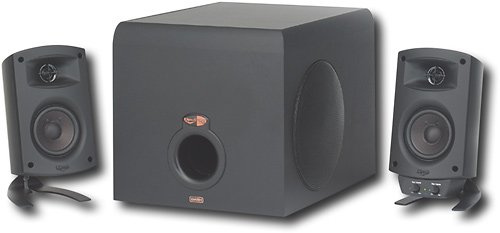
Use this Klipsch ProMedia 3-piece speaker system to enjoy brilliant sound when playing games, listening to music or watching videos on your computer.

Posted by: Spammer305
from Quitman, GA
I just hooked these up and I thought I should preview a movie before time to eat supper. So I started watching The Revenant using VLC Media player. I had the audio on my pc set at 31 and turned up the speakers to about 25%. They sound loud, clear but just a tiny bit muddied. So i paused the movie, went to the equalizer settings and set it on Live. I then slightly moved the sliders up in the high frequency section and resumed my movie. There's that WOW! Man, when the bear attacks the guy you better stand back. I closed my eyes and I could swear there was a bear on me. Whew! I sure am glad I got these. Now if they'll last for a few years I'll be happy. Awesome Speakers!
I would recommend this to a friend!

Share this review:


+1point
1of 1voted this as helpful.
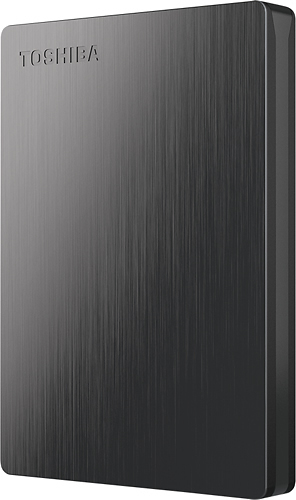
Store up to 500GB of your personal files on this Toshiba Canvio Slim II HDTD205XK3D1 hard drive, which is preloaded with NTI Backup Now EZ software, so you can enjoy customizable backup options. The slim, lightweight design enables simple portability.
Posted by: Spammer305
from Quitman, GA
Compatible with...:PC
This is a great little hard drive. I purchased this hard drive on eBay from Best Buy and got it today 8/08/2014. So far all I'm going to use it for is backing up my HP SimpleSave 1TB hard drive which has 447.53 GB of Wii backup (195 games) on it. I've been running both hard drives fairly hard for about two hours and the Toshiba Canvio Slim II drive is as cool as a cucumber. On the other hand my HP SimpleSave drive is starting to get hot. I think the Toshiba Canvio Slim II drive will make a great backup drive and it's well worth the $50 I paid for it. I also purchased my HP SimpleSave drives from Best Buy. Thank you Best Buy you've got excellent merchandise!
What's great about it: It's Fast and It Doesn't Get Hot
What's not so great: The plug seems a bit on the cheap side
I would recommend this to a friend!
Ease of Use

5
Performance

4
Share this review:


0points
0of 0voted this as helpful.
Spammer305's Review Comments
Spammer305 has not submitted comments on any reviews.
Spammer305's Questions
Spammer305 has not submitted any questions.
Spammer305's Answers
Will IDE Cable work with SATA internal harddrives
No, an IDE cable is different than an SATA cable. It won't plug into an SATA drive. However there is a workaround to that problem. You can purchase an SATA "power" adapter that will plug into the IDE cable then to your drive. BUT you still have to get an SATA "drive" cable to plug into your SATA drive. The SATA drive will have power to run but without the drive cable you will have no control over the SATA drive. It's like having a brain with your nerves being unplugged. lol
11 years, 10 months ago
by
Spammer305
Quitman, GA
Store up to 500GB of your personal files on this Toshiba Canvio Slim II HDTD205XK3D1 hard drive, which is preloaded with NTI Backup Now EZ software, so you can enjoy customizable backup options. The slim, lightweight design enables simple portability.
cant open the hard drive
i have installed the hard drive into the computer when i try to open it all i get is the propties how can i get into the hard drive
After your hard drive is finished being installed on your computer you should be able to just double left-click on the drive and it will open. Then what I would do is go down to the bottom right side of the screen and click the small upward arrow. Next click on the usb plug with the green check mark and click "Eject External USB 3.0". When the pop-up says it's ok to remove the drive unplug it and reboot your computer. After your computer reboots give it a few minutes to get going. Then try plugging the drive in to an active usb slot. (One that outputs 5 volts). You cannot plug the drive into a usb port from your keyboard. (It doesn't output 5 volts). Then give the drive a minute to get running and try double left-clicking on it again. *Last Effort*: If it won't open then you can right-click on the drive and format it to NTFS and make sure quick format is checked. You will lose all information on this drive, however you will then be able to access the drive. Being that I found the programs already on this drive useless to me I formatted mine and it worked like it should. Good Luck! : )
11 years, 10 months ago
by
Spammer305
Quitman, GA
Store up to 500GB of your personal files on this Toshiba Canvio Slim II HDTD205XK3D1 hard drive, which is preloaded with NTI Backup Now EZ software, so you can enjoy customizable backup options. The slim, lightweight design enables simple portability.
Is it compatible to a vaio desk top?
It should be. Any computer with a usb port should be compatible with the drive. You just have to make sure your usb port has an output of 5 volts. That's it!
11 years, 10 months ago
by
Spammer305
Quitman, GA