
Share CrazyLar's profile


CrazyLar
CrazyLar's stats
- Review count1
- Helpfulness votes1
- First reviewDecember 27, 2009
- Last reviewDecember 27, 2009
- Featured reviews0
- Average rating5
Reviews comments
- Review comment count0
- Helpfulness votes0
- First review commentNone
- Last review commentNone
- Featured review comments0
Questions
- Question count0
- Helpfulness votes0
- First questionNone
- Last questionNone
- Featured questions0
Answers
- Answer count0
- Helpfulness votes0
- First answerNone
- Last answerNone
- Featured answers0
- Best answers0
CrazyLar's Reviews
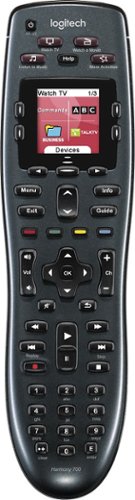
Manage up to 8 of your home theater electronics devices with this Logitech Harmony 700 915-000162 universal remote, which features a brilliant color command screen for easy navigation. One-touch activity buttons simplify device selection.
Customer Rating

5
Awesome Remote! My 30 year Quest has Ended!!!
on December 27, 2009
Posted by: CrazyLar
from Houston, TX
A miracle has happened! I programmed a remote control that controls everything on our home theater system! it's a Logitech Harmony 700 from best buy on sale for $135 bucks and it even works the karaoke and PC inputs.
Logitech's website will tell you which remotes will support your systems components, before you buy. ( see link below) The buttons are the remote are right were they should be, it's very economical and very intuitive. when you pick up the remote to look at it the back-lite automatically comes on, Wooo!, and once's it's programmed, the keys will be set to work the active device, such as your satellite, or DVD , blueray, etc. etc.. etc...!!!!
One button press turns on and switches all the video and audio inputs to the desired function! If it doesn't, then you hit the "HELP" key on the remote, and follow the easy prompts, such as is the TV ON, Is the input set to DVD? etc.. You dont have to have knowledge of how the components have been connected. Your 65 year old mother will be able to handle it!!! Now it's smart and remembers what you just did to it , and next time it will work on the fly!
You program the remote, via your PC's using the USB cable plugged into the remote, The process is very fluent, just follow the prompts to get the basic functions working, However you can spend a lot of time to customize the remote. It can learn any missing key functions from your old remotes. It's incredible, Way to go Logitech! Way awesome!!! My 30 year Quest to find a remote that works everything has Ended, I would be happy with just that, but the one button press to set all the devices to the desired activity and just automatically work, was way over the top, and I cannot express how excited I am about this remote!!! Way to go logiTech!!! :-)
Logitech's website will tell you which remotes will support your systems components, before you buy. ( see link below) The buttons are the remote are right were they should be, it's very economical and very intuitive. when you pick up the remote to look at it the back-lite automatically comes on, Wooo!, and once's it's programmed, the keys will be set to work the active device, such as your satellite, or DVD , blueray, etc. etc.. etc...!!!!
One button press turns on and switches all the video and audio inputs to the desired function! If it doesn't, then you hit the "HELP" key on the remote, and follow the easy prompts, such as is the TV ON, Is the input set to DVD? etc.. You dont have to have knowledge of how the components have been connected. Your 65 year old mother will be able to handle it!!! Now it's smart and remembers what you just did to it , and next time it will work on the fly!
You program the remote, via your PC's using the USB cable plugged into the remote, The process is very fluent, just follow the prompts to get the basic functions working, However you can spend a lot of time to customize the remote. It can learn any missing key functions from your old remotes. It's incredible, Way to go Logitech! Way awesome!!! My 30 year Quest to find a remote that works everything has Ended, I would be happy with just that, but the one button press to set all the devices to the desired activity and just automatically work, was way over the top, and I cannot express how excited I am about this remote!!! Way to go logiTech!!! :-)
Logitech's remote site.
http://www.logitech.com/index.cfm/remotes/&cl=us,en
http://www.logitech.com/index.cfm/remotes/&cl=us,en
P.S. Once you've purchased the remote, you will install the software on you pc, which will take you to logitech's website to create a free account that will keep your remotes setup.
What's great about it: Works all my deviice, Logitech's website will Confirm this before you buy.
What's not so great: No CON's, except I just bought the remote, so i dont know about durability.
I would recommend this to a friend!
Ease of Use

5
Durability

3

Share this review:


+1point
1of 1voted this as helpful.
CrazyLar's Review Comments
CrazyLar has not submitted comments on any reviews.
CrazyLar's Questions
CrazyLar has not submitted any questions.
CrazyLar's Answers
CrazyLar has not submitted any answers.