
Share RobertWOhio72's profile


RobertWOhio72
RobertWOhio72's stats
- Review count1
- Helpfulness votes1
- First reviewJanuary 30, 2010
- Last reviewJanuary 30, 2010
- Featured reviews0
- Average rating4
Reviews comments
- Review comment count0
- Helpfulness votes0
- First review commentNone
- Last review commentNone
- Featured review comments0
Questions
- Question count0
- Helpfulness votes0
- First questionNone
- Last questionNone
- Featured questions0
Answers
- Answer count0
- Helpfulness votes0
- First answerNone
- Last answerNone
- Featured answers0
- Best answers0
RobertWOhio72's Reviews
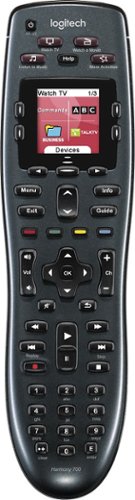
Manage up to 8 of your home theater electronics devices with this Logitech Harmony 700 915-000162 universal remote, which features a brilliant color command screen for easy navigation. One-touch activity buttons simplify device selection.

Posted by: RobertWOhio72
from Ohio
I have been using the Logitech 700 remote for about a month with my simple setup:
Samsung 46" LED 120Hz
AT&T U-verse digital set top IPTV/DVR
Sony Playstation 3
MS Xbox 360
Samsung 46" LED 120Hz
AT&T U-verse digital set top IPTV/DVR
Sony Playstation 3
MS Xbox 360
I gravitated to this remote because of its price (I have only those few devices to tie together) and because of Logitech's well-received software and device database.
While it took some reading of the forums there, before purchasing I was able to use Logitech's website to confirm support for all of my devices by entering their manufacturer part numbers.
When I got this remote home, it was a matter of taking it out of the box, installing the Logitech software from the CD, entering my device part numbers, and answering a few confirmation questions for each "Activity". In my case the software made it's own decisions about what devices to assign to "Activity" function buttons.. for instance, while "Watching TV", the volume buttons send signal to the TV, while pretty much every other button send signal to the AT&T set top.
Once set up the remote will take care of everything for you. I assigned my PS3 to "Watch a Movie", and my XboX to "Play Music" (just using what they give me). When I switch between "watch TV" and watch movie, the AT&T box powers down, the TV changes input and the PS3 gets powered on.
All of the buttons work with the PS3 and XboX360 and my digital set top. Using the software to map "deep" functions (normally accessed through the LCD) to regular buttons is pretty easy, just switch tabs on the main screen, select the activity and assign/re-assign the "real" buttons as desired.
It is great that it works with the PS3, but the price of the Bluetooth adapter felt about $20 too high. (The remote is all IR, and uses a special adapter to bind with the PS3).
I am still impressed with how I had my basic set up ready to go and working in about 30 minutes with this Logitech. The price and unnecessary complexity of other universals had abated my interest in this market.
This remote looks and feels almost like a regular cable remote. You have to make sure the device is pointed in the right direction when buttons are pressed, but this thing just WORKS.
For me this was a no fuss situation that relieved my living room of 3 remotes. It really does tie the room together.
What's great about it: Price, Familiar form, uncluttered buttons, works with everything, all functions!
What's not so great: Cannot charge in-remote and use sumultaneously, PS3 Adapter not cheap
I would recommend this to a friend!
Ease of Use

4
Durability

3
Share this review:


+1point
1of 1voted this as helpful.
RobertWOhio72's Review Comments
RobertWOhio72 has not submitted comments on any reviews.
RobertWOhio72's Questions
RobertWOhio72 has not submitted any questions.
RobertWOhio72's Answers
RobertWOhio72 has not submitted any answers.