
Share LarryWB's profile


LarryWB
LarryWB's stats
- Review count1
- Helpfulness votes2
- First reviewJanuary 27, 2010
- Last reviewJanuary 27, 2010
- Featured reviews0
- Average rating4
Reviews comments
- Review comment count0
- Helpfulness votes0
- First review commentNone
- Last review commentNone
- Featured review comments0
Questions
- Question count0
- Helpfulness votes0
- First questionNone
- Last questionNone
- Featured questions0
Answers
- Answer count0
- Helpfulness votes0
- First answerNone
- Last answerNone
- Featured answers0
- Best answers0
LarryWB's Reviews
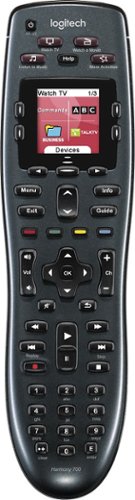
Manage up to 8 of your home theater electronics devices with this Logitech Harmony 700 915-000162 universal remote, which features a brilliant color command screen for easy navigation. One-touch activity buttons simplify device selection.

Posted by: LarryWB
from Schodack Landing, NY
When the Remote came in, I got pretty excited as it said it handled 6 items. I was disapointed though when I realized I had forgotten to include the TV. So.. I have one unit that I have to keep the other remote at hand for.
That said, Let me say that the remote works great once programmed. I give it a 4 for operation. Just remember, if you have more than three units, you may want to spend some time up front planning your program before setting up the remote. Setup itself is easy, it is the planning that takes the time. And as you add units, the programming can become rather complicated.
Each unit you add becomes the first on your devices list and each program you set up becomes the first program on your program list. That means that if you create the program you are going to use first, when you finish programming, it is the last item on your list which could be several pages deep unless you plan ahead.
I have to admit I have a pretty complicated setup. My 50' Wide Screen LCD Projection TV, the Cable company DVR, a Blue Ray Player, a Combination VCR/DVD Recorder/Player w/out a tuner, a DVD recorder with a Digital Tuner and a Western Digital Media player that accepts any USB disk drive (inclluding flash drives) wth anything from photos to full length movies on a single drive. Since all units are HDMI capable and I only have one HDMI input on my TV I also have to have a 5-way HDMI Switch. This setup also required adding a 3-way Digital signal splitter on the incoming cable line.(actually, I could use a 4-way, but I'll make do).
There was also the logistics of connecting everything so it would function properly when in use.
Now determining what units needed to be powered on and when just became a logistical programming nightmare.
Here's a hint. Let's say you want to switch from watching TV from the Cable DVR to watch a DVD movie on the DVD player. You need the DVD player on so you can load the DVD, then you need to switch the output from the Cable box to the DVD player (this might be as simple as switching inputs on the TV) and finally you need to turn off the Cable box. This way, you always have inpput to the TV.
You may also want to program a separate program for watching (not switching) the DVD player where you start with all components off. - This time your steps are: turn on the DVD Player, Make sure the correct input to the TV is selected and turn on the TV. In either case, you may want to remember to open the DVD tray to accept the DVD you are going to watch. Can you tell what step this would be?
I'm pretty Tech Savvy (it is what I do for a living and is also mmy hobby) and after a month I still do not have everything programmed the way I would like it - It could take months of a little here and a little there.
When programming, which is easy after you have everything planned out, you need to make cetrtain the functions for say the TV and the DVD/VCR Recorder and the cable box controls didn't collide when setting up a one-button program to turn on the Recorder, switch the HDMI output to the recorder, Turn on the Cable box which has an analog output going directly to the recorder in order to copy Recordings from the cable box to a DVD or VCR Tape, then turn on the TV so I could see what I was recording. That takes some real planning.
Now if you just have a TV, a DVD player and a Cable box, and the TV has more than one HDMI input, you are good to go. Programming will be pretty straight forward and once programmed correctly, it works really great.
There are a couple of things I'd like to see in future models though.
1. Allow drag and drop of each program during setup so they can be placed to the desired position in the display without having to plan it out completely before hand..
2. Lock the volume control to whatever unit you program it to (TV, Stereo, etc) so that you can still control the volume after switching from say the cable to watching a DVD.
1. Allow drag and drop of each program during setup so they can be placed to the desired position in the display without having to plan it out completely before hand..
2. Lock the volume control to whatever unit you program it to (TV, Stereo, etc) so that you can still control the volume after switching from say the cable to watching a DVD.
So now that you have read my review, go get yours and take the time to set it up the way you want it. You won't be sorry.
What's great about it: Lots of combinations to set up, learning mode to program keys not set up through codes
What's not so great: Setup can be tedious, number pad too low on the remote, Can't rearrange the programs as needed.
I would recommend this to a friend!
Ease of Use

4
Durability

3
Share this review:


+2points
2of 2voted this as helpful.
LarryWB's Review Comments
LarryWB has not submitted comments on any reviews.
LarryWB's Questions
LarryWB has not submitted any questions.
LarryWB's Answers
LarryWB has not submitted any answers.