
Share S2KTurbo's profile


S2KTurbo
S2KTurbo's stats
- Review count1
- Helpfulness votes8
- First reviewOctober 7, 2010
- Last reviewOctober 7, 2010
- Featured reviews0
- Average rating5
Reviews comments
- Review comment count0
- Helpfulness votes0
- First review commentNone
- Last review commentNone
- Featured review comments0
Questions
- Question count0
- Helpfulness votes0
- First questionNone
- Last questionNone
- Featured questions0
- Answer count2
- Helpfulness votes0
- First answerOctober 13, 2010
- Last answerOctober 13, 2010
- Featured answers0
- Best answers0
S2KTurbo's Reviews
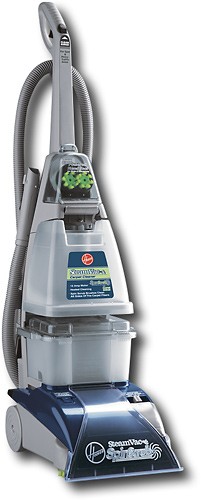
This Hoover SteamVac features a SpinScrub multiple brush system for outstanding cleaning performance. The translucent tank makes it easy to view water levels.
Posted by: S2KTurbo
from Salt Lake City, UT
This Steam-Vac, for the price, is the best around. I would have given it the full the full feature value, but it didn't come with the hard floor attachment (cheap to purchase separately though). It does a very good job on deep stains, and the combination sufficient volume of both the dirty and clean water tanks allows for plenty of cleaning time between fill-up, and comes with a mid-sized bottle of carpet cleaner inluded.
The two included attachments work great, only fall back on those is the process of changing from regular function to the attachments, but still, not that big of a downfall at all. Considering the price, there isn't a better steam-vacuum around, and I've owned a few at this point, most of witch at least $100 more. While all Wet-vac systems involve an inherent amount of cleaning, this one falls about in the middle as far as difficulty and time consumption.
The cleaning process is made somewhat easier by features allowing the crucial elements to be removed and disassembled easily, allowing most to be cleaned in the sink. It also includes a handy tool for reaching hard to reach dirt/buildup inside the suction nozzle, only downfall (maybe I missed it) is there is nowhere to store it on the vacuum). Cleaning and flushing the system on all models of steam vacuums is a must, leaving too much carpet solvent in the system can cause degradation of connections and seals, and failure to allow all moisture to evaporate will result in mold and bacterial, causing the equipment to not function properly, in addition to making your carpet smell worse, rather than cleaning it.
Overall, I'd recommend this to anyone, amazing product for the price. Just remember to maintain and clean it, no way around that. One additional feature that is great is the ability to control the amount of solution/steam hitting the carpet, not only does this extend the time between refills, but saves money on carpet cleaner, as well as cutting down on drying time, hit the button to add some extra in stained and high traffic areas, and use the normal trigger for everything else. One final note, some assembly required, and buy it, I would buy it again...
The two included attachments work great, only fall back on those is the process of changing from regular function to the attachments, but still, not that big of a downfall at all. Considering the price, there isn't a better steam-vacuum around, and I've owned a few at this point, most of witch at least $100 more. While all Wet-vac systems involve an inherent amount of cleaning, this one falls about in the middle as far as difficulty and time consumption.
The cleaning process is made somewhat easier by features allowing the crucial elements to be removed and disassembled easily, allowing most to be cleaned in the sink. It also includes a handy tool for reaching hard to reach dirt/buildup inside the suction nozzle, only downfall (maybe I missed it) is there is nowhere to store it on the vacuum). Cleaning and flushing the system on all models of steam vacuums is a must, leaving too much carpet solvent in the system can cause degradation of connections and seals, and failure to allow all moisture to evaporate will result in mold and bacterial, causing the equipment to not function properly, in addition to making your carpet smell worse, rather than cleaning it.
Overall, I'd recommend this to anyone, amazing product for the price. Just remember to maintain and clean it, no way around that. One additional feature that is great is the ability to control the amount of solution/steam hitting the carpet, not only does this extend the time between refills, but saves money on carpet cleaner, as well as cutting down on drying time, hit the button to add some extra in stained and high traffic areas, and use the normal trigger for everything else. One final note, some assembly required, and buy it, I would buy it again...
What's great about it: Value, Function, Easily cleaned (in relation to other Steam-Vac's), Heated Cleanin, Adjustable water flow+scrubber
What's not so great: Doesn't come with hard floor attachment (cheap to add, but still), Some assembly required.
I would recommend this to a friend!
Other Best Buy Products I Recommend
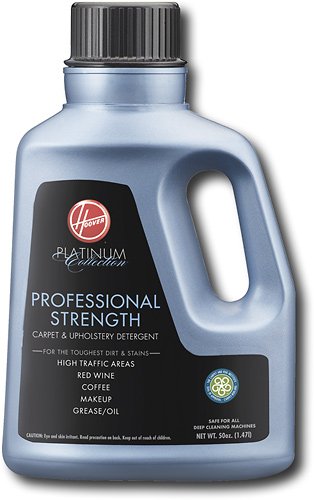
Hoover - 50 oz. Platinum Collection Professional Strength Carpet and Upholstery Detergent - Blue/Black
 (6)
(6)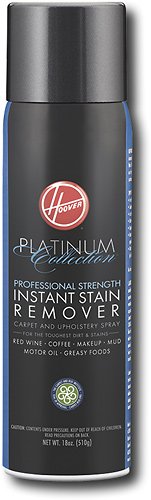
Hoover - Platinum Collection Professional Strength Instant Stain Remover - Black
 (38)
(38)
Hoover - 48 oz. Anti-Allergen Carpet Cleaner Detergent
 (1)
(1)Quality

5
Features

4
Performance
5


Share this review:


+7points
8of 9voted this as helpful.
S2KTurbo's Review Comments
S2KTurbo has not submitted comments on any reviews.
S2KTurbo's Questions
S2KTurbo has not submitted any questions.
S2KTurbo's Answers
Mobile Phones
Mobile Phones
how can i send a picture from my album to my e-mail address
Some providers allow you to send a "MMS" which typically allows you to send pictures and video clips to other phones, but this MMS option, maybe called Multi-Media-Message, often allows you to type in an e-mail address (which in this cas would be your own) in the "to" section, after having either previously selected the image to be sent, or select the image to be sent after, by either an icon or menu option on your cell. You could always link your phone via usb or BluTooth (if equipped on both computer and cell device) and transfer the image directly to your computer. PS. Almost all macs have BluTooth, while many modern PCs do, if they dont relatively cheap adapters are available.
It depends largely upon your phone. But here is another option; If your phone is equipped with an e-mail service, and allows you to attach things to an e-mail your creating, then you will be able to do so. Again, this function varies upon phone, plan, image size, and a number of other things. Usually, to accomplish this (assuming your phone and plan allow it) you would create an e-mail on your phone, addressed to yourself, select the add attachment option (may be in the menu, or displayed on the e-mail creation screen), find the file you would like to upload by following the prompts on your phone, and browsing for the correct file, and, if all goes well, send the email to yourself, and view it on your computer.
Some providers allow you to send a "MMS" which typically allows you to send pictures and video clips to other phones, but this MMS option, maybe called Multi-Media-Message, often allows you to type in an e-mail address (which in this cas would be your own) in the "to" section, after having either previously selected the image to be sent, or select the image to be sent after, by either an icon or menu option on your cell.
It depends largely upon your phone. But here is another option; If your phone is equipped with an e-mail service, and allows you to attach things to an e-mail your creating, then you will be able to do so. Again, this function varies upon phone, plan, image size, and a number of other things. Usually, to accomplish this (assuming your phone and plan allow it) you would create an e-mail on your phone, addressed to yourself, select the add attachment option (may be in the menu, or displayed on the e-mail creation screen), find the file you would like to upload by following the prompts on your phone, and browsing for the correct file, and, if all goes well, send the email to yourself, and view it on your computer.
Some providers allow you to send a "MMS" which typically allows you to send pictures and video clips to other phones, but this MMS option, maybe called Multi-Media-Message, often allows you to type in an e-mail address (which in this cas would be your own) in the "to" section, after having either previously selected the image to be sent, or select the image to be sent after, by either an icon or menu option on your cell.

Products from my answer
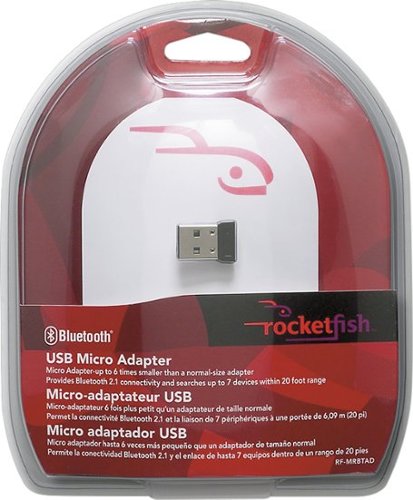
Rocketfish - Micro Bluetooth USB Adapter - Multi
 (538)
(538)15 years, 7 months ago
by
S2KTurbo
Salt Lake City, UT
Mobile Phones
Mobile Phones
How do I get my Verizon phone to accept SMS messages from an iPod touch user?
Verizon sent me a message saying if I wanted to continue to get SMS messages, I had to reply to the SMS message I received from an iPod touch user, but I forgot and now I can't receive any SMS messages as texts.
An iPod Touch is not a CDMA phone, and cannot transmit SMS messages, if you want to be able to send a message to your buddy with the iPod, use a mobile instant messaging service (AIM, Yahoo, Skype) which would have to be downloaded on both devices, you can use it anywhere, as long as you have some sort of data plan on your phone, while an iPod Touch is not a CDMA/3G enabled cellular device, he/she would have to be connected to a wifi network, while you both are logged into your messaging program of choice.
15 years, 7 months ago
by
S2KTurbo
Salt Lake City, UT