
Share Whitty1's profile


Whitty1
Whitty1's stats
- Review count1
- Helpfulness votes8
- First reviewJune 5, 2010
- Last reviewJune 5, 2010
- Featured reviews0
- Average rating5
Reviews comments
- Review comment count0
- Helpfulness votes0
- First review commentNone
- Last review commentNone
- Featured review comments0
Questions
- Question count0
- Helpfulness votes0
- First questionNone
- Last questionNone
- Featured questions0
- Answer count1
- Helpfulness votes0
- First answerJune 5, 2010
- Last answerJune 5, 2010
- Featured answers0
- Best answers0
Whitty1's Reviews
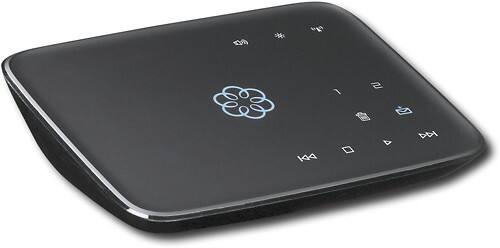
This hub works with your high-speed Internet and your home phones to deliver VoIP phone services and supports up to 4 Ooma Telo handsets. With easy setup, you can enjoy unlimited U.S. calling and low international rates.*

Posted by: Whitty1
from Fort Mill, SC
I tried the magic jack and it seemed to work ok on a regular phone, but when I bought a Dect 6.0 phone it wouldn't ring so I decided to try the ooma phone system. I researched online and I found that there are some issues with magic jack working with some phones.
I made the mistake of trying to set it up before activating it, but it was easy enough to correct. You want to activate your phone on the web site before hooking up ooma.
It seems to work perfect. They recommend hooking it between your cable modem and router, but I didn't like it that way. So I have it hooked into one of the out ports on my router and it works fine that way. They say they usually update it on the weekends at night, but twice last weekend I seen everything blinking and updating and it was around noon. So I guess it would have knocked you off the phone if you were on it? I don't know? It only took a couple of minutes. The first time you hook it up, it will take several minutes for the first update.
Best Buy had these $50 off, so I figure in 4 months it will pay for itself. The ooma premier is $9.99 a month and with that you get a second phone line and blocking/forwarding options. I think when the trial of premier runs out, I will buy a year. When you buy a year, they will either transfer you phone number free or send you a free second cordless handset. So for $10 a month, you have 2 lines with all the features. It seems to be the best deal going unless you can use the magic jack. You need your computer on and logged in to use magic jack, but with ooma you don't need a computer. I keep my cable modem on all the time anyway, so I always have my phone with ooma.
I highly recommend it though I have only had it a couple of weeks.
What's great about it: Save money on your phone bills and it pays for itself in 4 months.
What's not so great: Not a lot of phone numbers for my area
I would recommend this to a friend!
Ease of Use

5
Features
5
Performance
5
Share this review:


+8points
8of 8voted this as helpful.
Whitty1's Review Comments
Whitty1 has not submitted comments on any reviews.
Whitty1's Questions
Whitty1 has not submitted any questions.
Whitty1's Answers
Do I need a cell phone?
Can I use bluetooth tecknology to be able to use my landline phone with a mobile device that will dial by phone numbers or by individual name using voice command? Such as that used in the ford Escape.
It supports blue tooth and you can configure your premier options to ring your cell phone when someone calls your ooma number, and you can answer with either handset.
16 years ago
by
Whitty1
Fort Mill, SC