
Share Mattd313's profile


Mattd313
Mattd313's stats
- Review count1
- Helpfulness votes1
- First reviewJanuary 3, 2011
- Last reviewJanuary 3, 2011
- Featured reviews0
- Average rating5
- Review comment count1
- Helpfulness votes3
- First review commentJuly 15, 2010
- Last review commentJuly 15, 2010
- Featured review comments0
Questions
- Question count0
- Helpfulness votes0
- First questionNone
- Last questionNone
- Featured questions0
Answers
- Answer count0
- Helpfulness votes0
- First answerNone
- Last answerNone
- Featured answers0
- Best answers0
Mattd313's Reviews
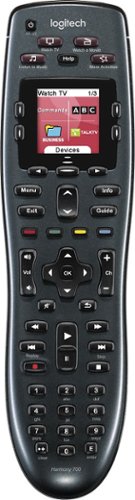
Manage up to 8 of your home theater electronics devices with this Logitech Harmony 700 915-000162 universal remote, which features a brilliant color command screen for easy navigation. One-touch activity buttons simplify device selection.
Customer Rating

5
Don't read my review- just go buy one... NOW
on January 3, 2011
Posted by: Mattd313
from Dallas
I got this last night, and I'm in love and in regret that I didn't buy one earlier. A couple great things- pick the remote up and the blacklight turns on so you can see the buttons in a dark room. My other remote can turn on all my stuff at once, similar to the Harmony, but the Harmony will turn off my satellite box and turn on the blu ray player when I click watch blu ray when on satellite mode. Also, I've got it programmed with my Lutron Maestro IR light controller. Pretty nice to be able to start a movie, then click a button to dim the lights to a perfect level. Phone rings, pause- lights brighten back up. The possibilities seem endless with the remote, and I'm loving it. I absolutely don't need a 120 dollar remote, my 20 dollar remote "worked" fine- but so did having several remotes. This investment provides huge convenience and it's a nice little gadget to add to my man cave.
What's great about it: Functionality
What's not so great: No charging dock
I would recommend this to a friend!
Ease of Use

5
Durability

4
Share this review:


+1point
1of 1voted this as helpful.
Mattd313's Review Comments
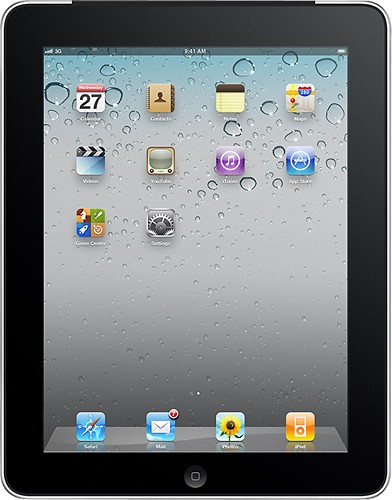
Introducing iPad. It's the best way to experience the Web, e-mail, photos, and video. All on a big, beautiful Multi-Touch screen. With just the touch of a finger.
Overall 2 out of 5
2 out of 5The lightweight! (light in lbs in features too!):)
By officejunkiee
from san diego
My Dad purchased an IPad for me and I tried for a while and took it back. Then friend of mine got one, (this one) I tried it out for another 2 weeks, but other thant the size of the memory it was essentially the same, so I wrote another review about this one.
Other than the memory size, this is exactly the same as the 64GB one.
Other than the memory size, this is exactly the same as the 64GB one.
The virtual keyboard is ok, but I type by feel, so for me a real keyboard is much more efficient. With the virtual keyboard, i Find that I had to keep looking at the IPad to make sure I was hitting the right keys. It was actually a little distracting as i was concentrating between typing correctly, and trying to focus on taking notes. But I could deal with it.
The biggest problem came when I was trying to use this for serious reports. In other words, when I sat down and tried to type for more than 8-10 minutes at a time, this was just not comfortable and kind of annoying. Not the same as having a real keyboard at all.
I also realized just how important USB is for a college student. You wouldn't think so, but it is a MUST!!!! And this does not have one...
When it came to printing out reports or projects, that was a bit of a problem as well....not to mention multitasking!!!!!!!
My friend says it will get it soon, but when i had it I definitely needed it and didn't have it. How can you have a computing device without the ability to multitask????? If it eventually gets it, great, but I needed it now, not in the possible future.
It was great for the web, (except for the ones with blank spots), but i realized I needed more.
Also because I go to college out of town, I was using my friend's computer to SKYPE. Nice way to keep in touch with friends and family, except the IPad didn't have a camera, so not really feasible.
I took it back and got another laptop. It gave me all I needed and more. Trust me when I say that my laptop can do everything I need to do and more, and still cheaper than the IPad. I can also get my college books in a digital format on my laptop, so it is easier than carrying around a bunch of books. Anything the IPad can do, my laptop can do and probably better, and probably more. And definitely for cheaper as well.
Not that the IPad is bad, it just needs to be cheaper. As a "starving" college student, I definitely need the best deal money can buy. Maybe if you need something for entertainment, then the IPad is for you, but for me, I needed something for more, and a laptop gave that to me and the entertainment value as well.
Took it back and got a laptop. Problem solved.
This wasn't much better than the other IPad my dad purchased for me to try. In fact it was the same.
The biggest problem came when I was trying to use this for serious reports. In other words, when I sat down and tried to type for more than 8-10 minutes at a time, this was just not comfortable and kind of annoying. Not the same as having a real keyboard at all.
I also realized just how important USB is for a college student. You wouldn't think so, but it is a MUST!!!! And this does not have one...
When it came to printing out reports or projects, that was a bit of a problem as well....not to mention multitasking!!!!!!!
My friend says it will get it soon, but when i had it I definitely needed it and didn't have it. How can you have a computing device without the ability to multitask????? If it eventually gets it, great, but I needed it now, not in the possible future.
It was great for the web, (except for the ones with blank spots), but i realized I needed more.
Also because I go to college out of town, I was using my friend's computer to SKYPE. Nice way to keep in touch with friends and family, except the IPad didn't have a camera, so not really feasible.
I took it back and got another laptop. It gave me all I needed and more. Trust me when I say that my laptop can do everything I need to do and more, and still cheaper than the IPad. I can also get my college books in a digital format on my laptop, so it is easier than carrying around a bunch of books. Anything the IPad can do, my laptop can do and probably better, and probably more. And definitely for cheaper as well.
Not that the IPad is bad, it just needs to be cheaper. As a "starving" college student, I definitely need the best deal money can buy. Maybe if you need something for entertainment, then the IPad is for you, but for me, I needed something for more, and a laptop gave that to me and the entertainment value as well.
Took it back and got a laptop. Problem solved.
This wasn't much better than the other IPad my dad purchased for me to try. In fact it was the same.

Mattd313
July 15, 2010
You don't need to use a software keyboard. Once you get used to it, it is fine though- believe me. If you don't want to adapt, you can use a bluetooth physical keyboard.
As for no USB, that's not entirely true. Check the camera connection kit.
Multi-tasking is coming to the iPad this fall.
And your laptop definitely can't do everything the iPad can. One thing I bet it can do better though, is crash.
The iPad wasn't meant to replace a computer. That seems to be what you were trying to do. You cannot replace your computer with an iPad, unless all you do on a computer is play silly games and browse the web, email, etc.
As for no USB, that's not entirely true. Check the camera connection kit.
Multi-tasking is coming to the iPad this fall.
And your laptop definitely can't do everything the iPad can. One thing I bet it can do better though, is crash.
The iPad wasn't meant to replace a computer. That seems to be what you were trying to do. You cannot replace your computer with an iPad, unless all you do on a computer is play silly games and browse the web, email, etc.
+1point
3of 5voted this comment as helpful.
Mattd313's Questions
Mattd313 has not submitted any questions.
Mattd313's Answers
Mattd313 has not submitted any answers.