


TechEnthusiast's stats
- Review count209
- Helpfulness votes894
- First reviewAugust 16, 2014
- Last reviewJune 2, 2026
- Featured reviews0
- Average rating4.1
Reviews comments
- Review comment count0
- Helpfulness votes0
- First review commentNone
- Last review commentNone
- Featured review comments0
Questions
- Question count0
- Helpfulness votes0
- First questionNone
- Last questionNone
- Featured questions0
- Answer count13
- Helpfulness votes17
- First answerAugust 25, 2016
- Last answerJanuary 22, 2022
- Featured answers0
- Best answers2

The TCL QM7L Series delivers powerful SQD-Mini LED performance for movies, sports, and gaming. TCL~s Deep Color System with Super Quantum Crystals (Super QLED), UltraColor Filter, and Advanced Color Purity Algorithm produces vivid, accurate color and impressive clarity. With LD2100+ Precise Dimming Series and up to 3,000 Peak Nits, QM7L delivers bold contrast and impactful HDR. The TSR AI Processor optimizes every scene, while a 144Hz native refresh rate with Motion Rate 480 ensures smooth, crisp motion. Built on the anti-reflective HVA 2.0 Pro panel, the experience is completed with Audio by Bang & Olufsen and Dolby Atmos FlexConnect, allowing you to expand your setup with optional subwoofer and satellite speakers for a more immersive, room-filling sound experience.
Customer Rating

4
Great TV but I disliked the stand it came with.
on June 2, 2026
Posted by: TechEnthusiast
My 60" TV recently broke, and I was eager to get a similarly sized replacement. I saw this TV was just a little bigger, and I grabbed it as soon as I saw it.
The physical setup wasn't quite as smooth as I would have liked.
It really does take two people to setup this TV. You could probably get away with only having one person if it wasn't for the setup of the stand.
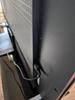
I am not a fan of the stand that comes with this TV. It feels distressingly thin, it comes in multiple parts that have to be wedged together and then screwed in, and it requires elevating the TV at an angle (while not scraping the screen) in order to get it attached to the TV itself.
The TV does come with standard VESA mounts with standoffs. I'd recommend just getting a third party stand instead.
The software setup went very smoothly.
The TV comes with the standard Google TV interface. It's easy to navigate and integrates well with the rest of Google's products and services.
The TV also comes with Gemini built in. While the TV is on, you can talk to it like you would with a Nest speaker.
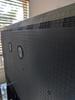
The power cord comes out of the left side of the TV, and it's a little short. The ports are all positioned on a panel on the right side. The TV has ample HDMI ports.
Picture and sound quality are great. Everything looks bright and crisp, and the sound fills the room nicely.
I like this TV, and I hope it lasts me for a while.
I would recommend this to a friend!



Share this review:


0points
0of 0voted this as helpful.
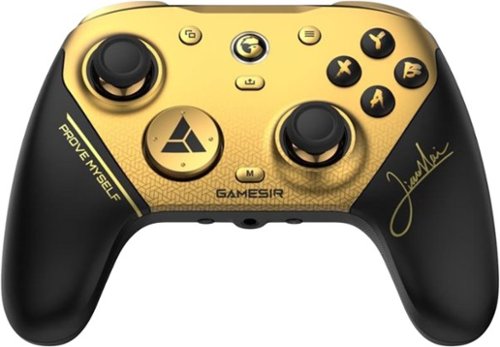
Introducing the G7 Pro 8K PC Champion Edition wireless esports controller~crafted for competitive PC gaming, co-created with world fighting game champion XiaoHai. Boasting 8K Hz wired/2.4G wireless ultra-responsive polling, it captures every move with lightning precision, empowering you with a true competitive edge.
Posted by: TechEnthusiast
I really like this controller.
The controller uses the Xbox button layout and works seamlessly with my Windows PC. It can connect via either USB dongle or Bluetooth. Connecting via Bluetooth, it was recognized as a Xinput controller on my system.
It's a smidge small, but it's weighted perfectly for my taste. The buttons are all well positioned and easy to press, and the buttons have just the right amount of resistance to them.
Aesthetically, the controller looks quite striking. The black and gold color palette looks terrific.
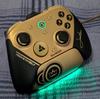
The charging dock also looks good on my desk and is very easy to use.
The charging dock also looks good on my desk and is very easy to use.
The panels on the grip of the controller are held in place magnetically and pop off a little too easily.
The controller comes with a couple interchangeable Dpads, but I couldn't figure out how to get the one it came with off. It appears to be very sturdily attached.
There was no noticeable lag when using the controller. I was able to dash around in my roguelite without dying once.
Battery life is "okay." I was able to get through a day's worth of gaming before I had to recharge. I wish it lasted a bit longer, but this is adequate for my needs.
I would recommend this to a friend!
Share this review:


0points
0of 0voted this as helpful.
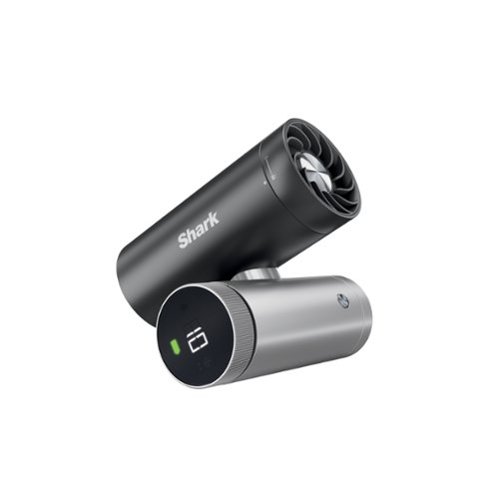
Meet Shark ChillPill, the only 3-in-1 fan, mist, and InstaChill personal cooling system. ChillPill delivers 3 customizable ways to powerfully cool indoors and outdoors. The high-speed fan delivers airflow up to 25 ft per second, while the dry-touch evaporative misting attachment provides an instant refresh. Shark~s revolutionary InstaChill Cooling Plate chills in seconds to drop your skin temperature by up to 16~F on contact.
Customer Rating

5
Personal, portable cooler.
on April 23, 2026
Posted by: TechEnthusiast
Summer is my least favorite season. In winter, if you're too cold, then you can toss on a sweater or burrow under some blankets. But summer? There's not much you can do aside from cranking up the AC or parking yourself in front of a fan.
Unfortunately, I often find myself in hot environments where I just can't get comfortable.
This little "ChillPill" should help with that a lot.
The device has 3 interchangeable heads: a fan, a cooling plate, and a mister.
I was a little dismayed to see that the mister uses a wick that has to be replaced every 30 days or so. The device comes with quite a few, but I worry about finding replacements once these run out. I don't plan on using this head very often because of this.
The fan and cooling plate don't use any consumables though and can be used indefinitely.
Changing out the heads is quick and easy. Just turn the head slightly to unlock it, and lift it off the base.
The cooling plate works surprisingly well, but it doesn't have much surface area. It feels a lot like running an ice cube against your skin. It's a small bit of relief, but it doesn't make a substantial difference.
The fan works quite well. It has lots of speed settings to select from, and it can easily be positioned for optimal airflow.
I think this device will be a real lifesaver this summer.
I would recommend this to a friend!


Share this review:


0points
0of 0voted this as helpful.
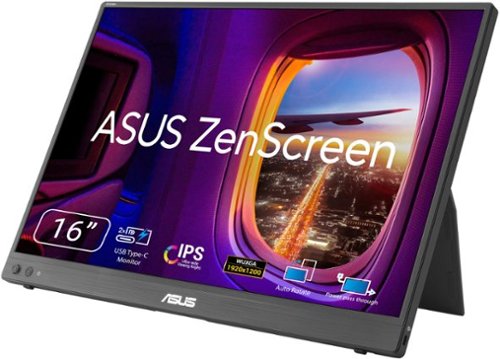
ASUS ZenScreen MB16FC is a 16-inch portable IPS monitor with a 16:10 WUXGA resolution that expands your workspace anywhere. Featuring dual USB~C with power pass-through, mini-HDMI, auto-rotation support, and T~V-certified eye care, it~s a lightweight, versatile second screen for hybrid work and travel, with sleek design and simple one-cable connectivity
Customer Rating
5
Great portable monitor from a quality brand.
on April 15, 2026
Posted by: TechEnthusiast
I do quite a bit of work from my local coffee shop and having a second monitor comes in handy sometimes.
This ASUS ZenScreen monitor is light-weight, very thin, bright, and vivid.
My first time connecting the monitor, I did encounter some difficulties. The screen flickered on and off repeatedly and my cursor was bouncing all over the place.
Unplugging the monitor and then opening Windows' display settings BEFORE plugging it back in seemed to fix the issue.
The monitor comes with cables to connect with either HDMI or USB-C. The monitor does need to be powered over a USB-C connection though (a single USB-C from the laptop to the monitor works for both power and video. If you're going to use an HDMI connection then the monitor will need to be plugged into the wall somehow or another USB-C port).
The image is impressively bright and colorful. The contrast is also quite impressive. The black are nice and dark, and the whites are nice and bright.
The monitor comes with a padded carrying case to keep it safe. I do wish that the monitor had some type of protection for the screen itself though. You really can't help but touch the face of the monitor when pulling it out of the carrying case.
It should be noted that this is not a touchscreen.
I also wish that the monitor had USB-C ports on both sides. The monitor only has ports on the left-hand side. There are times where I'd prefer to have the ports on the opposite side.
I think this is a great monitor, and it'll really help my productivity when working away from home.
I would recommend this to a friend!




Share this review:


0points
0of 0voted this as helpful.
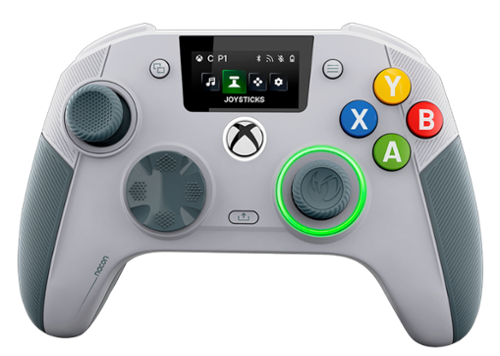
The REVOLUTION X UNLIMITED wireless controller by NACON, officially licensed for Xbox, is compatible with Xbox One, Xbox Series S, Xbox Series X, Windows PC, and Android. Precise, high-performance, and customizable, it will allow you to stay in control of your game, whatever your playing style. Ergonomic and wireless, it frees your movements and offers you total gaming comfort. Eliminate your opponents thanks to increased responsiveness and formidable precision. Chain victories in your favorite battle royale or FPS/TPS shooter, thanks to an arsenal of fully customizable features and settings, even in the middle of the game, via the integrated control screen. Discover the ultra-high-performance PC mode with very low latency, with a gyroscopic aiming function to stay one step ahead. Designed by and for competitive players, and adapting to all your video games, the REVOLUTION X UNLIMITED will allow you to dominate the competition!
Customer Rating
4
Finicky setup, but well worth it.
on April 3, 2026
Posted by: TechEnthusiast
I recently got an ASUS ROG Ally X, and I needed a controller to use with it when docked to my TV.
I saw that this controller advertised both XBox and PC support, so I thought that it would be the perfect solution for a device that straddles the two platforms.
The controller comes with lots of accessories for adjusting the thumbsticks, weight, and d-pad. Sadly, the instructions for swapping out the thumbsticks and d-pad were lacking, but adjusting the weight of the device was fairly intuitive.
Overall, the controller feels very well constructed. It's solid in the hands and has decent heft even without adding additional weight. The controller comes with a really nice case for storing the controller and the various accessories that it comes with.
Setup was very finicky.
First, you can't connect this controller to an Ally X via Bluetooth and uses it as a controller. It simply doesn't work.
I was able to plug the dongle and charging station into my dock though, and it works great that way. You will need to connect the controller to a PC via the included cable to perform updates though.
Settings are controlled from the "Revolution X Unlimited" app from the Windows store. I didn't fuss with this too much as the default settings worked fine for my needs.
Gameplay was absolutely fantastic. I didn't notice any lag of any sort, and I even managed to finish the game that I've been struggling with for months.
I think this is a great controller. It could do with a better set of instructions for setting it up and configuring it, but it's well worth it.
I would recommend this to a friend!


Share this review:


-1point
0of 1voted this as helpful.
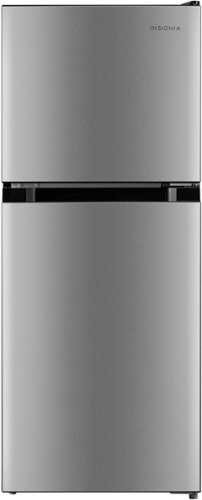
The Insignia 4.5 Cu. Ft. Mini Fridge with Top Freezer has three shelves in the fridge and one in the freezer, and its crisper drawer keeps produce fresh. The fridge compartment has an interior light for spotting exactly what you need inside.
Customer Rating
5
Compact fridge and freezer setup
on December 6, 2025
Posted by: TechEnthusiast
My kitchen's layout is unusual, and there is no way to fit a full-size fridge in the kitchen itself. I had a fridge in the adjoining dining area, but the setup looked "odd," and it was inconvenient having to dart over there to grab things while prepping a meal.
I decided to move my existing fridge to the basement for long-term, bulk food storage and pick up this smaller fridge to keep in the kitchen itself.
So far, it's working very well for my needs.
The fridge keeps food nice and cold. I haven't had any issues with it icing over or being too warm. The temperature settings seem just about perfect.
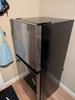
The shelf placement in the fridge portion is a little unfortunate. I had to drop the top shelf down a bracket in order to accommodate standard size water bottles. This wasn't the easiest task to accomplish. The shelves do not move easily. If you want to fit a full gallon size jug of milk or something in this fridge, then you'd have to remove a shelf completely. There is no way that it would fit with the default shelf positioning.
The crisper bin is small, but it's "just" large enough to accommodate a head of iceberg lettuce and a couple small bags of baby peeled carrots (though it's a bit of a tight fit).
The bins on the door are a decent size, and they seem to hold bottles of salad dressing and the like securely.
The freezer is a decent size and has a shelf to separate it into two sections. I was able to easily store my ice cube trays and a couple bags of frozen veggies in it.
I with this fridge was just a smidge larger, and I wish that I was able to fit a gallon of milk in it without removing a shelf, but I'm otherwise quite happy with it.
I would recommend this to a friend!

Share this review:


0points
0of 0voted this as helpful.

Meet the ROG Xbox Ally, a gaming handheld for everyone, combining the freedom of Windows, craftsmanship of ROG, and the power of Xbox into the palm of your hands. Built in partnership with Xbox, the ROG Xbox Ally gives you seamless experience across Xbox Game Pass, Steam, Epic Games, and more in one versatile system. It~s powered by the AMD Ryzen Z2 A processor, delivering smooth, responsive gameplay for both cloud and native titles. With 16GB of LPDDR5 6400 MHz memory and a 512GB SSD, the ROG Xbox Ally is engineered to tackle everything from indie games to AAA titles. Its 60Wh battery power extends play sessions, while the redesigned ergonomics and Xbox-inspired grips keep you comfortable all day. Enjoy crisp, fluid visuals on the 7~ FHD 120Hz display with FreeSync Premium and launch straight into the Xbox full screen experience with just one press of a button.
Customer Rating

3
Good hardware held back by bad software
on November 10, 2025
Posted by: TechEnthusiast
I'm a huge fan of handheld gaming. I tend to game at random intervals in short spurts, so handheld devices have always fit my needs nicely.
This is my first Windows based handheld. I was eager to pick this up as a lot of my favorite games simply aren't compatible with Steam OS, and they aren't available on other platforms.
After playing with this device for a week, my feelings on this device are mixed.
The hardware is excellent. The grips are comfortable, the screen size is terrific, the image quality is great, the buttons are well positioned (though I did have issues with some of the buttons getting "stuck" if pressed at just the right angle), battery life is fairly impressive, and having dual USB-C ports and a micro-SD slot are huge benefits.
My one complaint about the hardware is that it needs more storage space. I've read that the hard drive is user replaceable, but that's not something I'm eager to tackle until I've had the device a bit longer. I'm going to be using a larger micro-SD card in the short term instead.
The software has some serious issues.
I've had several Windows tablets in the past, and I'm no stranger to interacting with the default Windows experience via touchscreen. In a lot of respects, I wish that they'd just kept as the default on this device.
By default, the handheld opens into the XBox app. The user interface is extremely cluttered, and it's trying entirely too hard to sell you stuff. I get the impression that the interface was designed more for making sales than the user experience.
At the time of this review, the device comes with 3 months of GamePass' middle tier option. From within the XBox app, It's extremely unclear as to which games are playable and which games aren't. The interface hits you with a little bit of everything (including games that are only available on console).
XBox has really been pushing cloud gaming lately, but it's unclear which games are able to be played from the cloud as well. Clicking the little cloud icon along the left again brings up an array of games that may or may not be available for this device.
On top of issues with the user interface, I also found that the XBox app liked to freeze when first opened. The only way to get it working again was to hit the physical library button. The app would immediately unfreeze after visiting the library.
The library is also the best way to find which games are installable and cloud playable. You can use the filters along the top of the library to locate these games (note that it has a default filter set for "installed games" when you first open the library. You need to turn this off to actually find anything).
When I first got the Ally, the Armoury Crate software was completely unusable. I got a consistent error about it being unable to update followed by a crash screen. I endured this for three days before I visited ASUS' site, downloaded a fresh copy of Armoury Crate, tried to install it, got told I couldn't install it without first installing ASUS' uninstall utility to remove the previous version, installed and ran that, and FINALLY got a working copy of Armoury Crate on my device.
The Armoury Crate software is a lot cleaner than the XBox app, and it offers more options for customization, but it also lacks integration with GamePass. If you're not planning on using GamePass with this device, you may want to just stick with Armoury Crate for navigating your game library.
Controls are not standardized across applications. I had to learn a completely different set of controls for navigating the Epic Game Store vs. the XBox app or Steam.
I don't like touching the screen on my handheld unless absolutely necessary. Unfortunately, there were several instances (including during the initial Windows setup) when you simply have no choice. Sadly, the screen is an absolute fingerprint magnet.
Once you're actually in a game, the device works well, and the game play is nice and immersive. It's just getting to the point of actually getting into a game that's a struggle.
I think the hardware on this device is excellent, but the software experience isn't very good right now. Software could be fixed with future device updates, so I'm cautiously optimistic that the user experience may improve over time. As it stands at the moment though, device navigation is extremely frustrating.
No, I would not recommend this to a friend.
Share this review:


0points
0of 0voted this as helpful.
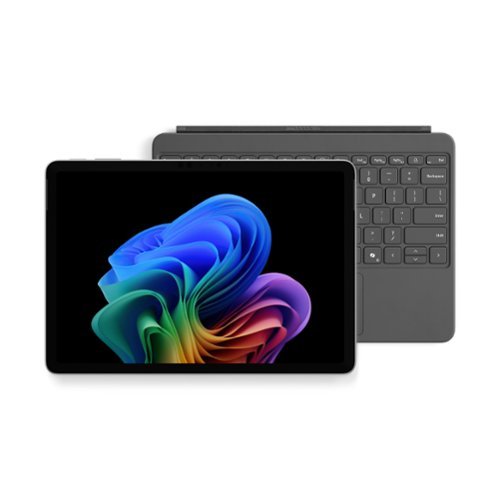
Use the new Surface Pro 12~, a Copilot+ PC, as a powerful tablet with an intuitive touchscreen, touch, voice, and Surface Slim Pen [3] to bring ideas to life, or attach the Surface Pro 12~ Keyboard for a full Windows laptop experience [3]. With built~in AI features, seamless integration across the Windows ecosystem, and an ultra~thin, lightweight design, Surface Pro gives you the freedom and versatility designed for creativity, efficiency and mobility to go beyond what you thought possible.
Customer Rating
3
Solid device but not exceptional
on November 6, 2025
Posted by: TechEnthusiast
I really really want to like this device.
"Surface" has long been synonymous with high quality Windows devices with cutting edge designs.
I was thrilled to get the opportunity to pickup this device, and I was eager to see what new functions and features Microsoft had added with this iteration of the Surface Pro line.
Unfortunately, this device isn't as "Pro" as the name would suggest.
My biggest issue is that the storage isn't replaceable OR explandable. I'm a big fan of installing micro-SD cards to supplement internal storage, but this device has completely done away with the SD card slot. The internal hard drive is soldered on and can't be replaced by the user. The default storage simply isn't adequate for my needs. I'll need to supplement this with a USB-C flash drive or hard drive to make this device work for my needs.
That's a huge blow to my workflow as I have lots of image asset and project files that I like to keep handy and offline (I do graphic design work).
The device has two USB-C ports, and that's it. There are no legacy type-A ports, SD card slots, Surface Connector ports, or any other ports.
The Snapdragon processor seems to work just as well as CPUs from other manufacturers. I didn't encounter any noticeable issues with software compatibility or performance.
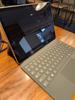
They changed up the Surface keyboard. It's no longer raised at an angle and now sits flat against the desk. Whether or not you'll like this is more a matter of personal taste. It's not as ergonomic as it had been, but it does feel more stable.
Battery life was impressive but not epic. Working at the coffee shop for an hour and a half a day over three days without charging, my battery dipped to about 25% by the third day.
The device does not come with a charger. I found that extremely odd. I understand that phones are shipping without chargers at this point, but a tablet / laptop requires more power than a phone and takes a more specialized type of charger. Fortunately, I still have a couple USB-C laptop chargers from previous devices that I can use.
My biggest takeaway from this device is that it's a little boring. The device works well enough, but it feels very stripped down and simplified. It's extremely reliable, but it's really only suitable for word processing, light photo and video editing, social media, internet browsing, and light media consumption.
This would be an excellent device for a student or writer, but I don't know that it really meets the needs of a business professional or graphic designer.
No, I would not recommend this to a friend.


Share this review:


-2points
1of 4voted this as helpful.

The Philips Norelco Body Groomer 7000 Series is designed for comfortable full body grooming, including intimate and hard-to-reach areas with a selection of combs and a foldable back attachment. Effortlessly switch between full body shaving and body hair trimming using our unique interchangeable dual-head system, without compromising on skin comfort. The dermatologist tested 2D flexing foil shaver head with Optilight functionality adapts to your body's contours and illuminates the target body area for a close, effective, and skin-friendly male grooming. Alternatively, the body trimmer head offers 10 length settings for a precise grooming experience. Our easy to use men's body trimmer & shaver features an ergonomic grip for more control, even in tough-to-reach areas and is 100% showerproof for convenient wet & dry use and easy cleaning. To clean the groomer, place the head and cutting element under running water. The Philips Norelco Men's Body Groomer 7000 Series is built to last, never needs to be oiled, and comes with a warranty of up to 5 years*. The high-power rechargeable hair trimmer battery allows for 120 minutes of cordless use, and you can use the appliance again after a 1-hour charge.
Customer Rating
3
Works okay but they made some odd design choices.
on November 2, 2025
Posted by: TechEnthusiast
I like to keep my body hair nice and trimmed, but shaving can be awkward.
I liked that this body groomer set had an extension handle for reaching hard to reach spots (like your middle back). That being said, they made some odd choices with the design.
The default head with the foil guard is seemingly the only one you can use with the extension tool. There are little clipper teeth along its edges, but I would have preferred to use the actual clipper head for the initial pass and then the foil head to cleanup afterward. Sadly, this isn't an option as the clipper head faces the wrong direction when placed in the extension tool.
The foil head does pull at your hairs some and isn't the most comfortable tool to shave with.
Attaching guards to the clipper head is fairly easy, but removing them is actually quite difficult. At one point, I worried that I'd broken a guard trying to pry it free from the clipper head. Fortunately I hadn't, but it certainly felt like I had given the amount of force it took and the loud "crack" that accompanied the removal.
The guards don't offer a very wide range of options for hair length. They work fine for my needs, but they might not for yours.
I thought it was strange that they opted for a USB charging base in conjunction with a proprietary charging port on the device itself. Why not just go USB all the way?
Despite these various design issues, the groomer does its job and does it fairly well. I'd recommend routinely keeping your hair fairly short as it does seem to struggle some with longer hair.
I would recommend this to a friend!
Share this review:


0points
0of 0voted this as helpful.
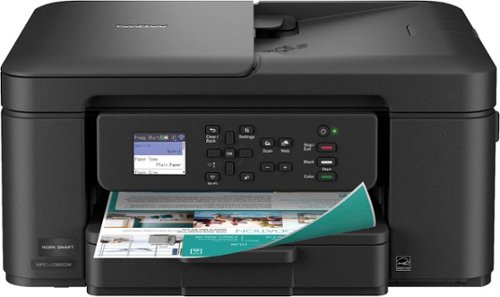
The Brother Work Smart 1360 Wireless All-in-One Refresh Subscription Eligible Inkjet Printer is the perfect choice for a reliable printer with robust efficiency-boosting features. With tools like automatic duplex (2-sided) printing, a 20-page single-sided automatic document feeder(1), and wireless(2) and Cloud connectivity(3) options available on the 1.8~ color display, this multifunction printer helps you get your work done with simplicity and ease. Perfect for printing anything from to-do lists to business reports, this color inkjet printer outputs quality prints at fast speeds. Brother Page Gauge(4) monitors your ink usage so you know when you~re running low. When paired with the Brother Mobile Connect app(5), setup is quick and easy ~ plus, you~ll be able to print from virtually anywhere on your mobile device(6). Print Confidently with Brother Genuine LC501 Ink in your Brother Work Smart 1360 for reliable, consistent prints ~it~s the only brand we recommend for your Brother printer.
Posted by: TechEnthusiast
In some respects, setting up the Brother MFC-J1360DW printer was easier than I expected. I overcomplicated things by telling myself that it couldn’t be as simple as it actually was. I used the android app found on the app store. It had easy-to-follow instructions to set up the machine and to install the software needed to start using it.
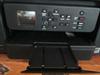
The printer is fairly compact, measuring about 15 inches wide and 7 inches high. Installing its paper tray (which required gently squeezing some green moveable “guardrails”) might have taken more time than running through the setup procedures. References to dark directional buttons on the onscreen keyboard to the right of the message screen took some getting used to.
The android app and on-screen instructions walked me through connecting the printer to my home WIFI and installing the various ink cartridge colors. Again, I overcomplicated things by not trusting just how simple that process really was.
I kept expecting that I needed to tear something off of the individual color-coded ink cartridges before installing them. Nope. Just remove them from their individual plastic bags and pop them in. Easy peasy.
Once the ink cartridges were installed, there was a slight delay as the ink loaded into position for the actual printing process. Again, the on-screen directions and app directed me through the process of printing out sample pages to ascertain whether the machine was printing correctly.
It was.
The instructions also guided me through some of the basic functions, such as placing the page to be copied on the glass printer surface and loading the paper into position.
It is easy to load paper into the flat pullout paper tray. You don’t have to fight with it to get it to load a fair amount of sheets.
The printer is made of sturdy plastic and has clearly labeled buttons for printing in color or black and white. There also are buttons for navigating the on-screen options, powering the machine and connecting the WIFI.
Making copies from existing prints was quick and easy. I easily navigated the on-screen selections to reduce the copy sizes to 85 percent and 46 percent of the original. More importantly, I successfully navigated the machine back to print copies at their original size.
I often print items from my phone, so having that capability was important. The app is very easy to navigate, and printing from my phone was an easy and seamless experience.
I would recommend this to a friend!

Share this review:


+2points
2of 2voted this as helpful.
TechEnthusiast's Review Comments
TechEnthusiast has not submitted comments on any reviews.
TechEnthusiast's Questions
TechEnthusiast has not submitted any questions.
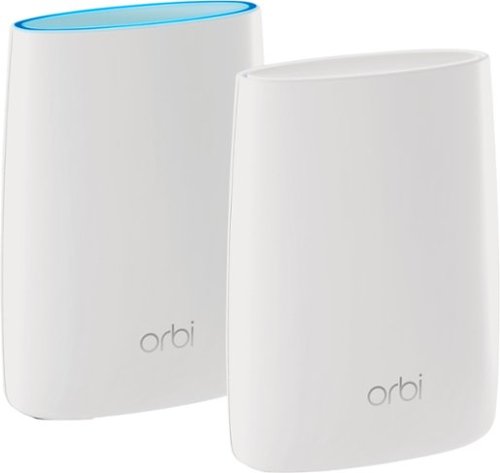
Orbi Whole Home WiFi System delivers up to 3.0Gbps high-performance WiFi. Sleek, modern design with high-gain internal antennas for up to 5,000 square feet of coverage. FastLane3 Technology creates a dedicated Tri-Band WiFi for seamless 4K streaming and gaming everywhere in your home. Keep a single WiFi name for uninterrupted connections as you move from room-to-room. Circle Smart Parental Controls runs on Orbi Routers for a smart way for families to manage content and time online, on any connected device. Provide internet access to guests without sharing your personal network password. Orbi is ready right out of the box and compatible with your ISP. Just use the Orbi app to get started with better WiFi, everywhere in minutes.
Can you use with comcast.
Yes. I'm using it with Comcast myself.
You plug the Ethernet cable from your modem to the Orbi router the same as you would any other router. The big difference between the Orbi and other routers is that it comes with a separate satellite unit to extend your wireless range. The satellite unit hooks up to the router wirelessly. Installation and pairing takes about ten - fifteen minutes to complete.
You plug the Ethernet cable from your modem to the Orbi router the same as you would any other router. The big difference between the Orbi and other routers is that it comes with a separate satellite unit to extend your wireless range. The satellite unit hooks up to the router wirelessly. Installation and pairing takes about ten - fifteen minutes to complete.
9 years, 8 months ago
by
TechEnthusiast
Orbi Whole Home WiFi System delivers up to 3.0Gbps high-performance WiFi. Sleek, modern design with high-gain internal antennas for up to 5,000 square feet of coverage. FastLane3 Technology creates a dedicated Tri-Band WiFi for seamless 4K streaming and gaming everywhere in your home. Keep a single WiFi name for uninterrupted connections as you move from room-to-room. Circle Smart Parental Controls runs on Orbi Routers for a smart way for families to manage content and time online, on any connected device. Provide internet access to guests without sharing your personal network password. Orbi is ready right out of the box and compatible with your ISP. Just use the Orbi app to get started with better WiFi, everywhere in minutes.
So if it comes with two, I'm assuming you have one that internet is linked to by cable and the other is used as a extender? Or do you have to have both units hooked to cable?
The router portion is connected to your modem via an Ethernet cable, but the satellite / extender unit links up to the router wirelessly. The only wire that you need to have connected to the extender is the power cord.
9 years, 8 months ago
by
TechEnthusiast
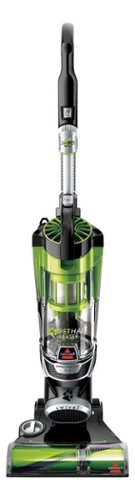
Nothing puts a vacuum to the test quite like a home with pets. That's why the BISSELL~ Pet Hair Eraser~ was developed from the ground up by pet parents for pet parents. Whether it's shedding season for your dog or your cat tracks kitty litter all over the house, this revolutionary vacuum is designed to make cleaning up after pets and the people who love them a breeze~from beginning to end. Say goodbye to hair wrap with its Tangle-Free Brush Roll, remove embedded hair everywhere with specialized pet tools, help capture allergens and eliminate odors with the SmartSeal~ Allergen System, and when you're finished cleaning, enjoy a hands-free tank empty with our patented Cyclonic Spooling System~.BR>
How load is it? I've used an Oreck XL upright and a Eureka Mighty Mite and would hope it's no louder as those. I prefer bagged vacuums but want to try the BISSELL Pet Hair Eraser because of its claims of not getting hair tangled on the roller.
I haven't tried the two vacuums that you mentioned, but I can say that I was surprised that this vacuum wasn't terribly loud.
Given it's size and the number of vents coming out of it, I expected it to be deafening. Upon turning it on, I was surprised by just how mild the sound was. It'll definitely drown out a television or radio some, but you'll still be able to hear people talking over it.
Given it's size and the number of vents coming out of it, I expected it to be deafening. Upon turning it on, I was surprised by just how mild the sound was. It'll definitely drown out a television or radio some, but you'll still be able to hear people talking over it.
9 years, 9 months ago
by
TechEnthusiast